
More project photos (2)
The problem
Waking up exhausted despite eight hours in bed is usually a timing problem, not a duration problem: an alarm that fires mid deep-sleep drags you out of the hardest sleep phase, while waking during light sleep feels far easier. Commercial sleep trackers solve this with wearables and cloud accounts, which most students neither own nor want to depend on. This project takes a different route — the phone everyone already owns becomes the sensor. Laid on the mattress, the phone's accelerometer picks up the micro-movements of tossing, turning and stillness through the night, and an on-device classifier converts that motion trace into estimated sleep stages, a nightly sleep score, and a smart alarm that rings when you are in light sleep inside a configurable wake window. Because every byte stays in a local Room database, the app works fully offline and demonstrates a complete, honest mobile health prototype: sensor acquisition, signal processing, local persistence, background scheduling and a polished UI.
Phone rests on the mattress overnight
Follow the working sequence
How it works
- The user taps "Start sleep" and places the phone face-down on the mattress near the pillow; a foreground service keeps the accelerometer sampling even with the screen off.
- Movement magnitude is aggregated into fixed time windows (e.g. one-minute epochs) and written to the local Room database as the night progresses.
- An actigraphy-style classifier labels each epoch: sustained near-zero movement becomes deep sleep, frequent movement becomes light sleep, the still-but-irregular pattern after roughly ninety minutes becomes REM, and large prolonged movement becomes awake.
- From the labelled epochs the app computes total sleep, sleep efficiency, awake time, stage shares, a 0–100 sleep score and bedtime regularity.
- During the smart-alarm window, the scheduler watches live epochs for a light-sleep phase and fires the alarm then; if none occurs, it rings at the latest set time with a rising-volume tone.
- Every morning the dashboard refreshes with the new night; the history chart, statistics screen and stage donut are recomputed from the local database.
Tech stack:
- Kotlin (100% — no Java legacy code)
- Android SDK (minimum API 26, Android 8.0)
- Room · SQLite (local database)
- Kotlin Coroutines · Flow (background sampling pipeline)
- WorkManager · AlarmManager (reliable alarm scheduling)
- Material Design 3 components (UI)
- MPAndroidChart-style custom canvas charts (history & statistics)
- Git (version control)
| Parameter | Value |
|---|---|
| Platform | Android 8.0 (API 26) and above (expected) |
| Language | Kotlin, single-module app (design target) |
| Database | Room over SQLite, on-device only |
| Sensor | Accelerometer, approximately 1 sample epoch per minute aggregated (design target) |
| Sleep-stage method | Rule-based actigraphy classifier (estimation, not medical-grade) |
| Smart-alarm window | 10–60 minutes, user-configurable |
| Alarm fallback | Rings at the set latest time if no light-sleep phase is detected |
| Overnight battery use | Design target: under 3% on a modern device (not a measured claim) |
| App size | Approximately 25–40 MB installed (expected) |
| Network | None required — fully offline |
Project features
- [Mattress-side movement tracking] Place the phone on the mattress and start sleep mode; the app samples the accelerometer continuously through the night and stores the raw motion trace locally, so the entire night is captured without any wearable or internet connection.
- [Estimated sleep-stage classification] A rule-based actigraphy classifier converts movement density into four stages — deep, light, REM and awake — with long still stretches mapped to deep sleep and restless patches to light sleep. Stages are honestly labelled as estimates throughout the UI, never as medical measurements.
- [Nightly sleep score] Duration, efficiency, stage balance and bedtime consistency are combined into a single 0–100 score with a per-factor breakdown, so you can see exactly which habit is dragging the number down.
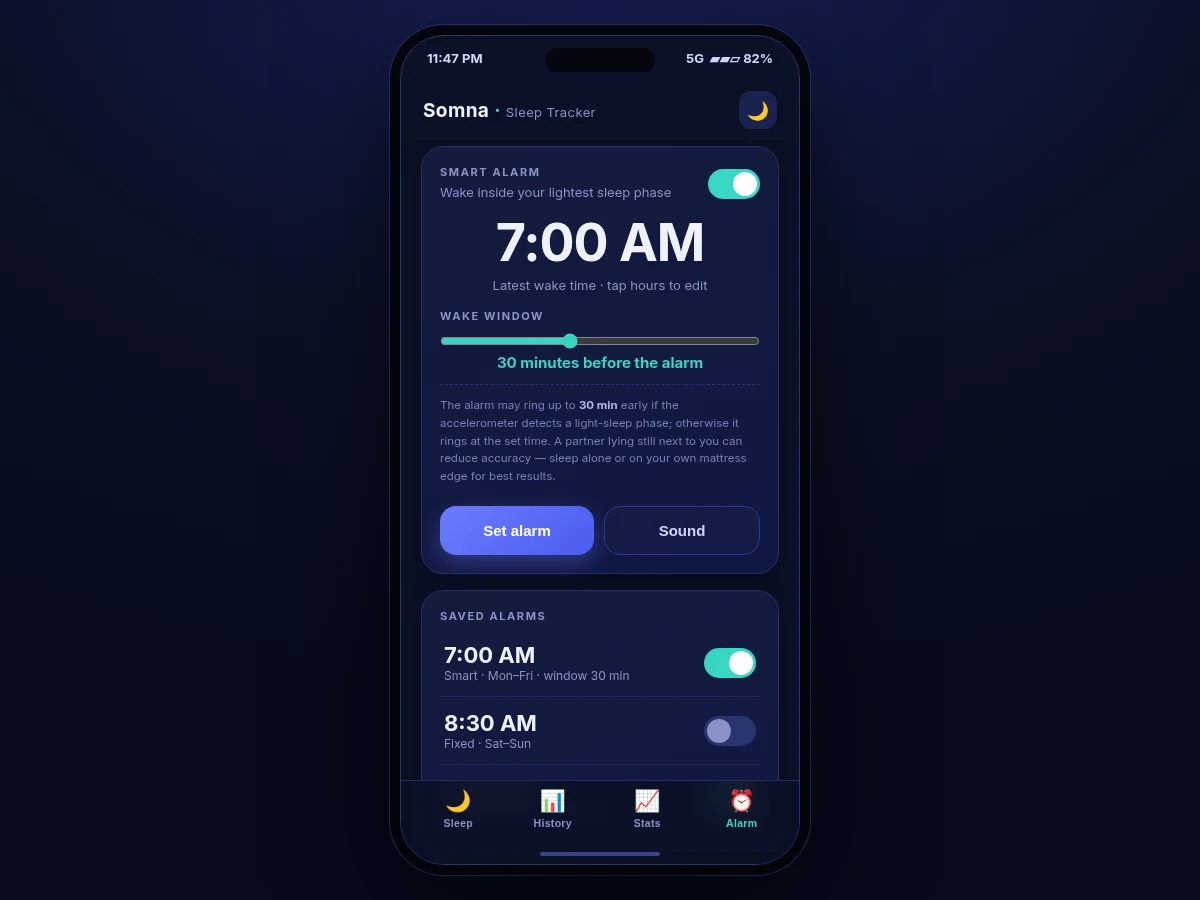
- [Smart alarm with wake window] Instead of one fixed ring time, you set a latest wake time plus a window (10–60 minutes). The alarm may fire early inside the window when a light-sleep phase is detected, otherwise it rings at the set time — with a gentle rising tone and configurable snooze.
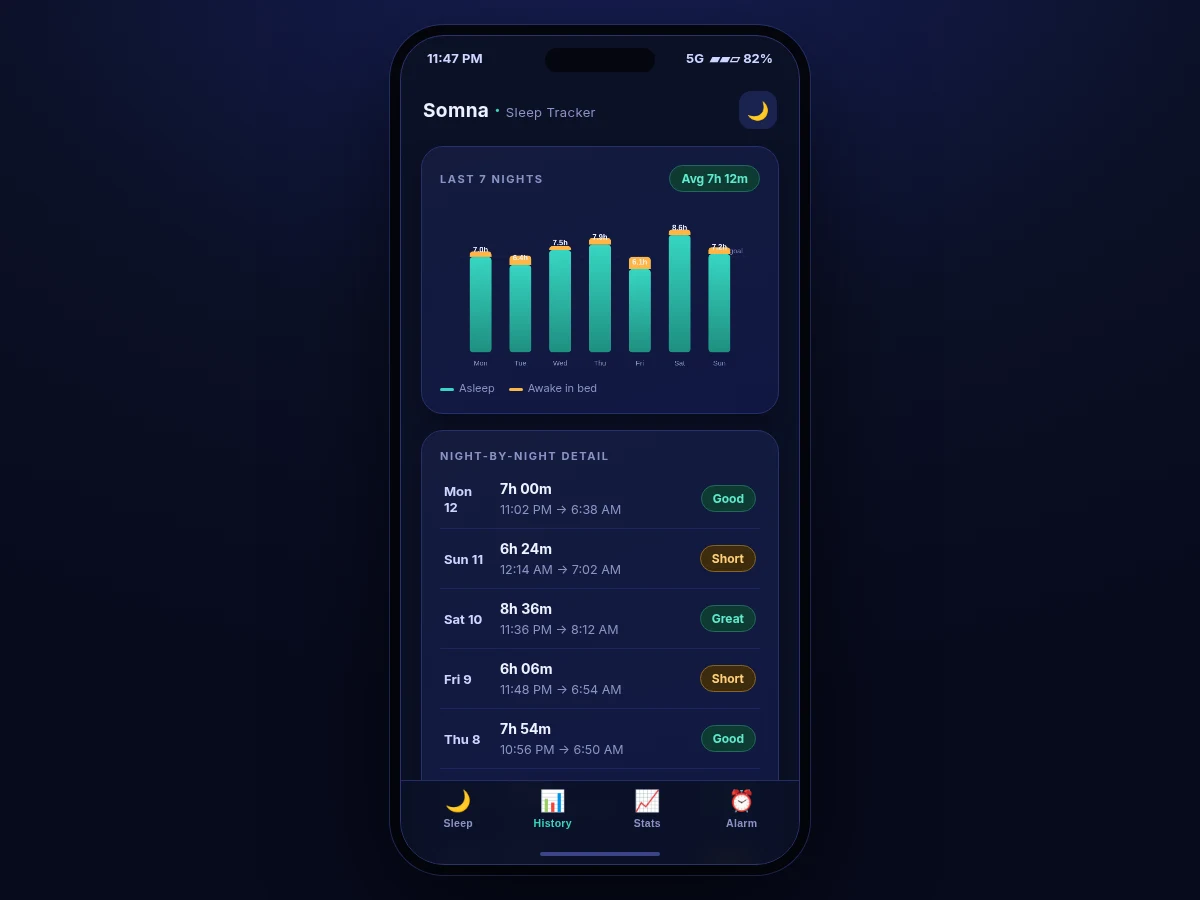
- [7-day sleep history] A bar chart of the last seven nights shows total sleep against a configurable goal line, with awake-in-bed time stacked on top, plus a night-by-night detail list with bedtime, wake time and a quality label.
- [30-day sleep statistics] Averages for sleep duration, bedtime and wake time, a bedtime-consistency percentage, cumulative sleep debt, and a stage-distribution donut computed over the last month of recorded nights.
- [Fully offline-first design] No account, no cloud sync, no analytics — the Room database, the classifier and the alarm scheduler all live on the device, so the app works in airplane mode and the student's data never leaves their phone.
Optional customization (not part of the base build): cloud backup and multi-device sync, snore/loud-noise detection via the microphone, wearable (smartwatch) heart-rate integration.
Future scope: circadian-rhythm coaching suggestions, integration with a sleep-clinic export format, adaptive window sizing that learns your personal cycle length.
What is included
- Complete Kotlin source code (single Android Studio module) with the tracking service, classifier, alarm scheduler and all four UI screens
- Room database schema, migrations and DAO layer with sample seed data
- Debug APK for direct installation and demonstration
- Setup guide: build instructions, permissions walkthrough, sensor calibration notes
- Project report PDF (background, actigraphy theory, classifier design, methodology, results, honest accuracy discussion)
- PPT presentation for final review
- Viva Q&A preparation document (accelerometer sampling, foreground services, Room, AlarmManager, why stage detection is approximate)
Limitations & prerequisites
- Sleep-stage labels are estimates from a phone accelerometer, not medical-grade measurements — this is an academic monitoring prototype and must not replace certified sleep equipment or clinical diagnosis.
- Accuracy depends on the phone lying on the mattress undisturbed; a restless partner on the same mattress, a phone left on the floor, or heavy blankets over the device all degrade the motion signal.
- The app cannot measure brain activity, so true REM/deep staging (as in polysomnography) is fundamentally out of reach — the classifier infers stages from movement patterns only.
- Exact Doze-mode behaviour varies by manufacturer; some aggressively skinned Android builds may need the app whitelisted from battery optimization for the all-night foreground service.
- The overnight battery figure is a design target, not a measured claim — actual drain varies with device age, sensor hardware and OS version.
Frequently Asked Questions
How does the app track sleep without a smartwatch?
The phone rests on your mattress while a foreground service samples its accelerometer all night. Movement patterns are surprisingly informative: long still stretches map to deep sleep, frequent tossing to light sleep, and the still-but-irregular stretch after about ninety minutes to REM. All of this runs on-device, so no wearable and no internet is needed.
How accurate is the sleep-stage detection?
Honestly approximate. It is a rule-based actigraphy classifier — the same family of technique early fitness bands used — and it tracks trends (are your deep-sleep hours rising or falling?) far better than it identifies any single minute's exact stage. The UI and report label every stage as an estimate, and the report explains exactly why phone accelerometry can never match a clinical sleep study.
Does the smart alarm really wake me at the right moment?
Within its design, yes: inside your configured window (say 30 minutes before 7:00 AM) the app watches for a light-sleep phase and rings then, with a gentle rising tone instead of a jarring blast. If no light phase appears, it rings at 7:00 AM as a normal alarm — so you are never late because the algorithm hesitated.
Does it work offline, and where is my data?
Completely offline. Nights are stored in a Room database on the phone itself — no account, no cloud sync, no analytics. That makes the app demo-able in airplane mode and gives the viva a clean story about on-device data ownership.
Is this project suitable for a final-year project?
Yes — for Computer Science, IT and Mobile Application Development programs. It demonstrates Android fundamentals students actually get asked about: foreground services, sensors, Room persistence, background scheduling with WorkManager and AlarmManager, custom chart rendering, and the discipline of labelling an estimation algorithm honestly. Suitable for B.E./B.Tech final-year projects in Computer Science, IT and Mobile Application Development.
Components & software requirements
- Kotlin (100% — no Java legacy code)
- Android SDK (minimum API 26, Android 8.0)
- Room · SQLite (local database)
- Kotlin Coroutines · Flow (background sampling pipeline)
- WorkManager · AlarmManager (reliable alarm scheduling)
- Material Design 3 components (UI)
- MPAndroidChart-style custom canvas charts (history & statistics)
- Git (version control)
Delivery information
Built-to-order project. Delivery timeline is shared after order confirmation based on current queue.
Support terms
Complete documentation, setup guide, and viva preparation included. Support for setup and explanation provided.
Download free synopsis (PDF)
Enter your name and email — the synopsis PDF downloads immediately. We may send occasional project updates; no spam, unsubscribe anytime.