
More project photos (2)
The problem
The Unit Converter Android App with Offline Currency Conversion answers a daily friction: converting a measurement or a price when there is no connection, no calculator at hand, and no patience for a second app. A cook reading a recipe in cups, a traveller checking a 5 kilometre walk, or a shopper comparing a price in dollars with rupees faces the same interruption: open a browser, search for a factor, and trust a result copied from a page. The Unit Converter Android App with Offline Currency Conversion keeps seven conversion categories on the phone itself: length, weight, temperature, volume, area, data storage, and currency. Length, weight, volume, area, and data storage convert through fixed factors stored in the app, temperature converts through its offset formulas, and currency converts through a stored rate table that the user refreshes when online. Every result appears at once, with the factor or formula shown beside it, so a conversion can be checked.
Most converter tools assume a connection. A browser search returns a single answer with no working shown, and a currency page returns a rate that cannot be used again once the connection drops. That leaves the two moments when a conversion matters most — in a kitchen, on a walk, in a market, or on a bus — exactly the moments when a connection is weakest. Keeping factors, formulas, and a currency rate table on the device removes that dependency: the conversion runs from stored values, the working stays visible, and the currency date stays visible too, so a stale rate is never mistaken for a current one.
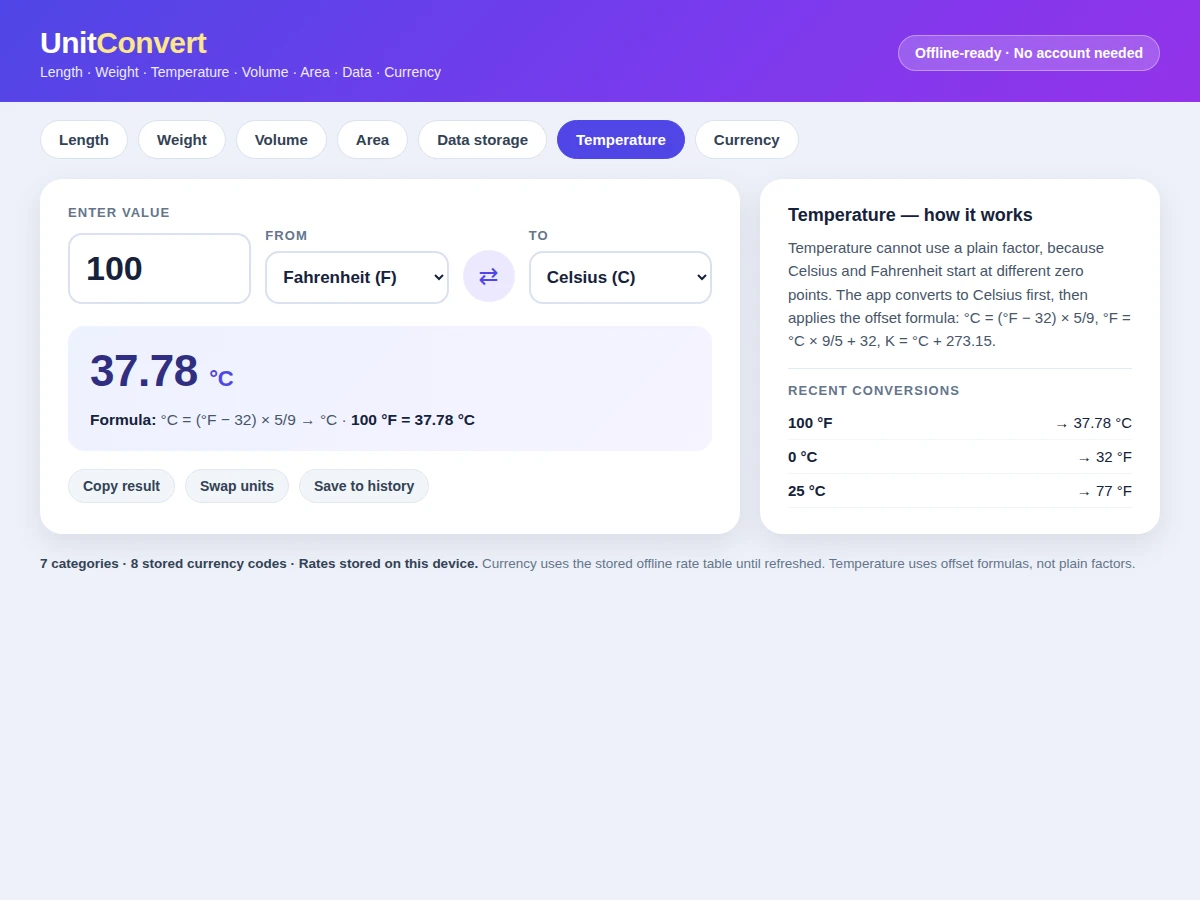
Original-data note from the demo build: a round-trip check actually run during the build converts 5 kilometres to miles and back to 5.00 kilometres, and converts 100 degrees Fahrenheit to 37.78 degrees Celsius and back to 100.00 degrees Fahrenheit. Temperature cannot use a plain multiplication factor like the other categories, because Celsius and Fahrenheit start at different zero points — the conversion must add or subtract an offset as well as scale the value, which is why the app carries offset formulas for temperature and plain factors for the rest.
Picks a category, enters a value and chooses the from-unit and to-unit.
Follow the working sequence
How it works
Using the Unit Converter Android App with Offline Currency Conversion follows one short path from input to answer. The user picks a category, types a value, and chooses the from-unit and the to-unit. For length, weight, volume, area, and data storage, the app divides the input by the from-unit factor to reach a base unit, then multiplies by the to-unit factor to reach the answer. Temperature follows a different route because its scales start at different zero points: the app first converts the input to Celsius, then applies the offset formula for Fahrenheit or Kelvin. Currency skips factors entirely and looks up the stored offline rate table, converting through the base currency when the pair is not stored directly. The converted result, the factor or formula used, and the rate date for currency appear together on screen.
- The user picks one of the 7 conversion categories and the converter loads that category's unit list.
- The user types a value and chooses a from-unit and a to-unit from the two unit lists.
- For length, weight, volume, area, and data storage, the app converts the input to the category base unit (metres, kilograms, litres, square metres, or bytes) using the stored factor, then converts from the base unit to the to-unit.
- For temperature, the app converts the input to Celsius first, then applies the offset formula for the target scale: Fahrenheit = Celsius × 9/5 + 32, Kelvin = Celsius + 273.15.
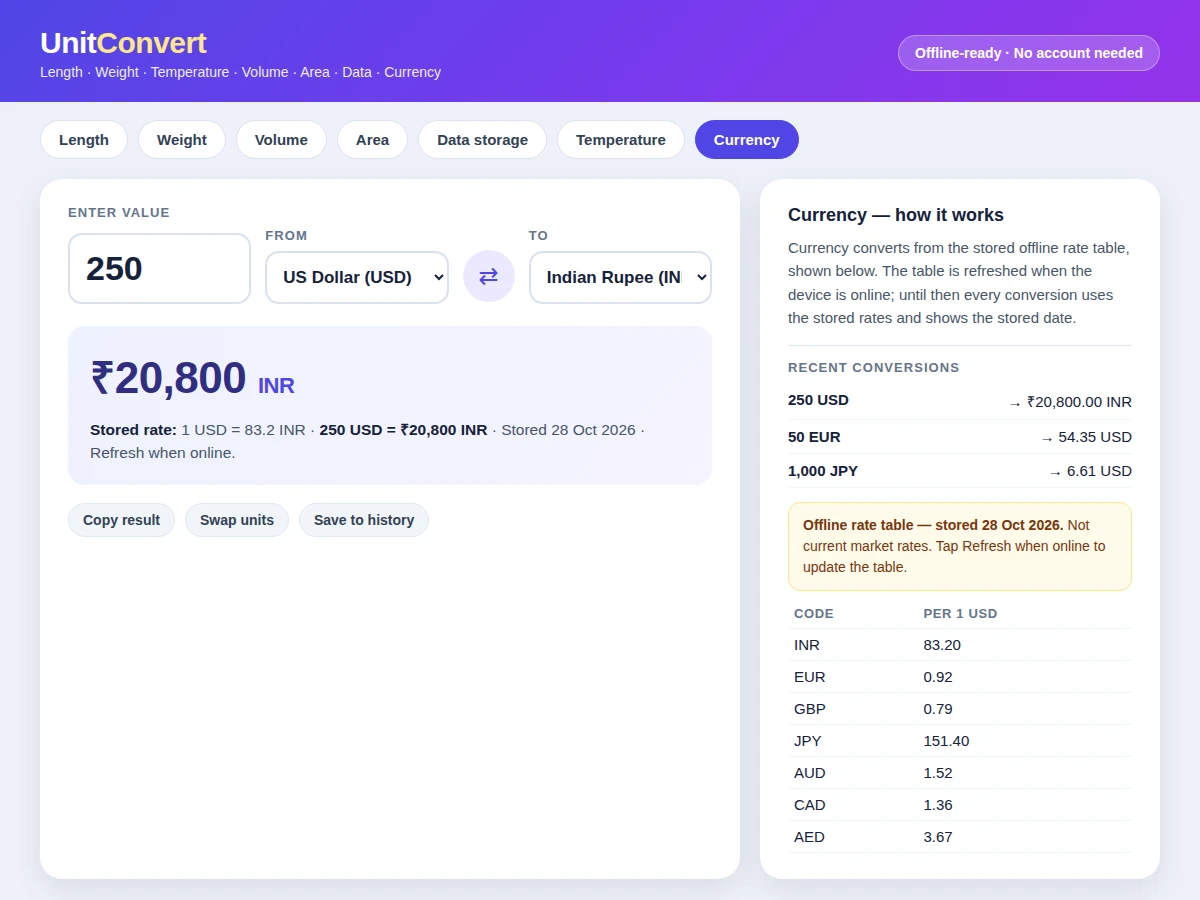
- For currency, the app looks up the stored offline rate table, converts the input to the base currency (USD) at the stored rate, then converts to the target currency at its stored rate.
- The converted result appears with its working — the base-unit step, the temperature formula, or the stored rate plus the stored rate date — and the conversion is added to the history list.
- When the device is online, the user can refresh the stored rate table; the new stored date replaces the old one, and later conversions use the refreshed table.
Tech stack:
- Kotlin
- Android SDK · Jetpack components
- Room local database
- Material Design 3
- HTML · CSS · JavaScript demo build
- Gradle build tools
- Git
| Parameter | Value |
|---|---|
| Conversion categories | 7 categories (design count) |
| Length units | 8 units (design count) |
| Weight units | 6 units (design count) |
| Temperature scales | 3 scales (design count: Celsius · Fahrenheit · Kelvin) |
| Volume units | 7 units (design count) |
| Area units | 6 units (design count) |
| Data-storage units | 5 units (design count: bytes through terabytes) |
| Currency codes in stored table | 8 codes (design count: USD · INR · EUR · GBP · JPY · AUD · CAD · AED) |
| Conversion response | Under 100 milliseconds (design target) |
| Minimum Android version | Android 8.0 · API level 26 (minimum supported version) |
Project features
The Unit Converter Android App with Offline Currency Conversion is built around four capabilities a user reaches for most often: seven-category conversion in one place, a currency converter that works from a stored offline rate table, a visible factor or formula for every result, and a conversion history that keeps recent results on screen. Seven-category conversion removes the need to switch between separate tools for length, weight, temperature, volume, area, data storage, and currency, because each category opens in the same converter with its own units. Offline currency conversion answers the price question where a connection is weakest, using rates the user can view, edit, and refresh. Visible factors and formulas, plus a saved history, turn each answer into something checkable, which matters when a converted value feeds a recipe, a bill, or a lab entry.
- [Seven-category converter] Length, weight, temperature, volume, area, data storage, and currency live in one converter, each category opening with its own unit list and its own conversion route. Implemented in the base app.
- [Offline currency rate table] Currency converts from a rate table stored on the device, with 8 currency codes in the base table and a stored date shown beside every currency result. Implemented in the base app.
- [Editable and refreshable rates] The user can view and edit stored rates, and refresh the table when the device is online; until a refresh, conversions keep using the stored table and its stored date. Implemented in the base app.
- [Visible factor and formula] Every result shows its working: the base-unit step for factor categories, the offset formula for temperature, and the stored rate for currency, so a result can be rechecked by hand. Implemented in the base app.
- [Swap, presets and copy] A swap control exchanges the from-unit and to-unit in one tap, common pairs open as quick presets, and the result can be copied for use in another app. Implemented in the base app.
- [Conversion history] Recent conversions stay on screen in the order they were run, so a value used minutes earlier does not need to be typed again. Implemented in the base app.
- [Offline-first, no account] All conversion runs locally on the device with no account and no server call, so the converter opens and answers with or without a connection. Implemented in the base app.
- [Extra currencies and custom units] Additional currency codes and user-defined units can be added to the table and unit lists on request. Optional customization, not part of the base build.
What is included
- Complete Android app source code in Kotlin
- Stored offline currency rate table with edit and refresh flow
- Working demo build (single-file HTML version of the converter, used for the screenshots)
- Local history and settings storage using the on-device database
- Project report PDF (problem, conversion routes, rate-table design, limitations)
- Project abstract PDF
- PPT presentation for final review
- Setup and demo guidance document
Limitations & prerequisites
- Stored currency rates go stale between refreshes: a currency result is only as current as its stored date, which is shown beside the result, and the app never presents stored rates as current market rates.
- Volume uses the US gallon (3.785 litres) only; the imperial gallon is not in the base unit list and needs the optional custom-unit addition.
- Data storage uses a 1024-based scale (1 kilobyte = 1024 bytes, labelled in the app), so results differ from decimal labelling used by some storage makers.
- Temperature covers 3 scales only (Celsius, Fahrenheit, Kelvin); no other scale is included in the base build.
- History and settings live on one device only: there is no account and no sync, so uninstalling the app clears the saved history.
- The base table holds 8 currency codes; further codes need a table edit or the optional customization.
- Conversion is arithmetic only: the app does not judge whether a converted value suits a recipe, a bill, a dosage, or any other context, and the user must check that separately.
Frequently Asked Questions
Does currency conversion work without internet?
Yes, currency conversion works offline from the rate table stored on the device, with the stored date shown beside every result. A connection is needed only to refresh the table; until a refresh happens, conversions keep using the stored rates, so a result must be read together with its stored date rather than treated as a current market rate.
Why does temperature conversion need a formula instead of a factor?
Temperature needs a formula because Celsius and Fahrenheit start at different zero points, so scaling alone cannot move between them. The app first converts the input to Celsius, then applies the offset formula for the target scale — Fahrenheit = Celsius × 9/5 + 32, Kelvin = Celsius + 273.15 — which is why temperature follows a separate route from the factor-based categories.
Is this project suitable for a final-year project?
Yes, for Computer Science, IT and Android application development programs, because it demonstrates mobile UI design, local storage, unit-conversion logic, and offline-first behaviour. The temperature offset route and the stored-rate currency design give the review discussion two concrete mechanisms to explain, beyond a plain factor lookup.
Can more units or currencies be added?
Yes, additional currency codes and custom units can be added to the rate table and unit lists as an optional customization. The base build ships with 7 categories and 8 currency codes, and the conversion routes stay the same for added entries: factor entries convert through the base unit, and currency entries convert through the base currency.
Are the screenshots from the real app?
The screenshots show the working demo build, a single-file HTML version of the converter that mirrors the Android app's screens, categories, factors, formulas, and stored rate table. The delivered source is the Kotlin Android app itself, and the demo exists so the converter logic can be reviewed and tried before the Android build is examined.
What will I receive with the project?
The delivery includes the complete Kotlin Android source, the stored rate table with its edit and refresh flow, the working demo build, the report and abstract PDFs, a review PPT, and setup guidance. No account, server, or store listing is part of the delivery, since the app runs entirely on the device.
Components & software requirements
- Kotlin
- Android SDK · Jetpack components
- Room local database
- Material Design 3
- HTML · CSS · JavaScript demo build
- Gradle build tools
- Git
Delivery information
Built-to-order project. Delivery timeline is shared after order confirmation based on current queue.
Support terms
Complete documentation, setup guide, and viva preparation included. Support for setup and explanation provided.
Download free synopsis (PDF)
Enter your name and WhatsApp number — the synopsis PDF downloads immediately. We may send occasional project updates on WhatsApp; no spam.