
More project photos (2)

The problem
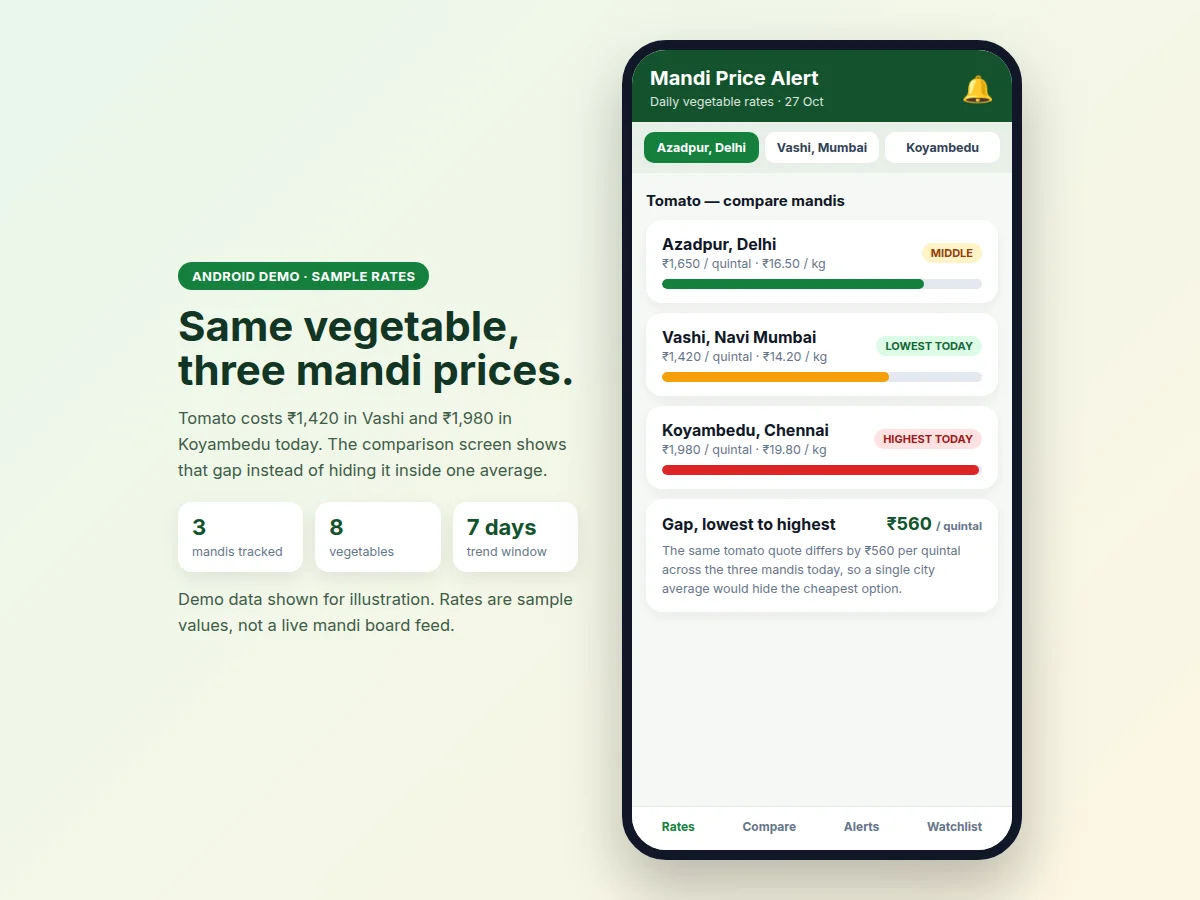
The Mandi Price Alert Android App with Daily Vegetable Rate Comparison is an Android app that shows daily vegetable rates separately for each named wholesale mandi, instead of merging them into one city average. A user picks a vegetable and a mandi, such as onion in Azadpur, and sees that mandi's modal rate for the day in rupees per quintal, with the change since yesterday. That mandi-wise split matters because a mandi rate is a morning clearing price: when arrival volume outruns buyer demand, sellers lower quotes to clear perishable stock before the day ends, and when arrivals are thin, the same stock clears higher. Two mandis can therefore move in opposite directions on the same day, and a single average hides both movements. This app keeps each mandi's rate separate, so a buyer, seller, or student can see where a vegetable is cheaper, set an alert for one mandi only, and follow the rate over seven days.
Picks a vegetable and a named mandi, then sets a price alert.
Follow the working sequence
How it works
The Mandi Price Alert Android App with Daily Vegetable Rate Comparison works as one daily loop from rate refresh to alert. Each morning, fresh modal rates arrive for every tracked vegetable in each named mandi and are stored per vegetable–mandi pair, so Azadpur onion and Vashi onion remain separate records. The app compares each new rate with yesterday's figure to show the rise or fall, checks every stored alert threshold for that exact pair, and fires a notification only where the threshold was crossed. The user can then open the comparison screen for that vegetable, read the seven-day trend for that mandi, and adjust or delete the alert, while saved rates stay available offline for later review. A fired alert is also kept in a dated history, and the comparison and trend screens let the user judge whether the movement is isolated to one mandi or shared across all three before changing the threshold.
- The user opens the app and picks a mandi from the tracked list, or opens the watchlist to see pinned vegetable–mandi pairs first.
- The app shows that mandi's daily rates per vegetable in rupees per quintal, with the rupee-per-kilogram figure and the change since yesterday.
- The user selects a vegetable and a mandi and sets an alert threshold, choosing whether to be notified when the rate falls below or rises above that price.
- After each morning rate refresh, the new rate is saved against that exact vegetable–mandi pair and compared with the stored threshold.
- If the threshold was crossed, the app fires one notification naming the vegetable, the mandi, the threshold, and the new rate; otherwise the alert stays silent.
- The user opens the comparison screen to see the same vegetable across all mandis, with the lowest and highest quotes and the gap between them.
- The user checks the seven-day trend for the pair, adjusts or deletes the alert, and reviews fired alerts in the dated alert history.
Tech stack:
- Kotlin
- Android Jetpack · Compose
- Material 3 design
- Room local database
- WorkManager · alerts
- Retrofit · rate feed sync
- Firebase Authentication
- Git
| Parameter | Value |
|---|---|
| Platform | Android phones (minimum Android 8.0 version) |
| Tracked mandis | 3 mandis (Azadpur · Vashi · Koyambedu, sample data in the demo) |
| Tracked vegetables | 8 vegetables (design scope) |
| Tracked rate pairs | 24 vegetable–mandi pairs (design scope: 3 mandis × 8 vegetables) |
| App screens | 6 screens (rates, compare, alerts, trend, watchlist, alert history) |
| Rate unit | Rupees per quintal, with rupees per kilogram shown alongside |
| Trend window | 7 days per vegetable per mandi (design) |
| Alerts per user | Up to 20 alerts (design limit) |
| Rate refresh | Daily morning refresh (design behaviour) |
| Alert delivery | Local notifications via WorkManager (requires notification permission) |
| Offline viewing | Saved rates and alerts viewable offline (Room local storage) |
| App language | English (initial release) |
Project features
The Mandi Price Alert Android App with Daily Vegetable Rate Comparison is built around four capabilities that carry the whole task: mandi-wise daily rates for named wholesale mandis, price alerts set for one vegetable in one mandi, side-by-side comparison of the same vegetable across mandis, and a seven-day rate trend for each vegetable–mandi pair. A user opens the app, picks a mandi, checks today's rates, and either sets an alert threshold or opens the comparison screen to see how far apart the mandis sit. The trend screen then shows whether today's quote is a one-day jump or part of a longer slide, which changes how the alert is read. Together these four capabilities replace a single city average with a mandi-by-mandi picture that a student can demonstrate screen by screen in a review.
- [Mandi-wise daily rates] Each named mandi shows its own daily modal rate per vegetable in rupees per quintal, with the rupee-per-kilogram figure alongside and the rise or fall since yesterday.
- [Per-vegetable per-mandi price alerts] A user chooses one vegetable, one mandi, and a threshold price; the app notifies only when that exact pair crosses the threshold, so other mandis never trigger the alert.
- [Side-by-side mandi comparison] One vegetable is shown across all tracked mandis on a single screen, with the lowest and highest quotes marked and the gap between them stated in rupees per quintal.
- [7-day rate trend] Each vegetable–mandi pair carries a seven-day trend chart, so a user can tell a one-day spike apart from a steady climb or slide before acting on an alert.
- [Watchlist of vegetables and mandis] Users pin the vegetables and mandis they follow, so the home screen opens on their pairs first instead of the full rate list.
- [Alert history] Every fired alert stays in a dated list with the vegetable, mandi, threshold, and rate that triggered it, giving a clear record to show and discuss.
- [Rate search and filters] Users search by vegetable name and filter by mandi, price movement, or watchlist, keeping the daily list usable as more pairs are added.
Builder note from the demo build: alerts were stored per vegetable per mandi from the first screen, because a single per-vegetable alert fired for every mandi during early testing and hid which mandi had actually moved.
Optional customisation (not in the base build): a live mandi-board rate feed, retail price estimates on top of wholesale rates, and multi-language screens. Future scope: arrival-volume notes beside each rate, and a seller-side listing for farmers to post expected arrivals.
What is included
- Complete Android app source code in Kotlin with Jetpack Compose screens
- Mandi-wise daily rates, per-pair alerts, side-by-side comparison, 7-day trends, watchlist, and alert history
- Room local storage with WorkManager alert scheduling and Firebase Authentication sign-in
- Demo build with labelled sample rates for tracked mandis for testing
- Project report PDF (background, problem, design, implementation, testing, limitations)
- PPT presentation for final review
- Viva Q&A preparation document (Android architecture, Room, WorkManager, alert logic, mandi rate behaviour)
- Setup and demo guide for running the app on an Android phone or emulator
Limitations & prerequisites
- Demo rates are labelled sample data, not a live mandi-board feed — a live feed needs a rate source agreed for the delivered build, and is an optional customisation.
- The app tracks one modal rate per vegetable per mandi, not every grade or variety, so quotes for premium grades in the same mandi can differ from the shown rate.
- Rates move within a day and by arrival lot, so the morning modal rate is a daily reference, not a guaranteed selling price at any single stall.
- Alerts are local notifications: they need notification permission granted, and aggressive battery-saver settings on some phones can delay them by up to a few hours.
- Only 3 mandis are covered in the base build; adding a mandi needs its rate pair, alert mapping, and history set up for that mandi.
- The shown price is a wholesale mandi rate, not a retail shop price — transport, handling, and retail margin are not included in the figure.
- New rates need internet to arrive; saved rates and alerts remain viewable offline, but fresh rates wait until the phone is back online.
Frequently Asked Questions
Is this project suitable for a final-year project?
Yes, this project suits Computer Science, Information Technology and Mobile Application Development students, because it combines Android app development, local and cloud data handling, scheduled notifications, and a real comparison problem with named mandis, distinct rates, and per-pair alerts that a student can demonstrate end to end. In a viva, the student can open the rates screen, trigger an alert for one mandi, and show why the same vegetable's alert stays silent for another mandi, which makes the per-pair design easy to explain and defend.
How is this different from a generic vegetable price tracker?
It differs because every rate, alert, and trend in this app belongs to one vegetable in one named mandi, while a generic tracker usually shows one blended price for a city or a single market without saying which mandi quoted it. That distinction is the whole point of the project: a buyer deciding between Azadpur and Vashi needs the two separate quotes and the gap between them, not an average that matches neither mandi.
Where do the daily rates come from?
The demo build uses labelled sample rates for three named mandis, while the delivered app is designed to take each morning's modal rate per vegetable per mandi from a rate feed or manual entry, stored separately so no mandi's figure overwrites another's. The report documents the rate-pair storage clearly, so a reviewer can see that Azadpur onion and Vashi onion are two records, and the sample data is never presented as live market data.
How do alerts work exactly?
An alert is created by choosing one vegetable, one mandi, and a threshold price, and the app checks that pair after each morning rate refresh, firing a notification only when the new rate crosses the threshold for that exact pair. The notification names the vegetable, the mandi, the threshold, and the new rate, and the fired alert is kept in the dated alert history, so the student can show a complete chain from threshold to notification.
Can another mandi or vegetable be added?
Yes, a new mandi or vegetable can be added by creating its rate pair, its alert thresholds, and its seven-day history, without changing the existing mandis, because every rate, alert, and trend is stored per vegetable–mandi pair rather than per city. Realistic extensions include a live rate feed, retail price estimates, and multi-language screens, each scoped separately from the base build so the core mandi-wise flow stays intact.
What will I receive with the project?
You receive the complete Android source code, the demo build with sample rates for three mandis, the project report, the review presentation, the viva question-and-answer document, and the setup guide for running the app on an Android phone or emulator. The deliverables cover the full journey from installing the app to demonstrating a mandi comparison and a per-pair alert, and the report documents the screens, the alert logic, and the rate-pair storage so the work can be presented without guessing at any step.
Components & software requirements
- Kotlin
- Android Jetpack · Compose
- Material 3 design
- Room local database
- WorkManager · alerts
- Retrofit · rate feed sync
- Firebase Authentication
- Git
Delivery information
Built-to-order project. Delivery timeline is shared after order confirmation based on current queue.
Support terms
Complete documentation, setup guide, and viva preparation included. Support for setup and explanation provided.
Download free synopsis (PDF)
Enter your name and WhatsApp number — the synopsis PDF downloads immediately. We may send occasional project updates on WhatsApp; no spam.