
More project photos (2)
The problem
Most college hostels still run on paper registers: the warden assigns rooms from memory, fee dues are chased from a notebook, and at admission time nobody can say with certainty which beds are actually free. Double allocations happen, receipts go missing, and the monthly accounts take days to reconcile. Spreadsheets help only until the file corrupts or two people edit different copies. HostelDesk replaces this with a purpose-built desktop application: every bed in every block is a tracked record, every admission is tied to a specific bed, every month's billing is generated from the room-type fee, and every payment produces an auto-numbered receipt. Because it is a desktop app with a local SQLite database, it works with zero internet, installs on the hostel office computer in minutes, and keeps all student data on that machine. The demo ships with a realistic sample hostel — two blocks, 16 rooms, 27 residents, a full October fee cycle — so every screen can be evaluated with real workflows.
Hostel warden who allocates beds, records admissions, bills fees and tracks dues.
Follow the working sequence
How it works
- Install the provided setup file on a Windows 10/11 machine; on first launch the app creates its local SQLite database.
- The warden enters the hostel's blocks, rooms, bed counts and the monthly fee for each room type (Single, Double, Triple).
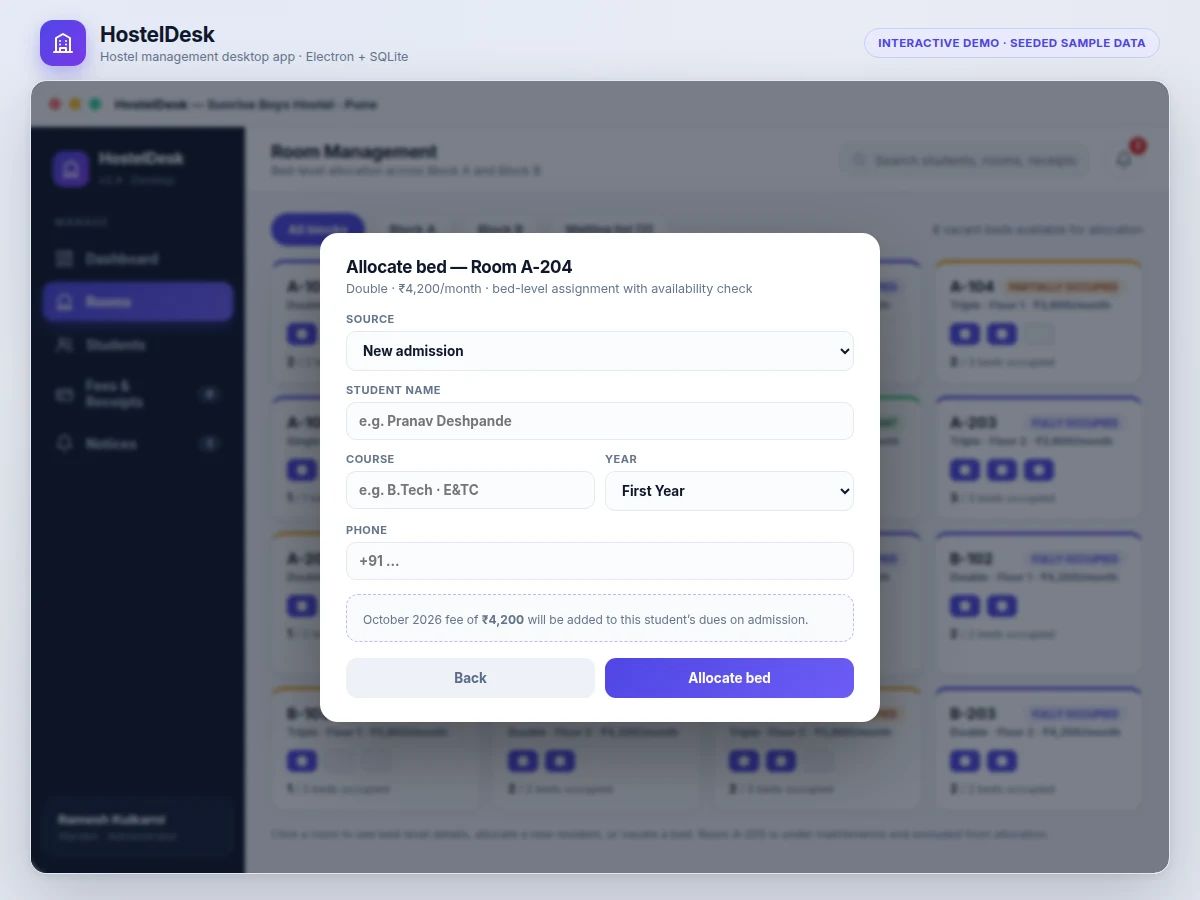
- New admissions are recorded — directly or from the waiting list — and assigned to a specific vacant bed; the availability check blocks double allocation.
- At the start of each month the warden generates billing; every resident gets a due based on their room type's fee.
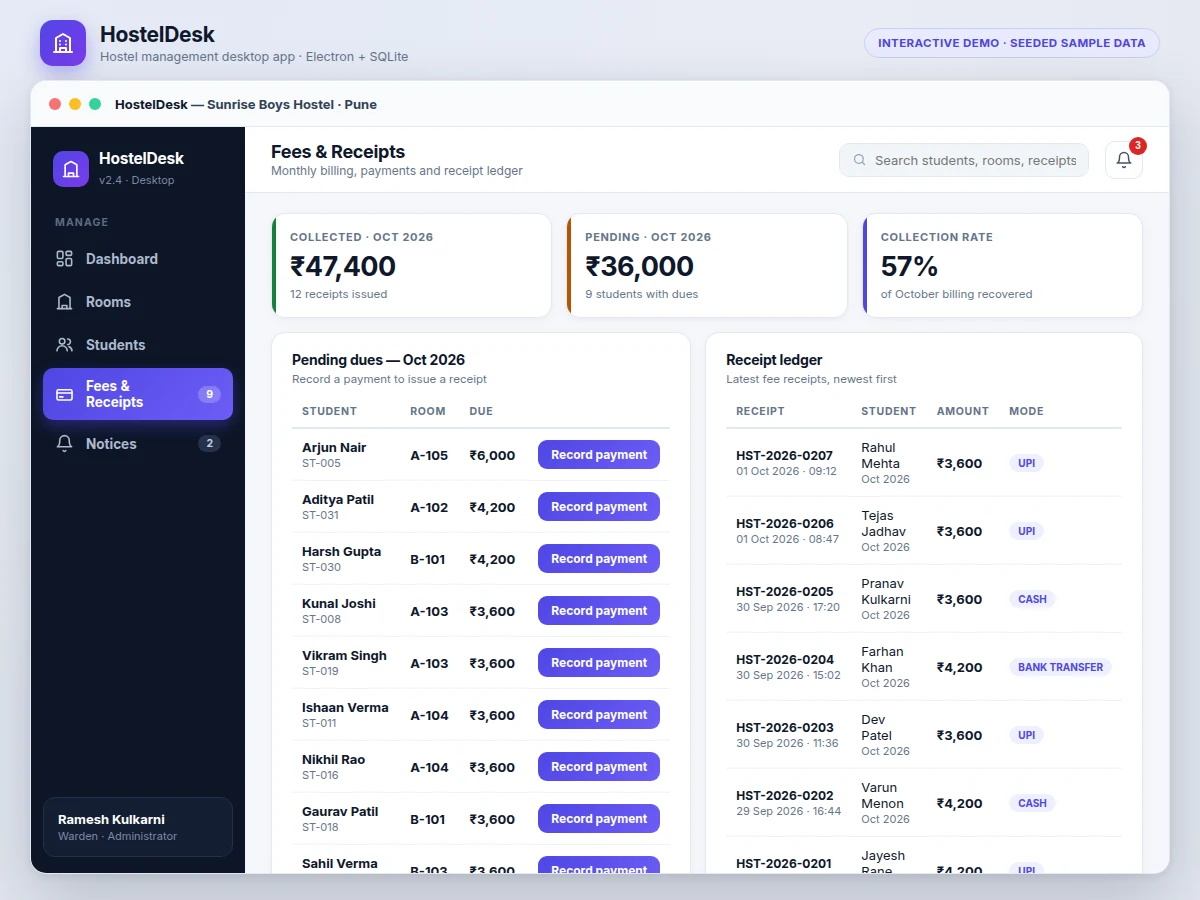
- Payments are recorded with their mode; the app issues an auto-numbered receipt and clears the resident's due for the month.
- The dashboard stays current throughout: occupancy, collection rate, pending dues and open complaints, with Excel exports for the monthly accounts and a one-click database backup.
Tech stack:
- Electron (desktop application shell)
- Node.js runtime
- SQLite · better-sqlite3 (local database)
- HTML5 · CSS3 · JavaScript (user interface)
- pdfmake (receipt printing)
- ExcelJS (Excel export)
- bcrypt (password hashing for login)
- electron-builder (Windows installer packaging)
| Parameter | Value |
|---|---|
| Application type | Desktop app (Electron), single-machine install |
| Supported OS | Windows 10/11, 64-bit (design target) |
| Database | SQLite local file, no server needed |
| Student records | Design target: 1,000+ resident records |
| Room capacity | Design target: 500+ rooms across blocks |
| Fee plans | Per room type (Single/Double/Triple), configurable |
| Receipt numbering | Auto-incremented, format HST-YYYY-NNNN |
| Reports | On-screen lists, print, Excel export |
| Search speed | Design target: under 1 second on the demo database |
| Backup | One-click local backup of the database file |
| Login | Password-hashed warden/admin login (bcrypt) |
| Internet requirement | None — fully offline operation |
Project features
- [Bed-level room allocation] Assign, vacate and transfer individual beds across blocks with a live availability check — the app refuses to double-allocate a bed, and rooms under maintenance are excluded automatically.
- [Student admission records] Complete resident profiles: course and year, phone, admission date, room assignment and a document checklist (Aadhaar, admission slip, photo), with search and course/fee-status filters.
- [Monthly fee billing] Generate the month's billing in one step; each resident's due is computed from their room type's monthly fee (Single/Double/Triple plans).
- [Receipts for every payment] Record UPI, cash or bank-transfer payments and issue auto-numbered receipts (HST-2026-NNNN) with student, month, amount, mode and timestamp — printable or saved as PDF.
- [Dues tracking & collection rate] Pending-dues list per month, per-student payment history, and a collection-rate stat that shows how much of the month's billing is recovered.
- [Occupancy dashboard] Total beds, live occupancy percentage, six-month fee-collection charts, and an alerts feed for dues, open complaints and maintenance rooms.
- [Notice board & complaint register] Publish notices by audience (all residents / per block) and track maintenance complaints through Open → In progress → Resolved.
- [Local-first data with backup] All data lives in a local SQLite file with one-click backup and Excel export of student lists, dues and the receipt ledger.
What is included
- HostelDesk desktop application as a Windows installer
- Complete source code (Electron + Node.js + SQLite)
- Database schema with a seeded sample hostel (blocks, rooms, residents, fee cycle)
- Warden's user manual: installation, setup, admissions, billing, backup
- Project report PDF (requirements, database design, workflows, test notes)
- PPT presentation for the final review
- Viva Q&A preparation document (Electron, SQLite, schema design, business rules)
Limitations & prerequisites
- Single-hostel, single-machine deployment in the base build — multi-hostel or networked multi-user access is optional scope, not included.
- No online payment gateway: UPI/bank payments are recorded manually and the app does not verify them against any bank feed.
- Receipt printing needs a connected printer; saving receipts as PDF is the built-in fallback.
- SQLite suits one concurrent user on one machine; heavy multi-user use would need a server database (optional scope).
- Fee reminders are on-screen and in-app; SMS or WhatsApp reminders are optional scope.
- The demo's residents, rooms and fee figures are illustrative sample data; the delivered build ships with an empty database plus the warden's own setup.
Frequently Asked Questions
Why a desktop app instead of a website?
Hostel offices typically have one shared computer and unreliable internet. A desktop app works fully offline, keeps sensitive student data on the local machine instead of a server, and installs in minutes with no hosting or domain costs.
Can it manage more than one hostel?
The base build manages one hostel with multiple blocks (Block A/B in the demo, extendable). Separate ledgers per hostel with a combined view is optional scope the buyer can request.
How do the receipts work?
Every recorded payment generates an auto-numbered receipt in the format HST-2026-NNNN, stamped with the student, billing month, amount, payment mode and timestamp. Receipts can be printed directly or saved as PDF.
Can the data go to Excel?
Yes — student lists, the dues register and the full receipt ledger export to Excel, which is what most wardens use for the monthly accounts reconciliation.
Is this project suitable for a final-year project?
Yes — for Computer Science and IT programs. It demonstrates desktop application development, relational database design, CRUD with real business rules (no double bed allocation), reporting and exports, and ships as a complete installable product. Suitable for B.E./B.Tech final-year projects in Computer Science and IT.
Components & software requirements
- Electron (desktop application shell)
- Node.js runtime
- SQLite · better-sqlite3 (local database)
- HTML5 · CSS3 · JavaScript (user interface)
- pdfmake (receipt printing)
- ExcelJS (Excel export)
- bcrypt (password hashing for login)
- electron-builder (Windows installer packaging)
Delivery information
Built-to-order project. Delivery timeline is shared after order confirmation based on current queue.
Support terms
Complete documentation, setup guide, and viva preparation included. Support for setup and explanation provided.
Download free synopsis (PDF)
Enter your name and email — the synopsis PDF downloads immediately. We may send occasional project updates; no spam, unsubscribe anytime.