
More project photos (2)
The problem
Resolutions fail by February for a well-studied reason: motivation is unreliable, but visible streaks are compelling — nobody wants to break the chain. Habit trackers weaponize this with daily checklists, streak counters and calendars, and the data they accumulate reveals genuine patterns: weekday versus weekend adherence, which habits drag the average down, when streaks actually break. This project builds that loop as a calm desktop app. Habits carry schedules — daily, or specific weekdays like gym on Mon/Wed/Fri — with optional reminders. The streak engine counts consecutive expected days while skipping rest days instead of breaking on them. The calendar colors each day by completion fraction, the statistics view aggregates heatmaps and strongest streaks, and the missed-day analyzer turns a broken streak into an observation with a fix, such as a rest-day mode for Sundays.
How it works
- The user defines habits with schedules: daily, or specific weekdays, each with an optional reminder time.
- Each day the checklist shows the expected habits; checking one off timestamps the check-in and extends its streak.
- Rest days are marked in advance; the streak engine skips them instead of counting them as breaks.
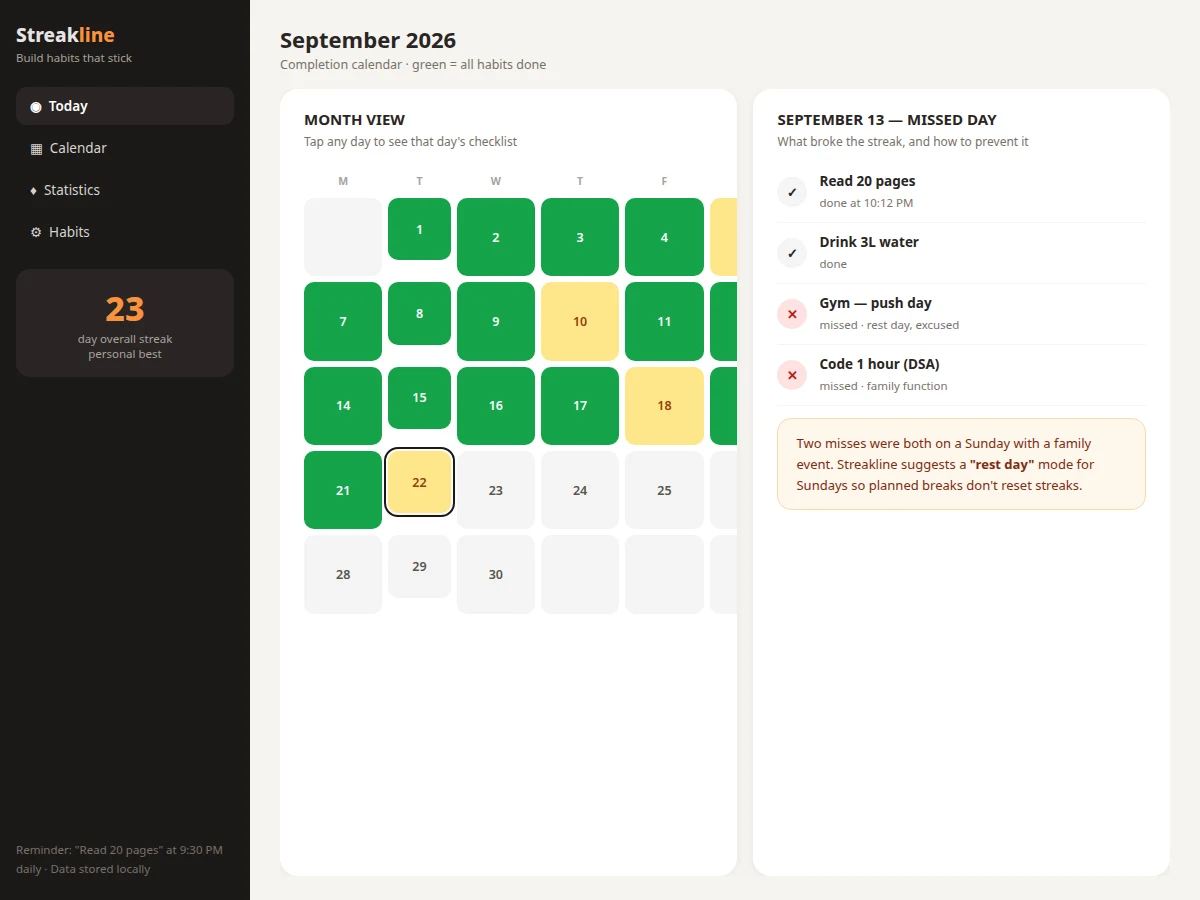
- The calendar colors every day by the fraction of expected habits completed — full, partial or missed.
- Opening a missed day shows which habits broke and the recorded reason, plus the analyzer's pattern observations.
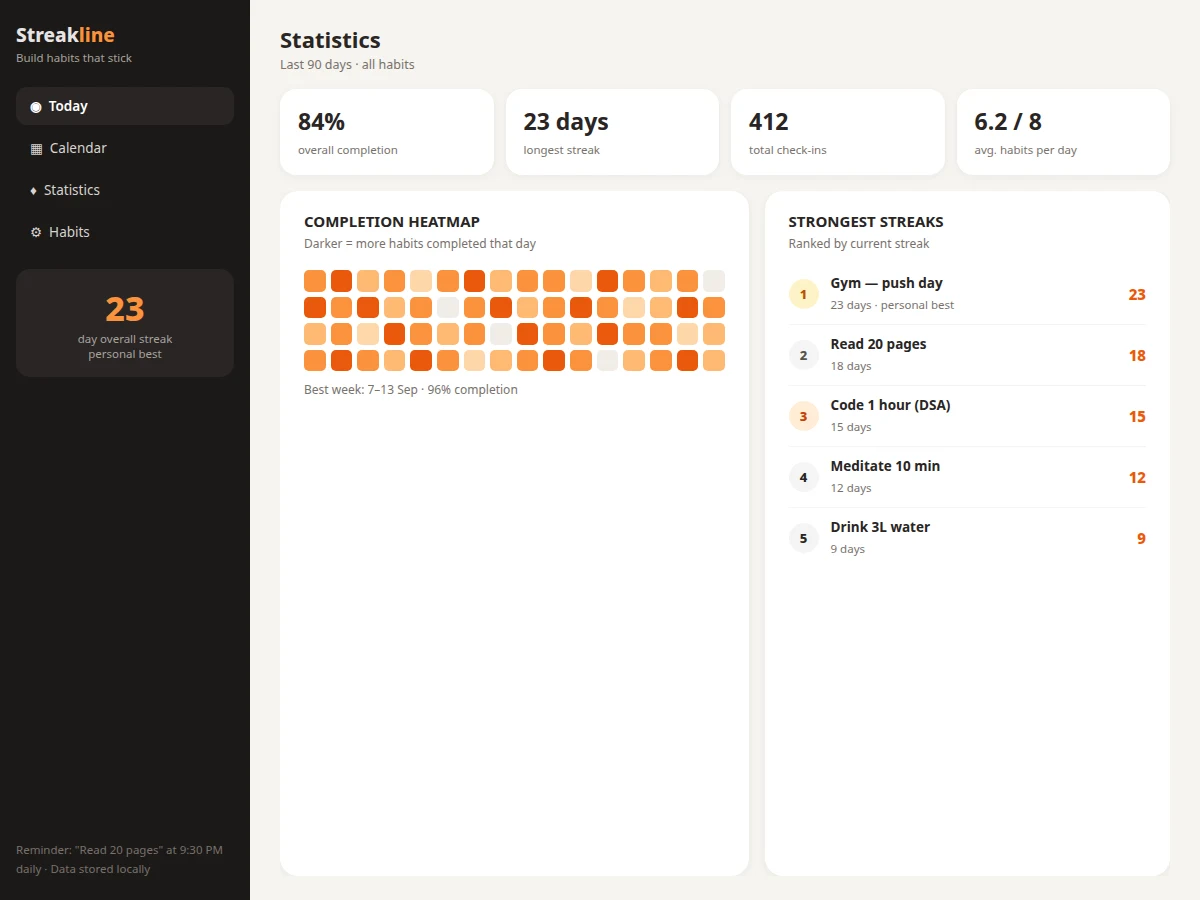
- Statistics aggregate the log into completion rates, heatmaps, best weeks and the strongest-streaks leaderboard.
Tech stack:
- Python with desktop GUI toolkit (or Electron)
- SQLite for local storage
- Streak engine (weekday-mask + rest-day logic)
- Calendar and heatmap rendering
- OS notification API for reminders (optional)
| Parameter | Value |
|---|---|
| Scheduling | Daily or weekday-mask per habit; optional reminder times |
| Streak logic | Consecutive expected days; rest days skipped, not counted as breaks |
| Calendar states | Full / partial / missed per day by completion fraction |
| Statistics | Completion %, longest streak, total check-ins, heatmap, best week, per-habit streaks |
| Storage | Local SQLite; years of check-ins fit in a few MB (expected) |
| Connectivity | Fully offline; no account needed |
| Platform | Windows, macOS and Linux desktops (expected) |
Project features
- [Habit definitions with schedules] Daily habits or weekday-specific ones (gym Mon/Wed/Fri, guitar Tue/Thu/Sat) with per-habit reminders.
- [Daily checklist] One-tap check-off with per-habit streak badges and an overall completion count for the day.
- [Rest-day-aware streaks] Planned rest days are skipped by the streak counter instead of resetting it — a Sunday off doesn't kill a 23-day streak.
- [Completion calendar] A monthly view colors each day full, partial or missed; tapping a day shows that day's checklist.
- [Missed-day analysis] For a broken streak, the app shows what was missed, the noted reason, and pattern-based suggestions.
- [Statistics dashboard] Overall completion rate, longest streak, total check-ins, average habits per day, completion heatmap and strongest-streaks ranking.
- [Streak badges and personal bests] Per-habit day counters and an overall personal-best display keep milestones visible.
- [Fully local data] Every habit, check-in and streak lives in a local database — no account, no cloud, no network needed.
What is included
- Complete desktop app source code (checklist, calendar, stats, streak engine)
- Streak-engine documentation (expected-day computation, rest-day rules)
- Sample 90-day habit history for demonstration
- Setup guide (install, usage walkthrough)
- Project report PDF (background, habit-formation theory, methodology)
- PPT presentation for final review
- Viva Q&A preparation document (data modeling, date logic, desktop apps)
Limitations & prerequisites
- Streaks measure check-ins, not effort quality — checking off gym says nothing about the workout itself, and the report states this plainly.
- The analyzer's pattern observations are simple weekday aggregations, not a behavioral model; suggestions are heuristics.
- Reminders depend on the OS notification system; if notifications are disabled at OS level, they won't appear.
- There is no phone companion or cloud sync in this build; habits live on one desktop.
- Schedule changes apply going forward; historical expected-day computations use the schedule active at the time (documented in the report).
Frequently Asked Questions
How do rest days work?
Mark a day as a rest day (for example Sundays) and the streak engine skips it when counting consecutive days. A planned break no longer resets a long streak, but unplanned misses still break it — the distinction is the point.
What does the missed-day analysis do?
For a selected missed day it lists which habits were missed with their recorded reasons, and the analyzer adds pattern observations — for example lower weekend adherence — with concrete suggestions like lighter weekend targets.
Does it need internet?
No. Habits, check-ins, streaks, calendar and statistics are all local with no account and no network calls.
Can habits run on specific weekdays only?
Yes. Each habit takes a weekday mask — gym on Mon/Wed/Fri, guitar on Tue/Thu/Sat — and only those days count as expected for streak purposes.
How is this different from a phone habit app?
It is a calm desktop tool with transparent streak math, full statistics and no notification spam or subscription. The streak rules are documented and inspectable rather than a black box.
Is this project suitable for a final-year project?
Yes — for Computer Science, Information Technology and related branches. It demonstrates data modeling, date/weekday logic, statistics visualization and behavioral-design thinking. Suitable for B.E./B.Tech final-year projects in Computer Science, Information Technology and related branches.
Components & software requirements
- Python with desktop GUI toolkit (or Electron)
- SQLite for local storage
- Streak engine (weekday-mask + rest-day logic)
- Calendar and heatmap rendering
- OS notification API for reminders (optional)
Delivery information
Built-to-order project. Delivery timeline is shared after order confirmation based on current queue.
Support terms
Complete documentation, setup guide, and viva preparation included. Support for setup and explanation provided.