
More project photos (2)
The problem
Home libraries fail quietly: books lent to friends and family drift out of reach, nobody remembers who has which book, and the owner discovers a loss months later, too late to ask. ShelfWise, the Home Library Manager Android app, answers that problem by treating every book as a catalogued item with a shelf location and every loan as a dated record with a named borrower. The owner adds a book by typing or scanning its ISBN barcode number, files it on a named shelf, and lends it by choosing the book, the borrower, and a due date. The app then watches the calendar: books near their due date appear for follow-up, overdue books stand out with days late and the fine the owner configured, and returning a book appends a history entry instead of erasing the loan. The owner always knows what they own, where each book sits, who has it, and when it comes back.
A home library is not a public library, and this project does not pretend otherwise. There is no central catalogue to consult, no librarian to chase returns, and no standard fine chart to apply — just one owner, their shelves, and the people they trust with their books. That is exactly why loans go missing: the record lives in memory, and memory is the weakest catalogue of all. This project replaces memory with a small, honest system: a book list the owner controls, a loan record for every handover, a due date for every loan, and a history that survives returns. The Android app is the delivered product, and the single-file web preview demonstrates its flows — catalogue search, lending, returns, overdue lists, and fine calculation — with a frozen seed library so every number in the demo can be checked by hand.
How it works
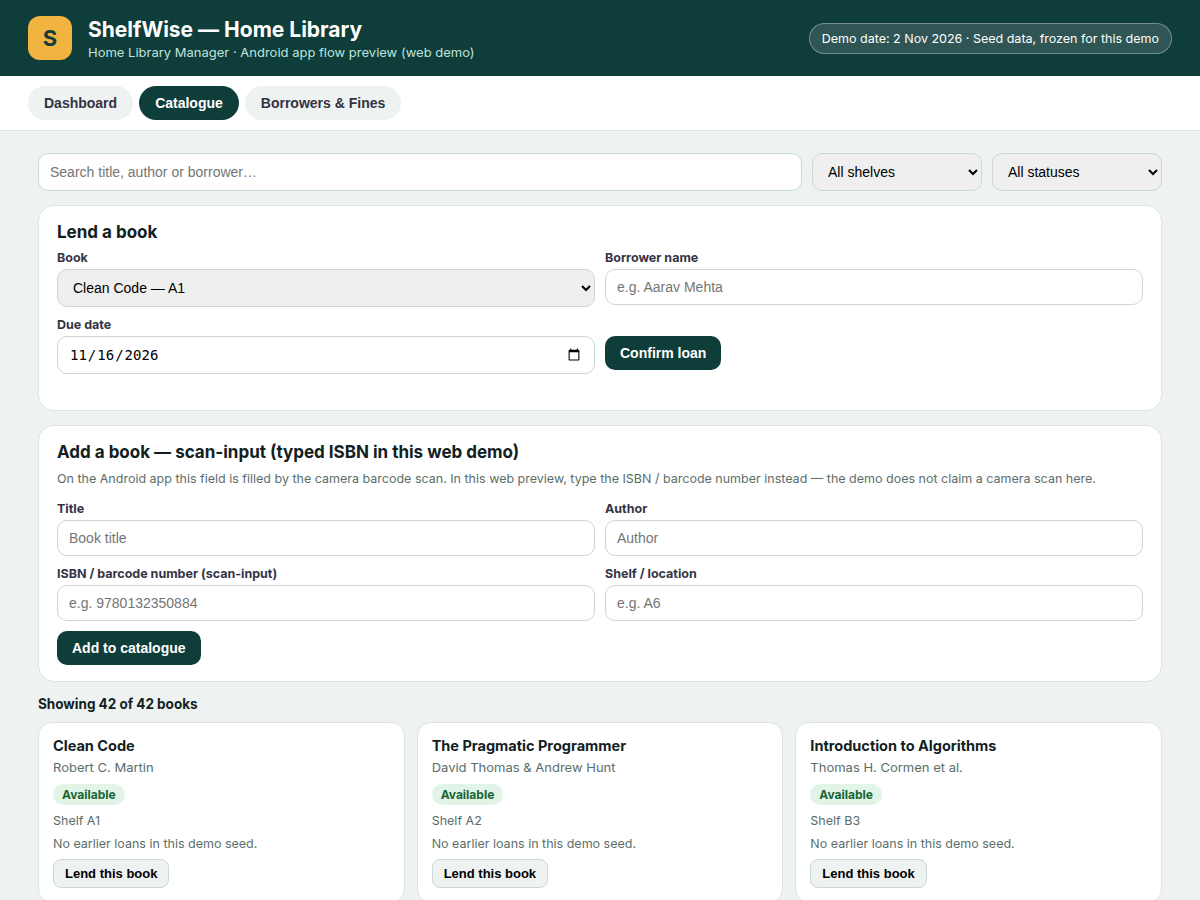
From a new book to a returned book, the flow has six stages and no stage depends on memory. The owner enters a book by scanning its barcode on the Android device or typing its ISBN number into the scan-input, then confirms its title, author, and shelf location, and the book joins the catalogue. Lending takes seconds: the owner picks the book, names the borrower, and sets a due date, creating a loan record that stays visible until the book returns. While the loan runs, the app sorts books by due date, flags anything past due with days late, and raises a reminder so the owner follows up instead of forgetting. The fine, if the owner configured one, is computed from days late multiplied by the owner's daily rate. Return closes the loop by appending a history entry, freeing the book for the next borrower, and leaving the full handover chain readable.
- The owner adds a book by scanning its barcode on the Android device or typing its ISBN barcode number into the scan-input, then confirms the title, author, and shelf location.
- The book joins the shelf catalogue, where it can be found by searching title, author, or borrower, or by filtering to its shelf.
- To lend, the owner picks the book, enters the borrower's name, and sets a due date; the app creates a loan record and marks the book as on loan.
- While the loan runs, the app sorts loans by due date and raises an on-device reminder as the due date approaches, so follow-up happens before the book is forgotten.
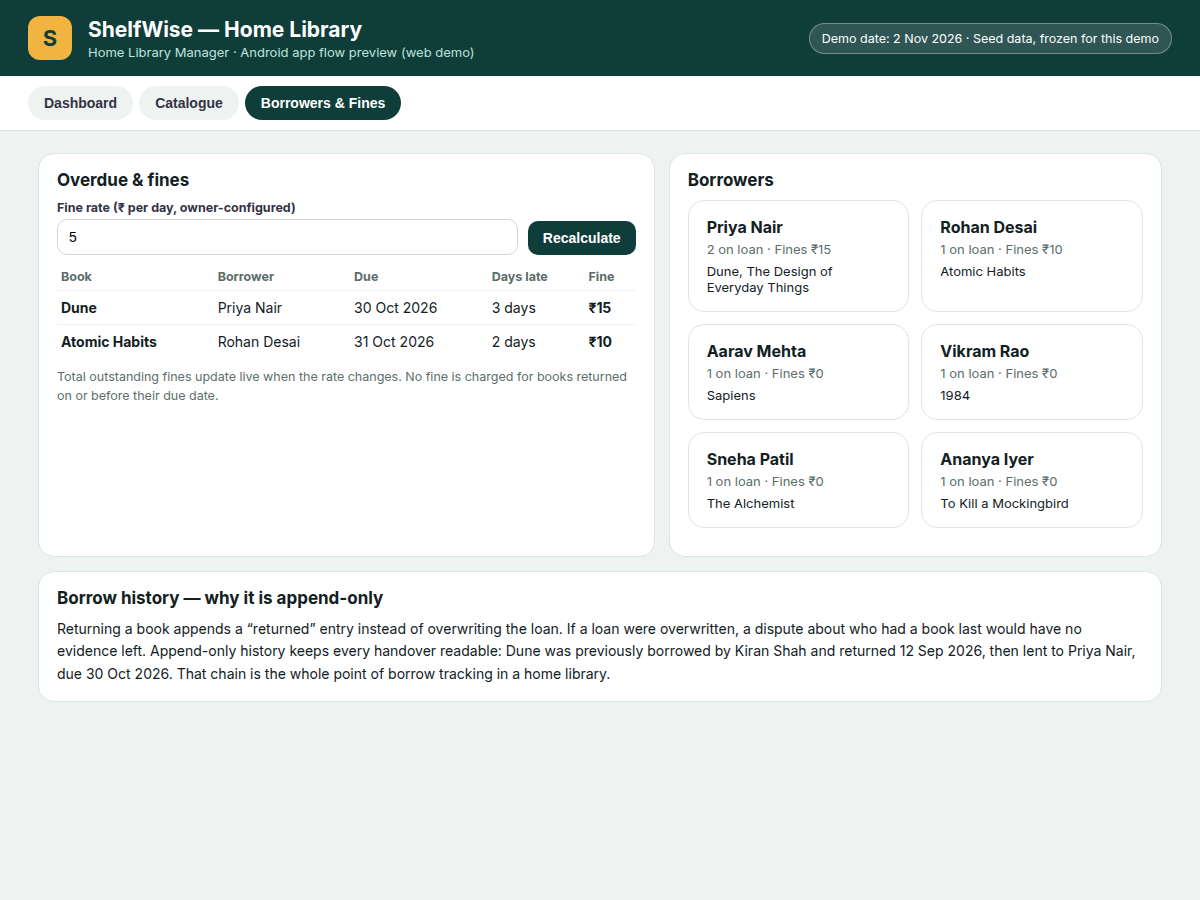
- If the due date passes, the book moves to the overdue list with its days late counted from the due date, and the fine is calculated as days late multiplied by the owner's configured daily rate.
- When the book comes back, the owner marks it returned; the app appends a history entry, clears the loan, and makes the book available to lend again.
Tech stack:
- Kotlin · Android SDK
- Room Database · SQLite
- ML Kit Barcode Scanning
- WorkManager reminders
- Material Design 3
- HTML · CSS · JavaScript demo preview
- Git · Android Studio
| Parameter | Value |
|---|---|
| Platform | Android app, Android 8.0 or later (design target) |
| Catalogue size (demo seed) | 42 books across 9 shelf groups (demo seed data) |
| Books on loan (demo seed) | 7 books on loan to 6 borrowers (demo seed data) |
| Overdue books (demo seed) | 2 overdue books on 2 Nov 2026 (demo seed data) |
| Outstanding fines (demo seed) | ₹25 at ₹5 per day (demo seed, owner-configured rate) |
| Fine calculation | Days late × owner-configured daily rate (formula) |
| Data storage (base build) | On-device Room database (base build) |
| Barcode input | Camera scan on Android device · typed scan-input in web demo |
| Search fields | Title · author · borrower (3 search fields) |
| Demo preview | Single-file HTML · CSS · JavaScript working preview (demo only) |
Project features
Four capabilities carry this app. First, fast cataloguing: a book enters the library through its ISBN barcode number, typed or scanned on the Android device, together with its title, author, and shelf location, so finding a book later means searching, not hunting through piles. Second, shelf-aware organisation: every book lives on a named shelf, and the catalogue filters by shelf, so the owner can walk straight to the right spot. Third, complete borrow tracking: each loan names its borrower and due date, overdue books surface automatically with days late, and reminders prompt a follow-up before a loan is forgotten. Fourth, honest history and fines: returning a book appends a history entry rather than overwriting the loan, and fines follow a daily rate the owner sets, so charges are transparent and disputable only against a visible record.
- [Barcode & ISBN entry] On the Android device, the camera reads a book's barcode; in the web demo preview, the same field accepts a typed ISBN barcode number. A duplicate-ISBN guard blocks adding the same barcode twice, so one physical book can never become two catalogue entries.
- [Shelf & location catalogue] Every book is filed on a named shelf, such as Shelf A1 or Shelf B2, and the catalogue filters by shelf, so the owner can find a book's physical spot in seconds rather than searching the whole house.
- [Search by title, author, or borrower] One search box covers 3 fields — title, author, and borrower — so the owner can answer "who has my copy of Dune?" as fast as "where is my copy of Dune?"
- [Borrow & return with due dates] Lending a book records the borrower and a due date in one step, and returning it frees the book for the next borrower. The demo seed shows 7 books on loan to 6 borrowers, each with its own due date.
- [Overdue list & reminders] Books past their due date surface automatically with days late, and on-device reminders prompt a follow-up before a loan is forgotten. The demo seed shows 2 overdue books on the demo date of 2 Nov 2026.
- [Owner-configured fines] The owner sets the daily fine rate — ₹5 per day in the demo seed — and the app multiplies days late by that rate. Changing the rate recalculates every outstanding fine immediately, and no fine is charged before the due date.
- [Append-only borrow history per book] Returning a book appends a history entry instead of overwriting the loan. That is the project's key mechanism line: if a loan were overwritten, a dispute about who had a book last would have no evidence left, so history must only ever grow.
- [Cloud backup & sync — optional, not in the base build] Cloud backup and multi-device sync are an optional add-on, clearly separated from the base build. The base build stores data on the device only, so buyers who want sync must ask for it explicitly.
What is included
- Complete Android app source code (Kotlin, Room database, barcode scan flow, borrow/return and fine logic)
- Working single-file web demo preview of the app's flows, with the frozen seed library of 42 books
- Setup guide for building and running the app on an Android device
- Project report PDF (background, problem, methodology, architecture, results, limitations)
- PPT presentation for final review
- Viva Q&A preparation document (Room, barcode scanning, WorkManager reminders, append-only history design)
Limitations & prerequisites
- The web demo preview uses a typed ISBN scan-input; the camera barcode scan is an Android-device feature and is not shown in the web demo.
- The base build stores data on the device only; there is no cloud sync or multi-device backup unless the optional cloud add-on is chosen.
- Fine amounts are owner-configured, not legal or library-standard figures; the ₹5 per day rate in the demo is a sample setting, not a prescribed charge.
- The base build does not fetch book cover art or catalogue metadata from an online source; title and author are entered or confirmed by the owner.
- On-device reminders depend on the device's notification permissions and battery settings; a reminder will not appear if notifications are blocked for the app.
- The demo seed library of 42 books is sample data for demonstration, not the buyer's library; a delivered app starts with an empty catalogue unless a seed import is requested.
Frequently Asked Questions
How do I add a book to the library?
Scan the book's barcode with the Android device camera, or type its ISBN barcode number into the scan-input in the web demo preview, then confirm the title, author, and shelf location to add the book to the catalogue in one step. A duplicate-ISBN guard blocks the same barcode from being added twice, so one physical book never becomes two catalogue entries by accident.
What happens when a book becomes overdue?
The book moves to the overdue list with its days late counted from its due date, and it stays there until it is returned, so the owner can follow up with the borrower, while any fine is calculated only from the days late multiplied by the owner's chosen daily rate. In the demo seed, Dune is 3 days overdue and Atomic Habits is 2 days overdue on the demo date of 2 Nov 2026.
Are the fines fixed by the app?
No, the fine rate is set by the library owner, and the app only multiplies days late by that chosen rate, so charges always trace back to a visible rule, and the owner can change the rate at any time, with every outstanding fine recalculating immediately. The demo seed uses a sample rate of ₹5 per day, giving ₹25 in outstanding fines across 2 overdue books, and no fine is ever charged before a due date.
Where is my data stored, and is there cloud sync?
In the base build, all data lives in an on-device Room database on the owner's Android phone, with no account and no server copy, and cloud backup with multi-device sync is available only as an optional add-on the buyer must request explicitly. That keeps the base app private and usable offline, while buyers who want sync can ask for it explicitly.
Does the web demo preview use my phone camera?
No, the web demo preview cannot use a camera scan, so it uses a typed ISBN scan-input instead and labels it honestly, while the camera barcode scan itself is a feature of the delivered Android app, built with ML Kit barcode scanning. The demo still proves the rest of the flow — catalogue, lending, returns, overdue lists, and fine calculation — with real working controls.
Is this project suitable for a final-year project?
Yes, it fits Computer Science, IT, and Android application development programmes, because it combines a real mobile build with a database design decision worth defending, covering barcode input, Room persistence, scheduled reminders, and append-only borrow history in one working app. The report documents each choice with its limits stated plainly.
Components & software requirements
- Kotlin · Android SDK
- Room Database · SQLite
- ML Kit Barcode Scanning
- WorkManager reminders
- Material Design 3
- HTML · CSS · JavaScript demo preview
- Git · Android Studio
Delivery information
Built-to-order project. Delivery timeline is shared after order confirmation based on current queue.
Support terms
Complete documentation, setup guide, and viva preparation included. Support for setup and explanation provided.
Download free synopsis (PDF)
Enter your name and WhatsApp number — the synopsis PDF downloads immediately. We may send occasional project updates on WhatsApp; no spam.