
More project photos (2)
The problem
Students are told to "use Git properly" in project work, yet most experience version history only as a scrolling terminal: git log --graph ASCII art becomes unreadable past a few branches, and hosted UIs are unavailable for offline or private coursework repositories. Branching, merging and rebasing stay abstract, and examiners get little insight from a flat commit list when they want to judge how a project actually evolved — which feature branches existed, when hotfixes landed, how conflicts were resolved. This project closes that gap with a lightweight desktop visualizer: export the log once with a documented git command, and the app reconstructs the commit DAG, draws one lane per branch with merge nodes and branch-off connectors, lays the same history out as a date-grouped timeline, and shows per-commit file statistics with diff bars. Parsing is fully client-side on the exported JSON — the app never executes git itself and never modifies the repository.
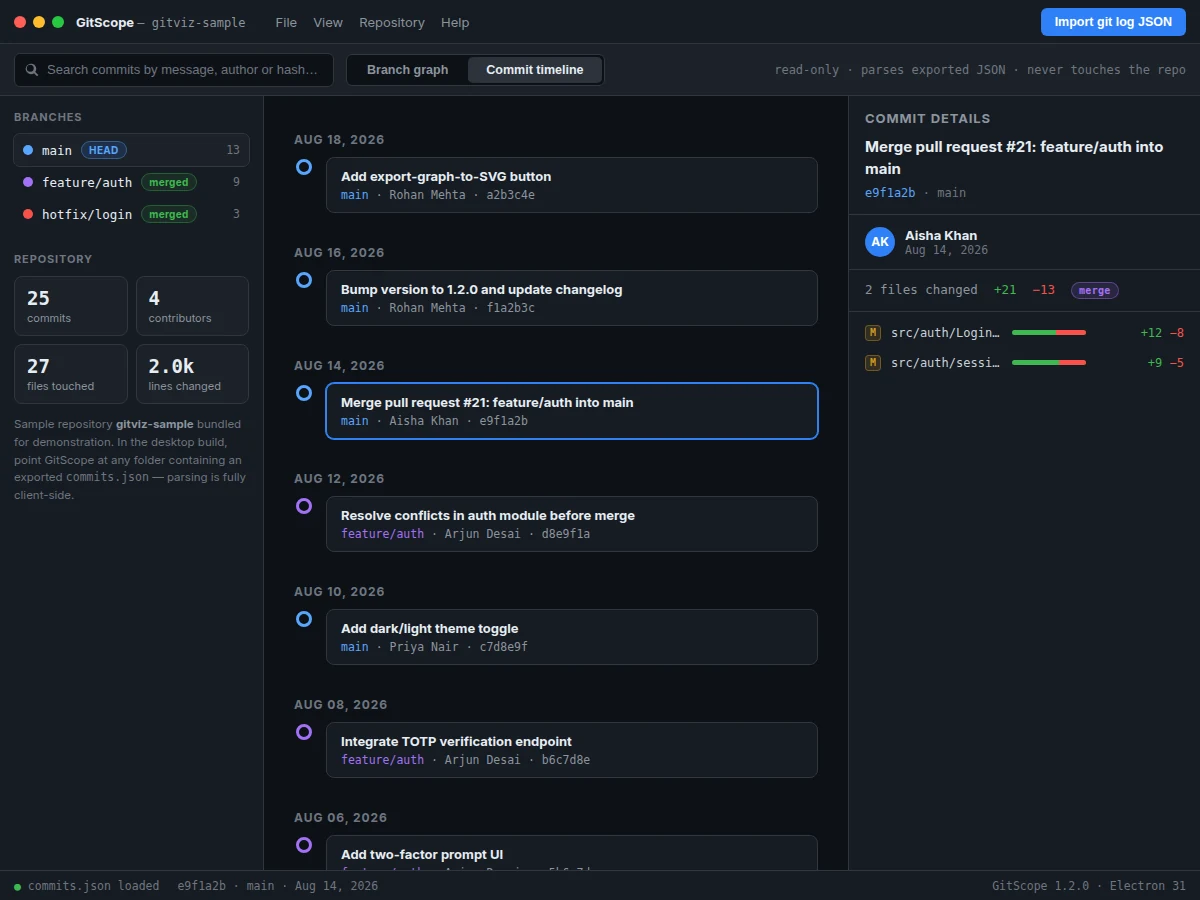
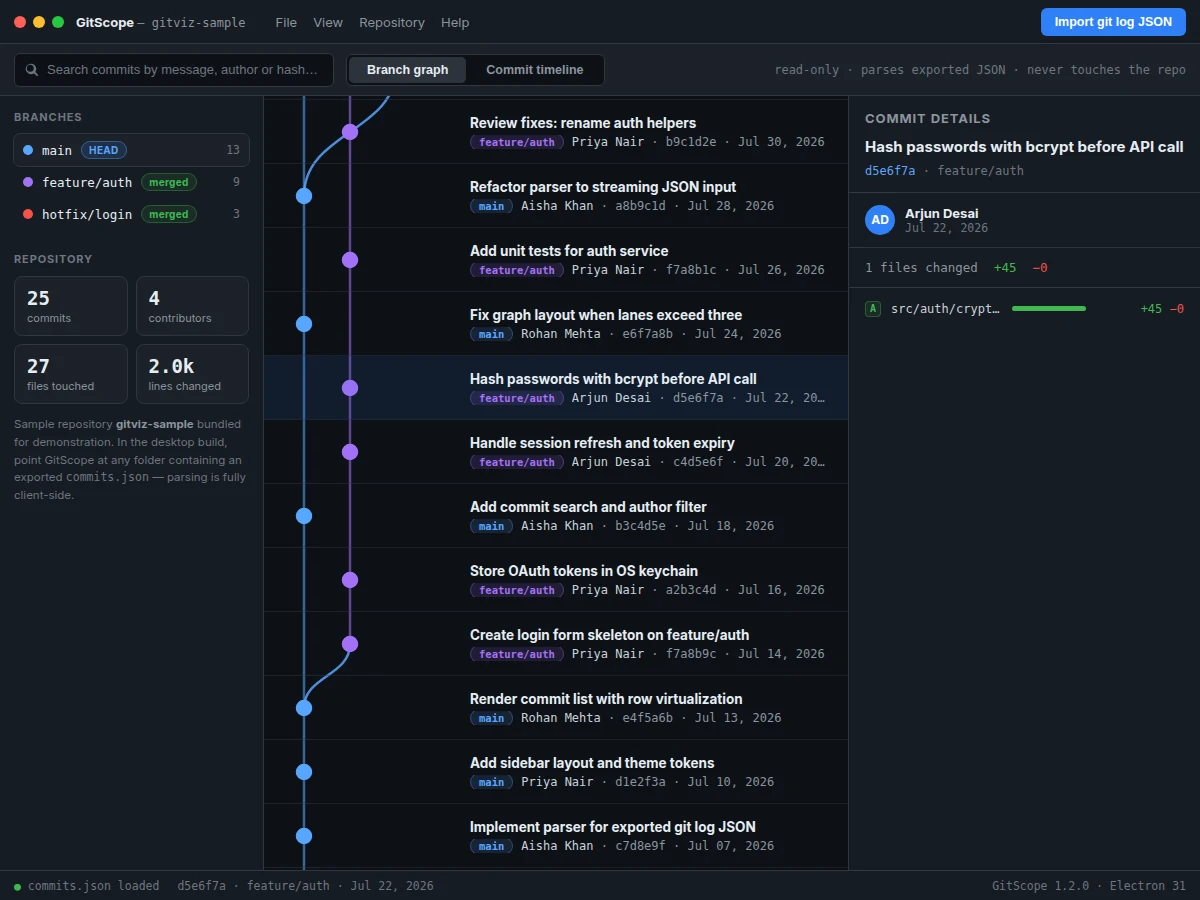
Exports the repository log once, then explores the graph, timeline and detail panel.
Follow the working sequence
How it works
- The student runs one documented git command that exports the repository log — full hashes, author names, dates, subjects, branch refs and per-file numstat data — into a commits.json file.
- The app loads commits.json and the TypeScript parser validates it, building an in-memory commit DAG from parent hashes and indexing commits for search.
- The graph engine assigns lane indices (main on lane 0, each side branch on its own lane), detects merge commits by their two parents, and lays commits out newest-first in rows.
- The renderer draws the SVG graph: lane lines between each branch's first and last commit, bezier curves for branch-off points and merges, and clickable node circles (ring nodes for merges).
- The timeline view groups the same commits by date into cards; the search box filters both views by message, author or hash with dimmed non-matches.
- Clicking any node or card selects the commit and populates the detail panel — subject, full hash, author, date, branch badge, file list with addition/deletion statistics and diff bars.
Tech stack:
- Electron 31 (cross-platform desktop shell)
- TypeScript 5 · React 18 (UI)
- SVG graph rendering (custom lane layout engine)
- Node.js 20 LTS (build tooling)
- Git 2.x (export command only — the app never invokes it)
- HTML5 · CSS3 (dark professional theme)
| Parameter | Value |
|---|---|
| Platform | Windows, macOS, Linux (Electron desktop app) |
| Input format | Exported git log JSON (commits.json: hash, author, date, subject, branch refs, numstat) |
| Sample repository | 25 commits, 3 branches, 4 contributors (bundled) |
| Graph capacity | Design target: 1,000 commits rendered in under approximately 2 seconds on a typical laptop |
| Graph views | Branch graph (lane layout) + date-grouped commit timeline |
| Search | By message, author, short hash — instant, client-side |
| Repository access | Read-only by design — no git execution, no history mutation |
| UI theme | Dark professional theme, 1200×900 reference layout |
| Deliverables | Source code, sample data, user guide, report PDF, PPT, viva Q&A |
Project features
- [Interactive branch graph] One lane per branch with distinct branch colours, merge commits rendered as ring nodes with two-parent bezier connectors, and branch-off curves — click any node to inspect it.
- [Commit timeline view] The same history laid out chronologically as date-grouped cards showing subject, branch, author and short hash, switchable from the toolbar with one click.
- [Per-commit detail panel] Full hash, author, timestamp, branch badge, files changed, and per-file addition/deletion counts with proportional diff bars, plus a merge badge on merge commits.
- [Commit search and filter] Instant filtering across commit messages, author names and hashes with a live match count; non-matching commits are dimmed in both views.
- [Read-only by design] The app parses an exported commits.json entirely on the local machine — it holds no repository handle, runs no git commands, and cannot alter history.
- [Repository statistics sidebar] Commit count, contributor count, files touched and lines changed, computed from the loaded export, with a branch list showing commit counts and HEAD/merged badges.
- [Bundled sample repository] A realistic 25-commit, 3-branch sample (main, feature/auth, hotfix/login) ships with the app, so the visualizer is demonstrable without any setup.
- [Import guide] A one-command git export workflow documented in the app and the user guide, so the student can point the visualizer at their own repositories.
What is included
- Complete Electron + TypeScript + React source code
- Bundled sample repository export (gitviz-sample: 25 commits, 3 branches)
- One-command git export workflow and in-app import guide
- User guide for pointing the visualizer at the student's own repositories
- Project report PDF (Git internals, parsing approach, graph-layout algorithm)
- PPT presentation for final review
- Viva Q&A preparation document (DAG, refs, merges, rebasing, parser design)
Limitations & prerequisites
- The app reads an exported JSON file — it does not watch a live repository or auto-refresh on new commits; re-export to see newer history.
- Only committed history is visualized: uncommitted working-tree changes, stashes and reflog entries are not shown.
- Very large repositories (tens of thousands of commits) exceed the design target; the 1,000-commit figure is a design target, not a measured benchmark on the student's machine.
- Branch lanes are derived from the export's branch refs — detached-HEAD or ref-less exports render as a single lane.
- The demo screenshots show the bundled sample repository; the student's own data replaces it after import.
- Packaging installers per OS (Windows/macOS/Linux) is a build step documented in the guide, not a prebuilt binary.
Frequently Asked Questions
How does the app read my repository without modifying it?
It doesn't touch the repository at all. You run a documented git export command once, which writes commits.json. The app parses that file locally — it never executes git, holds no repository handle, and has no code path that could alter history.
Can I use it with my own final-year project repository?
Yes — that is the intended workflow. Export your repository's log with the one command from the import guide, load the file, and the branch graph, timeline and statistics rebuild from your own history.
What is the main technology used?
Electron 31 for the cross-platform desktop shell, TypeScript 5 with React 18 for the UI, and a custom SVG lane-layout engine for the branch graph. Node.js 20 is the build tooling.
Does it need internet connectivity?
No. Everything — parsing, graph layout, search — runs locally on the machine. Internet is only needed if the student chooses to download dependencies during the build.
What are the main limitations?
It visualizes exported history only (no live watching, no uncommitted changes), lane assignment depends on branch refs in the export, and the 1,000-commit responsiveness figure is a design target rather than a measured claim on every machine.
Is this project suitable for a final-year project?
Yes — for Computer Science, IT and Software Engineering programs. It demonstrates data parsing, graph algorithms, desktop application architecture and Git internals, with a working demo the student can run on their own repositories. Suitable for B.E./B.Tech final-year projects in Computer Science, IT and Software Engineering.
Components & software requirements
- Electron 31 (cross-platform desktop shell)
- TypeScript 5 · React 18 (UI)
- SVG graph rendering (custom lane layout engine)
- Node.js 20 LTS (build tooling)
- Git 2.x (export command only — the app never invokes it)
- HTML5 · CSS3 (dark professional theme)
Delivery information
Built-to-order project. Delivery timeline is shared after order confirmation based on current queue.
Support terms
Complete documentation, setup guide, and viva preparation included. Support for setup and explanation provided.
Download free synopsis (PDF)
Enter your name and email — the synopsis PDF downloads immediately. We may send occasional project updates; no spam, unsubscribe anytime.