
More project photos (2)
The problem
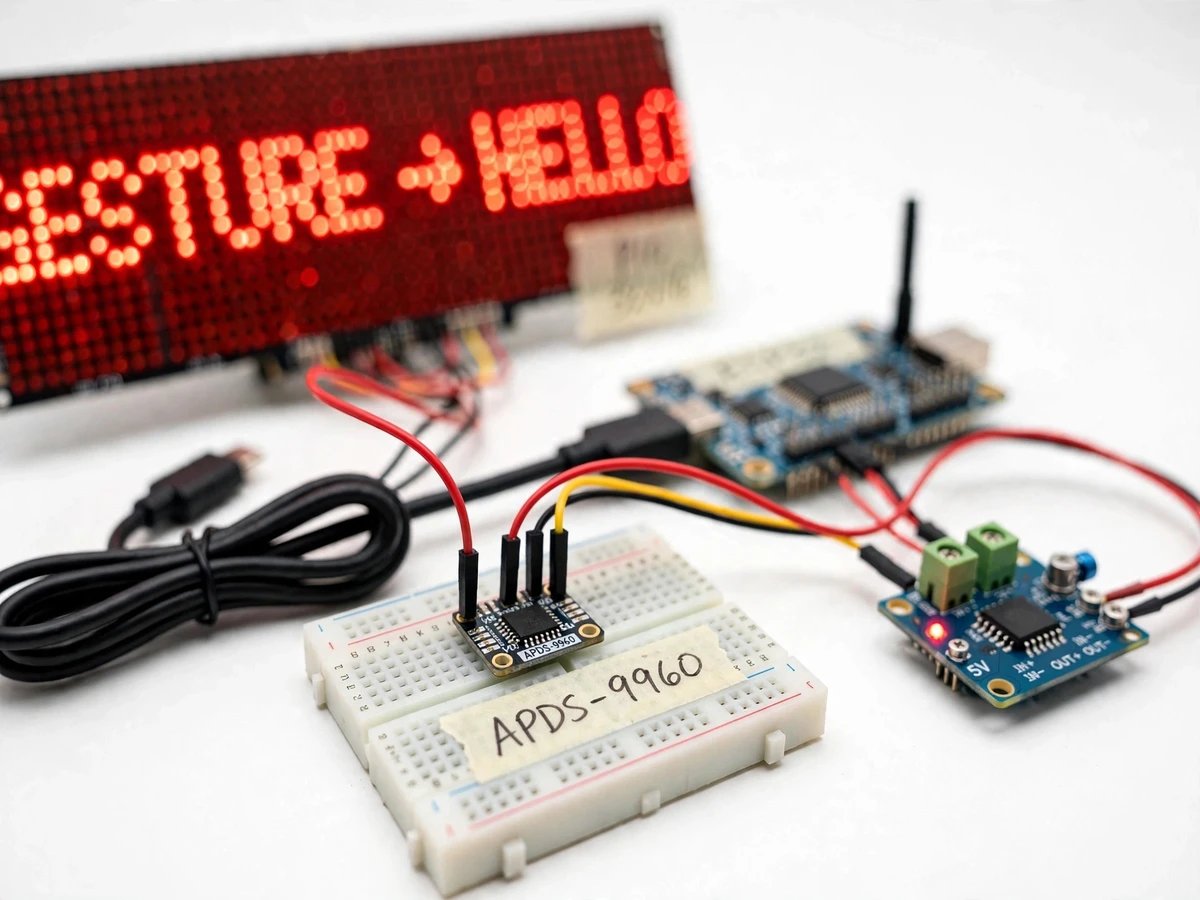
Department notice boards still run on printed paper or on USB-tethered LED boards that someone has to walk up to and reprogram. Both are slow to update and the push-button boards in shared corridors get grimy fast. This project replaces that setup with a wireless board: an ESP32 subscribes to an MQTT topic, and any authorised publisher — a phone app, a web console, or a simple MQTT client — pushes a text message that appears on a 32×16 P10 LED dot-matrix panel within seconds. Local control is entirely touchless: an APDS-9960 infrared gesture sensor reads four discrete hand swipes and maps them to next/previous message, scroll-speed step, and brightness step with a standby off-state. This is not an SMS notice board — there is no GSM module and no per-message cost — and it is not a Bluetooth pointer; the remote channel is MQTT over Wi-Fi and the local input is gestures, recognised by reflected infrared light, not by a camera.
How it works
- The ESP32 joins the configured 2.4 GHz Wi-Fi network and connects to the MQTT broker on its standard port (1883, plain TCP; design default) using the stored username and password, then subscribes to the board's topic (e.g. campus/noticeboard/main).
- An authorised publisher sends a UTF-8 text payload (design limit: 200 characters per message) to that topic from the web console or any MQTT client; QoS 1 is the design default so the protocol retries a lost packet.
- The ESP32's MQTT callback receives the payload, stores it at the head of a small in-RAM message queue (design default: 5 messages), and switches the panel to the new message.
- A font renderer converts the text into a 1-bit bitmap column stream and drives the 32×16 P10 panel through the HUB12 interface, scrolling it at one of 5 firmware-defined speed steps.
- In parallel, the ESP32 polls the APDS-9960 over I2C; the sensor's four directional photodiodes report a swipe as UP, DOWN, LEFT or RIGHT when a hand moves within approximately 10–20 cm (module documentation; proximity factory-calibrated to 100 mm per the Avago APDS-9960 datasheet).
- The firmware maps each gesture to a board action — right/left for next/previous message, up for scroll-speed step, down for brightness step with a fourth step that blanks the panel into standby — and debounces repeats for about 500 ms (firmware-defined) to avoid double triggers.
Tech stack:
- ESP32 dev board (dual-core, Wi-Fi 2.4 GHz)
- APDS-9960 gesture sensor (I2C, 4 directional photodiodes)
- P10 32×16 LED matrix panel (HUB12, 5 V DC)
- Arduino framework + PubSubClient MQTT library
- Mosquitto MQTT broker (self-hosted or cloud)
- 5 V DC power supply for panel + logic
- Companion web console (HTML/JavaScript)
- Breadboard + jumper wiring (prototype build)
| Parameter | Value |
|---|---|
| Display panel | P10 LED matrix, 32 × 16 pixels (512 dots), 320 × 160 mm (module documentation) |
| Panel interface | HUB12, 1/4 scan drive, 5 V DC (module documentation) |
| Controller | ESP32, dual-core, Wi-Fi 2.4 GHz, 3.3 V logic (Espressif specifications) |
| Gesture sensor | APDS-9960, I2C interface, 4 directional photodiodes (Avago/Broadcom datasheet) |
| Gesture set | 4 discrete swipes: UP, DOWN, LEFT, RIGHT (sensor capability) |
| Gesture range | Approximately 10–20 cm hand distance (module documentation) |
| Message limit | 200 characters per payload (firmware-defined design limit) |
| Queue depth | 5 messages in RAM (firmware-defined) |
| Scroll speeds | 5 steps (firmware-defined) |
| Brightness steps | 4 levels including standby/off (firmware-defined) |
| MQTT transport | Broker port 1883 (standard); QoS 1 design default; username/password auth |
| Power | 5 V DC supply; panel up to approximately 4 A at full brightness (module documentation) |
| Wi-Fi band | 2.4 GHz 802.11 b/g/n (ESP32 does not support 5 GHz) |
Project features
- [MQTT message push] From the web console or any MQTT client, an authorised publisher sends a text payload to the board's topic; the ESP32 stays subscribed and renders each new message on the panel within seconds (design target; depends on broker reachability).
- [Touchless 4-gesture control] The APDS-9960 recognises four discrete swipes — left, right, up, down — mapped to previous message, next message, scroll-speed step, and brightness step with a standby off-state. No camera, no touch, no training data.
- [P10 LED matrix display] A 32×16 dot-matrix panel (320×160 mm, 5 V DC, HUB12 interface, per module documentation) shows scrolling text readable from several metres indoors (design target).
- [Authenticated publishing] The broker connection uses an MQTT username and password (design default), so only authorised publishers can push messages and random clients on the network cannot hijack the board.
- [On-board message queue] The ESP32 keeps the most recent messages in RAM and cycles through them; gestures move through the queue without anyone touching a phone.
- [Offline gesture path] Gesture control is fully local and keeps working when Wi-Fi or the broker is down; only remote message push needs the network.
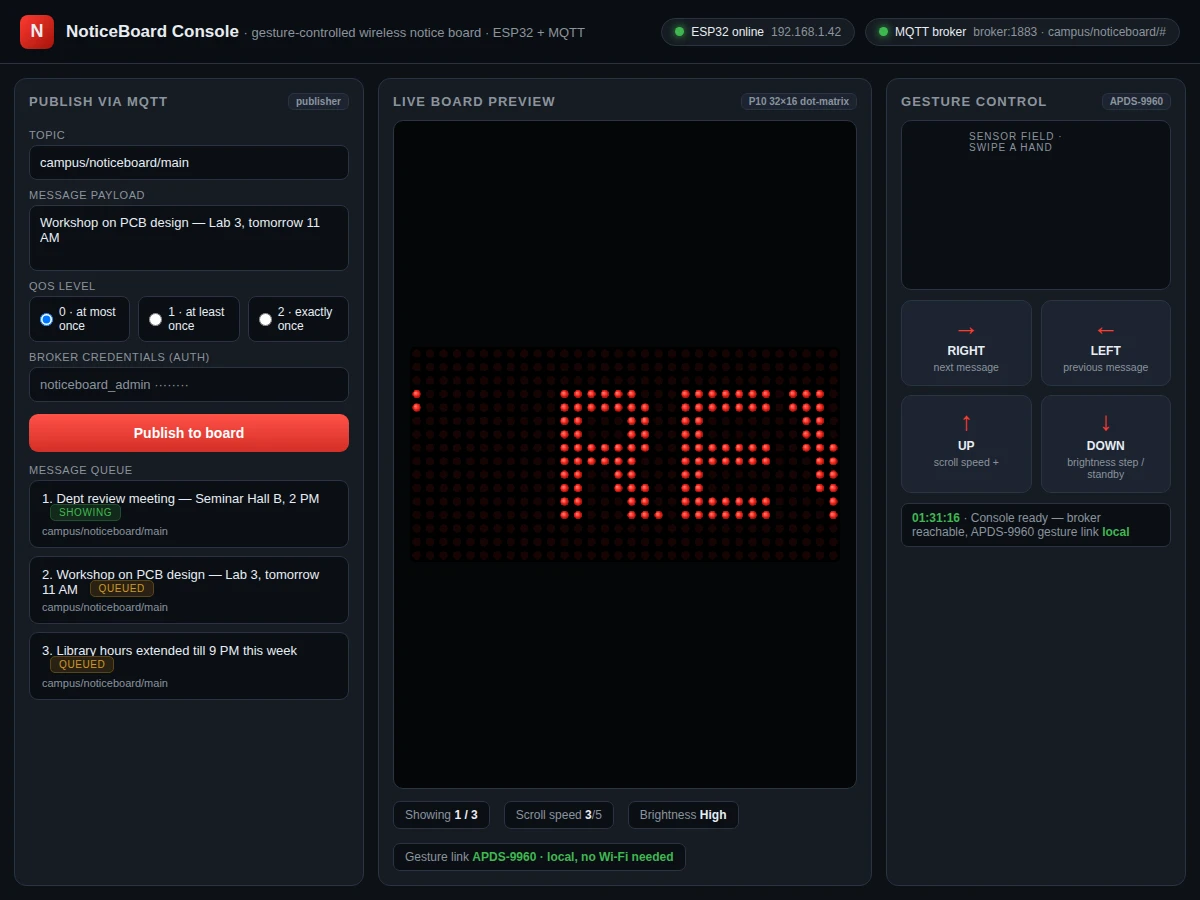
- [Companion push console] A single-file web dashboard with a topic/payload/QoS publish form, a message-queue view and a live board preview, matching the firmware's topic layout.
What is included
- Assembled prototype: ESP32 board, APDS-9960 gesture module, P10 LED panel, 5 V supply, wiring
- ESP32 firmware source (Arduino): MQTT subscriber, gesture mapping, matrix scroll driver
- Companion web push console (single-file HTML) with publish form, queue view and board preview
- MQTT broker setup guide (Mosquitto on a lab PC or cloud VM) with username/password configuration
- Wiring diagram and component list with part numbers
- User manual: gesture chart, topic layout, troubleshooting steps
- Project report PDF (10-section), PPT presentation and viva Q&A document
Limitations & prerequisites
- The gesture vocabulary is 4 discrete swipes only — you cannot type or draw text by hand; message text always arrives through MQTT.
- Gesture range is short: approximately 10–20 cm in front of the sensor (module documentation) — a near-field control, not across-the-room.
- Remote updates need Wi-Fi and a reachable MQTT broker; offline, the board keeps cycling its stored queue and gestures keep working, but no new messages arrive.
- The P10 panel is an indoor-brightness module; direct sunlight washes it out (design expectation).
- A single 32-pixel-wide panel shows only a few characters at once, so longer messages scroll — a design consequence, not a defect.
- Plain MQTT on port 1883 is unencrypted; credentials travel in cleartext on the local network unless TLS is configured (documented as optional hardening).
- The ESP32 connects to 2.4 GHz Wi-Fi only; 5 GHz-only networks will not work.
Frequently Asked Questions
Which controller and sensor does this project use?
The controller is the ESP32 (dual-core, 2.4 GHz Wi-Fi, 3.3 V logic, per Espressif specifications). The gesture sensor is the APDS-9960, wired over I2C. The display is a 32×16 P10 LED dot-matrix module driven through its HUB12 interface.
How are gestures recognised — is there a camera?
No camera and no image processing. The APDS-9960 shines an integrated IR LED and watches four directional photodiodes; the firmware interprets the sequence of reflected light as an UP, DOWN, LEFT or RIGHT swipe. It works in the dark and needs no training data.
What happens if the Wi-Fi or the broker goes down?
Gesture control keeps working because it is fully local. The board keeps cycling its stored message queue. New remote messages arrive only once the network and broker are back; nothing already on the board is lost.
How is the MQTT broker set up?
The build ships with a setup guide for Mosquitto, the common open-source broker: install it on a lab PC or a small cloud VM, create a username and password, and point the ESP32 firmware and the web console at it. The default topic layout is documented in the user manual.
How is this different from an SMS notice board?
SMS boards need a GSM module and a SIM with an active plan, and every message costs money; this board uses MQTT over existing Wi-Fi, so pushing a message costs nothing per message. And instead of grimy push-buttons, all local control is touchless gestures — more hygienic for shared spaces.
Is this project suitable for a final-year project?
Yes — for Electronics, E&TC and IoT programs. It combines embedded firmware, a wireless protocol with authentication, sensor interfacing and a companion web UI, which gives solid material for both the report and the viva.
Components & software requirements
- ESP32 dev board (dual-core, Wi-Fi 2.4 GHz)
- APDS-9960 gesture sensor (I2C, 4 directional photodiodes)
- P10 32×16 LED matrix panel (HUB12, 5 V DC)
- Arduino framework + PubSubClient MQTT library
- Mosquitto MQTT broker (self-hosted or cloud)
- 5 V DC power supply for panel + logic
- Companion web console (HTML/JavaScript)
- Breadboard + jumper wiring (prototype build)
Delivery information
Built-to-order project. Delivery timeline is shared after order confirmation based on current queue.
Support terms
Complete documentation, setup guide, and viva preparation included. Support for setup and explanation provided.
Download free synopsis (PDF)
Enter your name and WhatsApp number — the synopsis PDF downloads immediately. We may send occasional project updates on WhatsApp; no spam.