
More project photos (2)
The problem
A conventional mouse needs a desk and a surface, which makes it useless for giving presentations, controlling a smart TV from the couch, or navigating a PC when hand mobility is limited. Existing "air mouse" products solve this with proprietary 2.4 GHz dongles and closed firmware that students cannot open, study or modify. This project rebuilds the idea as an open, student-built embedded system: a hand-held device whose motion is measured by a 6-axis IMU and reported to the host as a standard Bluetooth HID mouse. Because it uses the open HID-over-GATT profile, it pairs with Windows, macOS, Linux, Android and iOS devices with no receiver and no driver install. Along the way the build teaches the full embedded workflow — I2C sensor interfacing, gyroscope/accelerometer fusion, debouncing and power management — on hardware the student holds in their hand.
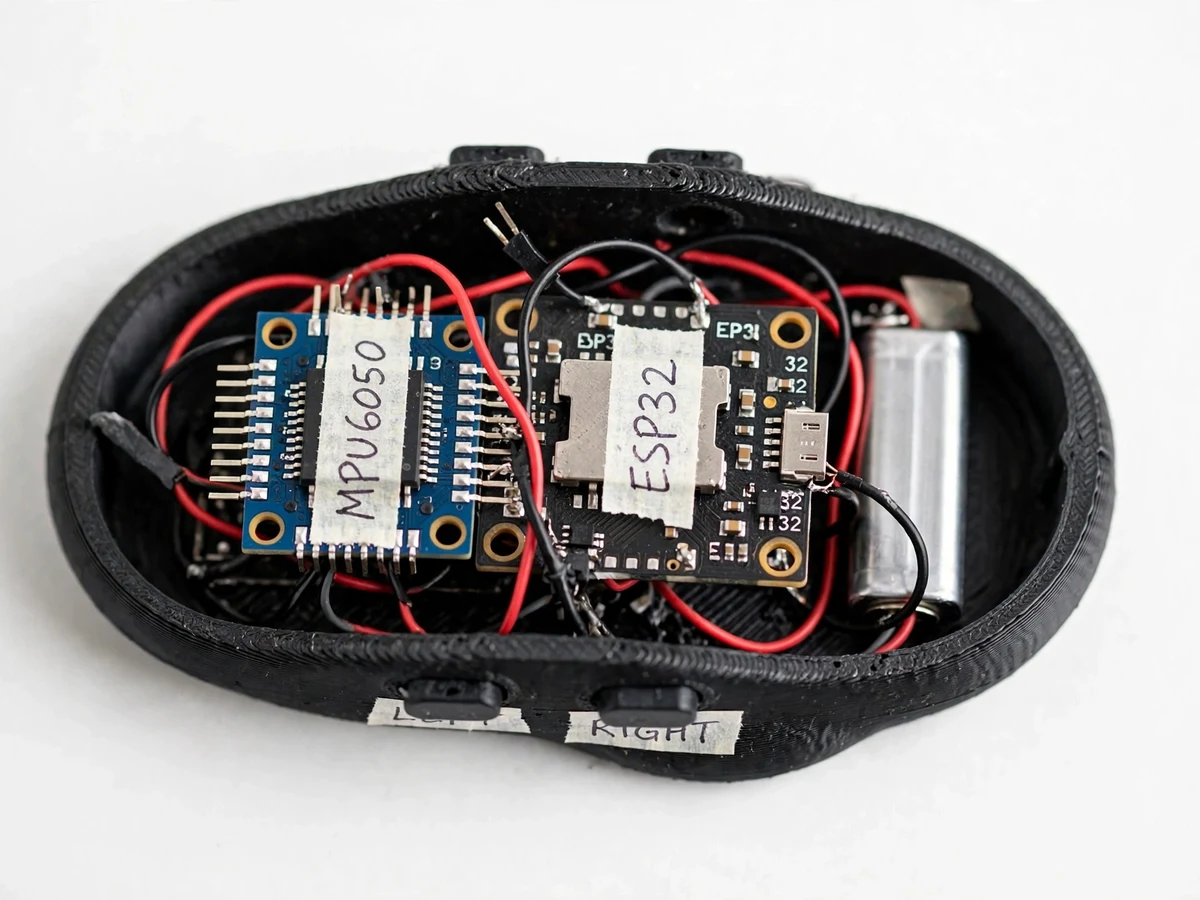
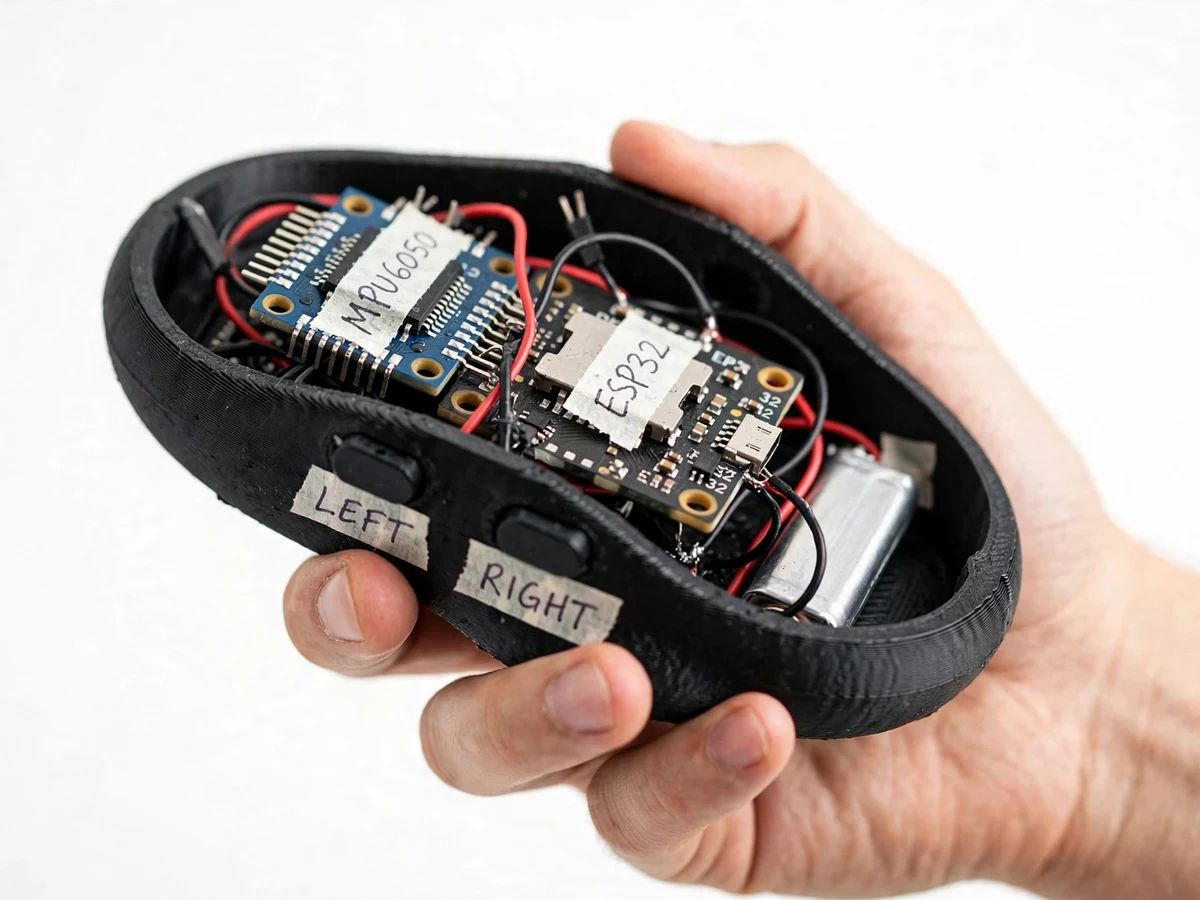
Tilts and rotates to steer the cursor; two tactile buttons give click and scroll input.
Follow the working sequence
How it works
- On power-up the firmware holds the device still for about a second and captures the gyroscope bias, while the accelerometer provides an absolute tilt reference.
- The MPU6050 is sampled at approximately 100 Hz over I2C at 400 kHz fast mode; a complementary filter fuses the fast gyroscope response with the drift-free accelerometer tilt into stable pitch and roll angles.
- Pitch and roll are mapped to X/Y cursor deltas using the configured speed multiplier, with a small dead-zone around center to kill resting jitter.
- The two tactile buttons are debounced in firmware (approximately 20 ms); holding the scroll button while tilting switches the report to vertical scroll.
- The ESP32 packs button states and cursor deltas into standard HID mouse reports and notifies the connected host over BLE HID at approximately 50 reports per second — the host needs no driver or receiver.
- A 3.7 V Li-ion cell powers the device through a TP4056 charger module with USB charging; the ESP32 and IMU run from the 3.3 V rail.
Tech stack:
- ESP32 (Bluetooth 4.2 + BLE)
- MPU6050 6-axis IMU (GY-521 module)
- BLE HID (HID-over-GATT)
- I2C (400 kHz fast mode)
- ESP-IDF with NimBLE host
- TP4056 Li-ion charger module
- 3D-printed mouse shell
- C/C++ firmware
| Parameter | Value |
|---|---|
| Controller | ESP32 — Xtensa LX6 dual-core, up to 240 MHz (datasheet) |
| Wireless | Bluetooth 4.2 BR/EDR + Bluetooth Low Energy (datasheet) |
| HID profile | HID-over-GATT via ESP-IDF esp_hid / NimBLE |
| IMU | MPU6050: 3-axis gyro ±250/±500/±1000/±2000 °/s, 3-axis accel ±2/±4/±8/±16 g, 16-bit ADCs (datasheet PS-MPU-6000A-00) |
| IMU interface | I2C, 400 kHz fast mode (datasheet) |
| IMU supply | 2.375–3.46 V chip (datasheet); module runs 3–5 V via onboard LDO |
| Buttons | 2 tactile push buttons (left/right click), firmware debounce approx. 20 ms (design value) |
| Battery | 3.7 V Li-ion pouch cell, typically 1000 mAh (typical build) |
| Charging | TP4056 module, 5 V USB input |
| BLE range | Approximately 10 m line-of-sight (approximate, environment-dependent) |
| HID report rate | Approximately 50 reports/s (design value) |
| Tilt-to-cursor latency | Design target: under ~30 ms from hand tilt to on-screen movement |
| Battery life | Approximately 4–8 hours of active use (approximate, capacity- and use-dependent) |
| Device size | Approximately 95 × 60 × 35 mm (design target, shell-dependent) |
Project features
- [Tilt-to-move cursor] Hand pitch and roll are converted into cursor movement, so the pointer follows the device like an air mouse. A small dead-zone around the rest position suppresses jitter.
- [BLE HID mouse, no dongle] The ESP32 implements the standard HID-over-GATT profile with the ESP-IDF esp_hid / NimBLE stack. It advertises on boot and pairs with any BLE host exactly like a commercial Bluetooth mouse.
- [Left and right click buttons] Two tactile push buttons on the shell act as left and right click, with firmware debouncing so every press registers exactly once.
- [Gesture scroll] Holding the scroll button while tilting sends vertical scroll reports, replacing a physical scroll wheel in the base build.
- [Adjustable pointer speed] A sensitivity constant in the firmware sets how fast the cursor moves per degree of tilt; it is tuned to the buyer's preference before flashing.
- [Power-up calibration] On every boot the firmware captures gyroscope bias while the device rests for about a second, then applies a dead-zone so the cursor does not drift on its own.
Optional customizations (not in the base build)
- Scroll-wheel add-on: a rotary encoder can be fitted as a physical scroll wheel.
- Extra buttons: middle-click or browser back/forward buttons on request.
Future scope
- Air-presentation mode with page-up/page-down gestures.
- Motion-wake deep sleep for longer standby between uses.
What is included
- Working hand-held prototype: ESP32, MPU6050 IMU, click buttons, Li-ion cell and charger in a 3D-printed mouse shell
- Complete firmware source (ESP-IDF/NimBLE BLE HID mouse)
- Circuit and wiring documentation with exact component list
- IMU calibration and sensitivity-tuning guide
- Project report PDF, PPT presentation and viva Q&A document
- Demonstration and pairing guidance
Limitations & prerequisites
- BLE range is approximately 10 m line-of-sight; walls, metal and busy 2.4 GHz environments reduce it.
- Cursor precision is below an optical desk mouse: tilt mapping has a small dead-zone and residual jitter, so fine pixel work (CAD, photo editing) is harder than with a surface mouse.
- Battery life of approximately 4–8 hours is an estimate for the typical 1000 mAh build, not a per-unit measured figure — actual runtime depends on cell capacity and usage.
- Gyroscope bias drifts over long sessions; the firmware re-captures it on every power-up, but extended continuous use can need a restart to re-zero.
- iOS pairs it as a BLE HID mouse, but pointer behaviour depends on the iOS version's assistive pointer support — it is not a certified Apple accessory.
- The base build has no physical scroll wheel; scrolling is gesture-based unless the encoder add-on is ordered.
- The prototype is a student build in a 3D-printed shell with an exposed charging port, not a sealed consumer product.
Frequently Asked Questions
Which controller and sensor are used?
An ESP32 reads an MPU6050 6-axis IMU (GY-521 module) over I2C at 400 kHz. A complementary filter fuses the gyroscope and accelerometer into pitch/roll angles, which the firmware maps to cursor movement — the same sensor-fusion approach used in real air-mouse products.
Does it need a USB dongle or driver?
No. The ESP32 implements the standard HID-over-GATT profile, so it advertises and pairs like any commercial Bluetooth mouse. Windows, macOS, Linux, Android and iOS recognise it immediately with no extra software.
How accurate is the cursor?
Honestly, below an optical desk mouse. A dead-zone and power-up calibration keep the pointer still at rest, and pointer speed is tunable, but tilt control has slight jitter — it suits presentations, media PCs and casual use better than pixel-precise CAD work.
Can the pointer speed and gestures be changed?
Yes. The tilt-to-cursor sensitivity constant, dead-zone size and the scroll-gesture mapping are all firmware parameters, tuned to the buyer's preference before flashing. Physical extras like a scroll wheel or middle-click button are optional customizations.
Is this project suitable for a final-year project?
Yes — for Electronics and E&TC programs. It demonstrates embedded C firmware, I2C interfacing, complementary-filter sensor fusion, the BLE HID stack, debouncing and battery power management, and it gives strong viva material: why BLE HID over classic Bluetooth, how drift is handled, and what a HID report descriptor does.
Components & software requirements
- ESP32 (Bluetooth 4.2 + BLE)
- MPU6050 6-axis IMU (GY-521 module)
- BLE HID (HID-over-GATT)
- I2C (400 kHz fast mode)
- ESP-IDF with NimBLE host
- TP4056 Li-ion charger module
- 3D-printed mouse shell
- C/C++ firmware
Delivery information
Built-to-order project. Delivery timeline is shared after order confirmation based on current queue.
Support terms
Complete documentation, setup guide, and viva preparation included. Support for setup and explanation provided.
Download free synopsis (PDF)
Enter your name and email — the synopsis PDF downloads immediately. We may send occasional project updates; no spam, unsubscribe anytime.