
More project photos (3)
The problem
The Food Delivery App Project is a native Android food-ordering application built with Kotlin that recreates the complete customer journey of a commercial delivery platform: discovering restaurants, browsing menus, building a cart, paying, and watching the order arrive on a live map. Students usually learn Android through isolated tutorials — one screen for lists, another for databases — and never connect authentication, a cloud database, payments and push notifications into one working system. This project closes that gap by wiring Firebase Authentication, Cloud Firestore and Firebase Cloud Messaging into a single Kotlin codebase, with the Google Maps SDK rendering the delivery-tracking screen. Ordering food is a workflow every student understands, which makes the architecture easy to defend in a viva: a Firestore restaurant document becomes a card on screen, a cart becomes an order document, and a Cloud Messaging push advances the tracking timeline. The result is a portfolio-grade app demonstrating real client-server thinking on Android, not another offline demo.
Opens the app, browses restaurants and places a food order.
Follow the working sequence
How it works
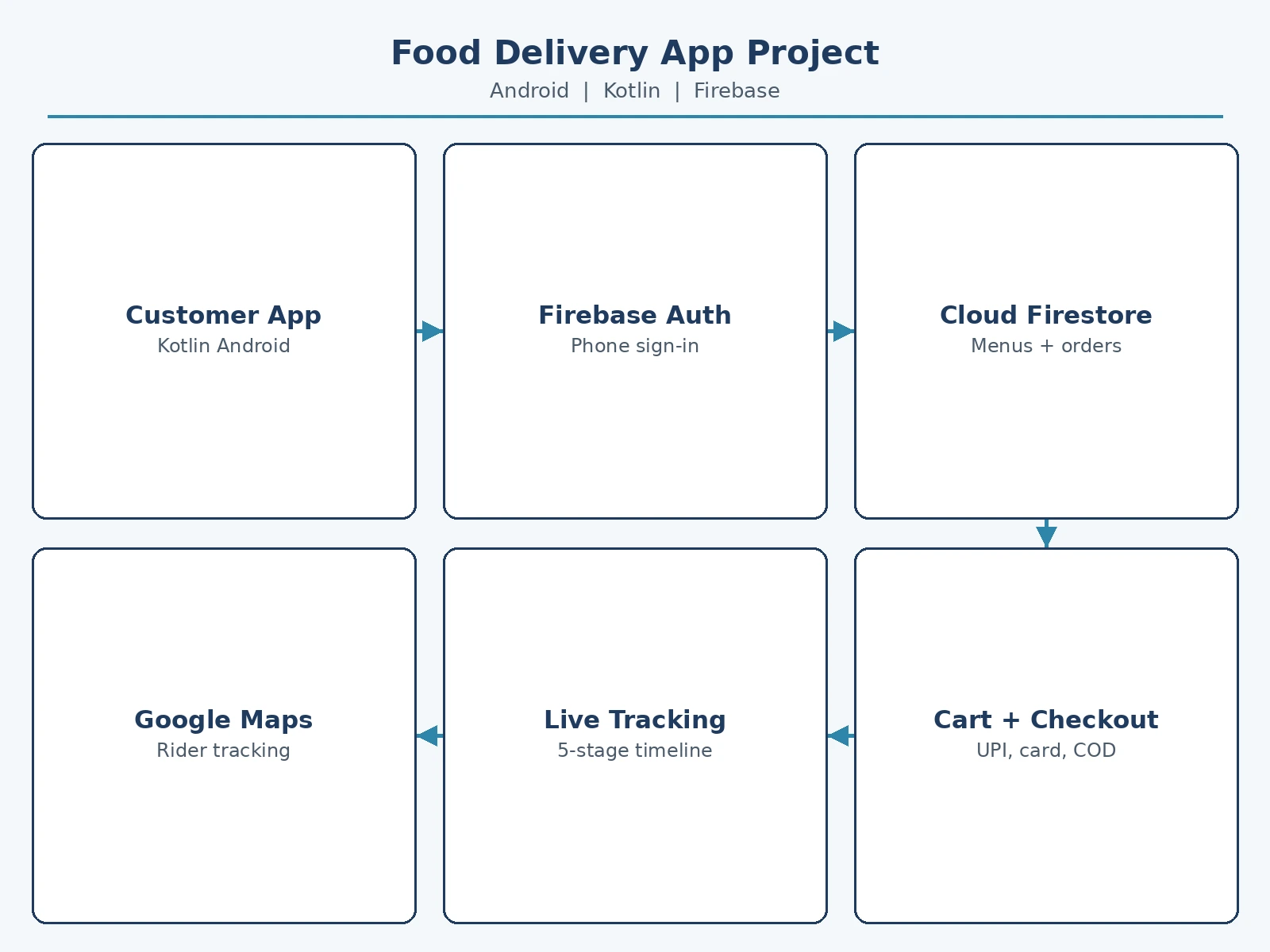
A customer opens the Food Delivery App Project, signs in once with Firebase Authentication, and lands on restaurant discovery backed by a Firestore collection: each restaurant document carries its name, cuisine, rating, ETA and menu sub-collection, and the app renders cards straight from those documents. Tapping a restaurant opens its menu, where stepper taps mutate a single cart state object that feeds the badge, the cart screen and checkout simultaneously. Checkout writes one order document to Firestore containing the items, address, payment mode and a "placed" status. From there the flow is push-driven: Cloud Functions update the order status through preparing, on the way, arriving and delivered, and each change arrives on the phone as a Firebase Cloud Messaging push that advances the tracking timeline and moves the rider marker on the Google Maps SDK view. Ratings and history are local-first reads of the user's own order documents.
- The user signs in with a phone number through Firebase Authentication; the auth token secures every Firestore read and write.
- The home screen queries the restaurants collection in Firestore and renders cards with live search and cuisine filters applied on-device.
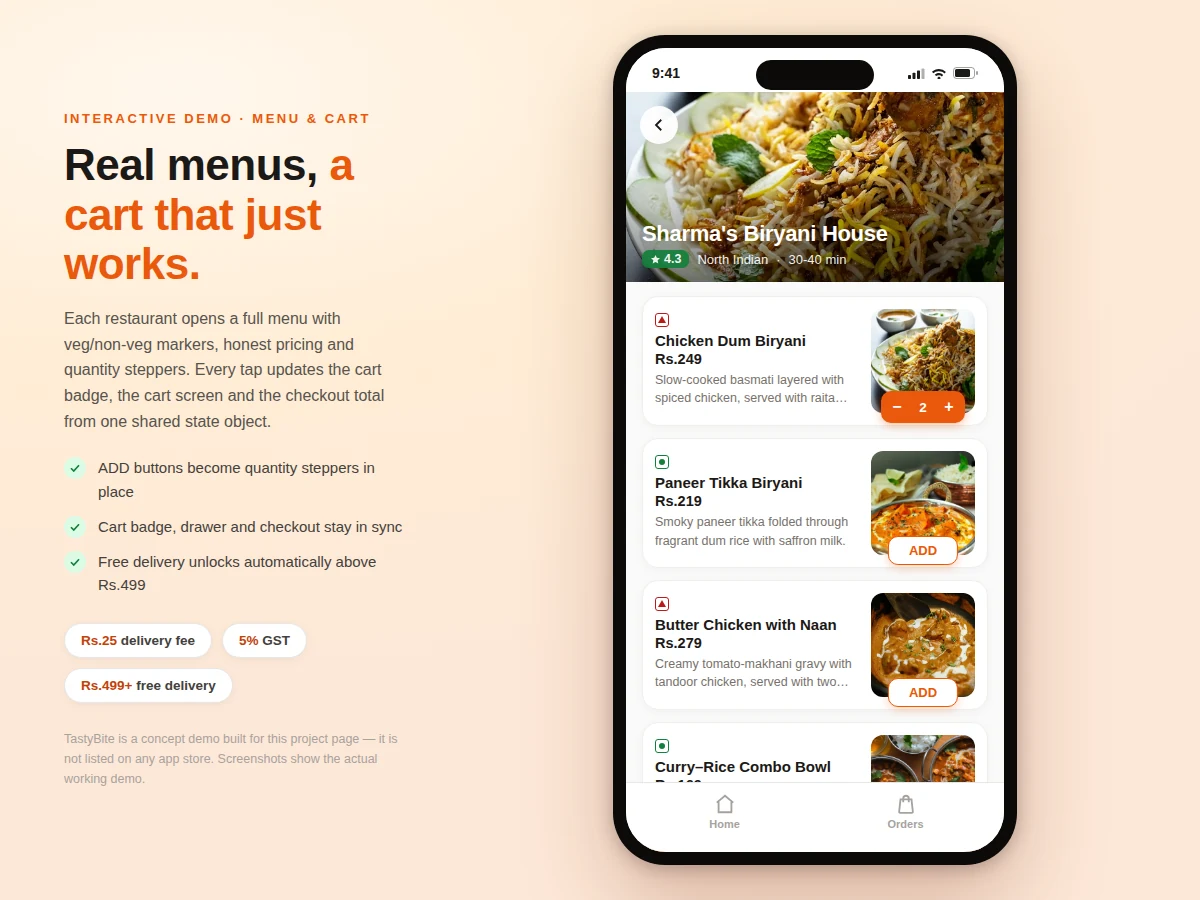
- Opening a restaurant loads its menu sub-collection; ADD/stepper taps update one shared cart object that keeps the badge, cart screen and checkout in sync.
- Checkout collects the delivery address and payment choice, then writes a single order document (items, totals, address, payment mode, status "placed") to Firestore.
- Cloud Functions advance the order status through preparing, on the way, arriving and delivered as the kitchen and rider act.
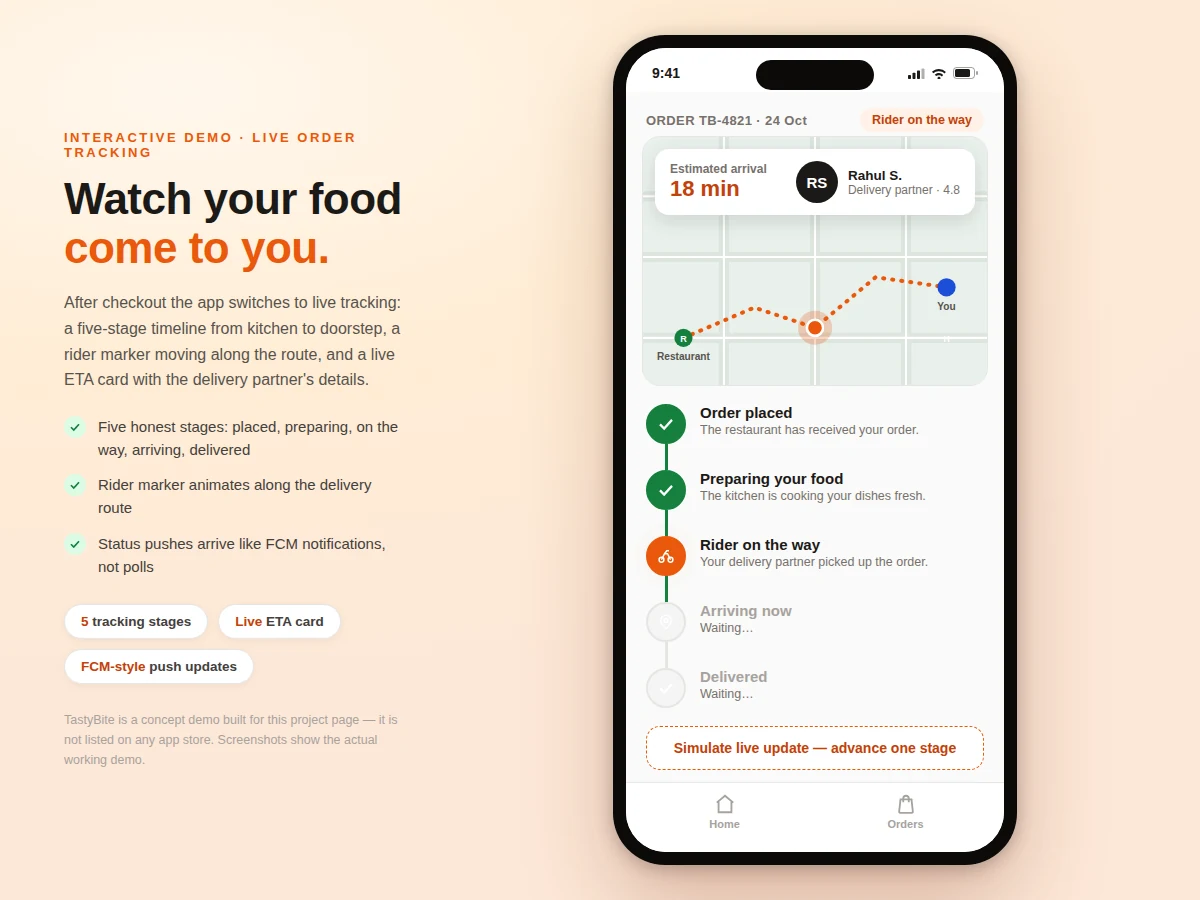
- Each status change is pushed to the phone via Firebase Cloud Messaging; the app advances the timeline, moves the rider marker on the Google Maps SDK view and refreshes the ETA without polling.
Tech stack:
- Kotlin, Android Studio
- Firebase Authentication (phone sign-in)
- Cloud Firestore (restaurants, menus, orders)
- Firebase Cloud Messaging (order-status pushes)
- Google Maps SDK for Android (tracking screen)
- Jetpack ViewModel · LiveData (UI state)
- Glide (restaurant and dish image loading)
- Material Design 3 components
| Parameter | Value |
|---|---|
| Platform | Android 7.0 (API 24) minimum · Android 14 (API 34) target (design target) |
| Language | Kotlin for the complete app codebase |
| Restaurants in the demo build | 6 (demo build count) |
| Menu items in the demo build | 24 (demo build count) |
| Order-tracking stages | 5: placed, preparing, on the way, arriving, delivered (design target) |
| Cart mutation time | Approximately 0.001 ms per add/remove including totals recompute (measured over 4,000 mutations in headless Chromium on the demo build) |
| Delivery fee rule | Rs.25 below Rs.499 · free at Rs.499 and above (demo business rule) |
| Tax on the bill | 5% GST (demo business rule) |
| Status updates | Firebase Cloud Messaging push events — no polling loop (design target) |
| Map rendering | Google Maps SDK for Android — a billing-enabled API key is required at build time |
Project features
The Food Delivery App Project ships four capabilities that carry the whole demo: restaurant discovery with live search and one-tap cuisine filters across 6 restaurants; menu browsing with veg/non-veg markers, honest pricing and quantity steppers on 24 dishes; a cart and checkout flow that breaks down subtotal, delivery fee and GST and accepts UPI, card or cash on delivery; and live order tracking with a five-stage timeline, a rider marker on the route and an ETA card. Around these sit Firebase Authentication login, an order-history screen with star ratings, and offer banners on every restaurant card. Every screen reads from one shared state design, so the cart badge, the cart screen and the checkout total can never disagree with each other. The demo on this page runs the same flow end to end, so the listing shows real working behavior rather than mockups.
- [Restaurant discovery] Search across restaurant names and cuisines with one-tap cuisine filters; each card shows the rating, delivery ETA, cost for two and an offer banner.
- [Menu browsing] Full per-restaurant menus with veg/non-veg markers, item photos, descriptions and prices; ADD buttons turn into quantity steppers in place.
- [Cart with live bill breakdown] Quantities, subtotal, delivery fee (Rs.25, free above Rs.499) and 5% GST recompute on every change from a single state object.
- [Checkout with UPI, card and cash on delivery] Saved delivery address form with three payment methods; placing the order issues an order ID and clears the cart.
- [Live order tracking] Five-stage timeline (placed, preparing, on the way, arriving, delivered) with a rider marker moving along the route and an ETA card showing the delivery partner.
- [Order history and ratings] Past orders persist on the device with their items, totals and payment mode; delivered orders can be rated with star feedback.
- [Firebase Authentication login] Phone-number sign-in secures the account, so carts, addresses and order history follow the user across devices.
Optional on request (not in the base build): a restaurant-owner panel for managing menus and order status, a delivery-rider app with GPS, and production payment-gateway onboarding.
What is included
- Complete Kotlin source code for the customer app (Android Studio project)
- Firebase project setup guide (Authentication, Firestore rules, Cloud Messaging, Cloud Functions)
- Firestore data model and security-rules documentation
- Interactive working demo of the customer flow for evaluation
- Project report PDF (background, architecture, methodology, screens)
- PPT presentation for the final review
- Viva Q&A preparation document (Firebase, Android components, push vs polling, Maps SDK)
- Buildable debug APK from the delivered source
Limitations & prerequisites
- Payments run in test/sandbox mode in the base build; production UPI and card gateways need merchant onboarding and approval, which is a customization.
- The base build is the customer app only — there is no restaurant-owner panel or delivery-rider app included (both available as customizations).
- Rider movement on the tracking screen is simulated in the demo; a production build needs the rider's live GPS feed integrated.
- The Google Maps SDK needs a billing-enabled API key; usage beyond Google's free monthly quota is the buyer's responsibility.
- The design assumes Firebase's free Spark-plan limits; very high read/write volumes need a paid plan (limits are Google's published figures).
- Push notifications need a physical device or a properly configured emulator image; some emulator images cannot receive FCM pushes.
Frequently Asked Questions
What does the app actually do?
It is a complete food-ordering customer app: you sign in, search and filter restaurants, browse menus with veg/non-veg markers, add dishes to a cart with a live bill breakdown, check out with UPI, card or cash on delivery, and then track the order through five live stages on a map with an ETA card. Past orders stay in a history screen where delivered orders can be star-rated. The whole flow — discovery to delivery — works end to end in the delivered build.
Which technologies are used, and why Firebase?
The app is written in Kotlin in Android Studio, with Firebase Authentication for phone sign-in, Cloud Firestore as the database for restaurants, menus and orders, Firebase Cloud Messaging for order-status pushes, and the Google Maps SDK for the tracking screen. Firebase is used because it gives authentication, a real-time database, push and serverless functions without running a custom backend — which keeps the project explainable and demoable in a viva.
Is this project suitable for a final-year project?
Yes — the Food Delivery App Project suits final-year projects in Computer Science, IT and Android application development programs, because it demonstrates client-server mobile architecture, Firebase integration across authentication, database and push messaging, Google Maps SDK usage, and a complete multi-screen commerce flow with checkout and live tracking. Those map directly onto standard evaluation criteria: system design, cloud integration, third-party SDK usage and a demonstrable end-to-end workflow. The report and viva Q&A document the architecture decisions explicitly, so the student can defend the build confidently.
Can the project be customized?
Yes. Common customizations include a restaurant-owner panel for managing menus and marking orders prepared, a delivery-rider app with live GPS tracking, additional cuisines and restaurants in the seed data, production payment-gateway onboarding, and college-specific changes such as a different app name, color theme or report format. Each customization is scoped and quoted separately from the base build, so the student knows exactly what the base project contains and what is being added on request.
Does the app work without the internet?
Partially — Firestore's offline persistence keeps previously loaded restaurant and menu data browsable without connectivity, and the cart keeps working offline. Placing an order, receiving status pushes and loading the live tracking map need an active connection, because ordering is inherently a server-side action. So the base build requires internet at checkout. This split is documented in the report: local-first reads where possible, server round-trips where the workflow demands them.
Components & software requirements
- Kotlin, Android Studio
- Firebase Authentication (phone sign-in)
- Cloud Firestore (restaurants, menus, orders)
- Firebase Cloud Messaging (order-status pushes)
- Google Maps SDK for Android (tracking screen)
- Jetpack ViewModel · LiveData (UI state)
- Glide (restaurant and dish image loading)
- Material Design 3 components
Delivery information
Built-to-order project. Delivery timeline is shared after order confirmation based on current queue.
Support terms
Complete documentation, setup guide, and viva preparation included. Support for setup and explanation provided.
Download free synopsis (PDF)
Enter your name and WhatsApp number — the synopsis PDF downloads immediately. We may send occasional project updates on WhatsApp; no spam.