
More project photos (2)

The problem
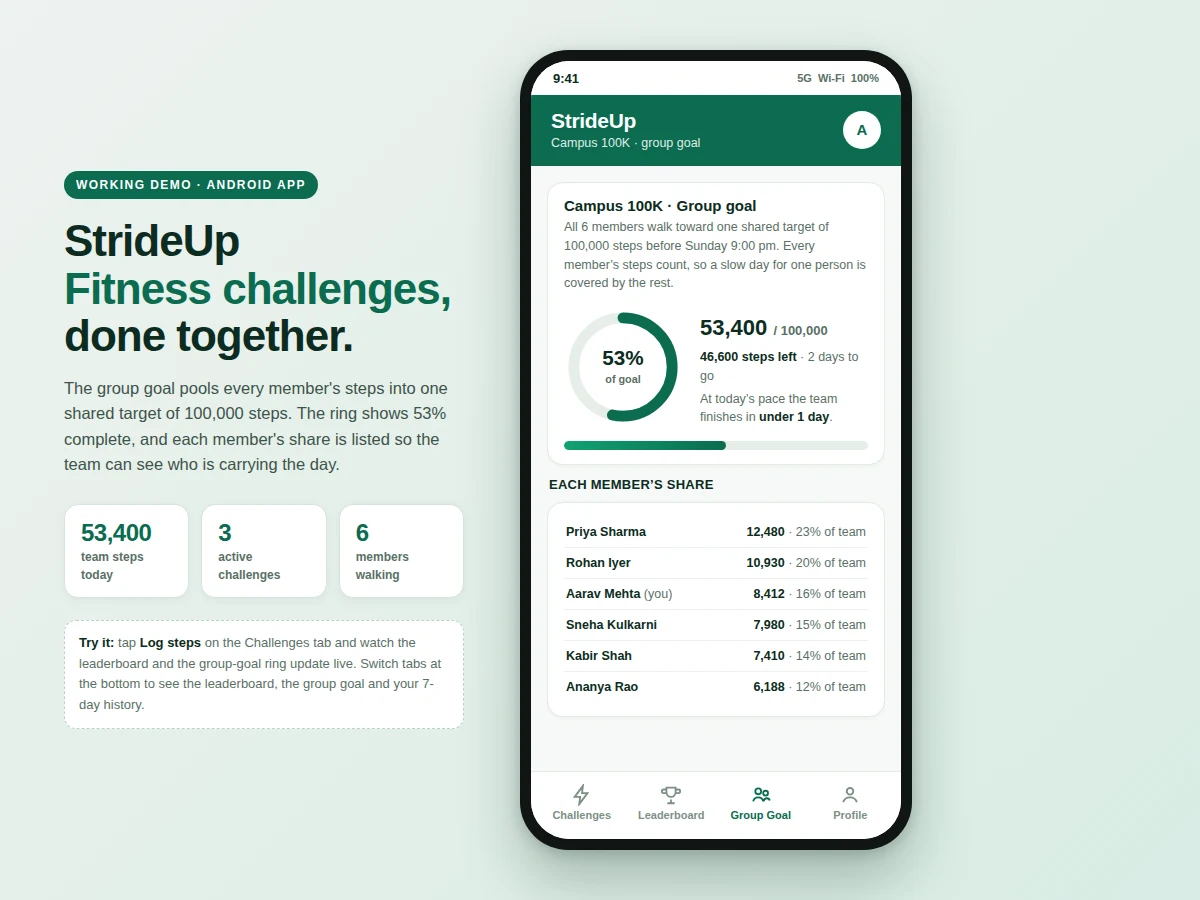
Most fitness apps count steps for one person alone, and that is why they stop working after the first week. The Fitness Challenge Android App with Step Leaderboard and Group Goals answers that gap by turning walking into a team sport, because a solo step counter has no social pull: when motivation dips, there is nobody to notice, nobody to catch up with, and no shared reason to walk instead of taking the lift. Friends join the same challenge, see each other's daily steps on a live leaderboard, and pool their steps into one shared group goal, so every walk helps the team. Steps come from the phone's step counter sensor, which counts while the app runs in the background, and sync to the challenge whenever the phone is online. The result is a project that demonstrates Android sensors, cloud sync, realtime ranking and group goal tracking in one working app students can build and explain.
Step challenges also fit how students actually live: hostel friends, classmates and gym partners already walk together, and a shared target gives that walking a point. The app keeps its scope honest — it counts steps and ranks people; it does not diagnose health or prescribe exercise — which is exactly what makes it buildable in a semester.
Firebase sign-in; create a challenge or join with a code.
Follow the working sequence
How it works
The app works as a loop between the phone in your pocket and a shared cloud challenge. Each Android phone reads steps from its step counter sensor, which reports the number of steps taken since the phone last restarted, and the app converts that total into a daily step count by subtracting the value recorded at midnight. A foreground service keeps the sensor listener registered so steps keep counting while the app is in the background, and each total is written to the challenge in Cloud Firestore, where a realtime listener pushes the change to every member's phone at once. The leaderboard re-sorts on each update, ranks are decided by synced daily steps with ties broken by who reached the total first, and the group goal adds all six members' steps into one shared total against the 100,000-step target. When the phone is offline, steps are stored on-device first and sync when the connection returns, so no walk is lost.
- The user signs in with Firebase Authentication and either creates a challenge (name, daily step target, duration) or joins one with an invite code.
- On first launch the app requests the ACTIVITY_RECOGNITION runtime permission and registers a listener for the phone's TYPE_STEP_COUNTER sensor through SensorManager.
- A foreground service keeps the sensor listener registered, so steps keep counting while the app is in the background; the service stores the first counter reading each day as a baseline.
- Each new sensor event updates the daily total (current counter value minus the day's baseline) and writes it to the challenge document in Cloud Firestore.
- Every member's phone holds a realtime listener on the same challenge, so a new total reaches all members within seconds and the leaderboard re-sorts immediately.
- The group goal adds all members' daily totals into one shared figure and compares it with the challenge target (100,000 steps by default), shown as a progress ring with each member's share.
- Steps recorded while offline are stored in a Room database on the phone and synced to Firestore automatically when the connection returns; the 7-day history, streak and badges are computed from the synced totals.
In the working demo build, logging 1,200 steps moved one member from 8,412 to 9,612 steps, lifted the six-member team total from 53,400 to 54,600 steps, and narrowed the gap to the leader from 4,068 to 2,868 steps, with the leaderboard re-sorting immediately. One detail the build taught early: TYPE_STEP_COUNTER returns steps since the last reboot, so the app stores the first reading of the day as a baseline and subtracts it from later readings — treating the raw counter value as the daily total is the single most common bug in student step-counter builds.
Tech stack:
- Kotlin, Android Studio
- SensorManager with TYPE_STEP_COUNTER
- Firebase Authentication
- Cloud Firestore (realtime sync)
- Firebase Cloud Messaging
- Room Database (offline step cache)
- MPAndroidChart (step history chart)
| Parameter | Value |
|---|---|
| Platform | Android 8.0 (API level 26) and above (design target) |
| Language | Kotlin |
| Step sensor | TYPE_STEP_COUNTER (API level 19 and above) |
| Permission | ACTIVITY_RECOGNITION (runtime permission, Android 10 and above) |
| Step sync | Realtime, within seconds on an active connection (expected) |
| Daily step goal | 10,000 steps per day (default, configurable) |
| Challenge length | 3, 7 or 14 days (configurable) |
| Group goal target | 100,000 steps per challenge (default, configurable) |
| Members per challenge | Up to 30 members (design target) |
| Offline history | Approximately 30 days of step records in Room (design target) |
| Demo team size | 6 members in the working demo build |
| Demo team total | 53,400 steps toward the 100,000-step goal (measured in the demo build) |
| Installed app size | Approximately 18 MB (expected) |
Project features
The app is built around four capabilities that work together. Step challenges let any member create a timed contest, such as 10,000 steps a day for 7 days, and invite friends with a code, so a new challenge takes under a minute to set up. The live leaderboard ranks all members by synced daily steps and re-sorts the moment anyone logs a walk, keeping the competition visible without anyone refreshing the screen. Group goals pool every member's steps into one shared target, such as 100,000 steps before Sunday evening, so a slow day for one person is covered by the rest of the team. Finally, the personal profile keeps a 7-day step history, the current streak and earned badges, giving each member their own progress to look at between challenges. Together they cover the full loop of joining, competing, cooperating and tracking.
- [Create and join step challenges] Any member creates a challenge with a name, a daily step target and a duration of 3, 7 or 14 days, then invites friends with a short code. Joining takes seconds and needs no admin approval.
- [Live step leaderboard] All members are ranked by synced daily steps and the list re-sorts the moment anyone's total changes, with rank, step count and share of the team total shown for each member.
- [Shared group goals] Every member's steps add into one team total against a shared target, such as 100,000 steps before Sunday evening, shown as a progress ring and a per-member contribution list.
- [Step history and streaks] A 7-day bar chart shows each day's steps, with the current daily streak and the week's average beside it, so progress is visible at a glance.
- [Badges and levels] Members earn badges for streaks, early walks and personal best days, and a level that rises with total challenge steps.
- [Offline step counting with auto-sync] Steps recorded without a connection are stored on the phone first and sync to the challenge automatically when the phone is back online, so no walk is lost.
- [Challenge invites and member list] Each challenge shows its members, their totals and their share of the goal, and the creator can remove members or close the challenge.
What is included
- Complete Kotlin source code (Android Studio project) for the challenge, leaderboard, group goal and profile screens
- Cloud Firestore data model, security rules and setup guide
- Working demo app (StrideUp) with seeded challenges, leaderboard and group goal
- Setup instructions for Firebase Authentication, Firestore and step-sensor permission
- Project report PDF (background, sensor and sync design, methodology, results)
- PPT presentation for final review
- Viva Q&A preparation document (step sensor behaviour, Firestore listeners, offline sync, ranking rules)
Limitations & prerequisites
- Step counts depend on the phone's hardware step counter; phones that do not report TYPE_STEP_COUNTER cannot count steps the same way in the background.
- The counter resets when the phone reboots, so the app re-records its daily baseline after a reboot; steps taken before the reboot are kept, but a reboot briefly pauses counting.
- Step accuracy depends on how the phone is carried; steps can be under-counted or over-counted, and the count is an activity estimate, not a medical measurement.
- The leaderboard and group goal need an internet connection to update; offline steps appear only after the phone syncs.
- Steps are counted from the sensor only — there is no manual step entry in the base build, so a forgotten phone records no steps.
- This is an academic fitness prototype, not a medical device: it offers no health advice, diagnosis or exercise prescription.
- Firebase free-tier (Spark plan) read/write limits apply; a large challenge with many members needs a usage check before launch.
Frequently Asked Questions
How does the app count steps?
Steps come from the phone's built-in step counter sensor (TYPE_STEP_COUNTER, available since Android API level 19), which reports the total steps taken since the phone last restarted. The app records the first reading of the day as a baseline and subtracts it from later readings to get the daily total, after the user grants the ACTIVITY_RECOGNITION permission. A foreground service keeps the sensor listener registered so counting continues while the app is in the background.
Does the app work without internet?
Yes, for counting: steps are recorded from the phone's sensor and stored in a Room database on the device, so a walk with no network still counts. The leaderboard and group goal need a connection to update, and offline steps sync to the shared challenge automatically as soon as the phone is back online.
Can I create my own challenges and invite friends?
Yes — any member can create a challenge with a name, a daily step target and a duration of 3, 7 or 14 days, then share the invite code with friends so they can join in seconds without needing any admin approval. The build supports up to 30 members per challenge as a design target, and the creator can remove members or close the challenge.
How is the leaderboard kept fair?
Ranks come only from synced sensor steps, so nobody can type in a step count in the base build, and every member sees the same numbers. Ties are broken by whoever reached the total first, and the leaderboard re-sorts the moment a new total syncs. Steps logged after midnight count toward the next day, so late-night syncs cannot rewrite yesterday's result.
What will I receive with the project?
The complete Kotlin source code as an Android Studio project, the Firestore data model with security rules and setup guide, the working StrideUp demo app, a project report PDF, a PPT for final review and a viva Q&A document. The demo app is included as a reference for how the finished screens behave.
Is this project suitable for a final-year project?
Yes — for Computer Science, IT and mobile application development students. It demonstrates Android sensor APIs, runtime permissions, foreground services, realtime cloud sync with Firestore, offline storage with Room and a genuinely social product idea, all of which make strong, specific viva material.
Components & software requirements
- Kotlin, Android Studio
- SensorManager with TYPE_STEP_COUNTER
- Firebase Authentication
- Cloud Firestore (realtime sync)
- Firebase Cloud Messaging
- Room Database (offline step cache)
- MPAndroidChart (step history chart)
Delivery information
Built-to-order project. Delivery timeline is shared after order confirmation based on current queue.
Support terms
Complete documentation, setup guide, and viva preparation included. Support for setup and explanation provided.
Download free synopsis (PDF)
Enter your name and WhatsApp number — the synopsis PDF downloads immediately. We may send occasional project updates on WhatsApp; no spam.