
More project photos (2)
The problem
Paper attendance registers are easy to forge and slow to process — one student signs for absent friends, and inflated figures reach university reports. A fingerprint attendance system with the R307 sensor answers this proxy-attendance problem by tying every entry to a biometric the student cannot lend: a finger. RFID cards and passwords do not fix proxy attendance — cards get borrowed and passwords get shared. The R307 optical module photographs the fingertip at 500 DPI, extracts a 512-byte template with its on-board DSP and stores it in the sensor's own flash memory. An Arduino UNO talks to the sensor over UART at 57600 baud, asks it to search 1000 stored templates (datasheet value) in under one second (datasheet value), and on a match stamps the student's ID with date and time from a DS3231 real-time clock. The result is a tamper-resistant attendance log on an OLED display and over USB serial.
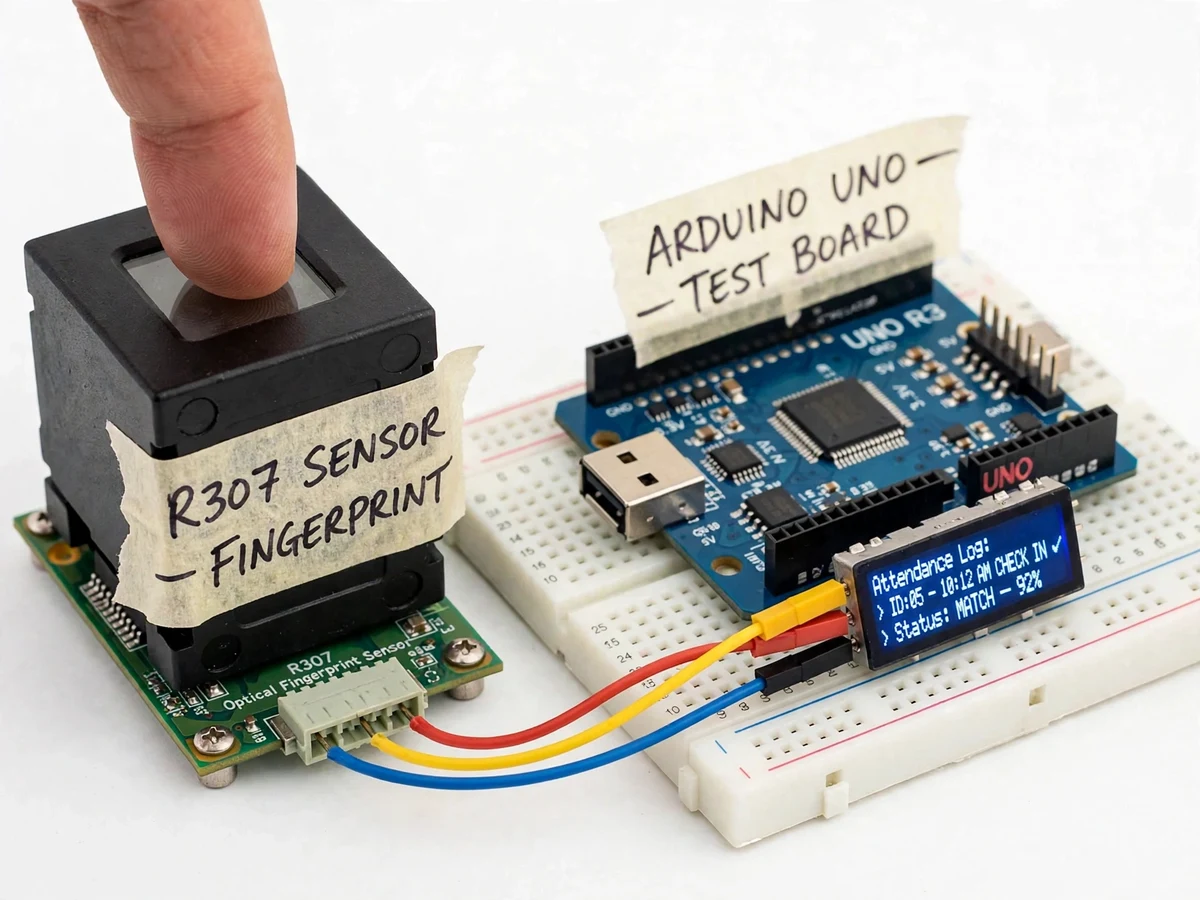
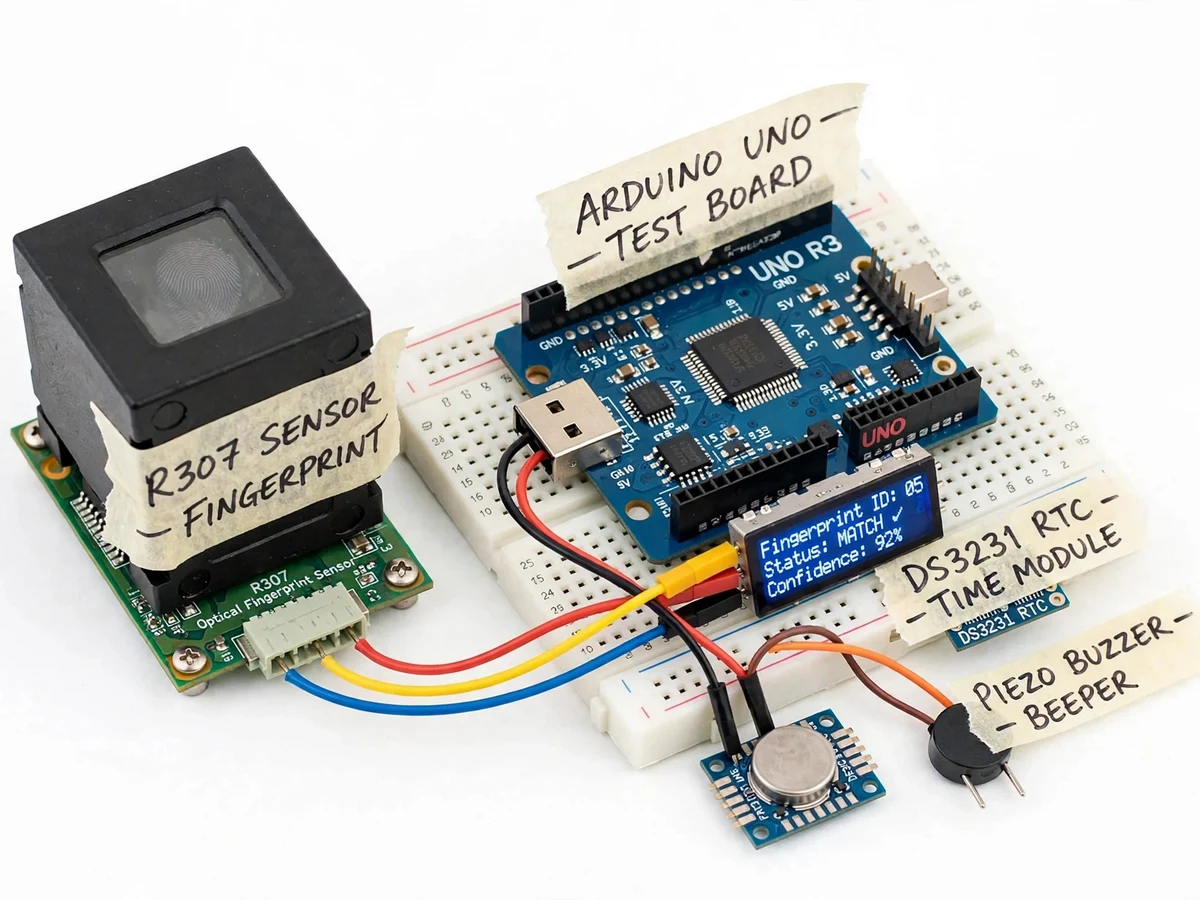
The hardware centers on the R307 optical fingerprint module paired with an Arduino UNO R3: the sensor captures and matches prints entirely on its own DSP, so the microcontroller only handles IDs, timestamps, display and logging. Builder note from the wiring bench: the R307's TX and RX must be crossed with the Arduino (sensor TX to Arduino RX, sensor RX to Arduino TX) — wiring TX-to-TX is the single most common reason a first power-up shows "sensor not found". The R307's pin-5 TOUCH line, an active-low finger-detect output (datasheet), can wake the controller between scans in low-power layouts.
A registered student presses a finger on the R307's glass window to mark attendance.
Follow the working sequence
How it works
From fingertip to attendance row, the mechanism runs end to end inside two chips. When a finger touches the R307's glass window, an internal LED array lights the fingertip and a CMOS imager photographs the ridge-and-valley pattern at 500 DPI; the module's DSP processor extracts a compact template from that image and searches its on-board library of up to 1000 templates (datasheet value), all in under one second (datasheet value). The Arduino UNO, connected to the sensor's TTL UART at 57600 baud, receives the matching ID — or a no-match code — and asks the DS3231 real-time clock for the current date and time. It pairs the two into one attendance record, commits it to EEPROM, shows the ID and time on the OLED display, and sounds the buzzer in the pattern for a successful match. The same record goes out over USB serial, where a PC-side capture turns the stream into the day's attendance register.
- Enrollment: the student places the same finger on the R307 window twice. The firmware requires the finger to be lifted between the two captures — if the finger never leaves the window, the sensor rejects the second image and enrollment fails.
- The DSP fuses the two good captures into one 512-byte template (datasheet value) and stores it in the sensor's on-board flash under a numeric student ID.
- The firmware opens the R307's TTL UART link at 57600 baud (datasheet default), with sensor TX wired to Arduino RX and sensor RX to Arduino TX.
- On each touch, the sensor's LED array lights the fingertip through the glass window, the CMOS imager captures the ridge-valley pattern at 500 DPI, and the DSP extracts a search template from it.
- The sensor searches its 1000-template library (datasheet value) in under one second (datasheet value) and returns the matching ID and a confidence score, or a no-match code.
- The Arduino reads date and time from the DS3231, pairs them with the matched ID, commits the record to EEPROM, shows it on the OLED, beeps confirmation, and streams the same record over USB serial to the PC register.
Tech stack:
- Arduino UNO R3 (ATmega328P)
- R307 optical fingerprint sensor module
- Adafruit Fingerprint Sensor library (UART 57600)
- DS3231 real-time clock module (I2C)
- 0.96 in SSD1306 OLED display (I2C)
- Arduino IDE · C++ firmware
- Piezo buzzer · push buttons · status LEDs
- 5 V DC adapter · breadboard / perfboard wiring
| Parameter | Value |
|---|---|
| Sensor resolution | 500 DPI (datasheet value) |
| Template storage | 1000 fingerprints (datasheet value) |
| Template size | 512 bytes (datasheet value) |
| Image capture time | Under 0.3 s (datasheet value) |
| 1:1000 search time | Under 1.0 s (datasheet value) |
| UART interface | 57600 bps default, 9600–115200 bps adjustable (datasheet value) |
| Supply voltage | 4.2–6.0 V DC (datasheet value) |
| Working current | 50 mA typical, 80 mA peak (datasheet value) |
| False acceptance rate | Under 0.001% (datasheet value) |
| False rejection rate | Under 1.0% (datasheet value) |
| Record capacity | Approximately 100 timestamped records in ATmega328P EEPROM (design target, computed from 1024-byte EEPROM) |
| RTC drift | ±2 ppm, under 1 minute per year (DS3231 datasheet value) |
Project features
The fingerprint attendance system's most important capabilities are its one-touch identification, its self-contained template storage, its timestamped logging and its admin tooling. One-touch identification means a student presses a finger and attendance is marked in under a second — the R307 searches all 1000 stored templates (datasheet value) without any PC in the loop. Self-contained storage means every 512-byte fingerprint template (datasheet value) lives inside the sensor's own flash memory, so no biometric database exists on the Arduino or the PC. Timestamped logging pairs each recognized ID with date and time from a battery-backed DS3231 real-time clock, and each record streams over USB serial so a teacher can build the day's register in any terminal program. Admin tooling covers enrollment, template deletion and re-enrollment through push buttons and buzzer-guided prompts, so the system can be set up and maintained without touching code.
- [Fingerprint enrollment mode] Register each student once: the sensor captures two images, fuses them into one 512-byte template (datasheet value) and stores it in on-board flash under a numeric ID. (Implemented)
- [One-touch 1:N identification] A single press searches all 1000 stored templates (datasheet value) in under one second (datasheet value) and marks attendance for the matching ID — no cards or register needed. (Implemented)
- [Live OLED feedback] The display shows the recognized ID, check-in time and a confirmation tick — or a "not registered" warning for unknown fingers. (Implemented)
- [Timestamped attendance log] Every marked entry pairs the fingerprint ID with date and time from the DS3231 real-time clock and streams over USB serial for the attendance register. (Implemented)
- [Duplicate-scan guard] A second scan of the same finger within a short window counts as one entry, so accidental double-taps do not create duplicate rows. (Implemented, design behavior)
- [Buzzer and admin keys] Distinct beep patterns for match, no-match and enrollment steps; push buttons enter enrollment and template-delete modes without a PC. (Implemented)
- [EEPROM record store] Each entry is committed to the ATmega328P's EEPROM before display, so a power cut cannot lose the attendance just marked. (Implemented)
Optional at order time: SD-card CSV logging of every entry, or an ESP32 variant that syncs the log to a cloud spreadsheet over Wi-Fi. Future scope (not in this build): multi-door networking of several readers, and liveness detection against spoofed silicone prints.
What is included
- R307 optical fingerprint sensor module with 6-pin connector cable
- Arduino UNO R3, DS3231 RTC module, 0.96 in OLED display, piezo buzzer, push buttons
- Fully wired prototype on breadboard/perfboard with a labeled pin-connection table
- Complete C++ firmware: enrollment, identification, template-delete/admin modes, duplicate-scan guard, serial logging
- Wiring diagram and connection table
- Bench-test checklist run on the shipped unit: enrollment and identification verified before dispatch
- Project report PDF (background, sensor working principle, methodology, results)
- PPT presentation for final review
- Viva Q&A preparation document (biometric matching, UART protocol, RTC timekeeping)
Limitations & prerequisites
- Optical recognition degrades on wet, dirty or heavily scarred fingers; the under-1.0% false-rejection figure (datasheet value) assumes clean, well-placed fingers.
- A proxy cannot be ruled out if enrollment itself is unsupervised — the template belongs to whoever was present at enrollment, so registration must be teacher-supervised.
- The ATmega328P EEPROM holds roughly 100 timestamped records (design target); larger classes need the optional SD-card logging or continuous PC capture.
- Records kept only in volatile RAM would be lost on a power cut, so every entry is committed to EEPROM before it is displayed.
- The sensor window must be wiped periodically; accumulated dust and skin oil reduce match reliability.
- Raw fingerprint images never leave the R307 module — privacy-positive, but it also means there is no image-level debugging when a match fails.
Frequently Asked Questions
How does the R307 fingerprint sensor recognize a fingerprint?
The R307 is an optical sensor: an internal LED array lights the fingertip through a glass window, and a CMOS imager photographs the ridge-valley pattern at 500 DPI. The module's on-board DSP converts that image into a 512-byte template (datasheet value) and compares each new scan against its stored library in 1:N search mode, returning the matching ID in under one second (datasheet value). All image processing happens inside the sensor; the Arduino only receives IDs and status codes, which is why the firmware stays simple.
How many fingerprints can the system store?
The R307 stores 1000 fingerprint templates (datasheet value) in its on-board flash memory — enough to cover several class sections at once. Each template is 512 bytes and lives entirely inside the sensor module, so the Arduino's limited memory is never the storage limit. If the roster changes, the admin mode deletes graduated students' templates to free slots for new ones.
What happens if a student scans twice by mistake?
Nothing bad: the firmware's duplicate-scan guard treats a second scan of the same finger within a short window as one entry, so an accidental double-tap does not create duplicate rows. Only scans separated by a longer interval — e.g. a genuine check-out later in the day — are logged as separate entries.
Can the system work without a computer?
Yes — the complete unit runs fully standalone on a 5 V adapter: the R307, Arduino UNO, DS3231 real-time clock and OLED together handle enrollment, identification, timestamping and display with no PC connected. The computer only becomes useful when you want the day's register as a file, which is done by capturing the USB serial stream in any terminal program.
Is student fingerprint data safe?
Yes — templates are stored inside the R307's own flash memory and are never transmitted as images or files, so the Arduino and the PC only ever see numeric IDs. There is no cloud account, no database and no network traffic for anyone to intercept. Deleting a student removes their template from the sensor permanently.
Is this project suitable for a final-year project?
Yes — it suits Electronics, E&TC, Electrical and Instrumentation programs because it combines real hardware interfacing with a complete, demonstrable system. It demonstrates optical sensor interfacing, UART serial protocol handling, real-time clock integration and embedded state-machine firmware, plus an honest treatment of biometric limitations like false rejections — exactly the kind of material that makes for a strong viva discussion.
Components & software requirements
- Arduino UNO R3 (ATmega328P)
- R307 optical fingerprint sensor module
- Adafruit Fingerprint Sensor library (UART 57600)
- DS3231 real-time clock module (I2C)
- 0.96 in SSD1306 OLED display (I2C)
- Arduino IDE · C++ firmware
- Piezo buzzer · push buttons · status LEDs
- 5 V DC adapter · breadboard / perfboard wiring
Delivery information
Built-to-order project. Delivery timeline is shared after order confirmation based on current queue.
Support terms
Complete documentation, setup guide, and viva preparation included. Support for setup and explanation provided.
Download free synopsis (PDF)
Enter your name and WhatsApp number — the synopsis PDF downloads immediately. We may send occasional project updates on WhatsApp; no spam.