
More project photos (2)
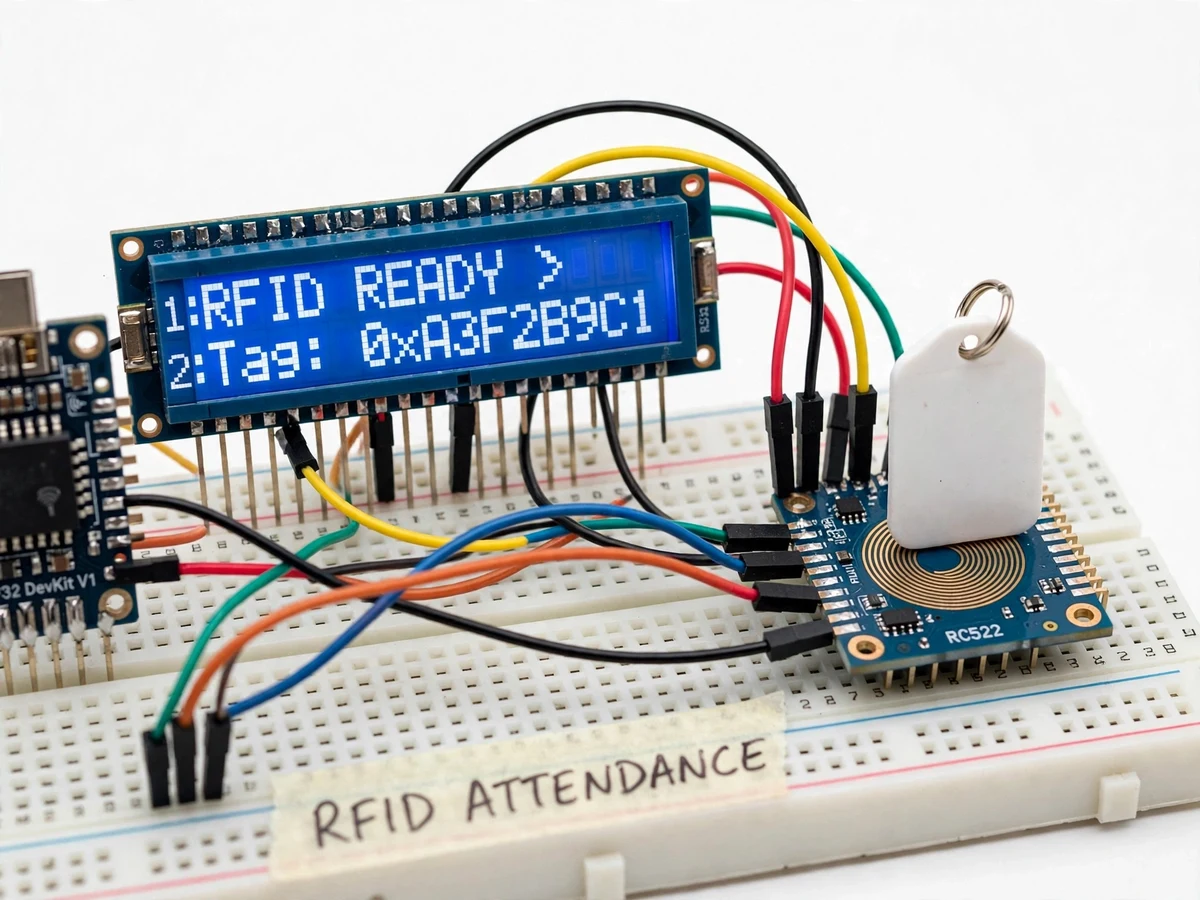
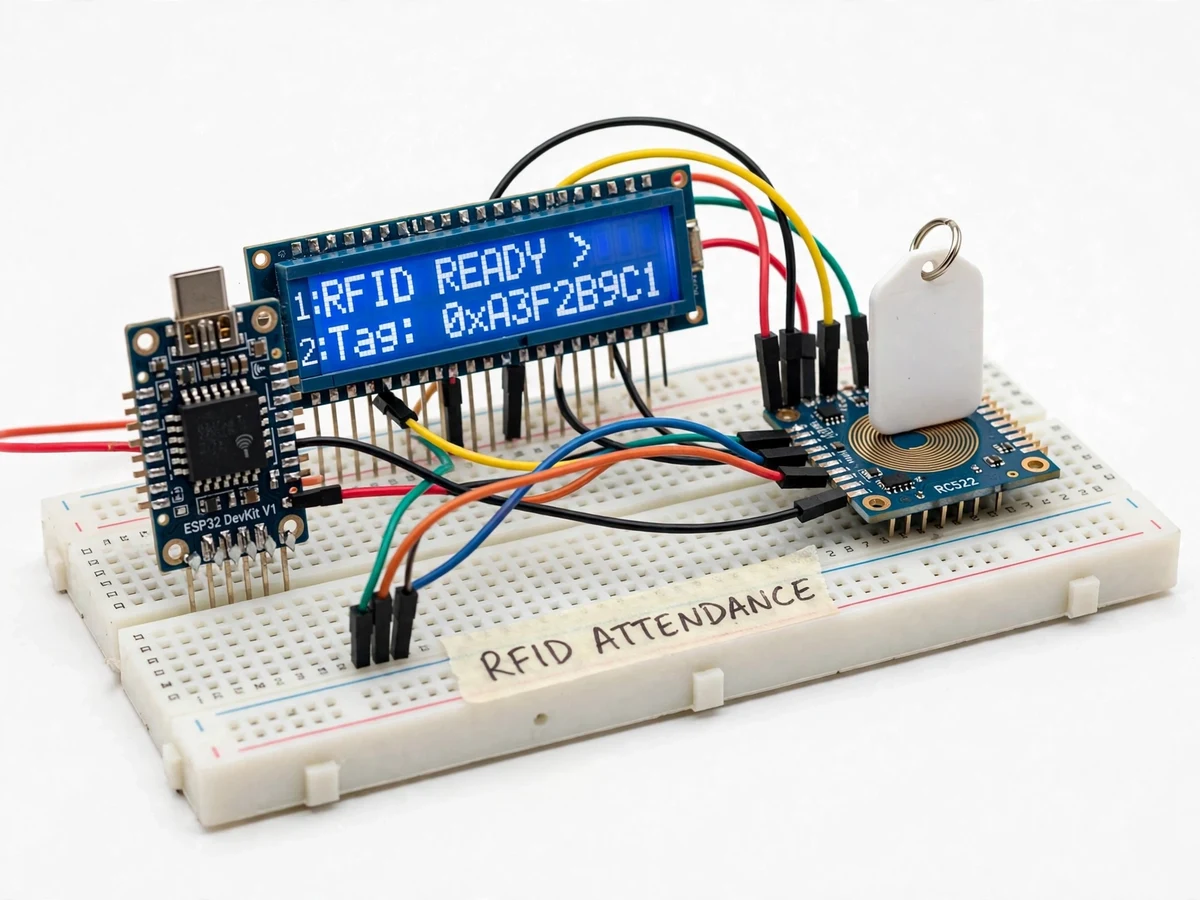
The problem
Paper registers and roll calls eat the first ten minutes of every lecture, and proxy attendance is trivially easy with them. Biometric systems solve this but are expensive, slow in queues and raise hygiene concerns that became very real in recent years. RFID cards sit in the sweet spot: a tap takes under a second, cards cost almost nothing, and the reader hardware is a student's-budget module. This project builds a complete attendance logger around that idea — an ESP32 reading MIFARE cards through an RC522 module, stamping every tap with date and time from a DS3231 real-time clock, confirming it on a 16x2 LCD, and writing a permanent CSV record to a microSD card. The demo enrolls cards with a master-card procedure and then logs entries and exits through a simulated classroom door, producing a spreadsheet-ready file at the end of the day. It is a compact lesson in how real access systems are architected: sensing, identity lookup, time-stamping and durable storage, each a separate, testable block.
How it works
- The RC522 reader continuously polls for a 13.56 MHz card in its field and wakes the ESP32's read routine on detection.
- The card's UID is read over SPI and looked up in the enrollment table stored in the ESP32's flash memory.
- The DS3231 RTC supplies the current date and time, which the firmware formats into a timestamp string.
- The LCD displays the cardholder's name with IN or OUT status (green path for known cards, warning for unknown ones).
- The event — timestamp, UID, name, direction — is appended as a new row to the day's CSV file on the microSD card.
- The CSV files can be copied off the card and opened in Excel, where a pivot table converts raw taps into a daily attendance sheet.
Tech stack:
- ESP32 DevKit (dual-core, WiFi-capable, used offline here)
- RC522 RFID reader module (13.56 MHz, SPI)
- DS3231 real-time clock with battery backup
- 16x2 LCD display (I2C backpack)
- MicroSD card module (SPI, CSV logging)
- MIFARE Classic cards and keyfobs
- Arduino IDE (C/C++ firmware)
- Excel / spreadsheet for attendance computation
| Parameter | Value |
|---|---|
| Controller | ESP32 DevKit, 240 MHz dual-core |
| Reader | RC522, 13.56 MHz, SPI interface, typical read distance 3–5 cm (module datasheet) |
| Card type | MIFARE Classic 1K cards and keyfobs (UID-based identification) |
| Clock | DS3231 RTC, ±2 ppm (about ±1 minute per year), CR2032 backup |
| Display | 16x2 character LCD via I2C |
| Storage | MicroSD card, one CSV file per day (timestamp, UID, name, direction) |
| Enrollment | Master-card procedure, roster stored in ESP32 flash (design target 200 cards) |
| Power | 5 V USB supply; typical draw approximately 150–250 mA during reads |
Project features
- [RC522 contactless reading] The 13.56 MHz reader detects MIFARE cards and keyfobs within a few centimetres and returns each card's unique UID over SPI.
- [On-device card enrollment] A master card puts the unit into enroll mode; new cards are registered to names typed in once, with the roster stored in ESP32 flash — no PC or app required.
- [RTC timestamping] A battery-backed DS3231 real-time clock stamps every tap with date and time accurate to about ±2 minutes per year, so logs stay correct through power cuts.
- [LCD feedback] The 16x2 display shows the cardholder's name and IN/OUT status on each tap, and flashes a warning for unknown cards — the visible behaviour examiners test.
- [SD card CSV logging] Every event is appended to a dated CSV file (timestamp, UID, name, direction) that opens directly in Excel for attendance computation.
- [Duplicate-tap debounce] Rapid repeat taps within a configurable window are ignored, so one enthusiastic tap never creates two attendance rows.
- [IN/OUT direction logic] A mode button toggles entry vs exit logging, letting one unit track both directions at a classroom or lab door.
What is included
- Working RFID attendance logger prototype (ESP32, RC522, DS3231, LCD, SD module, card set)
- Complete firmware source code (enrollment, logging, LCD UI, CSV writer)
- Enrollment and daily-operation procedure cards for the demo
- Circuit and wiring documentation
- Project report PDF (RFID background, system architecture, SPI/RTC/SD integration, test procedure)
- PPT presentation for final review
- Viva Q&A preparation document (RFID modulation, SPI, RTC accuracy, file systems)
- Setup and demonstration guide
Limitations & prerequisites
- Identification is UID-based; MIFARE Classic UIDs are readable by any compatible reader, so this is an attendance convenience system, not a high-security access control — that distinction is covered honestly in the report.
- Read distance is a few centimetres by physics of 13.56 MHz near-field; cards must be deliberately tapped, not read at a distance.
- The roster lives in ESP32 flash with a design target of about 200 cards; larger institutions would need the database variant (noted as future scope).
- The DS3231 keeps time through power cuts on its coin cell, but the cell must be present and fresh — a dead cell means timestamps reset.
- CSV export is manual (remove the SD card and copy the file); there is no WiFi upload in this build, by design, to keep it usable with no network.
Frequently Asked Questions
Which RFID technology is used?
The build uses the RC522 reader module at 13.56 MHz, communicating with the ESP32 over SPI, and reads MIFARE Classic 1K cards and keyfobs. Identification is by the card's factory-programmed UID, which the firmware looks up in an enrollment table stored in flash. Typical read distance is 3–5 cm — a deliberate tap, not a walk-by read — which suits a supervised classroom or lab doorway.
How are timestamps kept accurate?
A DS3231 real-time clock with a CR2032 backup battery stamps every tap with date and time. The DS3231 is temperature-compensated to about ±2 ppm — roughly a minute a year — so the log stays trustworthy across power cuts and long semesters. The firmware formats the timestamp into each CSV row, and the clock is set once during bring-up through a simple serial procedure.
Where does the attendance data go?
Every tap appends a row — timestamp, card UID, cardholder name and IN/OUT direction — to a dated CSV file on the microSD card. At day's end you move the card to a laptop and open the file directly in Excel, where a pivot table turns raw taps into a daily attendance sheet. There is no cloud or network involved, so the system works in any classroom.
How are new students enrolled?
Tap the designated master card to enter enroll mode — the LCD confirms it — then tap each new card in turn. The firmware stores each UID in the ESP32's flash roster with a design target of about 200 cards, and names are assigned through the documented procedure. No PC software is needed; the whole roster is managed on the device itself.
What are the main limitations?
Identification is UID-based, so this is an attendance convenience system rather than high-security access control — the report states that plainly. Read range is a few centimetres by the physics of 13.56 MHz near-field, the roster targets about 200 cards, and CSV export is manual via the SD card. A dead RTC coin cell also means timestamps reset until it is replaced.
Is this project suitable for a final-year project?
Yes — for Electronics, Computer and IoT programs. It integrates SPI communication, a temperature-compensated RTC, SD file handling and a complete sense-to-spreadsheet data pipeline. Every block — reader, clock, storage, enrollment logic — is independently testable and gives the examiner clean, technical viva questions. Suitable for B.E./B.Tech final-year projects in Electronics, Computer and IoT engineering.
Components & software requirements
- ESP32 DevKit (dual-core, WiFi-capable, used offline here)
- RC522 RFID reader module (13.56 MHz, SPI)
- DS3231 real-time clock with battery backup
- 16x2 LCD display (I2C backpack)
- MicroSD card module (SPI, CSV logging)
- MIFARE Classic cards and keyfobs
- Arduino IDE (C/C++ firmware)
- Excel / spreadsheet for attendance computation
Delivery information
Built-to-order project. Delivery timeline is shared after order confirmation based on current queue.
Support terms
Complete documentation, setup guide, and viva preparation included. Support for setup and explanation provided.