
More project photos (3)
Watch it work
The problem
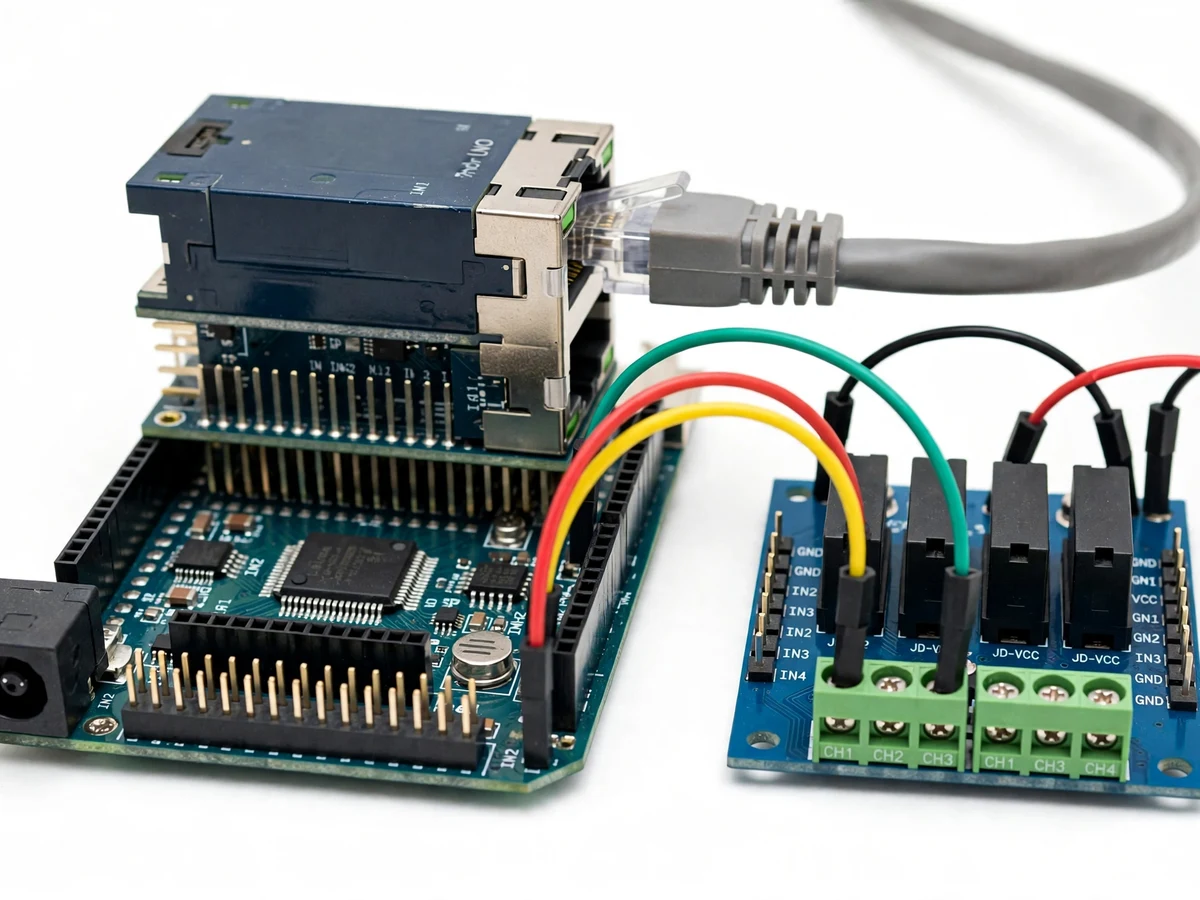
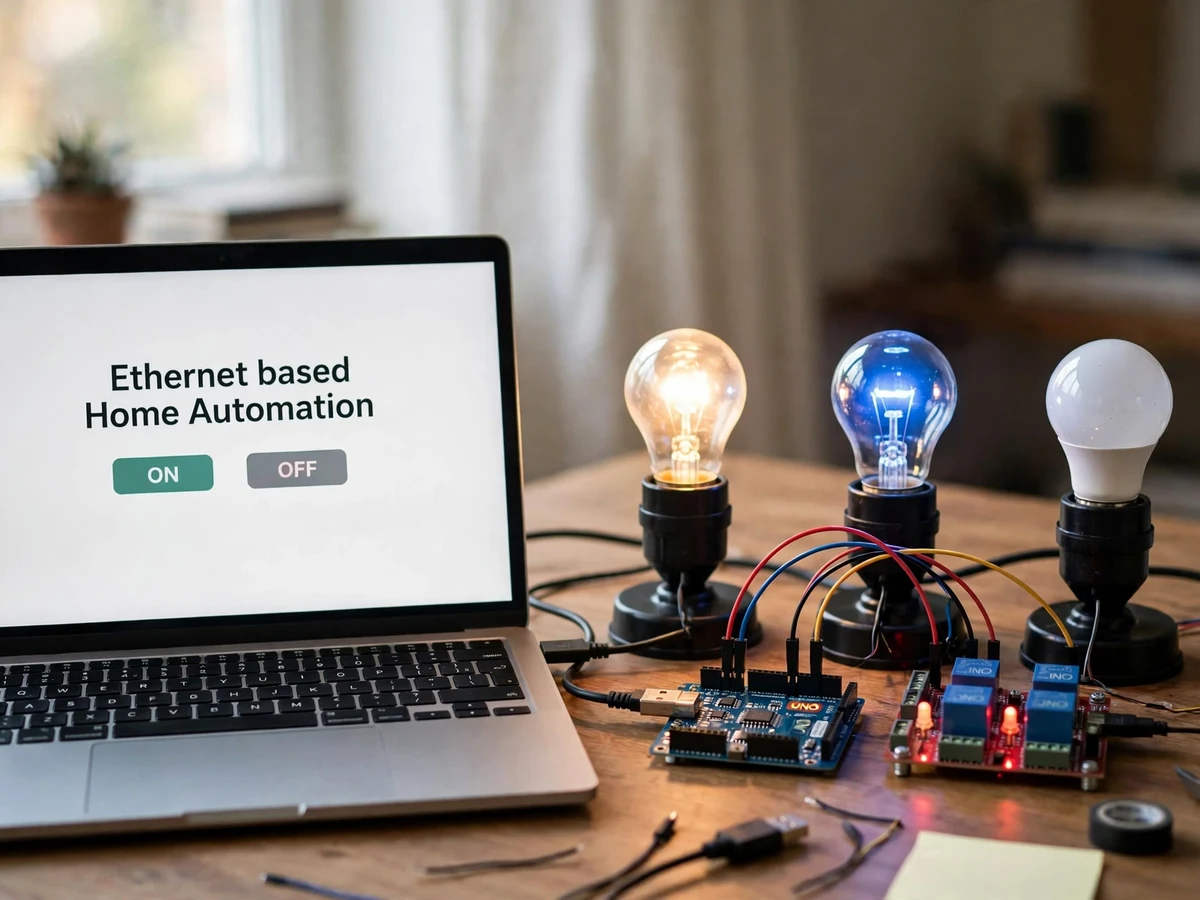
A light switch controls one load from one place, and the only way to change that has always been to walk over to it. A wired network changes the geometry: an Arduino with an Ethernet shield can serve a small web page on the local network, and every button on that page can drive a relay that switches a real lamp. This project builds that system at tabletop scale. A laptop browser opens the page, three lamps sit wired through a relay module, and each ON and OFF button switches exactly one lamp. There is no app, no account, and no cloud service in between, so the whole control loop is visible: a click in a browser becomes a relay click and a lamp changing state.
How it works
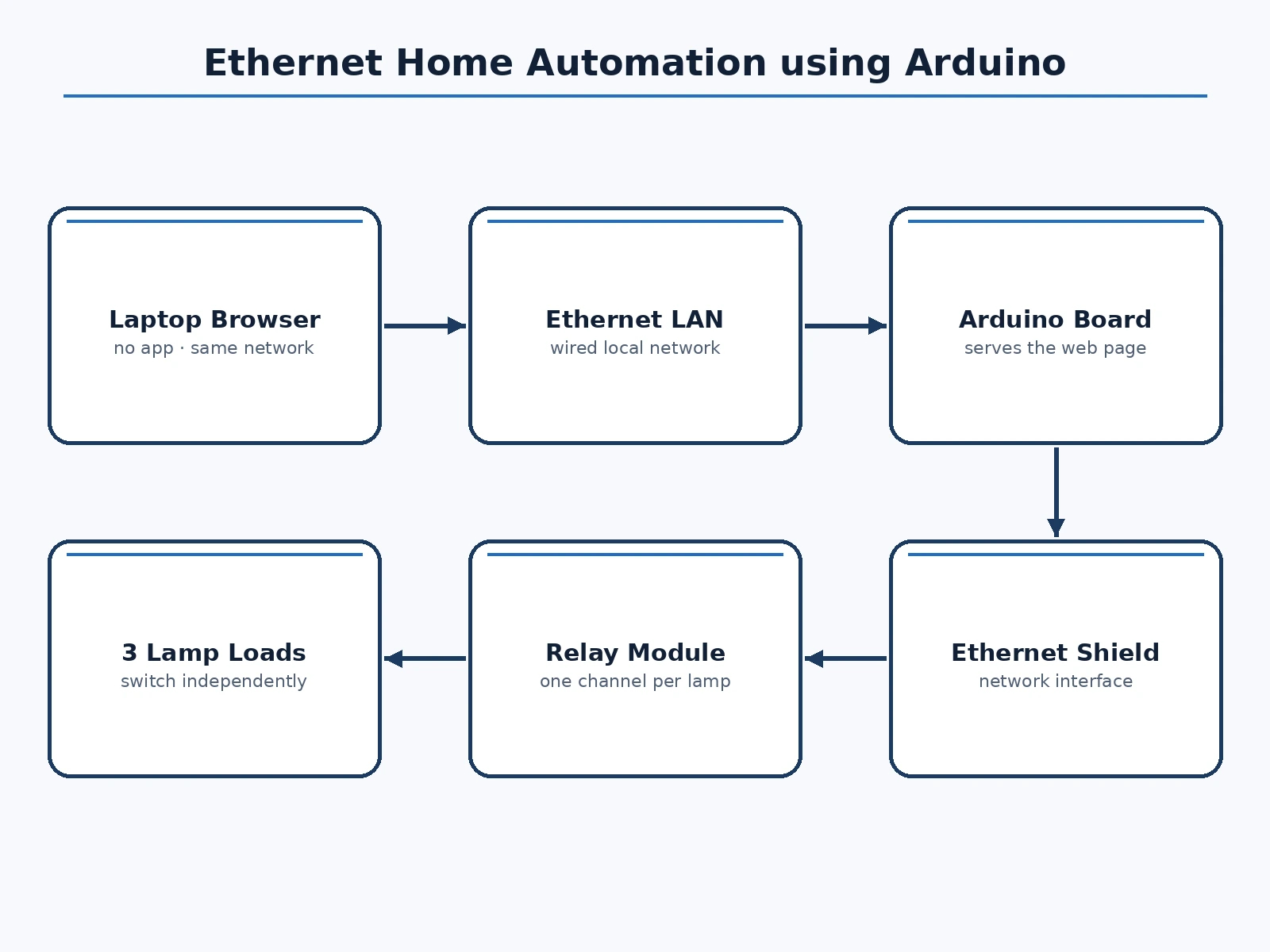
- The Arduino, fitted with an Ethernet shield, connects to the local network by cable and starts serving the control web page.
- The user opens the page in a browser on a laptop on the same network and sees the three loads with ON and OFF buttons.
- Tapping a button sends a short request from the browser to the Arduino over the wired network.
- The Arduino sets the matching relay channel, and the relay switches the lamp circuit for that load.
- The lamp turns on or off, and the page is ready for the next command.
- Each lamp is switched independently, so the user can build any combination of on and off lamps from the same page.
Tech stack:
- Arduino controller board · Ethernet shield
- Ethernet network connection · wired local network
- Relay module · lamp load switching
- Web control page · ON and OFF buttons
- Laptop browser · no app required
- Three lamp loads · independent channels
- Jumper wiring · bench prototype wiring
- 5 V controller supply · relay coil drive
| Parameter | Value |
|---|---|
| Control | Web page over wired local network (design target) |
| Controller | Arduino board with Ethernet shield serving the page (design target) |
| Loads | Three lamps · each on its own relay channel (design target) |
| Switching | Relay module · one channel per lamp (design target) |
| Access method | Browser on the same local network · no login on the demo page (design target) |
| App required | None · any browser on the local network (design target) |
| Power | 5 V supply for controller and relay coils (design target) |
| Not included | Internet remote access · cloud account · mobile app · login system (not in this build) |
Project features
- [Web page with ON and OFF buttons] A plain web page served by the Arduino lists the three loads with one ON button and one OFF button each, so control needs nothing more than a browser on the same network. Implemented in the base prototype.
- [Independent lamp switching] Each button switches only its own lamp through its own relay channel, so the three lamps can be on, off, or mixed in any combination. Implemented in the base prototype.
- [Arduino with Ethernet shield] An Arduino fitted with an Ethernet shield connects to the local network by cable and serves the control page itself, with no separate server computer. Implemented in the base prototype.
- [Relay module switching] A relay module sits between the controller and the lamp circuits, turning low-voltage controller signals into switched lamp loads. Implemented in the base prototype.
- [Visible result after every click] Every button press produces an immediate visible change in the matching lamp, so the demonstration can be checked lamp by lamp. Implemented in the base prototype.
- [No app or account required] Control works from any browser on the local network, with no app to install and no account to create. Implemented in the base prototype.
What is included
- Working prototype: Arduino board, Ethernet shield, relay module, and three lamp loads, wired and tested
- Firmware for the Arduino web server and relay control
- Web control page with ON and OFF buttons for each load
- Circuit and wiring documentation with labelled connections for every wire
- Component list with the exact parts used in the build
- Demonstration procedure, including switching each lamp on and off independently and showing that no button affects the wrong lamp
- Project report PDF (background, Ethernet networking basics, relay switching, methodology, limitations)
- PPT presentation for final review
- Viva Q&A preparation document (Ethernet shield operation, relay isolation, local-network limits, wiring safety)
Limitations & prerequisites
- The page is reachable only from devices on the same local network: this build has no internet remote access, no cloud account, and no public server, so control stops at the edge of the local network.
- The demonstration page has no login: anyone on the same local network who opens the page address can switch the lamps, so the report must state that limit plainly and the build must never be presented as access-controlled.
- The lamps are low-power tabletop loads: this is a bench demonstration of switching, not a house wiring installation, and it must not be wired into fixed household circuits.
- Relay switching of mains-powered lamps needs proper insulation and supervision: exposed relay contacts and loose mains wiring are a safety hazard, and the demonstration must be built and shown with that care.
- A wired connection is required: the controller must be cabled to the network, so it cannot be moved around like a wireless device, and a disconnected cable stops control until it is reconnected.
- The prototype is a tabletop demonstration: it is not a certified home automation product, it carries no safety certification, and it must not be fitted as the sole control for real household lighting.
Frequently Asked Questions
How does a browser button switch a real lamp?
The Arduino with its Ethernet shield serves a web page on the local network. Tapping a button sends a request to the Arduino, which sets the matching relay channel, and the relay switches the lamp circuit, so the lamp turns on or off. Each button maps to exactly one lamp.
Who is this project suitable for?
Electronics, Electrical, and IoT students, because it combines embedded control, wired networking, web serving, and relay switching into one demonstration with a result that is easy to verify in a viva: a click on a page visibly switches a real lamp.
Can I control the lamps from anywhere on the internet?
No, not in this build. Control works only from devices on the same local network. Internet remote access would need a public server, port forwarding, and authentication, none of which are included, and the report states that boundary explicitly.
Is there a login on the control page?
No. The demonstration page has no login, so anyone on the same local network who opens the page address can switch the lamps. That is a real limitation of this build, and the viva should discuss it honestly rather than presenting the page as protected.
Can more loads be added?
Yes, as a scope change, by adding relay channels and buttons for each new load and extending the firmware and the page. The base build covers three loads, and extra loads change the parts, the wiring, and the page layout, so they are not a free addition.
Components & software requirements
- Arduino controller board · Ethernet shield
- Ethernet network connection · wired local network
- Relay module · lamp load switching
- Web control page · ON and OFF buttons
- Laptop browser · no app required
- Three lamp loads · independent channels
- Jumper wiring · bench prototype wiring
- 5 V controller supply · relay coil drive
Delivery information
Built-to-order project. Delivery timeline is shared after order confirmation based on current queue.
Support terms
Complete documentation, setup guide, and viva preparation included. Support for setup and explanation provided.
Download free synopsis (PDF)
Enter your name and WhatsApp number — the synopsis PDF downloads immediately. We may send occasional project updates on WhatsApp; no spam.