
More project photos (2)

The problem
An Employee Management System with Angular 21 replaces the spreadsheets and paper registers that small companies still use to track their people. In a typical small office, employee details live in one spreadsheet, attendance in a register, leave requests in a chat group and salary workings in yet another file, so HR spends hours reconciling four different sources every month and a single mistyped salary figure can go unnoticed until payday. The problem is not a lack of data but a lack of one connected system: records, attendance, leave and pay must agree with each other, and only the right role should see or change each piece. This project builds that single system as a web app: an Angular 21 frontend with Firebase Authentication and Cloud Firestore, where Admin, HR and Employee roles are enforced by Firebase custom claims and security rules, and where the dashboard, leave approvals and salary slips all read from the same employee records.
An employee signs in with email and password.
Follow the working sequence
How it works
An employee signs in through Firebase Authentication, which issues an ID token carrying their role as a custom claim. The Angular 21 frontend reads that role and shows only the screens and actions the role is allowed to use, while Firestore security rules enforce the same limits on the server side, so hiding a button never grants access by itself. Employee, attendance, leave and salary data live in Cloud Firestore collections; the app subscribes to them with signals, so the dashboard updates the moment a record changes. An HR user adds an employee, marks attendance, or approves a leave request, and the write goes to Firestore, where the security rule checks the caller's role before accepting it. The dashboard then recomputes headcount, attendance and the monthly payroll total from the stored records, and a salary slip is generated by splitting the stored monthly salary into basic pay, allowances and deductions.
- The user signs in with email and password through Firebase Authentication; the Admin SDK assigns a role (Admin, HR or Employee) as a custom claim on the account.
- The Angular 21 app reads the role from the ID token and renders only the screens and actions that role is allowed to use — for example, leave approval buttons appear only for Admin and HR.
- Employee records, attendance entries, leave requests and salary data are stored in Cloud Firestore collections, one document per employee, per attendance day and per leave request.
- The dashboard subscribes to these collections with Angular signals, so headcount, attendance counts and the monthly payroll total recompute automatically when data changes.
- HR marks daily attendance by toggling each employee's status; the change is written to Firestore and the dashboard's present and on-leave counts update at once.
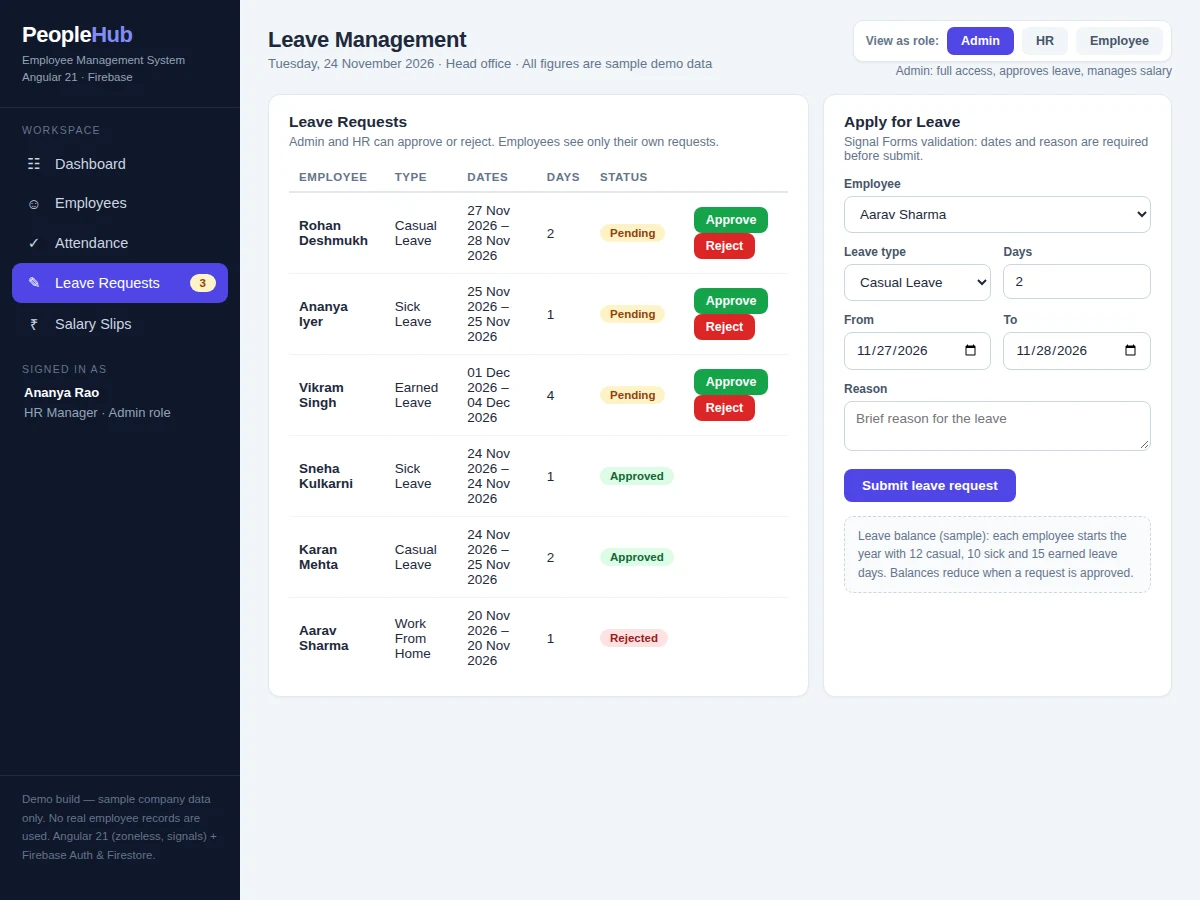
- An employee submits a leave request with type, dates and reason; an Admin or HR user approves or rejects it, and the request status and leave balance update together.
- For a salary slip, the app reads the employee's stored monthly salary and computes Basic (50%), HRA (20%), special allowance (30%), provident fund (12% of Basic) and professional tax (₹200, sample) to produce the net pay.
Tech stack:
- Angular 21 (standalone components, signals, zoneless)
- TypeScript (strict mode)
- Firebase Authentication (email/password + custom claims)
- Cloud Firestore (NoSQL document database)
- Firebase Hosting (deployment target)
- Angular Signals · RxJS (reactive state)
- HTML5 · CSS3 (responsive UI)
- Vitest (unit testing, Angular 21 default runner)
Requirements
- Node.js (LTS release, as required by Angular CLI 21)
- Angular CLI 21 for building and serving the project
- A Firebase project (free Spark plan is sufficient for the demo) with Authentication and Firestore enabled
- A modern web browser (Chrome, Edge or Firefox) for the demo and for the hosted app
- Git for version control of the source code
| Parameter | Value |
|---|---|
| Framework | Angular 21 (released 19 November 2025, zoneless by default) |
| Language | TypeScript (strict mode) |
| Backend | Firebase — Authentication + Cloud Firestore |
| Roles | 3 roles (Admin, HR, Employee) via custom claims |
| Sample employees in demo | 8 employees across 5 departments (demo data) |
| Monthly payroll total (demo) | ₹4,94,000 (computed from the 8 sample salaries) |
| Attendance rate in demo | 75% (6 of 8 employees present on the demo day) |
| Leave types | 4 types (Casual, Sick, Earned, Work From Home) |
| Annual leave balance (sample) | 12 casual + 10 sick + 15 earned days per employee |
| Salary-slip split (sample) | Basic 50%, HRA 20%, Special allowance 30% of gross |
| Salary-slip deductions (sample) | Provident fund 12% of Basic, professional tax ₹200 |
| Build timeline | 3–4 weeks (expected) |
| Hosting | Firebase Hosting (deployment target) |
Project features
The Employee Management System with Angular 21 is built around four capabilities that work together: a searchable employee directory, a daily attendance register, a leave workflow with approval, and salary slips computed from stored pay data. The directory holds each employee's profile, department, designation and joining date, and Admin and HR users can add new employees through a validated form. Attendance is marked per employee per day and feeds the dashboard's present and on-leave counts directly. Leave requests move from applied to approved or rejected with one click, and only Admin and HR can decide them. Salary slips are generated from the employee's stored monthly salary with a transparent breakdown of basic pay, allowances and deductions. A role switcher in the demo shows exactly what each role can and cannot do.
- [Employee directory with search and filter] Eight sample employees across 5 departments are listed with name, email, department, designation, joining date and sample monthly salary. Search matches name, role or email, and a department filter narrows the list instantly.
- [Add-employee form with validation] Admin and HR users add new employees through a form that requires name, email and salary before saving. The new record appears in the directory and updates headcount and payroll totals immediately.
- [Daily attendance register] Each employee is marked Present, Absent or On Leave for the day with a click, and the dashboard counts update at once. Check-in and check-out times are recorded for employees marked present.
- [Leave workflow with approve and reject] Employees apply for casual, sick, earned leave or work from home with dates and a reason. Admin and HR approve or reject with one click; employees see only their own requests.
- [Salary-slip generator] A slip is generated for any employee and month from the stored monthly salary, split into Basic pay (50%), HRA (20%) and special allowance (30%), with provident fund (12% of Basic) and professional tax (₹200) deducted to give the net pay.
- [Role-based access for 3 roles] Admin, HR and Employee roles are carried in the Firebase ID token as custom claims and enforced by Firestore security rules, so a button hidden in the UI cannot be bypassed by calling the database directly.
- [HR dashboard with live totals] Headcount, present today, on leave, pending leave requests and the monthly payroll total are computed from the stored records, with headcount by department and the day's attendance snapshot below.
Optional customizations (not part of the base build): biometric attendance import, payroll export to a spreadsheet, email notifications through Cloud Functions, and a companion mobile app. Future scope: performance appraisal module, recruitment pipeline, and shift rostering.
What is included
- Complete Angular 21 source code with standalone components and signal-based state
- Firebase setup guide: Authentication, custom claims, Firestore collections and security rules
- Working demo app with 8 sample employees, attendance, leave workflow and salary slips
- Project report PDF (background, Angular 21 features, architecture, methodology, results)
- PPT presentation for final review
- Viva Q&A preparation document (Angular signals, zoneless change detection, Firebase security rules, Firestore data modelling)
Limitations & prerequisites
- All employee names, salaries and dates in the demo are fictional sample data; real payroll must come from the company's actual HR records and statutory rules.
- The demo stores data in the browser session for the demonstration; the delivered build connects to a real Firebase project, which the student must create with their own account.
- Leave balances and the salary split (Basic 50%, HRA 20%, professional tax ₹200) are sample figures for the demo, not statutory advice — real payroll rules vary by company and location.
- Firebase's free Spark plan has usage limits (reads, writes and storage); a busy production deployment may need the Blaze pay-as-you-go plan.
- The base build has no biometric attendance hardware, no email notifications and no mobile app — these are optional customizations.
- Angular 21's Signal Forms API is experimental in this release, so the demo uses validated template-driven forms and documents Signal Forms as future scope.
- The system is an academic build, not a certified HR or payroll product, and it does not replace professional payroll compliance.
Timeline
- Week 1 (expected): project setup, Firebase project creation, authentication with custom claims, Firestore data model.
- Week 2 (expected): employee directory with search and add-employee form, daily attendance register.
- Week 3 (expected): leave workflow with approval, salary-slip generator, HR dashboard with live totals.
- Week 4 (expected): role-based access testing, report and PPT preparation, viva Q&A document, final demo verification.
Support
- Setup guidance and doubt-clearing for 30 days after delivery, covering installation, Firebase project configuration and running the demo.
- Help with one round of college-specific changes (report format, department names, sample data) within the support window.
- Additional features or a second round of changes are quoted separately.
Frequently Asked Questions
Is this project suitable for a final-year project?
Yes — for Computer Science, IT and Web Development programs. It demonstrates a complete modern web stack: Angular 21 with zoneless change detection and signals, Firebase Authentication with role-based access, Firestore data modelling, and a working HR workflow with four connected modules. The report explains each design decision, including why roles are enforced by security rules rather than only in the UI.
What is the main technology used?
Angular 21 with Firebase. The frontend is built with Angular 21's standalone components and signals under zoneless change detection, released 19 November 2025. The backend is Firebase: Authentication handles sign-in and role claims, Cloud Firestore stores employee, attendance, leave and salary data, and Firebase Hosting serves the app.
How does role-based access work?
Roles are stored as Firebase custom claims on the user's account and travel inside the ID token. The Angular app reads the role to show or hide screens and buttons, and Firestore security rules check the same claim on every read and write. This means an Employee user cannot approve leave or edit salaries even by calling Firestore directly, because the rule rejects the write.
Are the salaries and employee names real?
No — every name, salary and date in the demo is fictional sample data created only for the demonstration. The demo's monthly payroll total of ₹4,94,000 is computed live from the 8 sample salaries, so the figure is verifiable inside the demo itself. The delivered build connects to the student's own Firebase project, where they enter their own sample or college-approved data.
Can this project be hosted online?
Yes. The build target is Firebase Hosting, which serves the compiled Angular app over HTTPS with a single deploy command from the Angular CLI. The Firebase project itself is created free on the Spark plan, which is sufficient for the demo and the viva demonstration, and the hosting setup is documented step by step in the delivery.
Can more modules be added?
Yes. The Firestore collections are designed so new modules plug in without changing the existing ones: an appraisal module adds a reviews collection, a recruitment module adds candidates, and shift rostering adds a shifts collection. Biometric attendance import, spreadsheet payroll export and email notifications through Cloud Functions are available as optional customizations.
Components & software requirements
- Angular 21 (standalone components, signals, zoneless)
- TypeScript (strict mode)
- Firebase Authentication (email/password + custom claims)
- Cloud Firestore (NoSQL document database)
- Firebase Hosting (deployment target)
- Angular Signals · RxJS (reactive state)
- HTML5 · CSS3 (responsive UI)
- Vitest (unit testing, Angular 21 default runner)
Requirements
- Node.js (LTS release, as required by Angular CLI 21)
- Angular CLI 21 for building and serving the project
- A Firebase project (free Spark plan is sufficient for the demo) with Authentication and Firestore enabled
- A modern web browser (Chrome, Edge or Firefox) for the demo and for the hosted app
- Git for version control of the source code
Delivery information
Built-to-order project. Delivery timeline is shared after order confirmation based on current queue.
Support terms
Complete documentation, setup guide, and viva preparation included. Support for setup and explanation provided.
Download free synopsis (PDF)
Enter your name and WhatsApp number — the synopsis PDF downloads immediately. We may send occasional project updates on WhatsApp; no spam.