
More project photos (2)

The problem
A Web-Based Clinic Management System with Patient Records and Appointments replaces the paper register and the appointment diary that a small single-doctor clinic still runs on. Today the receptionist writes names in a notebook, the doctor flips through old prescription pads to recall what a returning patient was given, and nobody can tell at a glance who is waiting or which bills are unpaid. Paper records get lost, handwriting gets misread, and follow-ups slip through because no list of them exists. This project builds a single web application that holds the whole day together: patients are registered once with their history, appointments sit on a visible slot grid, every consultation is recorded against the patient's record, and each visit ends with a printed prescription and a bill. It removes the two most common daily failures — a double-booked slot and a forgotten patient history — without asking the clinic to run hospital software it does not need.
Name, age, gender, phone, blood group and known conditions.
Follow the working sequence
How it works
A Web-Based Clinic Management System with Patient Records and Appointments moves a patient through five stages in one continuous flow: registration, booking, consultation, prescription and billing, all reading and writing the same MySQL database. The receptionist registers the patient once, which creates a permanent record with a generated patient ID. Booking picks a free 15-minute slot from the grid, and the system refuses the slot to anyone else from that moment on. When the patient arrives, the doctor opens the record, sees every past visit and prescription, records the new consultation, and writes the prescription from the same screen. Saving the visit creates the bill automatically, and the dashboard updates the queue, the completed count and the day's collection without anyone retyping anything. Because every step writes to the same tables, the patient's history, the day's schedule and the money collected can never disagree with each other.
- The receptionist registers the patient with name, age, gender, phone, blood group and known conditions; the system generates a patient ID and stores the record in the patients table.
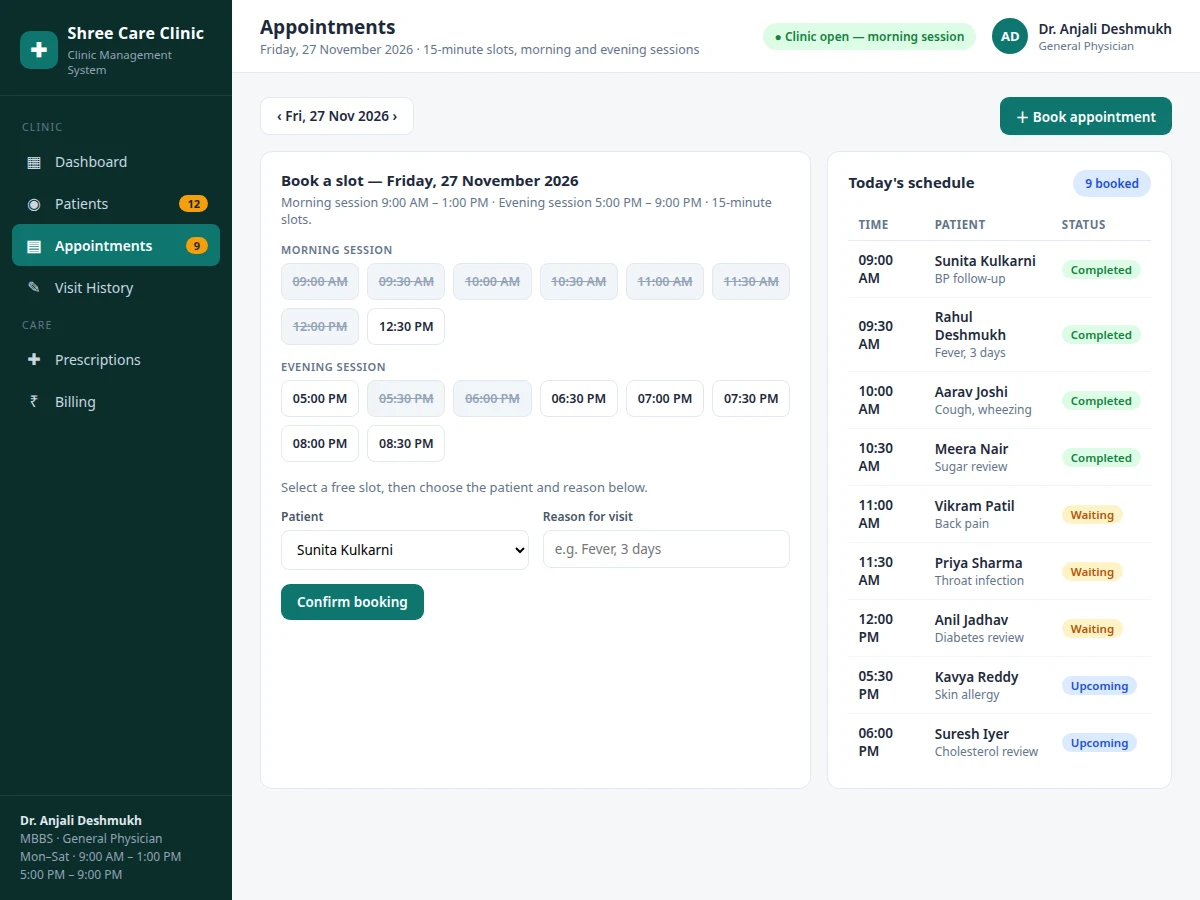
- An appointment is booked by choosing a free 15-minute slot from the morning or evening grid; booked slots are greyed out immediately, so the same slot cannot be booked twice.
- On arrival the appointment status moves from Upcoming to Waiting, and the doctor opens the patient's record to see all past visits, diagnoses and prescriptions.
- The doctor records the consultation — complaint, diagnosis, follow-up date — which is saved as a new visit row linked to the patient ID.
- A prescription is written from the same screen: medicines with dose timing and duration are saved as prescription items linked to the visit.
- Saving the visit creates a numbered bill with the consultation fee and any test charges; the receptionist marks it Paid (cash or UPI) or leaves it Pending.
- The dashboard reads the same tables to show the live queue, completed visits, follow-ups due and the day's total collection.
Tech stack:
- PHP 8.4 (backend, PDO prepared statements)
- MySQL 8.0 · InnoDB
- HTML5 · CSS3 (responsive clinic dashboard)
- JavaScript (ES6, slot grid and live search)
- Apache 2.4 (local and shared hosting)
- XAMPP (local development server)
- phpMyAdmin (database administration)
- Git (version control)
| Parameter | Value |
|---|---|
| Platform | Web application — runs in any modern browser, no installation |
| Backend | PHP 8.4 with PDO prepared statements |
| Database | MySQL 8.0 · InnoDB (ACID transactions, foreign keys) |
| Core tables | 6 tables (patients, appointments, visits, prescriptions, prescription items, bills) |
| User roles | 2 roles (Doctor, Receptionist) |
| Appointment slot | 15 minutes (design target) |
| Sessions per day | 2 sessions (morning and evening) |
| Seeded demo records | 12 patients, 9 appointments, 6 visit records (measured from the demo build) |
| Consultation fee in demo | ₹300 (demo figure, configurable) |
| Concurrent users | 1–2 users (design target, single clinic) |
| Page load | Under 2 seconds on local hosting (design target) |
| Hosting | Shared hosting or local XAMPP server |
Project features
A Web-Based Clinic Management System with Patient Records and Appointments is built around four capabilities that carry the clinic's whole day. Patient records hold registration details, known conditions and every past visit in one screen, so the doctor opens a history instead of hunting through paper. Appointment booking runs on a visible 15-minute slot grid where booked slots are greyed out and cannot be clicked twice, which is what actually stops double-booking. Visit recording links each consultation, diagnosis and prescription to the right patient automatically, and billing turns the same visit into a numbered bill with the consultation fee and any test charges. Around those four, a dashboard shows the day's queue, collection total and follow-ups due, and search finds any patient or visit by name, phone or patient ID.
- [Patient registration and records] Register a patient once with age, gender, phone, blood group and known conditions; an auto-generated patient ID (SC-1001 onwards) links every later visit, prescription and bill to that one record.
- [Appointment booking with slot grid] Morning and evening sessions are shown as a 15-minute slot grid; booked slots are greyed out and unclickable, and confirming a booking adds the patient to the day's schedule instantly.
- [Visit history per patient] Each consultation records the complaint, diagnosis, medicines and follow-up date against the patient's record, so the doctor sees the full history before writing the next prescription.
- [Prescription writing] The doctor selects a patient, enters the diagnosis, adds medicines with dose timing (1-0-1, 0-0-1) and duration, and saves a prescription that stays linked to the visit and can be printed.
- [Billing basics] Every visit generates a numbered bill with the consultation fee and optional test charges, marked Paid or Pending, with a daily collection total on the dashboard.
- [Dashboard and daily queue] The dashboard shows today's appointments by status (completed, waiting, upcoming), registered patients, consultations done and today's collection at a glance.
- [Search across patients and visits] Live search by name, phone or patient ID in the patient register, and by patient or diagnosis in the visit history, so a returning patient's record is found in seconds.
- [Role-based access] Separate doctor and receptionist logins: the receptionist registers patients and books slots, while only the doctor records diagnoses and writes prescriptions.
What is included
- Complete PHP + MySQL source code with the 6-table database schema
- Seeded demo database (12 patients, 9 appointments, 6 visit records)
- Working single-file HTML demo of the dashboard, patient register and booking grid
- Project report PDF (background, system design, ER diagram, methodology, testing)
- PPT presentation for final review
- Viva Q&A preparation document (PHP, MySQL, normalization, sessions, CRUD, roles)
- Setup guide (XAMPP install, database import, first login)
- Project abstract PDF (10-section, matches this page)
Limitations & prerequisites
- Built for a single-doctor small clinic — multi-department hospital workflows, pharmacy inventory and insurance billing are not included.
- No SMS or email appointment reminders in the base build; they can be added as customization with a messaging API.
- The demo runs on fictional seeded patient data; real patient data must be entered after setup and backed up by the clinic.
- This is an academic prototype, not certified medical software, and it does not diagnose or recommend treatment — the doctor enters every diagnosis.
- Patient records are only as safe as the hosting: the clinic must use HTTPS, strong passwords and regular database backups.
- Works best with 1–2 simultaneous users; it is not designed for multi-branch or multi-doctor concurrent load.
- Online lab-report upload and payment-gateway collection are future scope, not part of the base build.
Frequently Asked Questions
Is this project suitable for a final-year project?
Yes, for Computer Science, IT and Web Development programs. It demonstrates a complete CRUD web application with real database design — 6 related tables, role-based access, session handling and a working booking workflow — which maps cleanly to viva questions on PHP, MySQL normalization, forms and validation. The demo gives the student something real to show: a doctor's dashboard, a patient register and a slot grid that refuses double-bookings.
What is the main technology used?
PHP 8.4 on the backend with MySQL 8.0 (InnoDB) as the database, and HTML5, CSS3 and vanilla JavaScript on the front end, served by Apache 2.4. There is no framework to hide behind, which is deliberate: every query, form and session check is plain readable code, so the student can explain the full request cycle in the viva without leaning on framework internals.
Does the project include different logins for the doctor and the receptionist?
Yes, the system has two roles with different permissions: the receptionist registers patients, books appointments and collects bills, while only the doctor records diagnoses and writes prescriptions. The roles are enforced in the PHP backend, not just hidden in the interface, so a receptionist login cannot reach the prescription or diagnosis screens even by typing the URL directly.
Can this project be hosted online?
Yes, it is plain PHP and MySQL, so it runs on almost any shared hosting plan that offers PHP 8.4 and MySQL 8.0, and it also runs locally on XAMPP for the college demonstration. The setup guide covers both routes: importing the database, setting the database credentials in one config file, and creating the first doctor login. No cloud service or paid API is required.
Can more modules be added later?
Yes, the common additions are SMS appointment reminders, lab-report upload against a visit, a medicine stock list for the clinic's own dispensary, and monthly collection reports. Because the database already separates patients, appointments, visits, prescriptions and bills into their own tables, each new module attaches to the existing IDs without restructuring the schema.
What are the main limitations?
It is scoped to a single-doctor clinic: there is no multi-department workflow, no pharmacy inventory and no insurance billing. It sends no SMS or email reminders in the base build, it is an academic prototype rather than certified medical software, and it assumes 1–2 simultaneous users. Real patient data also needs HTTPS, strong passwords and regular backups, which are the clinic's responsibility.
Components & software requirements
- PHP 8.4 (backend, PDO prepared statements)
- MySQL 8.0 · InnoDB
- HTML5 · CSS3 (responsive clinic dashboard)
- JavaScript (ES6, slot grid and live search)
- Apache 2.4 (local and shared hosting)
- XAMPP (local development server)
- phpMyAdmin (database administration)
- Git (version control)
Delivery information
Built-to-order project. Delivery timeline is shared after order confirmation based on current queue.
Support terms
Complete documentation, setup guide, and viva preparation included. Support for setup and explanation provided.
Download free synopsis (PDF)
Enter your name and WhatsApp number — the synopsis PDF downloads immediately. We may send occasional project updates on WhatsApp; no spam.