
More project photos (2)

The problem
A web-based scholarship application portal with document verification is a website where a student picks a scholarship scheme, fills in one application form, uploads the required documents, and then follows the application as an administrator checks each document and marks the application Verified or returns it for correction with a reason. The portal in this project is built with PHP and MySQL, and it has three parts: a student side for applying and tracking, a document checklist that accepts PDF, JPG and PNG files of up to 2 MB each, and an admin review queue where every document is approved or rejected. Unlike a scholarship finder site, which only lists schemes and links elsewhere, this portal runs the whole application and verification workflow itself, so nothing is decided by email or on paper. The buyer configures the real schemes, eligibility rules and document lists, because the demo ships only with labelled sample schemes and sample applicants.
| Approach | What the student does | Who checks the documents | Where the decision is recorded |
|---|---|---|---|
| Application portal with verification (this project) | Applies and uploads documents in one form | An admin, document by document, in a review queue | On the application record, with a visible status timeline |
| Scholarship finder site | Reads scheme lists and follows an outside link to apply | Nobody on the site itself | Nowhere on the site; the application happens elsewhere |
| Email or Google-Form applications | Sends documents as email attachments or a form upload | Whoever reads the inbox, with no per-document record | In an inbox or a spreadsheet, not on the application |
| College notice board | Reads a paper notice and collects a paper form | Office staff, from a paper file | In a paper file or register |
Picks a scheme and fills in one application form.
Follow the working sequence
How it works
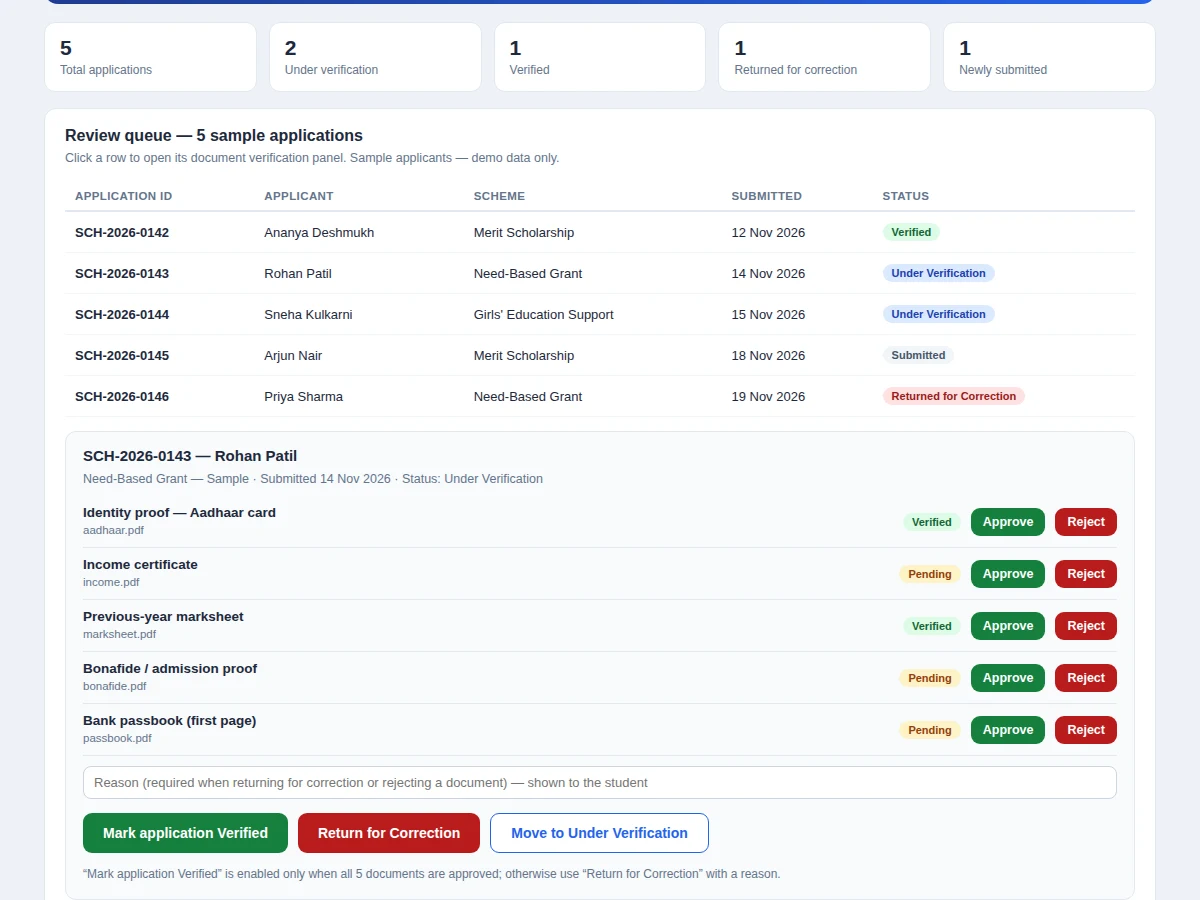
The portal runs end to end in seven stages, from picking a scheme to the final verified decision. The student first picks one of the 3 sample schemes, then fills in the application form, where the email format, the 10-digit mobile number and the 12-digit Aadhaar number are validated in the browser. Next the student uploads the 5 required documents, each checked for file type and the 2 MB size limit, and submits the form, which creates the application with an ID in the format SCH-2026-XXXX and the status Submitted. The application then appears in the admin review queue, where the administrator approves or rejects each document with a reviewer note. When all 5 documents are approved, the administrator marks the application Verified; if any document is rejected, the administrator writes a reason and returns the application for correction. The student follows all of this on the tracking page, which shows the timeline and the status of every document.
- The student picks one of the 3 sample schemes and reads its sample amount and sample eligibility rule.
- The student fills in the application form: full name, email, 10-digit mobile number, course, year of study, 12-digit Aadhaar number and family income bracket.
- The browser validates the email format, the 10-digit mobile number and the 12-digit Aadhaar number before the form can be submitted.
- The student uploads the 5 required documents; each file is checked to be a PDF, JPG or PNG file of up to 2 MB.
- On submission, the portal creates the application with an ID in the format SCH-2026-XXXX and the status Submitted, and the student can track it with that ID.
- The administrator opens the application from the review queue and approves or rejects each of the 5 documents individually, adding a reviewer note to each one.
- When all 5 documents are approved, the administrator marks the application Verified; if any document is rejected, the administrator writes a reason and the application is returned for correction so the student can re-upload it.
Tech stack:
- HTML · CSS · JavaScript
- PHP 8
- MySQL 8
- Apache web server
- phpMyAdmin
- Git
| Parameter | Value |
|---|---|
| Application ID | SCH-2026-XXXX format (design value) |
| Schemes in demo | 3 sample schemes (demo data) |
| Sample applications in demo | 5 sample applications (demo data) |
| Documents per application | 5 document types (design value) |
| Upload limit | 2 MB per file (design value) |
| Accepted file types | PDF · JPG · PNG (design decision) |
| Aadhaar field | 12-digit number (UIDAI-verified format) |
| Mobile field | 10-digit number (design value) |
| Verification stages | 4 stages: Submitted · Under Verification · Verified · Returned for Correction (design value) |
| Admin decisions | 3 decisions: Verified · Returned for Correction · Under Verification (design value) |
| Database | 6 tables: users · schemes · applications · documents · verifications · decisions (design value) |
| Hosting | Standard LAMP stack (design configuration) |
| Demo | Single-file front-end prototype; the full build adds a PHP + MySQL backend (design decision) |
Project features
The portal's strongest capabilities are its guided application form, its 5-document upload checklist with file validation, its per-document admin verification, and its status tracking that shows the student exactly where the application stands. The form collects the applicant's details and validates the email format, the 10-digit mobile number and the 12-digit Aadhaar number in the browser before anything is submitted, so incomplete applications are caught at the source. The document checklist covers 5 document types and accepts only PDF, JPG and PNG files of up to 2 MB each, with each document showing its own Uploaded or Pending state. In the admin queue, every document is approved or rejected on its own with a reviewer note, and the application can only be marked Verified once all 5 documents are approved. The tracking page then shows the 4-stage timeline and the status of each document, including the reason when anything is returned for correction.
- [Scheme browsing with sample schemes] The portal lists 3 clearly labelled sample schemes, each showing its sample amount and sample eligibility rule, so a student picks a scheme before starting the form instead of applying blind.
- [Guided application form with validation] The form collects full name, email, 10-digit mobile number, course, year of study, 12-digit Aadhaar number and family income bracket, and validates the email format, mobile length and Aadhaar length in the browser before submission.
- [Document checklist with upload validation] A checklist of 5 document types — identity proof, income certificate, previous-year marksheet, bonafide or admission proof, and bank passbook — accepts only PDF, JPG and PNG files of up to 2 MB each, and shows Uploaded or Pending against each document.
- [Application ID and status tracking] Every submitted application receives an ID in the format SCH-2026-XXXX, and the tracking page shows the 4-stage timeline (Submitted, Under Verification, Verified, Returned for Correction) plus the status of each document.
- [Admin review queue] The admin view lists all applications with their scheme, submission date and status, and opens any application into a verification panel where each document can be approved or rejected individually.
- [Per-document verification with reviewer notes] Each document carries its own status and a reviewer note that the student can read on the tracking page, so a rejection always explains what was wrong with that specific document.
- [Return-for-correction loop] When a document is rejected, the admin must write a reason, the application status changes to Returned for Correction, and the student can re-upload the corrected document and be reviewed again.
What is included
- Complete PHP + MySQL source code with the database schema (6 tables)
- Working web demo: scheme browsing, application form, document checklist, status tracking and admin review queue
- Sample data: 3 clearly labelled sample schemes and 5 sample applications with per-document statuses
- Document validation rules (PDF, JPG and PNG files up to 2 MB each) and the verification workflow logic
- Project report PDF (background, design, database schema, methodology, results)
- PPT presentation for final review
- Viva Q&A preparation document (form validation, file handling, verification workflow, database design)
Limitations & prerequisites
- The demo ships with 3 clearly labelled sample schemes only; no real scholarship scheme, amount, deadline or eligibility rule is included, and the buyer configures the real ones.
- The portal is a standalone application system: it does not connect to any government portal, so no real scholarship can be applied for or disbursed through it.
- File uploads in the demo are validated in the browser only; server-side storage and virus scanning arrive with the delivered PHP + MySQL build.
- The demo front-end has no login; role-based login for students and admins is part of the delivered build.
- Document checks are manual admin reviews; no OCR or automated document reading is included, so verification speed depends on the reviewer.
- The Aadhaar field validates the 12-digit number format only; it performs no UIDAI authentication or e-KYC check.
Frequently Asked Questions
Is this project suitable for a final-year project?
Yes — for Computer Science, IT and Web Development programmes. It demonstrates a complete database-backed web application: form design and validation, file upload handling, a multi-stage verification workflow, role-based views for students and admins, and a relational schema across 6 tables. The demo makes every step visible, from the scheme list to the admin decision, which gives the student concrete material to explain in the viva.
Is this a scholarship finder site?
No — this is an application portal, not a finder or discovery site. A finder site only lists schemes and sends the student elsewhere to apply, while this portal runs the application itself: the student picks a scheme, fills in the form, uploads the 5 documents, and an admin verifies each document before a decision is recorded on the application. The comparison table in the overview shows the difference side by side.
Does it use real scholarship schemes?
No — the demo ships with 3 clearly labelled sample schemes with sample amounts and sample eligibility rules, invented only for demonstration. No real scheme, amount, deadline or eligibility rule is included anywhere in the demo, the copy, or the abstract. The buyer configures the real schemes, eligibility rules and document lists for their own college or organisation when the project is built to order.
How does document verification work?
Each of the 5 documents is verified on its own by an administrator in the review queue. The admin opens an application, approves or rejects each document individually and adds a reviewer note, and the application can only be marked Verified once all 5 documents are approved. If a document is rejected, the admin must write a reason, the application is returned for correction, and the student sees the reason on the tracking page and can re-upload the corrected document.
What documents are required?
The checklist covers 5 document types: identity proof (Aadhaar card), income certificate, previous-year marksheet, bonafide or admission proof, and bank passbook (first page). Each file must be a PDF, JPG or PNG file of up to 2 MB, and the checklist blocks submission until all 5 documents are attached. The Aadhaar number itself is a 12-digit number issued by UIDAI, which is the format the form validates, and on India's National Scholarship Portal the one-time registration (OTR) is a unique number allotted to a student for their entire academic career — the portal follows the same one-application, one-record idea.
Can it be hosted online?
Yes — the delivered build runs on a standard LAMP stack with PHP and MySQL, so it can be hosted on any PHP-friendly host with the database credentials kept out of the source code. The demo itself is a single-file front-end prototype that runs in a browser with no server, so the workflow can be tested first and the backend added for the hosted version.
Components & software requirements
- HTML · CSS · JavaScript
- PHP 8
- MySQL 8
- Apache web server
- phpMyAdmin
- Git
Delivery information
Built-to-order project. Delivery timeline is shared after order confirmation based on current queue.
Support terms
Complete documentation, setup guide, and viva preparation included. Support for setup and explanation provided.
Download free synopsis (PDF)
Enter your name and WhatsApp number — the synopsis PDF downloads immediately. We may send occasional project updates on WhatsApp; no spam.