
More project photos (3)
The problem
College training and placement (TPO) cells still run internship season on spreadsheets, email threads and notice-board lists. A student applies by email, the TPO copies the details into a sheet, the company replies on a different thread, and nobody can say at a glance whether an application is Applied, Shortlisted, in Interview or Selected. Deadlines slip and interview slots clash because three people hold three different versions of the truth. This project builds a single web-based internship application tracking system for colleges that replaces that scattered workflow. The TPO publishes verified internship listings, students apply with an uploaded resume in one click, and every application moves through one shared status pipeline — Applied, Shortlisted, Interview, Selected or Rejected — visible to the student, the TPO and the recruiter at the same time. Status changes, interview slots and documents live in one MySQL database, so a placement officer can answer "where does this application stand?" in seconds.
Browses verified listings and applies in one click with the resume on file.
Follow the working sequence
How it works
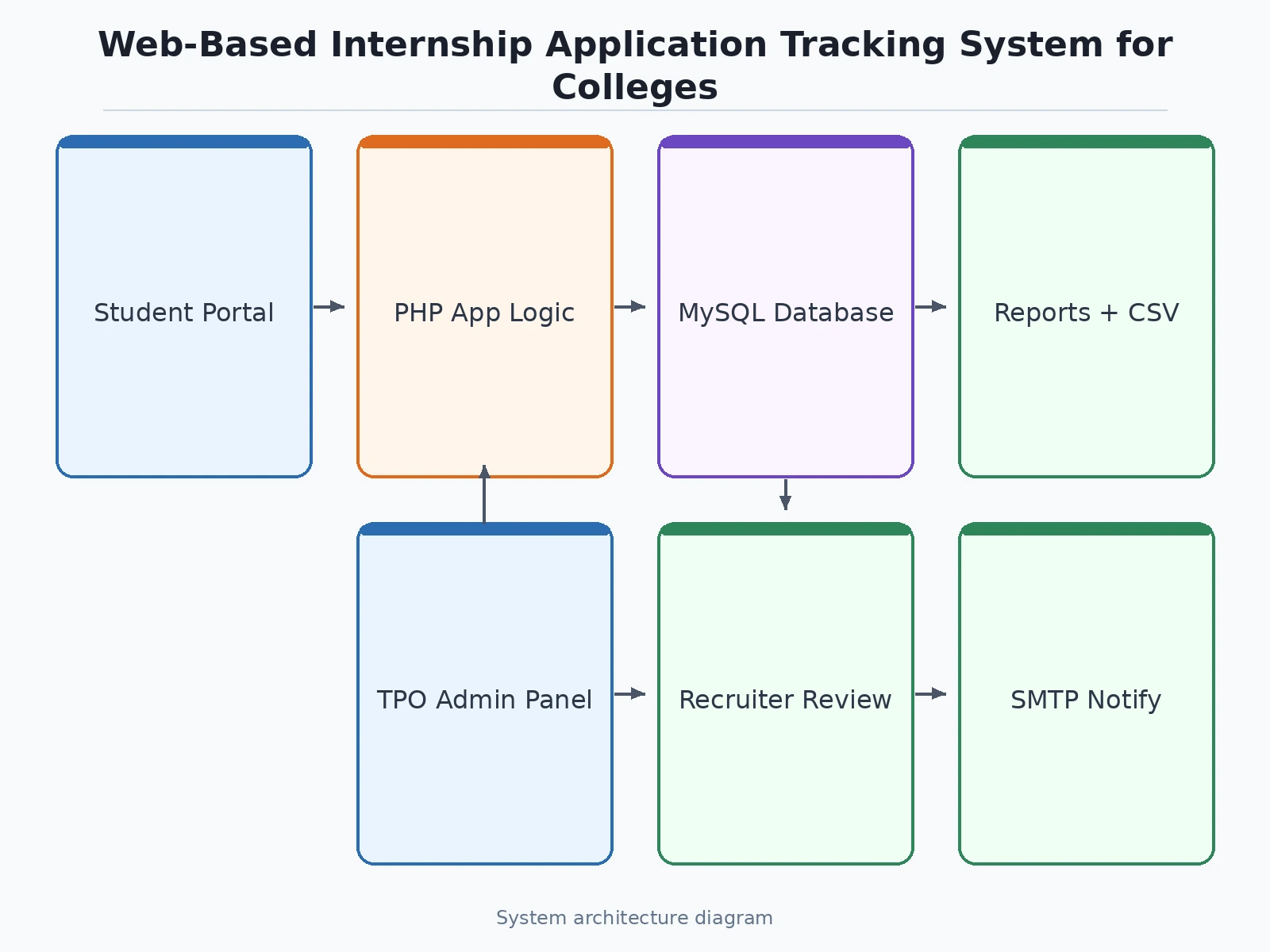
A student logs in and sees verified internship listings on the dashboard; the browser sends the request to the PHP backend, which checks the student's role and branch eligibility, queries the MySQL database for open listings, and returns them with stipend, deadline and mode. When the student clicks Apply, the backend attaches the stored resume, inserts one row in the applications table and one row in the application_history table inside a single database transaction, then sets the status to Applied. The TPO and the recruiter see the new application on their own screens because all three roles read the same tables. When the recruiter shortlists the student, the backend again writes the history row first and then updates the status, and the notification module emails the student; an interview slot is stored the same way, and the final selection or rejection closes the pipeline with a complete, auditable trail behind it.
- The TPO logs in to the admin panel and publishes a verified internship listing with role, stipend, location, mode, duration, eligibility and deadline.
- Students browse open listings on their dashboard, filter by mode or type, and check the deadline and branch eligibility before applying.
- The student applies in one click; the system attaches the stored resume and creates the application in the Applied stage with a timestamp.
- The recruiter reviews the application and resume, then shortlists or rejects; each decision writes a history record before the status changes.
- Shortlisted students are scheduled for interviews from the admin panel; date, time and mode are stored and emailed to the student and the recruiter.
- After the interview, the recruiter marks the student Selected or Rejected; the TPO sees the outcome, the student sees it on their tracker, and the offer letter is stored against the application.
- The TPO exports placement reports — applications by branch, selections per company, interviews pending — as CSV for the placement record.
Tech stack:
- HTML5 · CSS3 · JavaScript
- PHP 8 (backend and role-based sessions)
- MySQL 8 (listings, applications, history, interviews)
- Apache web server · XAMPP local stack
- PHPMailer (SMTP email notifications)
- CSV export (placement reports)
- Git
| Parameter | Value |
|---|---|
| User roles | 3 (Student, TPO admin, Company recruiter) |
| Application pipeline stages | 5 (Applied, Shortlisted, Interview, Selected, Rejected) |
| Database tables | 8 (users, listings, applications, application_history, interviews, documents, notifications, reports) |
| Demo seed data | 12 listings · 48 applications · 6 scheduled interviews |
| Resume upload | PDF or DOC, up to 2 MB (design limit) |
| Page response | Design target under 2 seconds on local XAMPP |
| Concurrent users | Approximately 50 on shared hosting (design target) |
| Hosting | PHP 8 + MySQL 8 shared hosting or local XAMPP |
| Browsers supported | Current Chrome, Firefox and Edge |
Project features
The system is built around four capabilities that carry the whole internship workflow: verified internship listings that only the TPO can publish, a one-click application flow with resume upload, a five-stage status pipeline shared by the student, the TPO and the recruiter, and placement reporting that turns the application data into branch-wise counts and CSV exports. Around those four, the system adds role-based logins, interview scheduling with notifications, and a document store for resumes and offer letters. The demo shipped with this project seeds 12 internship listings, 48 student applications and 6 scheduled interviews, so every screen can be shown working with realistic data instead of empty tables. Each feature below is implemented in the delivered build — nothing listed here is a future plan — and the admin panel, tracker and student dashboard all read the same MySQL tables, so a change made in one place is visible everywhere immediately.
- [Verified internship listings] The TPO creates and publishes each listing with role, company, stipend, location, mode, duration, eligibility and deadline, and only published listings are visible to students, so no unverified posting ever reaches an applicant.
- [One-click application with resume upload] A student applies from the listing itself; the system attaches the resume already stored on their profile (PDF or DOC, up to 2 MB) and creates the application in the Applied stage with a timestamp.
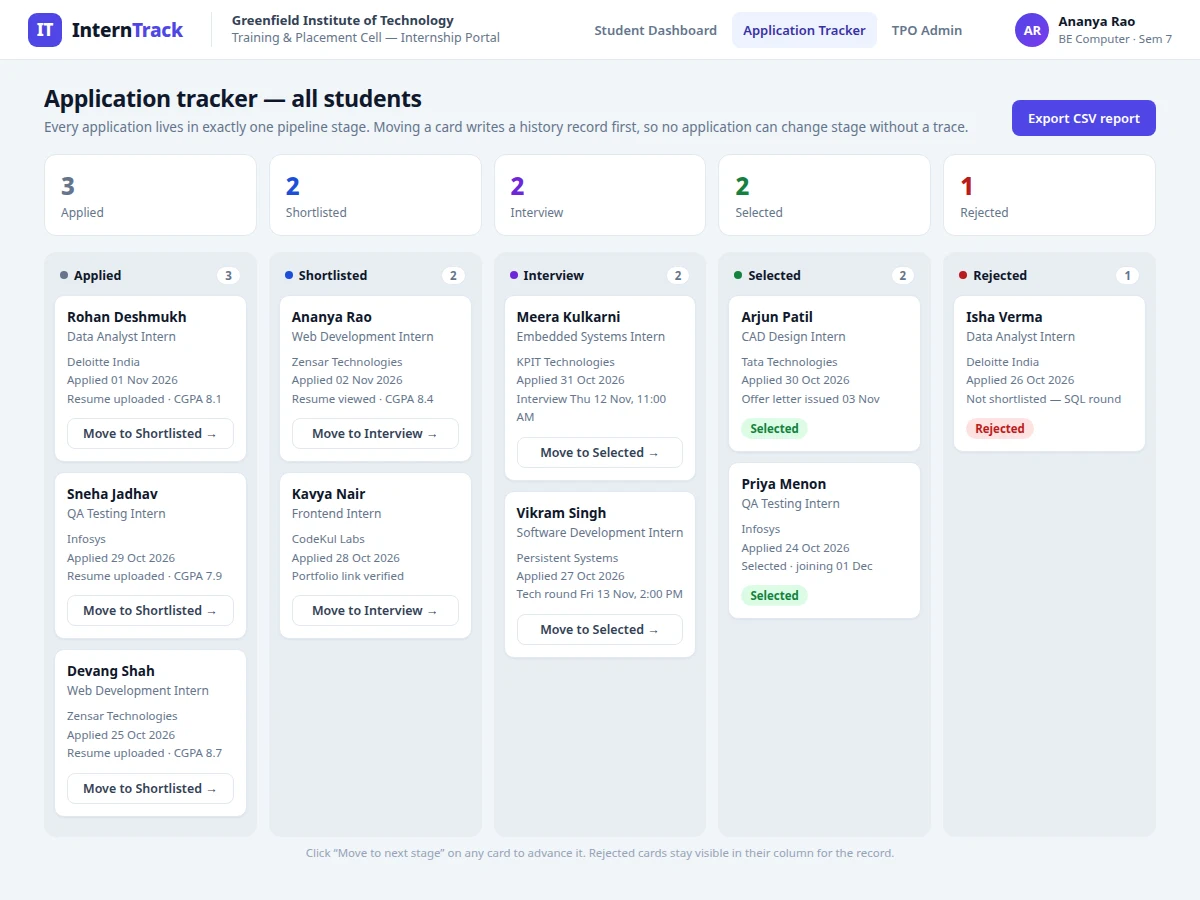
- [Five-stage application pipeline] Every application sits in exactly one stage — Applied, Shortlisted, Interview, Selected or Rejected — shown as a kanban tracker to the student, the TPO and the recruiter, so all three see the same state.
- [History-first status changes] Each status change writes a row to the application_history table before the status column is updated, and the whole update rolls back if the history write fails, so an application can never show a new status without a record of how it got there.
- [Interview scheduling and notifications] The TPO or recruiter proposes an interview date, time and mode (online or on-site); the student sees it on their dashboard and both sides receive an email notification through the configured SMTP account.
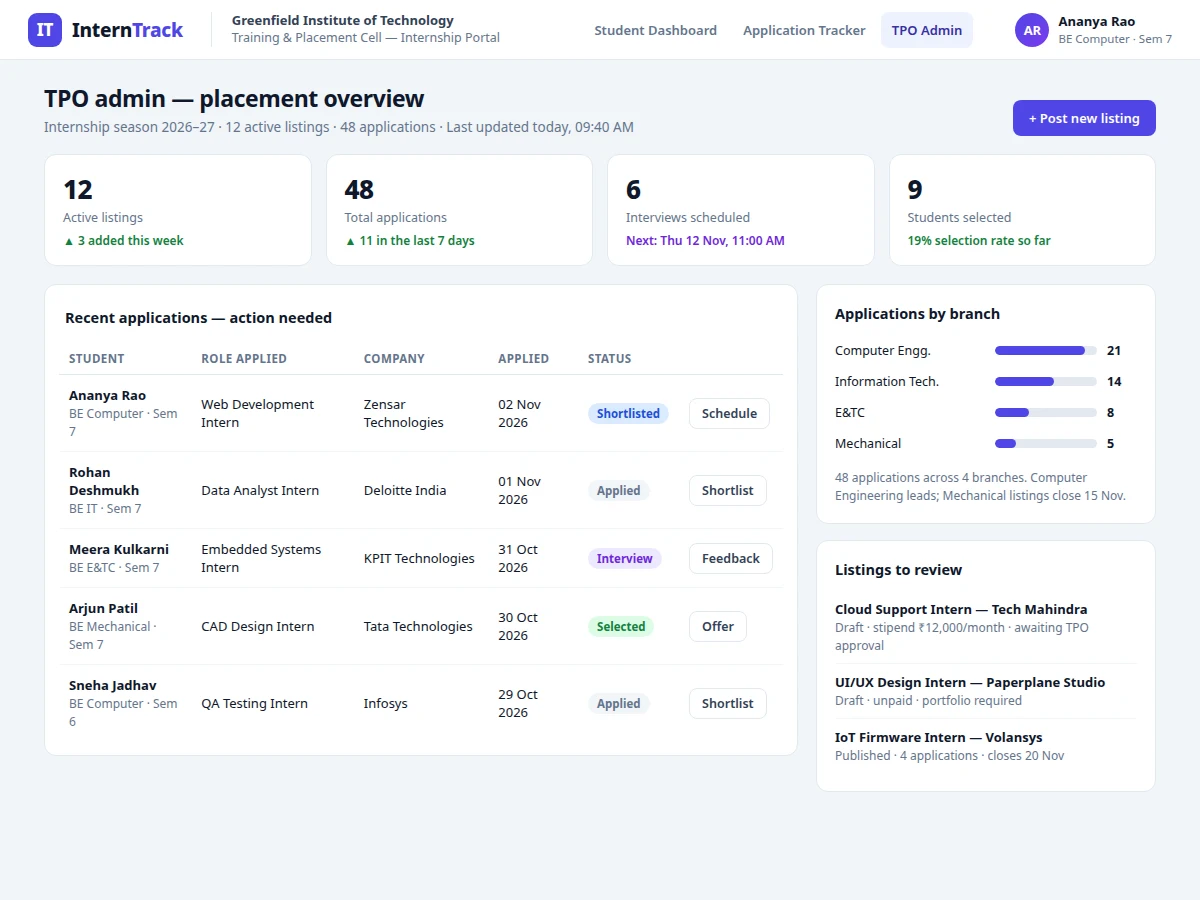
- [TPO admin panel and reports] The admin sees live counts of listings, applications, interviews and selections, applications by branch, and a list of applications needing action, with one-click CSV export of the full application register.
- [Document store] Resumes, shortlisted notices and offer letters are stored per application, so the file a recruiter reviewed is the same file the student uploaded — nothing is re-sent by email.
What is included
- Complete source code (PHP backend, MySQL schema, HTML/CSS/JavaScript frontend)
- Database with 8 tables and seed data (12 listings, 48 applications, 6 interviews)
- Student dashboard with listing search, filters and one-click apply
- Application tracker kanban with history-first status changes
- TPO admin panel with placement statistics and CSV report export
- Resume upload, document store and interview scheduling modules
- Email notification module (PHPMailer, SMTP configured by the college)
- Project report PDF (background, methodology, schema, testing, results)
- PPT presentation for final review
- Viva Q&A preparation document (sessions, roles, transactions, SQL design)
Limitations & prerequisites
- Resume screening is manual; the system does not auto-score resumes or match skills to listings.
- Email delivery depends on an SMTP account configured by the college; without it, notifications appear in-app only.
- Interview scheduling needs the recruiter to confirm slots; there is no automatic sync with Google Calendar in the base build.
- One active application per student per company; withdrawing and re-applying resets the application's place in the pipeline.
- The build is designed for a single college; multi-college support with separate TPO admins is an optional extension.
- Stipend and deadline values in the demo are fictional sample data; real listings must be verified by the TPO before publishing.
- The system tracks applications only; it does not conduct interviews, run coding tests or verify company credentials.
Frequently Asked Questions
Is this project suitable for a final-year project?
Yes, it is a strong fit for Computer Science, IT and Web Development students because it demonstrates the full web stack in one working system: role-based login, CRUD operations, file upload, relational database design with transactions, email notifications and reporting. The report and viva kit explain each design decision, including why status changes are written to a history table before the status itself is updated.
What can each of the three roles do?
Students browse verified listings, apply with their stored resume, track each application through all five pipeline stages and view their scheduled interview slots. The TPO admin publishes listings, shortlists applicants, schedules interviews, and exports placement reports as CSV for the placement record. Company recruiters see only the applications assigned to their company, review resumes, shortlist candidates and record interview outcomes. No role can see or change another role's screens, because every page checks the logged-in role on the server before rendering.
How does the application status pipeline work?
Every application sits in exactly one of five stages — Applied, Shortlisted, Interview, Selected or Rejected — and all three roles read the same status from one database table. A status change is a database transaction: the system writes a row to the application_history table first and only then updates the status column, so if the history write fails the whole update rolls back. That is the mechanism that stops an application from ever showing a new status without a record of how it got there, which is the most common failure in spreadsheet-based tracking.
Can the TPO export placement reports?
Yes — the admin panel shows live counts of listings, applications, interviews and selections, plus applications by branch, and exports the full application register as a CSV file with one click. The export can be filtered by company, branch or status before download, so the placement record for a review meeting is ready in seconds. The demo's export covers 48 applications across 4 branches.
Can this project be hosted online?
Yes, it runs on any standard PHP 8 and MySQL 8 shared hosting account, and locally on XAMPP for the viva demonstration. The setup guide covers creating the database, importing the schema and seed data, and configuring the SMTP account for email notifications. No paid service is required to run the base build, and the demo runs from a single folder with no build step.
Can more modules be added later?
Yes, the codebase is structured so new modules plug into the same tables and roles without breaking existing screens. Common additions are skill-based listing filters, a coding-test link per application, Google Calendar sync for interviews, and a mobile-friendly student view. Each addition is quoted separately, since it changes the database schema and the admin screens.
Components & software requirements
- HTML5 · CSS3 · JavaScript
- PHP 8 (backend and role-based sessions)
- MySQL 8 (listings, applications, history, interviews)
- Apache web server · XAMPP local stack
- PHPMailer (SMTP email notifications)
- CSV export (placement reports)
- Git
Delivery information
Built-to-order project. Delivery timeline is shared after order confirmation based on current queue.
Support terms
Complete documentation, setup guide, and viva preparation included. Support for setup and explanation provided.
Download free synopsis (PDF)
Enter your name and WhatsApp number — the synopsis PDF downloads immediately. We may send occasional project updates on WhatsApp; no spam.