
More project photos (2)
The problem
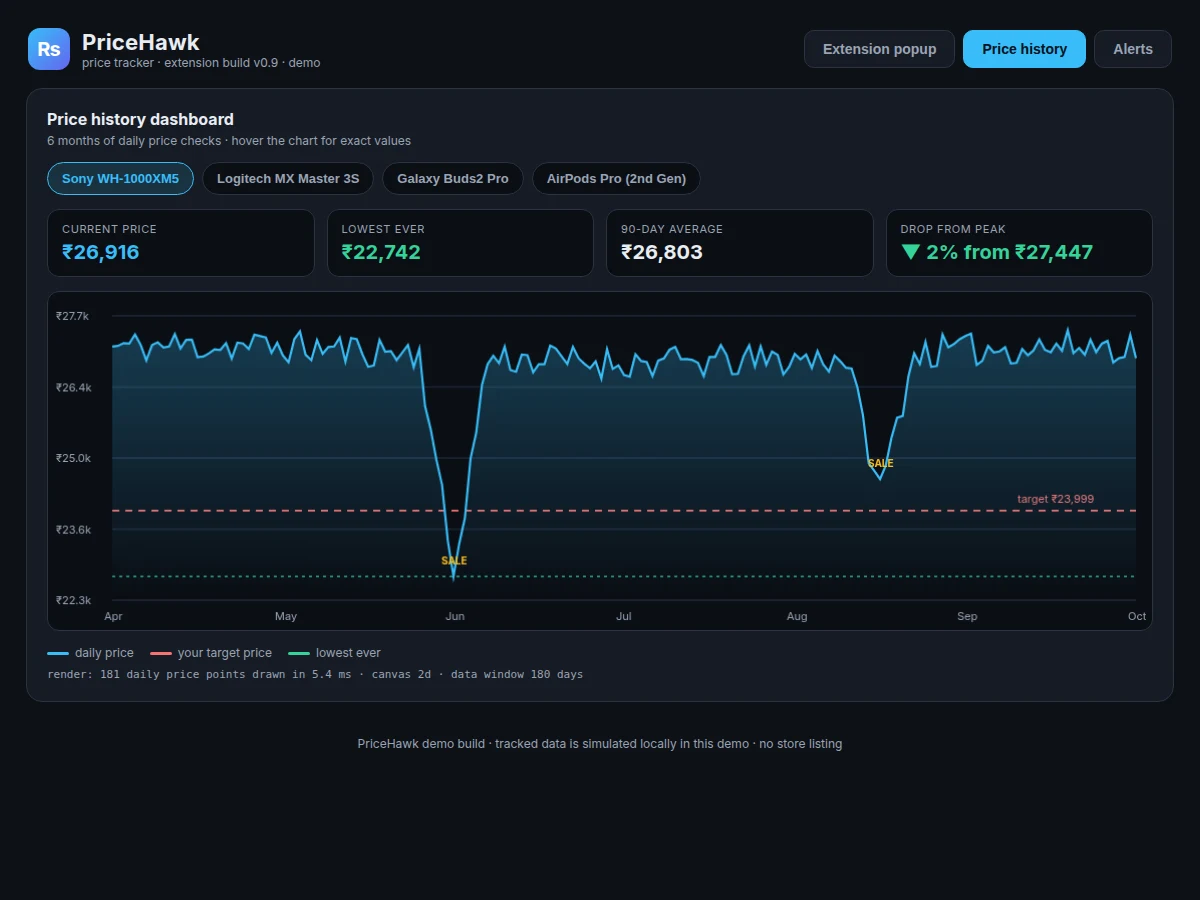
A price tracker browser extension is a small browser add-on that watches e-commerce prices for you and tells you when to buy. This project builds that: PriceHawk reads the price on any supported product page, records one reading per check, and charts six months of daily history so inflated "sale" prices are visible at a glance. Shoppers lose money to fake discounts — a strikethrough MRP of ₹34,990 next to a ₹26,990 price looks like a deal until history shows the product sold for ₹22,742 two months earlier. Sites rarely publish that history, and prices can swing 10–20% in a week around festival sales. PriceHawk automates it: set a target price or a drop percentage once, and the extension checks in the background every six hours, then pushes a browser notification and email the moment your rule triggers. A dashboard ranks every tracked product by current price, lowest ever and 90-day average, turning bargain hunting from guesswork into data.
E-commerce price tracking is also a strong engineering topic: it combines browser extension development (Manifest V3, content scripts, background service workers), resilient web extraction across changing page markup, time-series storage in SQLite, canvas-rendered data visualisation, and a rule-based alerting engine with push and email delivery. The built-to-order build ships the extension, the dashboard web app, the checker backend and a complete report.
The e-commerce product page the student is viewing. The content script reads the price straight from this page's DOM.
Follow the working sequence
How it works
The pipeline runs in six stages. First, a content script injected into the product page extracts the price: the extractor keys off stable attributes like data-asin rather than fragile CSS class names, because marketplace markup changes weekly (a builder note from the demo build: Amazon serves different markup to headless clients, so the extractor never trusts class names). Second, the reading is sent to the backend, which validates it (rejecting obvious misreads like ₹0) and appends it to that product's time series in SQLite. Third, the dashboard aggregates the series on demand — lowest-ever, 90-day average, drop-from-peak — and renders the canvas chart. Fourth, after every scheduled check the alert engine evaluates each product's rules: below-target triggers immediately, and drop-percentage rules compare today's reading against yesterday's. Fifth, triggered rules produce a browser push notification via the Web Push API and queue an email through the digest sender. Sixth, the notification log records every firing for a full audit trail.
- The user pastes a product URL or clicks the extension icon on a product page; the popup parses the URL pattern and registers the product.
- A content script runs on the product page and extracts the price using data-attribute-keyed selectors, resilient to weekly markup changes.
- The background service worker re-checks every tracked product every 6 hours and posts each reading to the backend API.
- The backend validates each reading (rejecting ₹0 misreads), appends it to the product's 180-day time series in SQLite, and timestamps the check.
- The dashboard aggregates lowest-ever, 90-day average and drop-from-peak, and renders the 181-point canvas chart with target and sale markers.
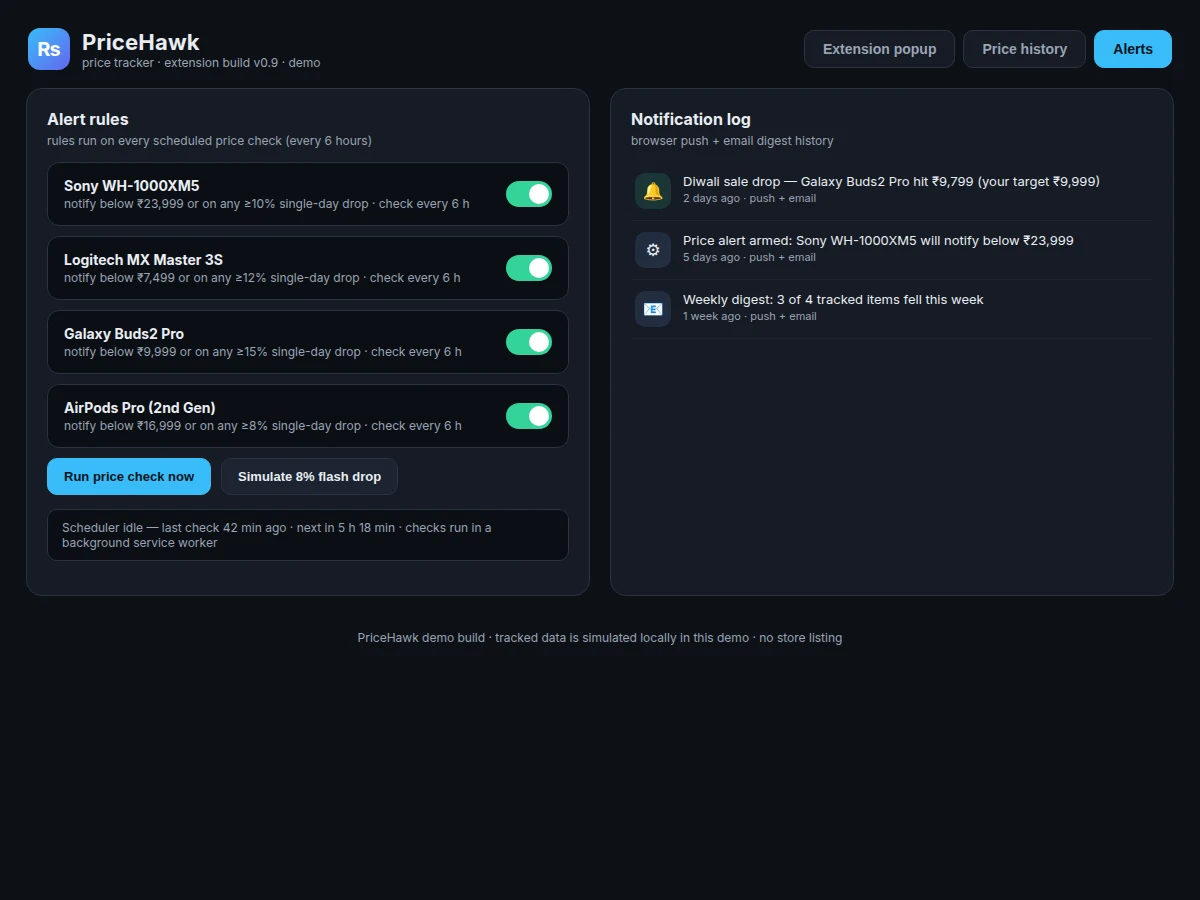
- The alert engine evaluates every rule after each check — below-target and single-day drop-percentage — and fires matching ones.
- Fired alerts go out as browser push notifications plus a queued email digest, and are recorded in the notification log.
Tech stack:
- JavaScript (ES2020), HTML5, CSS3
- Chrome Extension Manifest V3 (content scripts, service worker)
- Node.js + Express (checker API)
- SQLite (price time-series store)
- Canvas 2D (history chart rendering)
- Web Push API (browser notifications)
- Nodemailer (email digest)
- Git
| Parameter | Value |
|---|---|
| Extension platform | Chrome / Edge via Manifest V3 (design target) |
| Check cadence | Every 6 hours, 4 checks/day (design target) |
| History window | 180 days of daily readings per product (design target) |
| Chart render | 181 data points in ~5 ms (measured in the demo build, headless Chromium) |
| Alert channels | Browser push notification + email digest |
| Alert rule types | 2 (below target price, single-day drop %) |
| Storage per product | Approximately 15 KB for 180 readings (expected) |
| Extraction method | data-attribute-keyed selectors (builder note: ignores fragile class names) |
| Demo dataset | 4 products × 181 daily readings (simulated locally in the demo) |
Project features
PriceHawk's four headline capabilities are one-click tracking from any product page, a 180-day price-history chart, target-price and drop-percentage alert rules, and background scheduled checks. One-click tracking means pasting or auto-detecting a product URL adds it to the watchlist with its first price captured immediately — no account needed. The history chart renders six months of daily readings with the target-price line, lowest-ever line and sale-event markers, and hovering any point shows the exact price and date. Alert rules are the heart of the product: notify below a target price, or on any single-day drop above a chosen percentage, delivered by browser push and email digest. Behind it all, a background service worker runs the checker every six hours without the browser tab being open, keeping every series fresh — the same cadence a human would need but never sustain.
- [One-click product tracking] Paste a product URL (or click the extension on a product page) and the item joins the watchlist with its first price captured immediately; the demo parses Amazon /dp/, Flipkart /p/ and generic slugs.
- [180-day price-history chart] Canvas-rendered chart of daily readings with target-price line, lowest-ever line and sale markers; hover shows the exact price and day. The demo draws 181 points in ~5 ms.
- [Target-price alerts] Set a target price per product; the engine fires a browser push notification and queues an email the moment a check comes in below it.
- [Drop-percentage alerts] Get notified on any single-day drop above your threshold (e.g. ≥10%), catching flash sales even when the price stays above your target.
- [Background scheduled checks] A service worker re-checks every tracked product every 6 hours (4 checks/day) without any tab open; the dashboard shows last-check and next-check times.
- [Tracked-products dashboard] Every product with current price, 7-day change badge, lowest-ever, 90-day average and drop-from-peak in one sortable view.
- [Notification log] Full history of every alert fired — what dropped, to what price, when — with push + email delivery records.
What is included
- Browser extension source (Manifest V3: popup, content script, background service worker)
- Price-checker backend API (Node.js + Express) with SQLite schema
- Price-history dashboard web app with interactive canvas chart
- Alert engine with target-price and drop-percentage rules, push + email delivery
- Working single-file demo app with 4 tracked products and 180 days of simulated history
- Project report PDF (background, architecture, extraction strategy, evaluation)
- PPT presentation for final review
- Viva Q&A preparation document (extensions, service workers, web extraction, time-series storage)
Limitations & prerequisites
- Retail sites actively fight scraping: heavy anti-bot pages may need manual re-verification, and markup changes can break an extractor until its selectors are updated.
- Prices behind login walls (cart-only or account-specific prices) cannot be read by the content script as shipped.
- Check cadence is 4/day by design — intra-day flash sales shorter than 6 hours can be missed between checks.
- Email alerts depend on the configured SMTP sender; free-tier senders typically cap at ~100–300 emails/day (provider limit).
- The demo's 180-day history is simulated locally; the shipped build starts recording from installation day and needs ~2 weeks before its charts look meaningful.
- Manifest V3 service workers are event-driven and may be suspended by the browser; checks resume on the next scheduled alarm, not at exact wall-clock times.
Frequently Asked Questions
Which websites does the price tracker work on?
The built-to-order build ships dedicated extractors for Amazon.in, Flipkart and Croma, because each marketplace structures its product pages differently and a single shared parser cannot cover all three reliably. A generic fallback extractor scans for common price patterns on other sites, though it is less robust and may need per-site tuning after delivery. Adding a new site means writing one extractor module — a clean, well-scoped extension task for the viva demo.
How does the extension read the price from a page?
A content script runs inside the product page and pulls the price straight from the DOM using data-attribute-keyed selectors, such as data-asin on Amazon, instead of CSS class names that marketplaces change frequently. Every reading is sanity-checked before storage, so a ₹0 or empty misread is discarded rather than polluting the product's history. This two-layer approach — stable selectors plus validation — is what keeps months of history trustworthy.
Can Amazon or Flipkart block the extension?
Yes — retail sites actively fight scraping, and that is the honest engineering risk in this project rather than a solved problem. The build mitigates it with human-like check spacing of one reading every six hours, data-attribute selectors instead of fragile class names, and per-site extractor modules that can be updated independently when markup changes. The report documents this cat-and-mouse reality and the maintenance strategy, which makes for a stronger viva discussion than a claim of invincibility.
How do price-drop alerts reach me?
Through two channels: an instant browser push notification the moment a scheduled check triggers your rule, and an email digest summarising the day's drops across all tracked products. Rules are set per product — a target price, a single-day drop percentage, or both — and every firing is recorded in the notification log with the price and time. Push covers urgency; email covers the case where the browser was closed.
Is this project suitable for a final-year project?
Yes — for Computer Science and IT programs, because it combines five examinable engineering areas: browser extension development, resilient web data extraction, time-series storage, data visualisation, and a rule-based alerting system. It also has a genuine everyday use case that is easy to demonstrate live in the viva, which makes the presentation far stronger than a purely theoretical topic. The report, PPT and Q&A document are prepared with the build.
Components & software requirements
- JavaScript (ES2020), HTML5, CSS3
- Chrome Extension Manifest V3 (content scripts, service worker)
- Node.js + Express (checker API)
- SQLite (price time-series store)
- Canvas 2D (history chart rendering)
- Web Push API (browser notifications)
- Nodemailer (email digest)
- Git
Delivery information
Built-to-order project. Delivery timeline is shared after order confirmation based on current queue.
Support terms
Complete documentation, setup guide, and viva preparation included. Support for setup and explanation provided.
Download free synopsis (PDF)
Enter your name and WhatsApp number — the synopsis PDF downloads immediately. We may send occasional project updates on WhatsApp; no spam.