
More project photos (2)
The problem
Duplicate files eat disk space on almost every student's laptop: the same PDF downloaded three times, phone backups copied into two folders, WhatsApp forwards saved alongside camera originals, installers left in Downloads after use. Windows search cannot find byte-identical files scattered across folders, and manual cleanup is slow and risky — delete the wrong copy and a submission or a photo is gone. This project solves that with a desktop application. The user picks one or more folders; the app enumerates every file, groups candidates by size (a fast pre-filter, since files of different sizes can never be identical), then hashes each candidate with SHA-256 in chunked reads. Files with equal hashes are exact duplicates, grouped together with their paths, sizes and dates. Photos additionally get 64-bit perceptual hashes, so resized, recompressed, cropped or black-and-white versions of the same picture are flagged as near-duplicates with a similarity score. The app totals the reclaimable space, pre-selects every copy except one protected original, and deletes only to the OS Recycle Bin after explicit confirmation — nothing is ever destroyed silently.
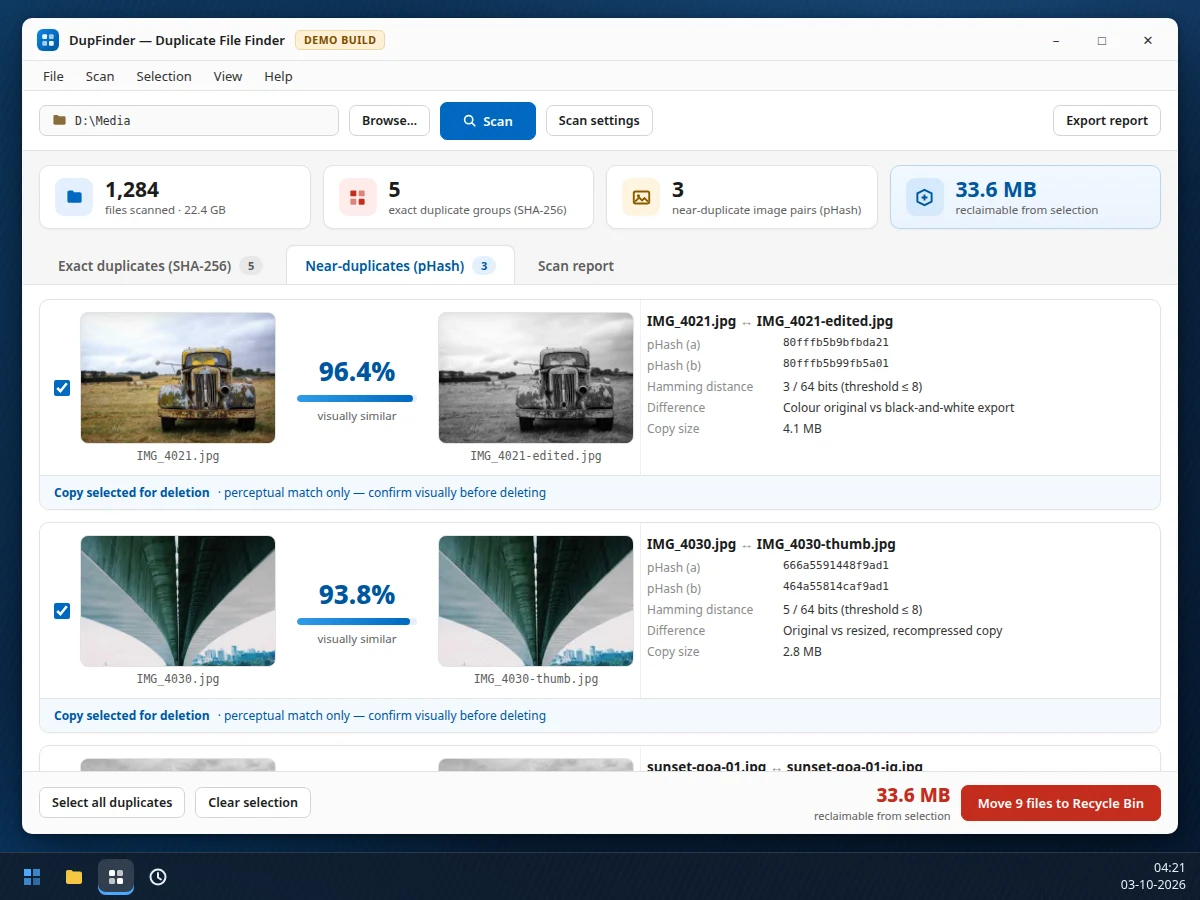
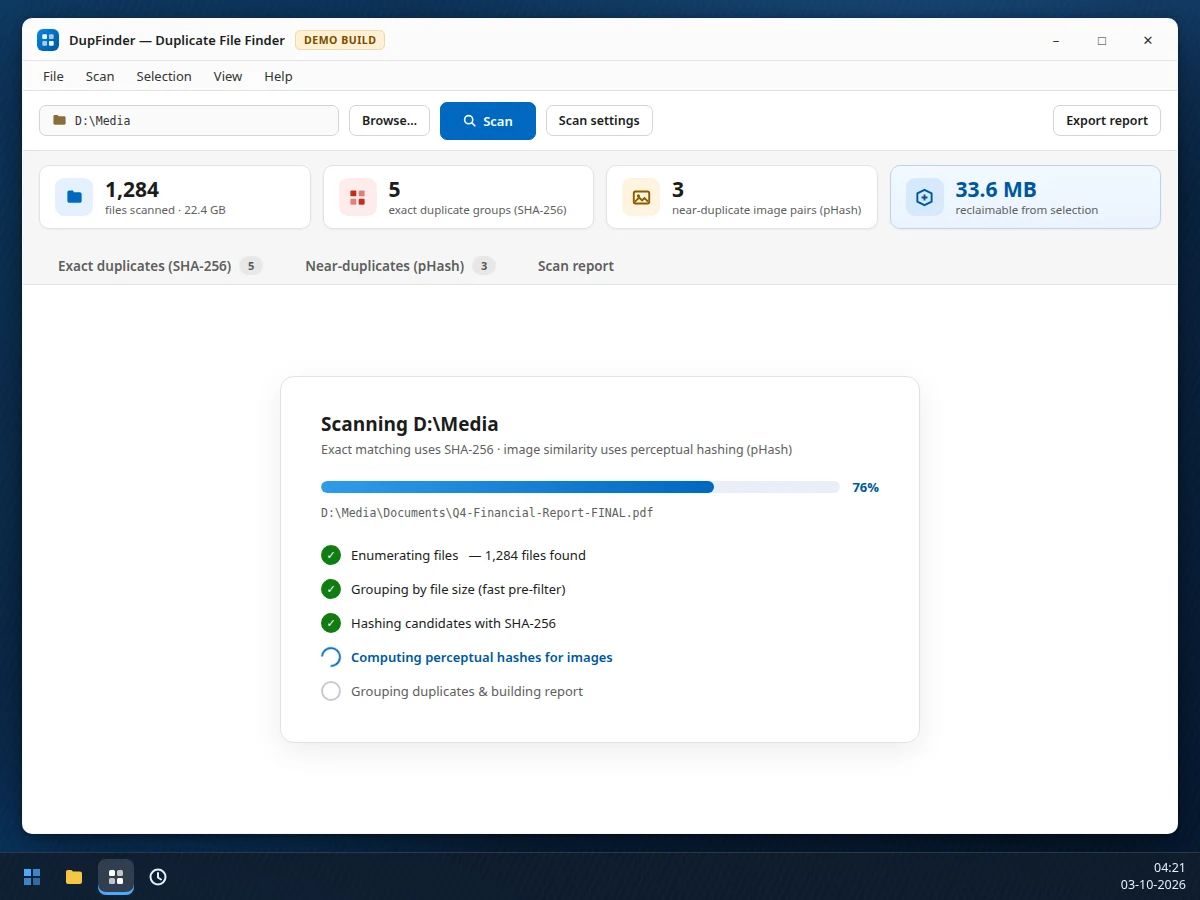
Selects root folders and reviews duplicate groups before confirming deletion.
Follow the working sequence
How it works
- The user selects one or more root folders; the app enumerates all files recursively, skipping system, hidden and user-excluded folders.
- Files are grouped by exact byte size. Any size that occurs only once cannot be a duplicate, so those files are never hashed — the fast pre-filter.
- Each remaining candidate is read in fixed-size chunks and hashed with SHA-256; files producing the same 256-bit digest are grouped as exact duplicates.
- Image files additionally get a 64-bit perceptual hash (DCT-based pHash); every pair whose hashes differ by no more than the configured Hamming-distance threshold is listed as a near-duplicate with a similarity score.
- Results are presented per group: one copy (the newest) is auto-marked "Kept" and locked, the rest are pre-selected, and the reclaimable space is totalled live.
- The user reviews groups, adjusts the selection, and confirms — selected files are moved to the OS Recycle Bin via the platform API, and the scan report can be exported.
Tech stack:
- Python 3
- PySide6 (Qt) desktop GUI
- SQLite (scan cache)
- hashlib (SHA-256)
- Pillow + ImageHash (pHash)
- send2trash (Recycle Bin API)
- reportlab (PDF reports)
- PyInstaller (packaging)
| Parameter | Value |
|---|---|
| Platform | Windows 10/11 desktop (design target) |
| Exact matching | SHA-256 over full file bytes, chunked reads (design target) |
| Speed pre-filter | Byte-size grouping; unique sizes skip hashing (design target) |
| Image similarity | 64-bit DCT pHash, Hamming-distance threshold ≤ 8, configurable |
| Scan scale | Design target: 100,000+ files per scan |
| Hash throughput | Design target: approximately 1 GB/min on a typical laptop SSD (not a measured claim) |
| Memory use | Chunked streaming; design target under 200 MB during scans |
| Deletion safety | Via OS Recycle Bin — recoverable; originals never auto-deleted |
| Scan cache | SQLite store of path, size, mtime and hash — unchanged files skip re-hashing |
| Reports | CSV and PDF export |
| Packaging | Single-file executable via PyInstaller (design target) |
Project features
- [SHA-256 exact-duplicate detection] Every candidate file is hashed with SHA-256 over its full bytes, read in chunks so multi-gigabyte files never load fully into memory. Files sharing a hash are byte-identical, grouped with path, size and modified date.
- [Size pre-filtering] Files are first grouped by byte size; files with a unique size skip hashing entirely. This is the standard fast path that keeps scans practical on large drives.
- [Perceptual image matching (pHash)] Each photo also gets a 64-bit perceptual hash. Pairs within a configurable Hamming-distance threshold (default 8 bits) are flagged as near-duplicates — catching resized, recompressed, cropped and filtered copies that SHA-256 alone would miss.
- [Reclaimable-space accounting] Every group shows the space its redundant copies waste; a running total updates live as the user changes the selection.
- [Safe selective deletion] One copy per group is auto-marked "Kept" and locked; deletion moves selected files to the OS Recycle Bin, so any mistake is recoverable from the bin.
- [Side-by-side visual review] Near-duplicate pairs render both thumbnails with the similarity percentage, both pHash values, the Hamming distance and a note on the detected difference — the user confirms visually before deleting.
- [Scan reports] The full result set — summary counts, per-group file lists, reclaimable space by file type — exports to CSV and PDF for the project report.
What is included
- Complete Python source code for the desktop application (scan engine, GUI, reports)
- SQLite scan-cache schema and migration notes
- Sample scan dataset description and demo walkthrough script
- Setup instructions (dependencies, virtual environment, running from source)
- PyInstaller packaging script for the single-file executable
- Project report PDF (background, hashing theory, methodology, design, testing procedure)
- PPT presentation for final review
- Viva Q&A preparation document (hashing, pHash, file systems, Qt)
Limitations & prerequisites
- Perceptual hashing is CPU-bound: a library of tens of thousands of photos takes minutes to tens of minutes to hash on a laptop — stated as a design expectation, not a measured benchmark.
- The near-duplicate threshold is heuristic. The default (Hamming distance ≤ 8) is a starting point; visually different images can occasionally match and heavily edited copies can miss, so visual confirmation before deleting is mandatory.
- SHA-256 finds byte-identical files only. The same picture saved as JPEG and as PNG is not an exact match — that case is covered by pHash, not by the exact-duplicates tab.
- Encrypted containers, password-protected archives and cloud-only files that are not synced locally are not scanned.
- Network drives and removable media work but scan slower; the media must stay connected for the whole scan.
- Deletion goes to the Recycle Bin, which is recoverable — but emptying the Recycle Bin afterwards is irreversible, per standard OS behaviour.
Frequently Asked Questions
How does the exact duplicate detection actually work?
Files are first grouped by byte size — different sizes can never be identical, so unique sizes skip the expensive step. Remaining candidates are read in chunks and hashed with SHA-256; files with equal 256-bit digests are byte-identical. The report shows the full hash per group so the mechanism is auditable.
What is perceptual hashing, and what counts as a near-duplicate?
A perceptual hash reduces a photo to a 64-bit fingerprint of its visual structure (via a discrete cosine transform), so minor edits barely change it. Two photos whose fingerprints differ by at most 8 bits (configurable) are flagged — this catches resized, recompressed, cropped and black-and-white versions of the same picture.
Is it safe? Can I lose an important file?
The app never deletes silently. One copy per group is auto-marked "Kept" and locked against selection, and deletion moves files to the OS Recycle Bin through the platform API — anything removed can be restored from the bin until the bin is emptied.
Does it need the internet, and which systems does it run on?
It is fully offline — hashing and the SQLite cache are all local, and no file content ever leaves the machine. The packaged build targets Windows 10/11; the Python source runs anywhere PySide6 installs.
Can it find duplicates across different drives or folders?
Yes. You select any number of root folders — different drives, an external disk, a phone-backup folder — and grouping is global across all of them, so a copy on C: and a copy on D: land in the same group.
Is this project suitable for a final-year project?
Yes — for Computer Science, IT and Software Engineering programs. It demonstrates cryptographic hashing, perceptual image hashing, file-system traversal, desktop GUI development with Qt, and safe destructive-operation UX, all in one coherent build. Suitable for B.E./B.Tech final-year projects in Computer Science, Information Technology and Software Engineering.
Components & software requirements
- Python 3
- PySide6 (Qt) desktop GUI
- SQLite (scan cache)
- hashlib (SHA-256)
- Pillow + ImageHash (pHash)
- send2trash (Recycle Bin API)
- reportlab (PDF reports)
- PyInstaller (packaging)
Delivery information
Built-to-order project. Delivery timeline is shared after order confirmation based on current queue.
Support terms
Complete documentation, setup guide, and viva preparation included. Support for setup and explanation provided.
Download free synopsis (PDF)
Enter your name and email — the synopsis PDF downloads immediately. We may send occasional project updates; no spam, unsubscribe anytime.