
More project photos (2)
The problem
Students preparing for semester exams and placements typically revise from static notes or PDFs, re-reading everything with no sense of what they actually remember. Cognitive research on the spacing effect shows that recall improves when revision is timed to the forgetting curve — but almost no student manually schedules reviews that way, and generic flashcard apps either need an account, sync to the cloud, or hide scheduling behind a subscription. This project builds a fully offline Android flashcard app that implements the SM-2 spaced-repetition algorithm (the algorithm behind SuperMemo and Anki): each card carries an easiness factor, interval and repetition count, and every Again/Hard/Good/Easy grade recomputes when that card appears next. The result is a personal revision system where difficult cards return tomorrow and mastered cards fade out for weeks. Because all data lives in an on-device Room database, the app works in hostels and classrooms with no connectivity, and the statistics screen turns study history into review forecasts a student can plan around.
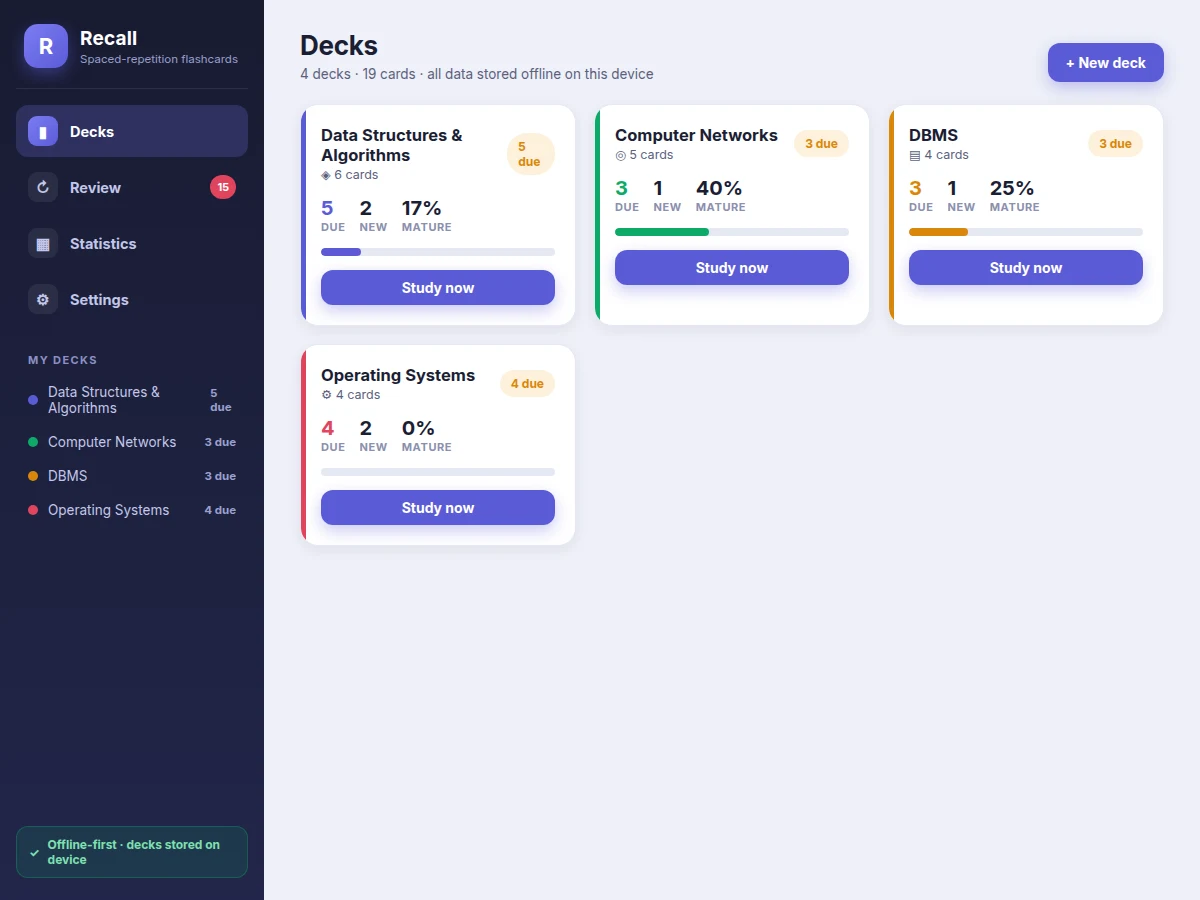
Student creating decks, reviewing cards and grading recall.
Follow the working sequence
How it works
- The student creates a deck (e.g. "Computer Networks") and adds two-sided cards — question on the front, answer on the back — optionally tagged by topic.
- New cards enter the review queue immediately; each carries SM-2 state (easiness 2.5, interval 0, repetitions 0) stored in the Room database.
- During a review session the app shows the front of each due card; tapping flips it to reveal the answer.
- The student grades recall honestly: Again (<3) resets repetitions and schedules a re-learn, while Hard/Good/Easy (3/4/5) grow the interval — 1 day, then 6 days, then interval x easiness factor.
- The easiness factor updates with the SM-2 formula (clamped at 1.3 minimum) so consistently hard cards return sooner and easy cards stretch further apart.
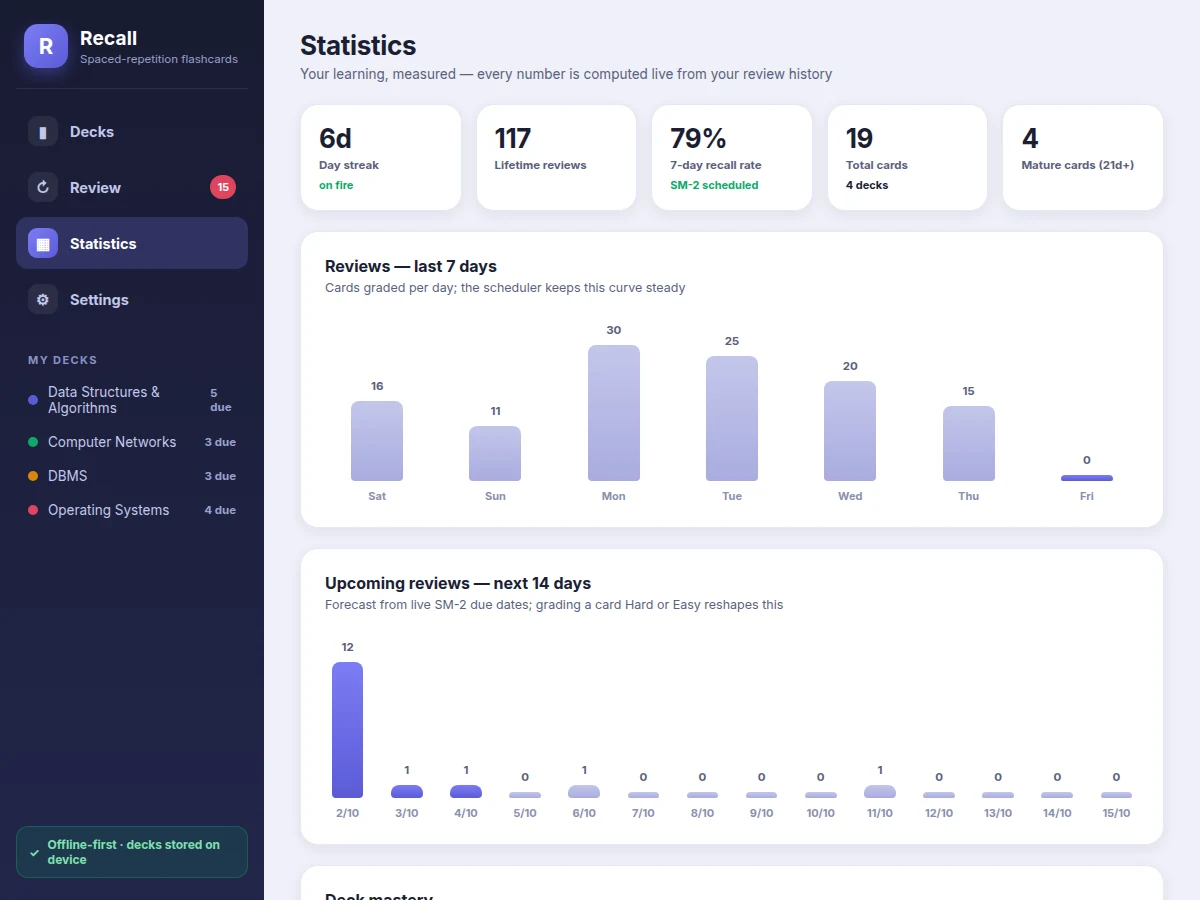
- The statistics screen aggregates the review log into streaks, recall rate, a 7-day activity chart and a 14-day forecast computed from live due dates.
- A WorkManager job fires a daily local reminder at the configured time; everything runs on-device with zero network calls.
Tech stack:
- Kotlin (Android)
- Android Jetpack: Room (SQLite), ViewModel, LiveData
- WorkManager (daily reminders)
- Android TextToSpeech API
- Material Design 3 components
- HTML/CSS/JavaScript (interactive screen demo)
| Parameter | Value |
|---|---|
| Platform | Android 8.0 (API 26) and above (expected) |
| Language | Kotlin |
| Local database | Room (SQLite), on-device only |
| Scheduling algorithm | SM-2 (easiness factor, interval, repetitions, lapse count) |
| Grades | 4 (Again / Hard / Good / Easy), mapped to SM-2 quality 0/3/4/5 |
| New-card interval sequence | 1 day, then 6 days, then interval x easiness (design target) |
| Easiness range | 1.3 minimum, starts at 2.5 (SM-2 standard) |
| Notifications | Local only via WorkManager; no server component |
| App size | Approximately 8-12 MB installed (expected) |
| Offline operation | 100% — zero network calls after install |
Project features
- [SM-2 spaced-repetition scheduler] Every card carries easiness factor, interval and repetition count; grading Again/Hard/Good/Easy recomputes the next due date with the classic SM-2 update rule, including easiness clamping and lapse handling.
- [Fully offline decks] All decks and review history live in an on-device Room (SQLite) database — no account, no cloud, no internet needed after install.
- [Graded review session] Tap-to-flip cards with a progress ring, cards-left counter, and four grade buttons that preview the resulting interval (<10 min, 4d, 6d, 20d) before you commit.
- [Statistics dashboard] Day streak, lifetime reviews, 7-day recall rate, last-7-days bar chart, 14-day review forecast and per-deck mastery — every number computed live from the review history.
- [Deck management] Create decks, add/edit/delete two-sided cards with tags, and browse each deck's card list with per-card status (New, Learning, Review, Mature) and next-due date.
- [Daily study reminder] A WorkManager-scheduled local notification nudges the student at a configurable time so the review streak survives busy weeks.
- [Text-to-speech read-aloud] Optional on-device TTS reads card fronts during review, useful for language decks and accessibility.
- [Import/export] Decks export to JSON for backup and sharing; cards can be bulk-imported from a simple CSV format.
What is included
- Complete Android app source code (Kotlin, documented)
- Room database schema and DAO layer with the SM-2 scheduling logic
- Interactive working demo of all app screens (decks, review, statistics, settings)
- Setup instructions (Android Studio build, install on device/emulator)
- Project report PDF (background, SM-2 theory, architecture, database design, testing notes)
- PPT presentation for final review
- Viva Q&A preparation document (spaced repetition, SM-2 math, Room vs SQLite, WorkManager, offline-first design)
Limitations & prerequisites
- The scheduler implements SM-2 as published; it does not learn per-user forgetting curves the way newer FSRS-based schedulers do.
- Text-to-speech quality and voice availability depend on the device's TTS engine — not all devices ship the same voices.
- Deck sharing is file-based (JSON/CSV); there is no multi-user sync or cloud backup in the base build.
- The reminder fires as a local notification only; exact timing can shift by minutes under Android's battery-optimization policies.
- Statistics describe past review behavior only — recall-rate figures are computed from the student's own grades, not from any standardized test.
- Built and tested against Android 8.0+; behavior on heavily customized OEM skins may vary.
Frequently Asked Questions
How does the spaced-repetition scheduling actually work?
Each card stores an easiness factor, an interval and a repetition count. Grading Again/Hard/Good/Easy applies the SM-2 update rule: failures reset the card to re-learning, passes grow the interval (1 day, then 6, then interval x easiness). The grade buttons preview the resulting interval before you tap, so the scheduling is fully transparent.
Does the app need the internet?
No. Every deck, card and review record lives in an on-device Room database, and reminders are local notifications. The app makes zero network calls after installation, so it works in hostels and classrooms without connectivity.
Is this an Anki clone?
It implements the same SM-2 algorithm family that Anki's default scheduler is based on, but it is a self-contained offline Android app built from scratch in Kotlin — no Anki account, no sync server, and a statistics screen designed around exam revision (streaks, recall rate, 14-day forecast).
Can I add my own subjects and cards?
Yes — that is the core workflow. Create a deck per subject, add two-sided cards with tags, and the scheduler takes over. Cards can also be bulk-imported from CSV, and whole decks export to JSON for backup.
Can this project be customized?
Yes. Realistic extensions include image/LaTeX support on cards, CSV import from question banks, a dark theme, per-deck scheduling settings, and an optional cloud-sync module — quoted separately since sync changes the architecture.
Is this project suitable for a final-year project?
Yes — for Computer Science, IT and mobile-application programs. It demonstrates mobile database design, a real scheduling algorithm with visible math, background work with WorkManager, and an offline-first architecture, all of which give strong viva material. Suitable for B.E./B.Tech final-year projects in Computer Science, IT and Mobile Application Development.
Components & software requirements
- Kotlin (Android)
- Android Jetpack: Room (SQLite), ViewModel, LiveData
- WorkManager (daily reminders)
- Android TextToSpeech API
- Material Design 3 components
- HTML/CSS/JavaScript (interactive screen demo)
Delivery information
Built-to-order project. Delivery timeline is shared after order confirmation based on current queue.
Support terms
Complete documentation, setup guide, and viva preparation included. Support for setup and explanation provided.
Download free synopsis (PDF)
Enter your name and email — the synopsis PDF downloads immediately. We may send occasional project updates; no spam, unsubscribe anytime.