
More project photos (2)
The problem
Missing doses is one of the most common reasons a treatment plan fails: elderly patients forget, busy adults skip, and almost nobody keeps a reliable record of what was actually taken. Phone alarms are a blunt tool — they ring once, are dismissed in a second, and reveal nothing about adherence patterns. This project builds MediRemind, a native Android app designed around exactly that gap. Each medicine is stored with its full schedule in an on-device Room database; WorkManager and AlarmManager fire exact-time notifications with Take and Snooze actions even when the phone is completely offline. Every action is written to a dose log, and a streak engine turns that log into motivation: a day-streak counter, a colour-coded adherence heatmap, and per-medicine adherence percentages. Because everything runs on-device with no server and no account, the app is private by design and keeps working with zero connectivity. The architecture — MVVM, repository pattern, notification channels — is precisely the stack Android vivas expect a student to be able to explain.
Adds medicines with dose times, then taps Take or Snooze on each reminder.
Follow the working sequence
How it works
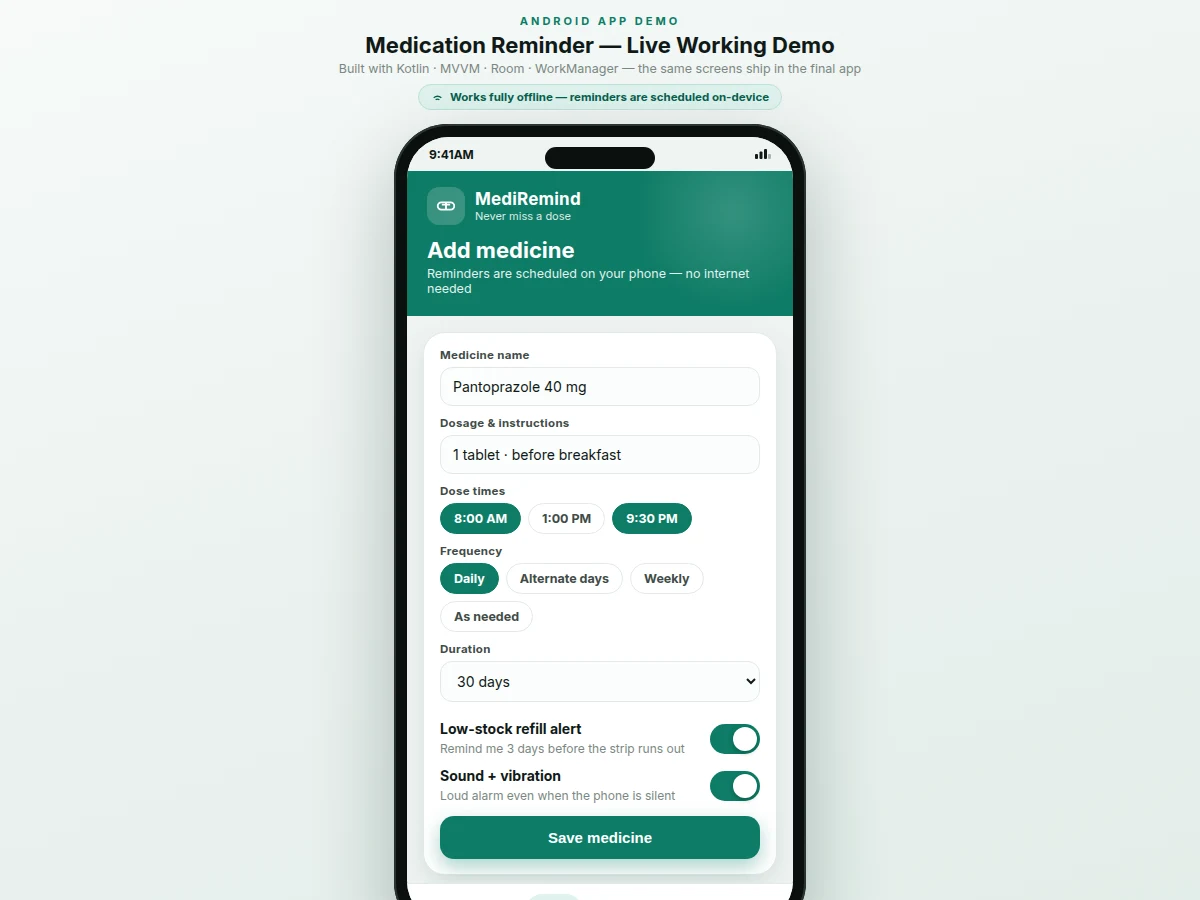
- The user adds each medicine with name, strength, dose times and frequency; the app stores it in a Room database and expands it into a schedule of dose events.
- For every dose event, WorkManager enqueues a one-shot worker for the exact dose time; a boot receiver re-registers all future doses after restarts so reminders survive reboots.
- When the time arrives, a high-priority notification fires with the medicine name, dosage and Take/Snooze actions — entirely on-device, with no internet required.
- Tapping Take writes a "taken" record with a timestamp to the dose log; tapping Snooze cancels the current alarm and enqueues a new one after the chosen delay while the dose stays pending.
- On every log change, the streak engine recomputes the day count and the adherence statistics, so the Today screen, heatmap and dashboard always reflect the latest state.
- All three screens — Today, Add medicine, Streak — read from the same Room database through an MVVM repository layer with LiveData, keeping every view consistent.
Tech stack:
- Kotlin
- Android Jetpack · Room database
- WorkManager · AlarmManager
- MVVM · LiveData · ViewModel
- Material Design 3
- Notification channels · BroadcastReceiver
- Gradle
- Git
| Parameter | Value |
|---|---|
| Platform | Android 8.0 (API 26) and above (design target — notification channels require API 26+) |
| Language | Kotlin |
| Local database | Room (SQLite), on-device only |
| Reminder engine | WorkManager one-shot workers + AlarmManager exact alarms |
| Internet dependency | None — all features work fully offline (design intent) |
| Notification timing | Expected within ~1 minute of the scheduled time (design target; depends on exact-alarm permission) |
| Dose times per medicine | Up to 6 per day (configurable) |
| Snooze options | 5 / 10 / 30 / 60 minutes (configurable) |
| Release APK size | Approximately 8–12 MB (expected) |
| Battery impact | Negligible — no persistent background service, only scheduled alarms (expected) |
Project features
- [Dose-due banner with Take / Snooze] When a scheduled dose becomes due, a prominent banner shows the medicine, strength and time with two actions: Take now logs the dose instantly, while Snooze defers the reminder.
- [Configurable snooze options] Snoozing offers 5, 10, 30 and 60-minute delays. The current alarm is cancelled and a new one is enqueued for the chosen delay; the dose stays pending in the log until Take is tapped, so snoozing never fakes adherence.
- [Fully offline on-device notifications] Reminders are scheduled with WorkManager and AlarmManager directly on the phone — no server, no account and no internet connection is needed for any notification to fire.
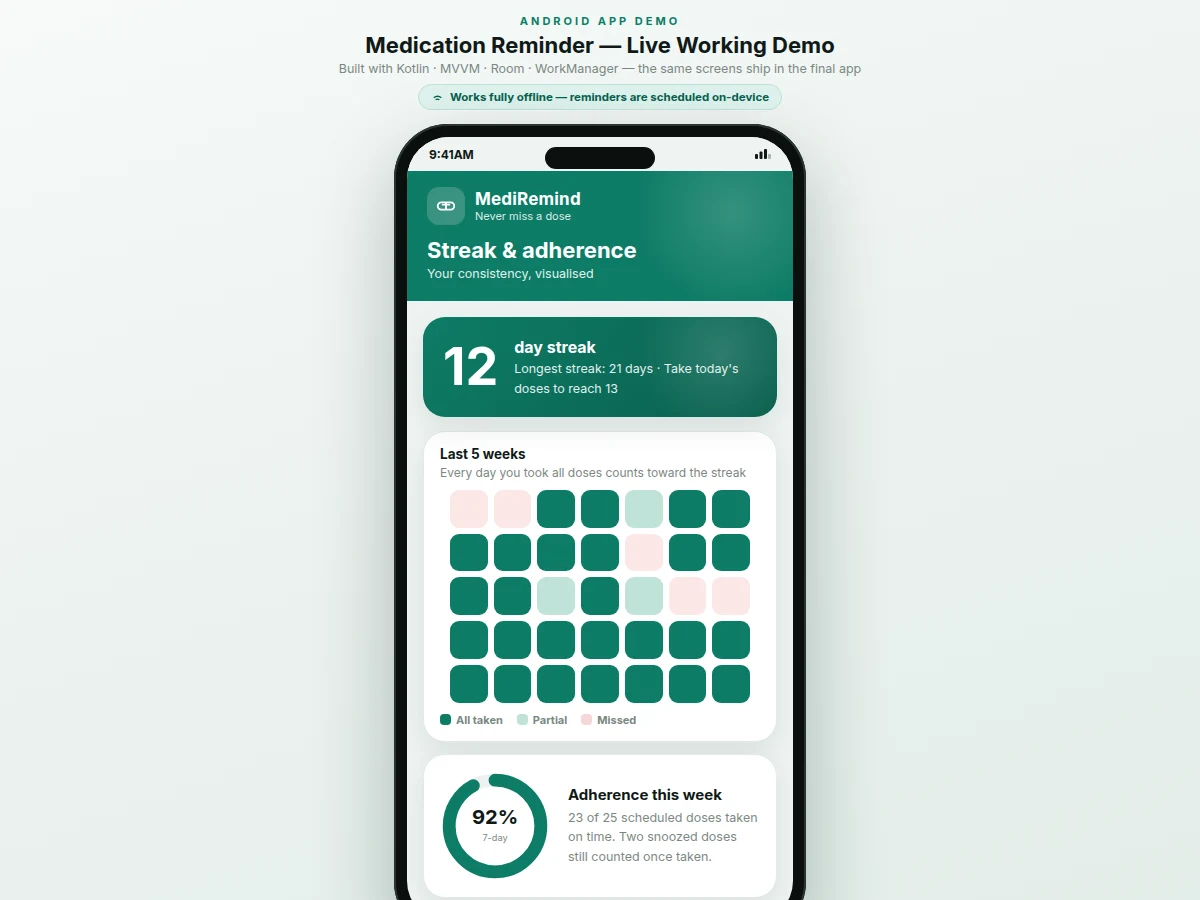
- [Streak tracking] A day counts toward the streak only when every scheduled dose is taken. The streak hero shows the current count and the longest streak, recomputed from the Room dose log.
- [Adherence heatmap and dashboard] A colour-coded calendar (all taken / partial / missed) over the last weeks, a 7-day adherence donut, and per-medicine adherence bars turn the dose log into readable progress.
- [Medicine library with schedules] Add and edit medicines with name, strength, dose times, daily/alternate-day/weekly frequency and duration; everything is persisted in Room and editable at any time.
- [Low-stock refill alerts] A configurable reminder fires a set number of days before the strip runs out, estimated from the dosage schedule and pack size.
- [Loud alarm mode] An optional high-priority notification channel plays sound and vibration even when the phone is on silent, for users who sleep through standard notifications.
What is included
- Complete Android app source code (Kotlin, MVVM, Room, WorkManager)
- Debug APK for installation and testing on a real device
- Project report PDF (problem, architecture, scheduling design, screenshots, limitations)
- PPT presentation for the final review
- Viva Q&A preparation document (WorkManager vs AlarmManager, Room, notification channels, streak logic)
- Setup and build guide (Android Studio, permissions, battery-optimization exemption)
- Project abstract PDF
Limitations & prerequisites
- Exact alarms depend on the Android "Alarms & reminders" permission and the manufacturer's battery optimization — on aggressive OEM skins the app must be exempted from battery optimization, covered in the setup guide.
- A phone that is powered off cannot deliver reminders; any dose whose time passes while the phone is off is logged as missed once it powers back on.
- Snoozed doses count as taken only when the Take action is tapped — repeated snoozing never auto-marks a dose.
- The app is a scheduling and logging aid; it cannot verify that a pill was actually swallowed.
- This project is an academic prototype and is not intended to replace certified medical equipment, professional diagnosis or clinical decision-making.
- Loud-alarm behaviour varies across Android versions and OEM skins; it follows the documented notification-channel behaviour and is not verified on every device.
- No cloud sync in the base build — all data lives on the device; multi-device sync is an optional customization.
Frequently Asked Questions
How do reminders work without internet?
Every reminder is scheduled on the phone itself using WorkManager and AlarmManager. Saving a medicine enqueues a worker for each dose time, and a boot receiver re-registers them after restarts. No server, account or data connection is involved at any point — the report walks through this scheduling flow step by step.
How does the snooze feature work?
When a dose notification appears, tapping Snooze offers 5, 10, 30 and 60-minute options. The current alarm is cancelled and a new one is enqueued after the chosen delay. The original dose stays pending in the log and is only marked taken when Take is tapped — so snoozing can never fake adherence.
How is the streak calculated?
A day counts toward the streak only when every scheduled dose for that day is marked taken. The streak engine recomputes from the Room dose log on every change, and the heatmap colour-codes each day as all-taken, partial or missed. The demo shows a 12-day streak with a 21-day longest record.
Can the app be customized?
Yes — realistic options include cloud backup and sync, a caregiver view that is notified of missed doses, multiple user profiles on one phone, medicine photo capture, and a Hindi or regional-language UI. These are optional customizations developed on request, not part of the base build.
Is this project suitable for a final-year project?
Yes — for Computer Engineering, IT and Android-focused programs. It demonstrates Android fundamentals end to end: Room persistence, background scheduling with WorkManager, notification channels, MVVM architecture and a complete Material 3 UI, all of which can be explained confidently in a viva. Suitable for B.E./B.Tech final-year projects in Computer Engineering, IT and Android development.
Components & software requirements
- Kotlin
- Android Jetpack · Room database
- WorkManager · AlarmManager
- MVVM · LiveData · ViewModel
- Material Design 3
- Notification channels · BroadcastReceiver
- Gradle
- Git
Delivery information
Built-to-order project. Delivery timeline is shared after order confirmation based on current queue.
Support terms
Complete documentation, setup guide, and viva preparation included. Support for setup and explanation provided.
Download free synopsis (PDF)
Enter your name and email — the synopsis PDF downloads immediately. We may send occasional project updates; no spam, unsubscribe anytime.