
More project photos (2)
The problem
Commuters who buy monthly, quarterly or annual bus passes still renew them the old way: a visit to the pass counter or an authorized outlet with the old pass, an ID card and cash, usually during working hours. The paper pass itself is fragile — it tears, fades and is easy to lose — and the printed expiry date is rarely checked until a conductor asks for it, which is when the penalty fare lands. Transport apps cover live tracking and single-journey tickets, but few combine renewal, an offline-readable digital wallet and proactive expiry reminders in one place. PassWallet fills that gap as an offline-first Android application: the pass lives in a digital wallet on the phone with a scannable pass code, renewal is a four-step flow inside the app, and reminders are scheduled on the device itself with WorkManager and AlarmManager, so they fire even without internet. All records stay in a local Room database — no account, no server, no data leaving the phone.
Creates a local profile, renews passes, and receives expiry reminders on the device.
Follow the working sequence
How it works
- On first launch the commuter creates a local profile (name, city, ID type) stored in the Room database — no account signup.
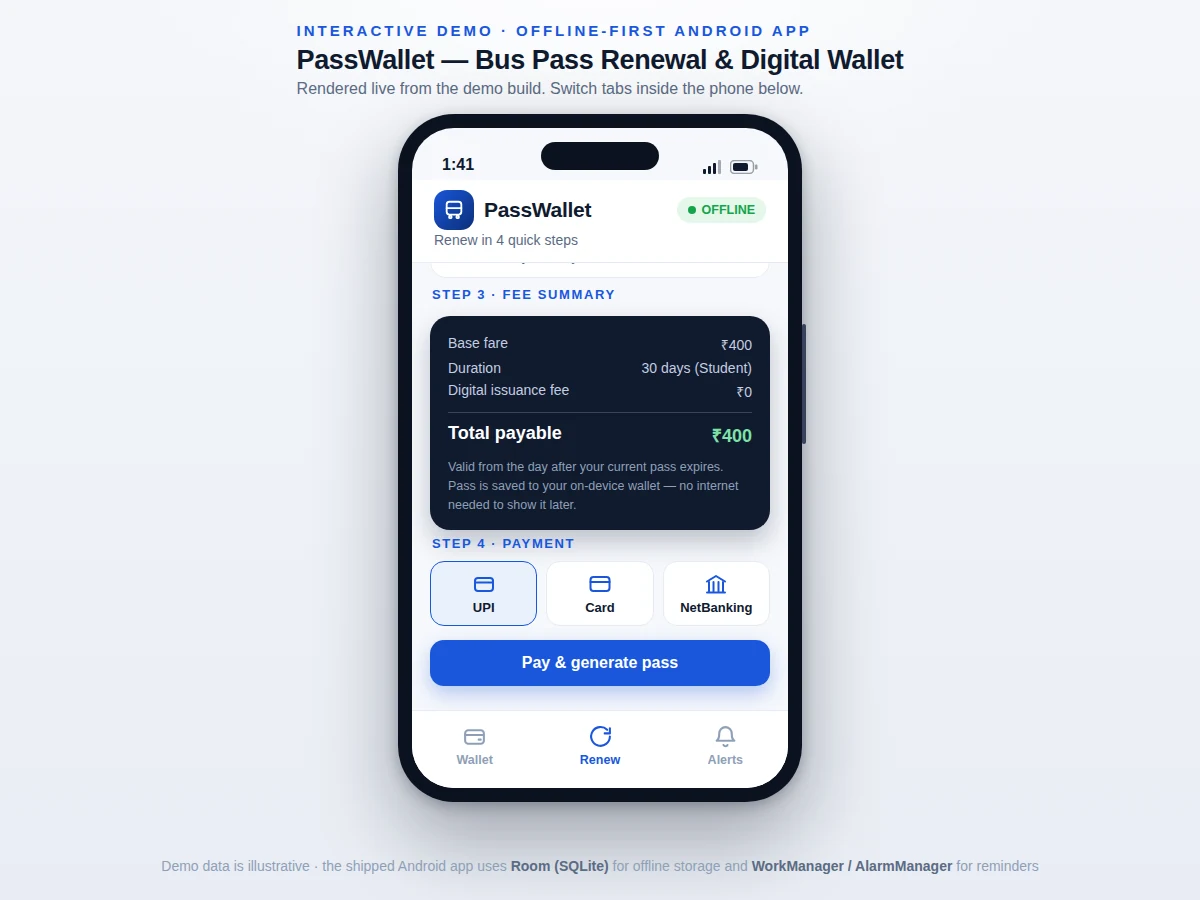
- The renewal flow issues the first pass: type, duration, fee confirmation and payment generate a pass with a fresh 12-character alphanumeric pass ID and QR-style code.
- The wallet screen shows the active pass with validity and days-left countdown; expiring passes move to an "Expiring soon" section with a Renew action.
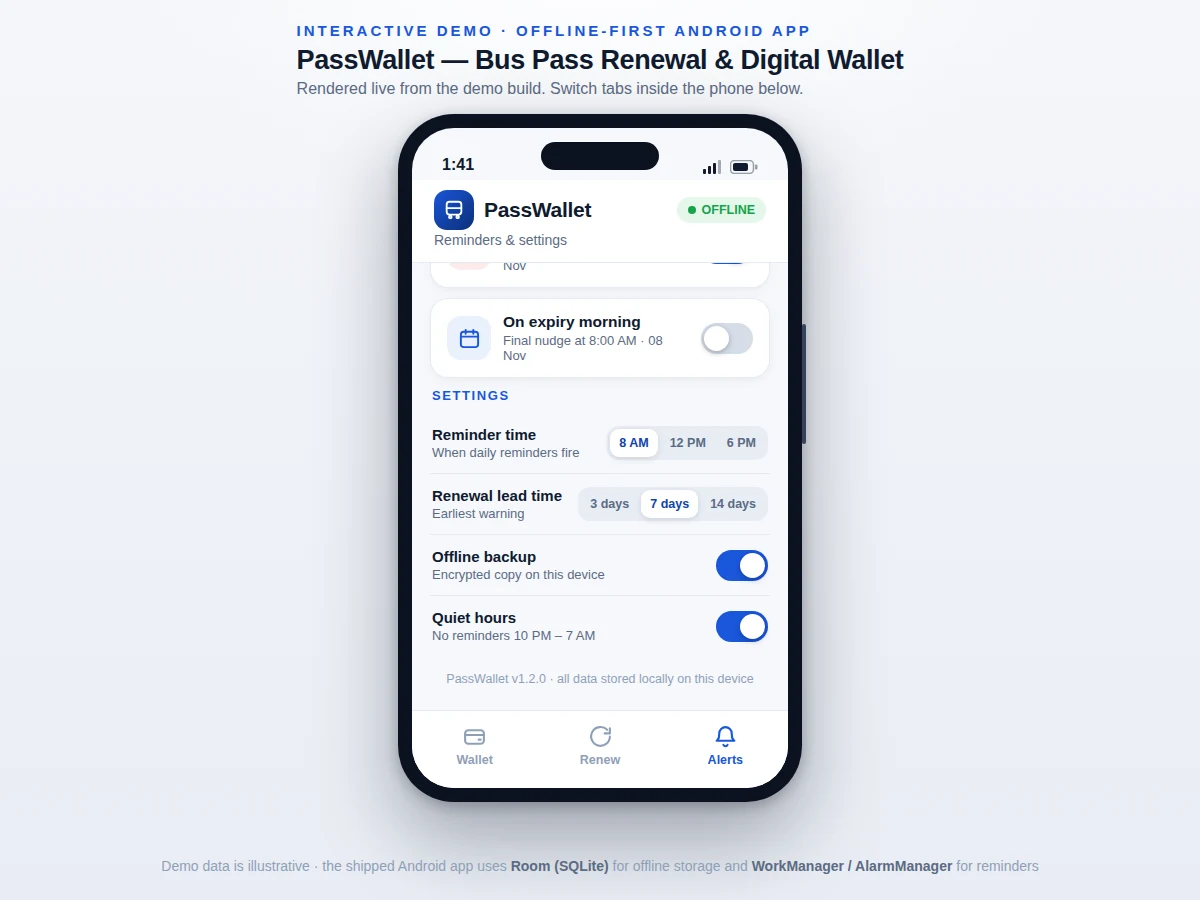
- Every renewal schedules three reminders — 7 days before, 1 day before, and an exact 8:00 AM alarm on expiry morning — via WorkManager and AlarmManager.
- Reminders arrive as notification-channel notifications that deep-link straight back into the wallet on tap, even with no internet.
- A BOOT_COMPLETED receiver re-enqueues all pending reminders after a restart, covered by the test plan.
- The optional encrypted backup keeps a copy of the pass database on the device for reinstall recovery.
Tech stack:
- Kotlin, Android Jetpack
- Room (SQLite) · Coroutines · Flow
- WorkManager · AlarmManager · NotificationCompat
- Jetpack Compose · Material Design 3
- PendingIntent deep links · BroadcastReceiver
- Gradle · Android Studio
- JUnit · Espresso (tests)
- minSdk 26 · targetSdk 34
| Parameter | Value |
|---|---|
| Minimum Android version | API 26 (Android 8.0), design target |
| Target SDK | API 34, design target |
| Local storage | Room over SQLite, schema v3 (design target) |
| Pass ID format | 12-character alphanumeric (design) |
| Reminder mechanism | WorkManager one-time work + AlarmManager exact alarms |
| Reminder lead options | 3, 7 or 14 days before expiry (configurable) |
| APK size | Approximately 6 MB (design target) |
| Offline coverage | 100% of wallet reads and scheduled reminders (by design) |
Project features
- [Digital pass wallet] Active pass shown as a card with route, validity, days-left countdown and a scannable QR-style pass code; expiring-soon and expired passes list below with one-tap renew actions.
- [Four-step renewal flow] Pass-type chips (Student, General, Concession), duration cards (30, 90, 365 days), a live fee-summary panel and payment-method choice (UPI, Card, NetBanking).
- [Live fee calculation] The fee panel recalculates instantly from a fare table as type and duration change, showing base fare, duration and total payable before confirmation.
- [On-device expiry reminders] WorkManager schedules lead-time reminders (7 days and 1 day before) and AlarmManager sets an exact expiry-morning alarm — all fire offline.
- [Fully offline wallet] Passes, renewals and reminder schedules live in a Room (SQLite) database on the device; the wallet is readable in airplane mode.
- [Reboot-safe scheduling] A boot receiver re-registers every pending reminder after a device restart, so nothing is silently lost.
- [Reminder settings] Configurable reminder time, renewal lead time (3, 7 or 14 days), quiet hours (10 PM–7 AM) and an encrypted on-device backup toggle.
What is included
- Complete Android Studio project source (Kotlin, Jetpack Compose)
- Room database schema and DAO layer with migration notes
- Reminder scheduling module (WorkManager + AlarmManager + boot receiver)
- Fare table: Student / General / Concession × 30 / 90 / 365 days
- Debug APK for on-device testing
- Project report PDF (requirements, design, database schema, test results)
- PPT presentation for final review
- Viva Q&A preparation document (Room, WorkManager vs AlarmManager, notifications, offline-first design)
Limitations & prerequisites
- The demo fare table is illustrative; connecting to a real transport-undertaking pass-issuing API is future scope, not included.
- Payment is a mock selection flow — no real payment-gateway integration is shipped.
- Reminder delivery ultimately depends on the device's battery-optimization settings; aggressive OEM power savers can delay WorkManager jobs (mitigations documented in the report).
- Pass codes are generated in-app; conductor-side validation hardware is out of scope.
- The app targets phones; tablets and foldables get no dedicated layouts in this build.
- Exact-alarm scheduling needs the SCHEDULE_EXACT_ALARM permission, which the user must grant on Android 12 and above.
Frequently Asked Questions
How does the app work without internet?
Every pass, renewal and reminder schedule is stored in a Room (SQLite) database on the phone, and reminders are fired by the OS schedulers (WorkManager, AlarmManager) — neither needs a network. The wallet is readable in airplane mode; the only thing you cannot do offline is a real payment, which the mock flow represents.
Why both WorkManager and AlarmManager for reminders?
WorkManager handles the deferrable lead-time reminders (7 days, 1 day before) with battery-aware batching, while AlarmManager sets the exact expiry-morning alarm where timing matters. The viva Q&A explains the trade-off: exactness costs battery, deferrability saves it.
Where is my pass data stored?
On the device only, in the app's private Room database. There is no account, no server and no analytics upload in this build. An optional encrypted backup keeps a local copy for reinstall recovery.
Do reminders survive a phone restart?
Yes. A BOOT_COMPLETED broadcast receiver re-registers every pending reminder when the device boots, and the test plan verifies this on a real device.
Is this project suitable for a final-year project?
Yes — for Computer Science, IT and mobile-application programs. It demonstrates offline-first architecture, local persistence with Room, background scheduling with WorkManager and AlarmManager, and a complete, testable everyday use case.
Components & software requirements
- Kotlin, Android Jetpack
- Room (SQLite) · Coroutines · Flow
- WorkManager · AlarmManager · NotificationCompat
- Jetpack Compose · Material Design 3
- PendingIntent deep links · BroadcastReceiver
- Gradle · Android Studio
- JUnit · Espresso (tests)
- minSdk 26 · targetSdk 34
Delivery information
Built-to-order project. Delivery timeline is shared after order confirmation based on current queue.
Support terms
Complete documentation, setup guide, and viva preparation included. Support for setup and explanation provided.
Download free synopsis (PDF)
Enter your name and email — the synopsis PDF downloads immediately. We may send occasional project updates; no spam, unsubscribe anytime.