
More project photos (2)

The problem
A daily hydration tracker Android app is an app that records each glass of water a person drinks, adds the amounts together for the day, and shows progress against a daily intake goal. This app does that with one-tap glass-size presets, a daily progress ring, and a simple history, so logging a drink takes seconds rather than a typed entry. Many people intend to drink steadily through the day but lose count after the first few glasses, and paper notes or mental tallies are easy to abandon. Existing reminder apps often bury logging behind menus or ask for exact millilitres every time, which adds friction at exactly the moment a drink is finished. This project removes that friction: pick a glass size once, tap once per drink, and the day's total, remaining amount, and weekly pattern stay visible without extra effort.
| Glass preset | Size | Typical use in the demo |
|---|---|---|
| Small glass | 150 ml | A small serving with medicine or a snack |
| Cup | 200 ml | A standard cup of water |
| Standard glass | 250 ml | The default preset in the demo build |
| Bottle | 500 ml | A full small bottle logged in one tap |
How it works
Using the app follows one continuous loop from opening it in the morning to reviewing the week at night. The user sees the day's goal and progress first, logs each drink with a preset size in a single tap, and watches the ring and remaining amount update immediately. Reminders arrive only inside the active-hours window the user chose, so nudges do not continue late at night. At any point the user can open history, check a past day, or fix a wrong entry, and the totals recalculate from the stored entries rather than from a typed running total. Each day starts fresh at midnight with the previous day moved into the weekly history, and reaching the goal shows a quiet confirmation instead of a further prompt. The steps below describe that loop exactly as the demo implements it, from first launch to weekly review.
- On first launch, the user confirms or changes the daily goal, starting from the 2,000 ml design-target default, and sets a reminder interval and active-hours window.
- The home screen shows the progress ring for today: total logged so far, amount remaining, and percentage of the goal reached.
- To log a drink, the user taps a glass-size preset (150 ml, 200 ml, 250 ml or 500 ml) and then the Log button; the entry is stored with the current time.
- The ring, remaining amount, glass count and today's log update immediately from the stored entries, with no manual total to maintain.
- At the chosen interval inside active hours, a local reminder fires; outside active hours, or with reminders off, no nudge appears.
- At midnight the day resets: the finished day moves into the 7-day history and a new day starts at 0 ml against the same goal.
- From history, the user opens any past day to see its entries, edits or deletes a wrong entry, and the totals for that day recalculate.
- From the weekly chart, the user compares the last 7 daily totals against the goal and spots patterns before adjusting the goal or reminder interval.
Tech stack:
- Kotlin · Android SDK
- Jetpack Compose (UI)
- Room database (local storage)
- WorkManager · AlarmManager (local reminders)
- Material 3 design components
- Android Studio
- Git
| Parameter | Value |
|---|---|
| Glass-size presets | 4 presets: 150 ml, 200 ml, 250 ml, 500 ml |
| Default preset | 250 ml (design target, selected in the demo build) |
| Default daily goal | 2,000 ml (design target, user-adjustable) |
| Goal range | 500 ml to 5,000 ml (design target) |
| History window | 7 days in the weekly chart (design target) |
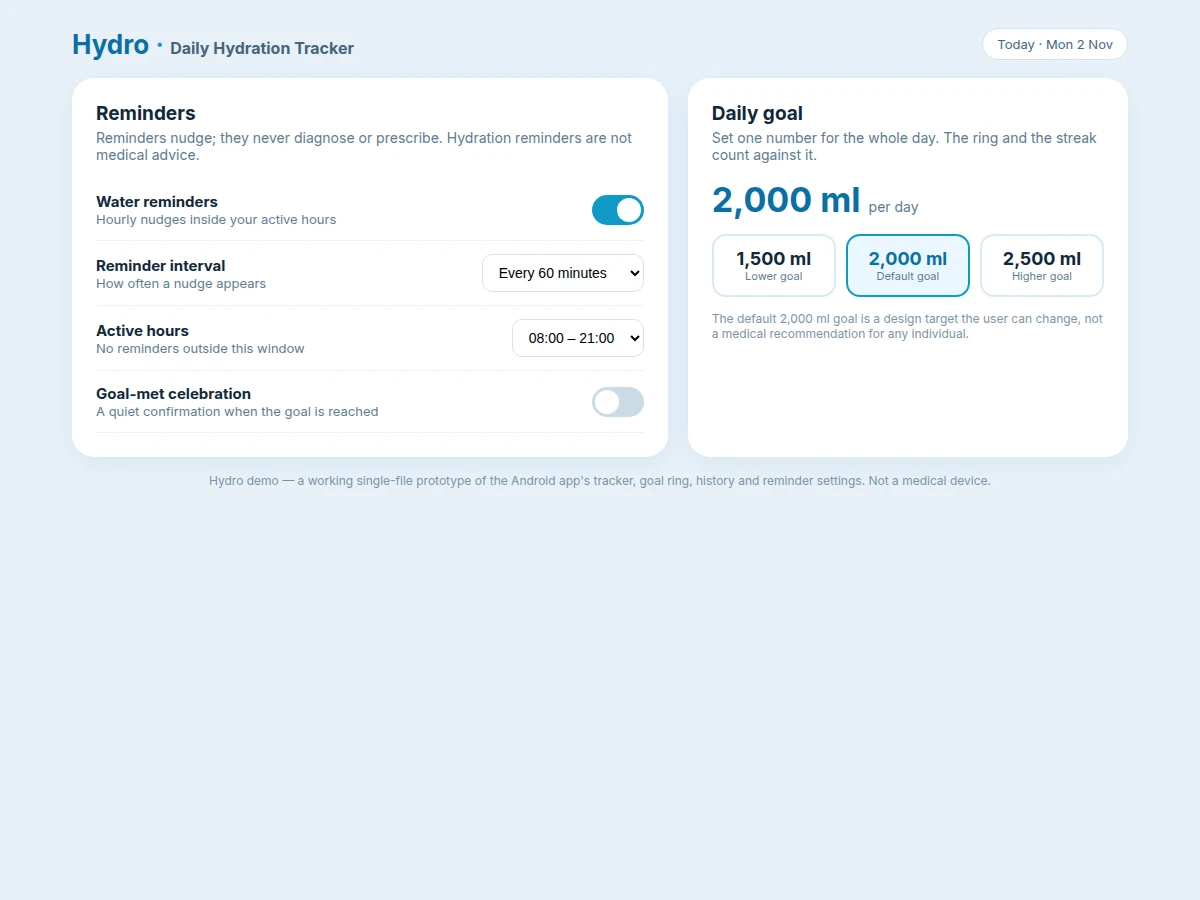
| Reminder intervals | 60 minutes, 90 minutes, 120 minutes (design target options) |
| Default active hours | 08:00 to 21:00 (design target, user-adjustable) |
| Minimum Android version | Android 8.0 (API level 26) (design target) |
| Storage | On-device database, no server in the core build |
| Sample day in the demo | 4 entries totalling 1,250 ml (250 ml + 250 ml + 500 ml + 250 ml) |
| Demo screens | 3 views: home, history, reminders and goal settings |
Project features
The app is built around four capabilities that carry the whole experience: one-tap logging with glass-size presets, a daily goal ring that shows progress at a glance, a dated history that can correct mistakes, and reminders that respect active hours. Together they keep the interaction under a few seconds per drink while still giving the user a record they can trust and review. The remaining features support those four: a weekly chart for spotting patterns, an editable daily goal, local storage that works without an account, and clear separation between what is implemented, what is optional, and what is left as future scope. Nothing in the list below requires a server, a wearable, or a paid service. The demo built for this listing proves the core loop directly: tapping a preset updates the ring, the remaining amount, and the glass count in the same interaction, with no page reload and no placeholder numbers.
- [One-tap glass-size presets] Four preset sizes — 150 ml, 200 ml, 250 ml and 500 ml — so logging a drink is one tap after selecting a size, with 250 ml selected by default in the demo build.
- [Daily goal ring] A progress ring shows the day's total against the user-set goal, with the amount remaining and the percentage reached visible beside it.
- [Dated intake history] Every entry keeps its date, time and glass size, and past days can be opened to review exactly what was logged.
- [Edit and delete entries] A mistaken entry can be edited or removed, and the day's total recalculates from the stored entries rather than from a typed running total.
- [Configurable reminders] Local reminders fire at a chosen interval inside a user-set active-hours window, and switching reminders off stops all nudges while logging keeps working.
- [7-day weekly chart] Daily totals for the last 7 days are charted against the goal, so patterns such as low-intake afternoons are visible at a glance.
- [Editable daily goal] The goal is a single user-set number, with 2,000 ml as the design-target default, and changing it recalculates the remaining amount immediately.
- [Local storage, no account] Entries live in the app's on-device database, so the core app works without sign-in, a server, or an internet connection. (Optional: cloud backup and sync, not part of the core build. Future scope: wearable integration and intake suggestions.)
What is included
- Working Android app (tracker, presets, goal ring, history, reminders)
- Single-file working demo of the app's UI for review before delivery
- Project report PDF (background, design, methodology, limitations)
- PPT presentation for final review
- Viva Q&A preparation document (local storage, notifications, UI state)
- Abstract PDF matching the page
Limitations & prerequisites
- Hydration reminders are not medical advice: the app does not diagnose, treat, or recommend an intake for any health condition, and the 2,000 ml default is a design target, not a personal recommendation.
- The core build logs only the 4 preset sizes; a custom millilitre entry is optional scope and is not claimed as implemented.
- Intake is self-reported: the app records what the user taps, and it cannot verify that a drink was actually consumed.
- No server, account, cloud backup or wearable integration in the core build; those are future scope.
- Reminders depend on the device's notification permissions and battery settings, which can delay or suppress local notifications.
- The weekly chart covers 7 days only; longer trends need an export or extended-history addition.
- The demo shows sample data for review; the delivered app starts with an empty history for a new user.
Frequently Asked Questions
Which glass sizes can be logged?
Four presets are built in: 150 ml, 200 ml, 250 ml and 500 ml. The 250 ml preset is selected by default in the demo because most glasses in the sample day use that size. A custom amount entry is optional scope, not part of the core build, so the shipped app logs only preset sizes unless that option is added.
How do reminders work?
Reminders are local notifications scheduled on the device, not messages from a server. The user sets an interval, such as every 60 minutes, and an active-hours window, such as 08:00 to 21:00, and no reminder fires outside that window. Turning reminders off stops all nudges while logging and history keep working.
Where is the intake data stored?
All entries are stored locally on the device in the app's own database, with no account and no server upload in the core build. Each entry keeps its date, time and glass size, so history and weekly totals are computed from real entries. A cloud backup or sync option is future scope and is not claimed as implemented.
Can the daily goal be changed?
The daily goal is a single number the user sets, with 2,000 ml as the design-target default. The progress ring, the remaining amount and the streak all count against that number, and changing it recalculates the remaining amount immediately. The default is a convenient starting point, not a medical recommendation for any individual.
Is this a medical app?
No. Hydration reminders are not medical advice, and the app does not diagnose, treat, or recommend an intake for any health condition. Anyone with a medical condition that affects fluid intake should follow their clinician's guidance rather than the app's default goal. This limitation is stated in the app and in the report.
Is this project suitable for a final-year project?
Yes, for Computer Science, IT and Android application development programmes. It demonstrates mobile UI design, local data storage, notification scheduling, and a complete working demo with report and presentation material, without requiring a server, a wearable, or a paid service.
Components & software requirements
- Kotlin · Android SDK
- Jetpack Compose (UI)
- Room database (local storage)
- WorkManager · AlarmManager (local reminders)
- Material 3 design components
- Android Studio
- Git
Delivery information
Built-to-order project. Delivery timeline is shared after order confirmation based on current queue.
Support terms
Complete documentation, setup guide, and viva preparation included. Support for setup and explanation provided.
Download free synopsis (PDF)
Enter your name and WhatsApp number — the synopsis PDF downloads immediately. We may send occasional project updates on WhatsApp; no spam.