
More project photos (2)
The problem
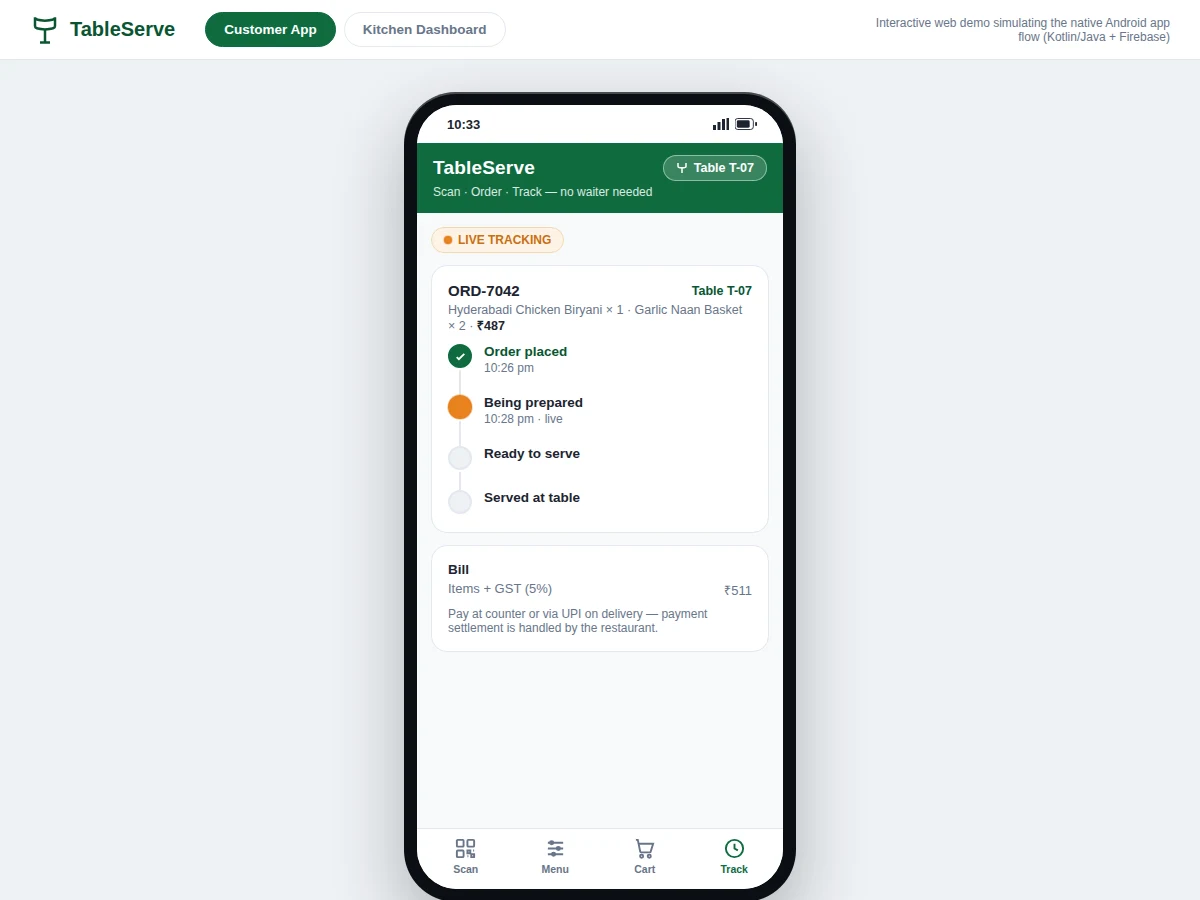
During rush hours, restaurant waiters juggle too many tables at once: order-taking gets delayed, handwritten slips get misread or lost en route to the kitchen, and customers sit waiting with no idea when their food will arrive. The Restaurant Table QR Ordering Android App with Kitchen Dashboard replaces this fragile paper handoff with a phone-to-kitchen digital pipeline. A customer scans the unique QR code printed on their table, which binds the phone session to that table number (e.g. Table T-07). A live menu with dish photos and prices appears; the customer builds a cart, places the order, and receives an order token. The order lands instantly in the kitchen dashboard queue under the correct table, and the customer watches it move through four live states — placed, preparing, ready, served — on a tracking timeline. Because every order carries its table identity from the QR scan itself, orders cannot be mixed up between tables.
How it works
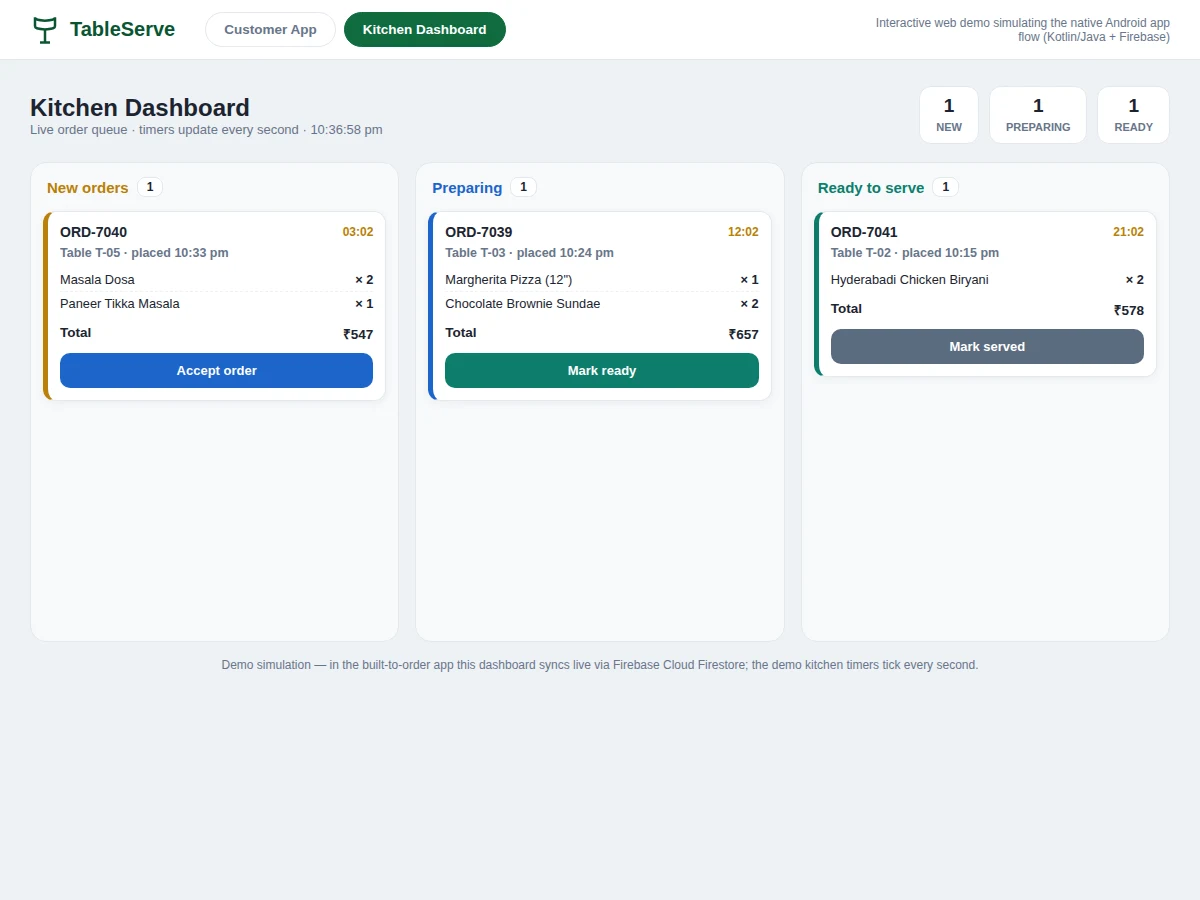
Ordering starts at the table: the customer opens the TableServe app and scans the QR code on the table, and the app decodes the table ID and binds the session — from this point every action the customer takes is tagged with that table number. A live menu streams in from Firebase with dish photos and prices; the customer adds dishes to a cart, sees a running bill with GST, and places the order. The app generates an order token and writes the order to Cloud Firestore; the kitchen dashboard, listening to the same database in real time, drops a new card into its New column stamped with the table number. A cook taps Accept and the card slides to Preparing; when the dish is done, Mark Ready moves it to Ready and the customer's phone timeline advances in the same moment. Mark Served closes the loop, and the dashboard keeps a completed-orders record for the session.
- The restaurant prints one unique QR per table (the QR payload encodes the table ID, e.g. table T-07); the app scans it with the phone camera and binds the session to that table.
- The app loads the live menu from Firebase Cloud Firestore — dish names, photos, ₹ prices and veg/non-veg markers — with category filters and search.
- The customer adds dishes with quantity steppers; the cart shows a running subtotal, 5% GST and the total, then generates an order token (e.g. ORD-7042) on placement.
- The order is written to Firestore; the kitchen dashboard's real-time listener drops a new card into the New column with table number, items, total and an elapsed-time counter.
- Kitchen staff tap Accept (→ Preparing), Mark Ready (→ Ready) and Mark Served (→ completed); each tap updates the customer's tracking timeline on their phone in the same moment.
- The dashboard generates an itemized bill with GST per order for pay-at-counter settlement; completed orders are logged for the session.
Tech stack:
- Kotlin · Android SDK (native app)
- Firebase Cloud Firestore (real-time order database)
- ML Kit barcode scanning (QR table binding)
- Firebase Cloud Messaging (status push notifications)
- Material Design 3 (app UI)
- Android Studio (development environment)
- Firebase Authentication (kitchen dashboard sign-in)
| Parameter | Value |
|---|---|
| Platform | Native Android app (Kotlin) + web kitchen dashboard |
| Minimum Android version | API 26 — Android 8.0 (design target) |
| Backend | Firebase Cloud Firestore (real-time sync) |
| QR payload | Table ID string, e.g. tableserve://restaurant/table/T-07 (demo value) |
| Order states | 4 — placed, preparing, ready, served |
| Kitchen queue columns | 3 — New, Preparing, Ready |
| Demo menu | 6 dishes with photos and ₹ pricing (demo build) |
| QR scan-to-menu | Under 2 s (design target, device-dependent) |
| Demo order flow | Order token screen renders ~5 ms after tapping Place Order (measured in the demo simulation, desktop Chrome) |
| Demo kitchen action | Kitchen "Accept" completes in ~76 ms (measured in the demo simulation, desktop Chrome) |
Project features
The Restaurant Table QR Ordering Android App stands on four capabilities that work as one pipeline. First, QR table binding: each table's QR encodes its table ID, so a single scan binds the phone to Table T-07 (or whichever table the customer sits at) — no typing, no room-number confusion, and every order placed from that phone automatically carries the right table. Second, the live digital menu: dishes with photos, prices and veg/non-veg markers served from Firebase, so the restaurant can add, hide or reprice items without rebuilding the app. Third, the kitchen dashboard: a three-column live queue (New, Preparing, Ready) with per-order elapsed timers, where the kitchen taps Accept, Mark Ready or Mark Served to advance cards. Fourth, live order tracking on the customer's phone: a four-state timeline (placed, preparing, ready, served) that updates in real time as the kitchen acts, so nobody has to flag down a waiter to ask where the food is.
- [QR table binding] Each table carries a unique QR code encoding its table ID; one scan binds the phone session to that table, and every order placed from the phone automatically carries the correct table identity — the mechanism that makes cross-table order mixing structurally impossible.
- [Live menu with dish photos] Dishes with photos, ₹ prices and veg/non-veg markers load from Firebase Cloud Firestore; the restaurant can add, hide or reprice dishes from the dashboard without rebuilding or republishing the app.
- [Cart with live billing] Quantity steppers, a running subtotal, 5% GST calculation and one-tap order placement that generates an order token (e.g. ORD-7042) the customer can quote to staff.
- [Four-state order tracking] The customer watches placed → preparing → ready → served update live on a timeline; status changes are pushed to the phone the moment the kitchen acts.
- [Kitchen dashboard queue] A three-column live queue (New / Preparing / Ready) shows every order with its table number, item list, running elapsed timer and total; kitchen taps move cards between columns.
- [Bill generation] Itemized bills with GST, viewable per order from the dashboard for counter settlement.
- [Order tokens] Every order gets a short token (e.g. ORD-7042) shown on the confirmation screen and the dashboard card, giving staff and customers a common reference.
- [Optional: payment settlement] UPI or payment-gateway settlement can be integrated on request; the base build generates bills for pay-at-counter settlement.
What is included
- Complete native Android app source code (Kotlin) — customer ordering app
- Kitchen dashboard with real-time order queue (web companion)
- Firebase setup guide: Firestore schema, security rules, FCM configuration
- Table QR code generator script + print-ready QR set for demo tables
- Project report PDF (background, architecture, methodology, results)
- PPT presentation for final review
- Viva Q&A preparation document
- Project abstract PDF
Limitations & prerequisites
- The interactive demo shown here is a web simulation of the native Android app flow; the built-to-order deliverable is the native Kotlin app plus the dashboard.
- Ordering needs restaurant Wi-Fi or mobile internet — orders sync through Firebase; offline ordering is not in the base build.
- Table binding depends on a scannable QR: damaged, defaced or missing table codes must be reprinted before that table can order.
- Payment settlement (UPI/payment gateway) is optional and integration-dependent; the base build generates bills for pay-at-counter settlement.
- Push notifications need Firebase Cloud Messaging configured with a valid google-services.json.
- The kitchen dashboard is a web companion for a staff device/browser, not a second native app, in the base build.
- Demo menu content (6 dishes, photos, ₹ prices) is illustrative; the restaurant provides its own menu data.
Frequently Asked Questions
How does the QR table binding actually work?
Each table's QR encodes its table ID (for example table T-07). When the customer scans it, the app attaches that table ID to the ordering session and to every order the phone places. Because the table is decided by the scan — not typed by the customer — orders are structurally tied to the right table and cannot be mixed up. Re-scanning simply rebinds the session.
What happens when many tables order at the same time?
Every order is an independent document in Firebase Cloud Firestore, so orders from different tables never interfere with each other. The kitchen dashboard listens to the database in real time and shows each new order as its own card in the New column, with its table number, items and an elapsed timer — the kitchen works through them in order.
Is online payment included?
No — payment settlement is optional in the base build. The app generates an itemized bill with GST for every order and supports pay-at-counter settlement. UPI or payment-gateway integration can be added as a customization, since it needs the restaurant's merchant credentials and production approval.
Can the restaurant change the menu without updating the app?
Yes. Menu items, photos, prices and availability live in Firebase Cloud Firestore, not inside the app binary. The restaurant edits the menu from the dashboard and every customer's phone shows the new menu on next load — no app rebuild or store update needed.
Can this project be customized for my college requirements?
Yes. Common additions include a waiter-call button, split-the-bill between friends, multilingual menus, order analytics for the restaurant, and printed-kitchen-slip integration. The report documents the architecture so extensions read as natural viva discussion, and the working demo build makes the whole flow easy to show an examiner.
Is this project suitable for a final-year project?
Yes — for Computer Science, IT and mobile-application programs. It demonstrates native Android development in Kotlin, real-time databases with Firestore, QR/barcode integration, push notifications, and a genuinely two-sided system (customer app plus kitchen dashboard) with a clear real-world deployment story.
Components & software requirements
- Kotlin · Android SDK (native app)
- Firebase Cloud Firestore (real-time order database)
- ML Kit barcode scanning (QR table binding)
- Firebase Cloud Messaging (status push notifications)
- Material Design 3 (app UI)
- Android Studio (development environment)
- Firebase Authentication (kitchen dashboard sign-in)
Delivery information
Built-to-order project. Delivery timeline is shared after order confirmation based on current queue.
Support terms
Complete documentation, setup guide, and viva preparation included. Support for setup and explanation provided.
Download free synopsis (PDF)
Enter your name and WhatsApp number — the synopsis PDF downloads immediately. We may send occasional project updates on WhatsApp; no spam.