
More project photos (3)


The problem
An Android vocabulary builder app with daily words, flashcards and quiz mode is a single-purpose learning app that gives a student one new English word every day, teaches it through a flip flashcard, and then tests it with a short multiple-choice quiz. Most students who want a stronger vocabulary collect word lists from books or websites, read them once, and forget them within days, because reading alone does not move a word into lasting memory. This app closes that gap with a short daily habit: a new word arrives each morning with its meaning, part of speech and an example sentence, the student practises it on flashcards during the day, and a quiz the same evening asks the student to recall it instead of only recognising it. Streaks and a simple review schedule keep the habit going, and everything works offline. The result is a small, focused tool that turns scattered word lists into steady, checkable progress.
Opens the app each day to learn one new word and review earlier ones.
Follow the working sequence
How it works
The app runs a four-stage daily loop: word selection, learning, quiz and review. Each morning the app picks the next word from the 24-word starter bank and shows it as the daily word card with its part of speech, definition and an example sentence. During the day the student practises that word and earlier words on flashcards, flipping each card to recall the meaning before checking it, and marking it known or still learning. In the evening a quiz round asks 10 multiple-choice questions drawn from the bank, with 4 options per question and instant feedback after every answer. The result of each card and quiz answer feeds the review schedule: a correct recall doubles the next review interval (1, then 2, 4 and 8 days, capped at 30 days), while a wrong answer resets the word to a 1-day interval. Streaks, words learned and the due list update from the same on-device records, and the whole loop runs offline.
- The app opens on the daily word card: one new word from the ordered 24-word bank, with part of speech, definition and example sentence.
- The student practises on flashcards, tapping each card to flip it and recall the meaning before reading the definition, then marking it known or still learning.
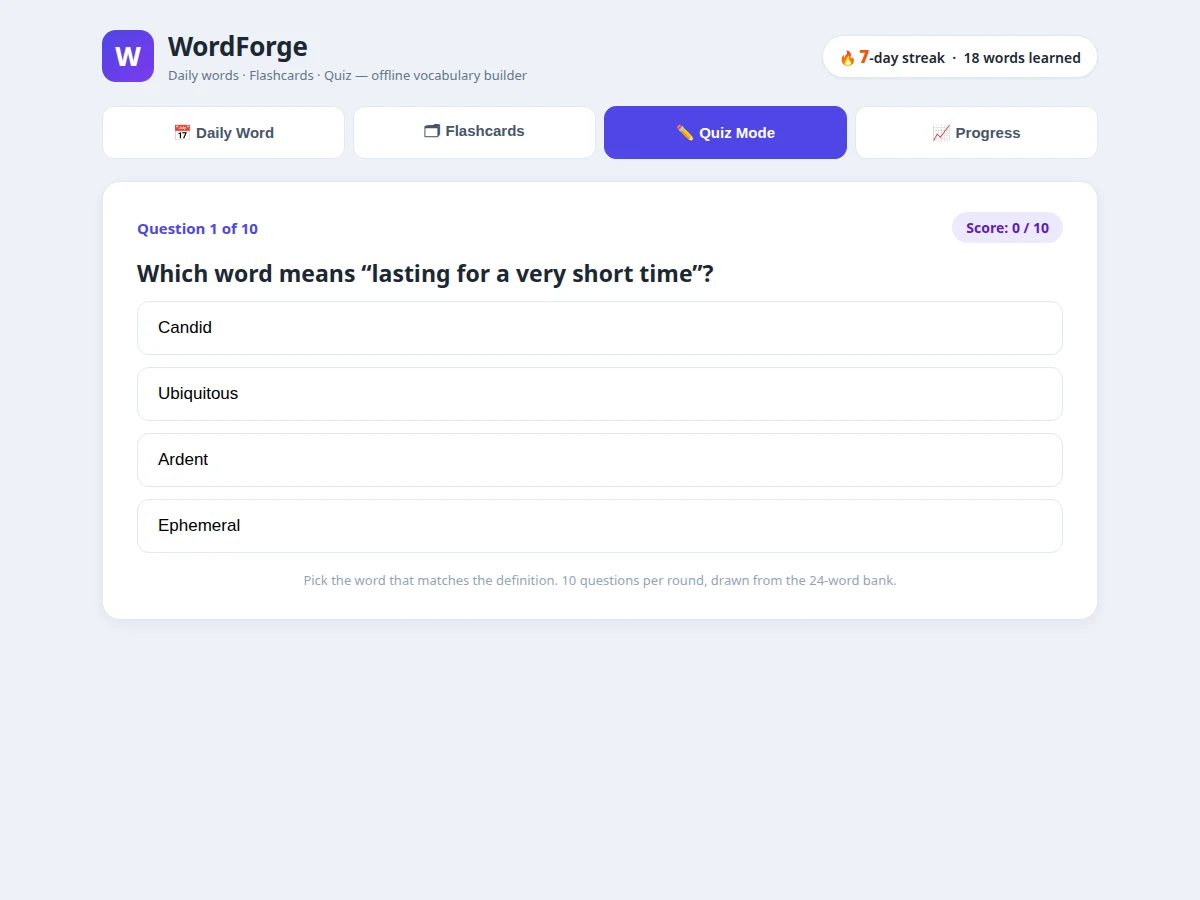
- Quiz mode starts a round of 10 multiple-choice questions drawn from the word bank, with 4 options per question.
- Each quiz answer gives instant feedback: a correct answer raises the score by 1, a wrong answer shows the correct word and adds it to the review list.
- Every answer updates the review schedule: correct recalls double the next interval (1, then 2, 4 and 8 days, capped at 30 days); a wrong answer resets the interval to 1 day.
- The progress screen updates the day streak, the words-learned count, the last quiz score and the list of words due for review today.
- All words, answers and progress are stored on the device, so the full loop works offline and resumes exactly where the student left off.
Tech stack:
- Kotlin (Android app language)
- Android Studio (development environment)
- Android Jetpack · Room Database (on-device storage)
- Material Design 3 (app UI)
- SQLite on-device storage
- Gradle build system
- JSON word bank (24 words)
- Git version control
| Parameter | Value |
|---|---|
| Platform | Android 8.0 (API level 26) and above (design target) |
| Language | Kotlin (design target) |
| Word bank | 24 words (exact count built for this listing) |
| Daily words | 1 new word per day (design target) |
| Quiz round | 10 questions per round (design target) |
| Quiz options | 4 options per question |
| Review intervals | 1, 2, 4 and 8 days, capped at 30 days (rule implemented in the demo) |
| Storage | On-device Room/SQLite database, no server |
| Daily session | Approximately 3 minutes per day (design target) |
| App size | Approximately 15–25 MB installed (expected) |
| Connectivity | Fully offline; no internet needed for learning, quiz or review |
Project features
Four parts make up the app's daily loop: a daily word card that introduces exactly one new word each morning, a flashcard deck that teaches the word by active recall, a quiz mode that tests it the same day, and a streak and progress view that shows what has been learned and what is due for review. The daily word card carries the word, its part of speech, a plain definition and an example sentence, so the student sees the word used in context rather than as an isolated entry. Flashcards flip on tap, and each card is marked known or still learning, which feeds a spaced review schedule that brings weak words back sooner. Quiz mode asks 10 multiple-choice questions per round, gives instant feedback, and returns missed words to the review list. All progress is stored on the device, so the app works fully offline.
- [Daily word card] One new word every morning with its part of speech, a plain definition and an example sentence, plus a morning reminder; the word is marked learned once the student has practised it.
- [Flashcard deck with flip and spaced review] Tap-to-flip cards for all 24 words in the starter bank; marking a card known or still learning sets its next review date under a doubling-interval rule (1, then 2, 4 and 8 days, capped at 30 days).
- [Quiz mode with instant scoring] 10 multiple-choice questions per round drawn from the word bank, 4 options per question, instant correct-or-wrong feedback, and a score shown at the end of each round.
- [Streak and progress tracking] A day streak, words-learned count, last quiz score and a due-for-review list on one progress screen, so the student can see exactly what needs attention today.
- [Fully offline word bank] The complete 24-word starter bank, definitions and example sentences are stored on the device; no account, no mobile data and no server are needed to learn or revise.
- [Review-due list] Words answered wrongly in the quiz return automatically to the next day's review list, so weak words are practised again instead of disappearing.
- [Configurable daily schedule] The daily word time and the number of questions per quiz round can be adjusted in the app settings to fit a student's routine. (Configurable feature.)
- [Optional custom word lists] Extra word lists for a specific exam or subject can be added on request, for example GRE-style academic words or placement-test vocabulary. (Optional customization — not part of the base build.)
What is included
- Complete Android app source code (Kotlin, Android Studio project)
- Curated 24-word starter bank with definitions and example sentences (JSON)
- Working demo of the app (daily word, flashcards, quiz and progress screens)
- Project report PDF (background, methodology, architecture, review schedule, results discussion)
- PPT presentation for final review
- Viva Q&A preparation document (Android basics, Room storage, spaced review logic, quiz scoring)
- Setup instructions for building and installing the app on a phone or emulator
Limitations & prerequisites
- The starter bank holds exactly 24 words; a larger bank or exam-specific list is an optional customization, not part of the base build.
- No pronunciation audio is included — the app teaches spelling, meaning and usage through text only; audio is future scope.
- The app covers English vocabulary only; it does not teach other languages and is not a dictionary or translation tool.
- The review schedule is a simple doubling-interval rule implemented in the app, not a published algorithm such as SM-2, and no retention improvement is claimed or measured.
- Quiz questions are definition-to-word multiple choice only; spelling tests and sentence-completion questions are not included.
- Progress is stored on one device only; there is no account, cloud backup or sync across phones.
- The app is an academic prototype build; it is not published on any app store and carries no store listing.
Frequently Asked Questions
Is this project suitable for a final-year project?
Yes, it suits Computer Science, IT and Computer Applications students. It demonstrates Android app development in Kotlin, on-device Room/SQLite storage, a working quiz engine with scoring, and a spaced review schedule, all of which give a student concrete design and implementation points to explain in the viva.
Does the app need the internet to work?
No. The app works fully offline: the word bank, quiz questions, answers and progress are all stored on the device, so learning, flashcards and quizzes run without mobile data or Wi-Fi, and the streak and progress records update from the same on-device data. An internet connection is needed only once, to download Android Studio and the build tools while setting up the project.
How does the spaced review schedule work?
A correct recall doubles the next review interval, from 1 day to 2, then 4 and 8 days, capped at 30 days, while a wrong answer resets the word to a 1-day interval so it returns tomorrow. This doubling rule is the exact rule implemented in the working demo, and it is described as the app's own design choice, not as a published algorithm such as SM-2.
Can I add my own words or use a different word list?
Yes. The word bank is a plain JSON file, so a new list can be added by replacing or extending it, and extra exam-specific lists can be built on request, with each entry carrying the word, its part of speech, a definition and an example sentence. The base build ships with the 24-word starter bank; any additional list is an optional customization agreed before development.
Does the app include pronunciation audio or other languages?
No. The base app teaches English vocabulary through text — word, meaning and example sentence — and includes no pronunciation audio, no multi-language support and no dictionary lookup, keeping the app small, fully offline and focused on one skill: building usable vocabulary through daily practice. Audio playback and a second language are possible future additions, listed as future scope in the report.
What will I receive with the project?
The complete Kotlin source code as an Android Studio project, the 24-word starter bank, a working demo of the daily word, flashcard, quiz and progress screens, the project report, a PPT for the final review, a viva Q&A document and setup instructions for building the app on a phone or emulator.
Components & software requirements
- Kotlin (Android app language)
- Android Studio (development environment)
- Android Jetpack · Room Database (on-device storage)
- Material Design 3 (app UI)
- SQLite on-device storage
- Gradle build system
- JSON word bank (24 words)
- Git version control
Delivery information
Built-to-order project. Delivery timeline is shared after order confirmation based on current queue.
Support terms
Complete documentation, setup guide, and viva preparation included. Support for setup and explanation provided.
Download free synopsis (PDF)
Enter your name and WhatsApp number — the synopsis PDF downloads immediately. We may send occasional project updates on WhatsApp; no spam.