
More project photos (2)
The problem
Every college has a lost-and-found problem: items pile up in an office drawer, a WhatsApp group scrolls past in a day, and anything valuable gets claimed by whoever describes it most confidently. Students lose ID cards, wallets, earbuds and notebooks weekly, and there is no trusted channel connecting the person who found an item with the person who lost it. This project solves it with a purpose-built Android app: found items are photographed and posted with the location and date, lost items get their own listings, and — the part that makes it a real project rather than a notice board — a claim-verification workflow requires the claimant to answer owner-only questions (distinguishing marks, contents, last-known location) that the finder and campus admin review before the item is released against a college ID. Everything runs on standard, well-documented mobile technology (Kotlin/Java Android frontend, Firebase backend), so the student can explain every screen and every backend rule in the viva.
Students who post lost or found items, search listings and file claims.
Follow the working sequence
How it works
- A student who finds an item creates a listing: they photograph it, pick a category, and enter the location and date where it was found.
- The listing enters the admin queue; once approved it appears on the Found feed with its photo gallery, location and date — sensitive details stay hidden.
- A student who lost something posts on the Lost feed or searches the Found feed by keyword, category or location.
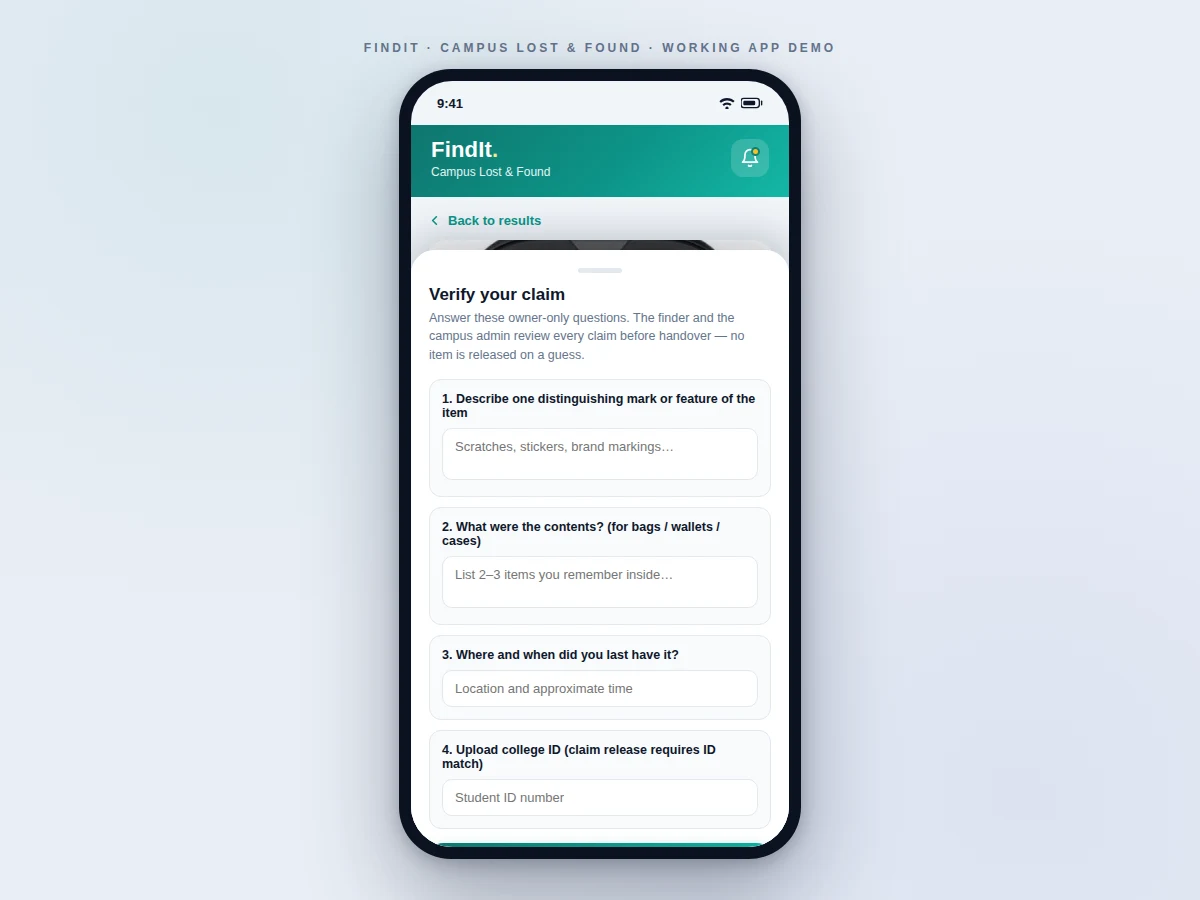
- To claim a found item, the claimant answers owner-only questions: distinguishing marks, contents, and where they last had it, plus their college ID number.
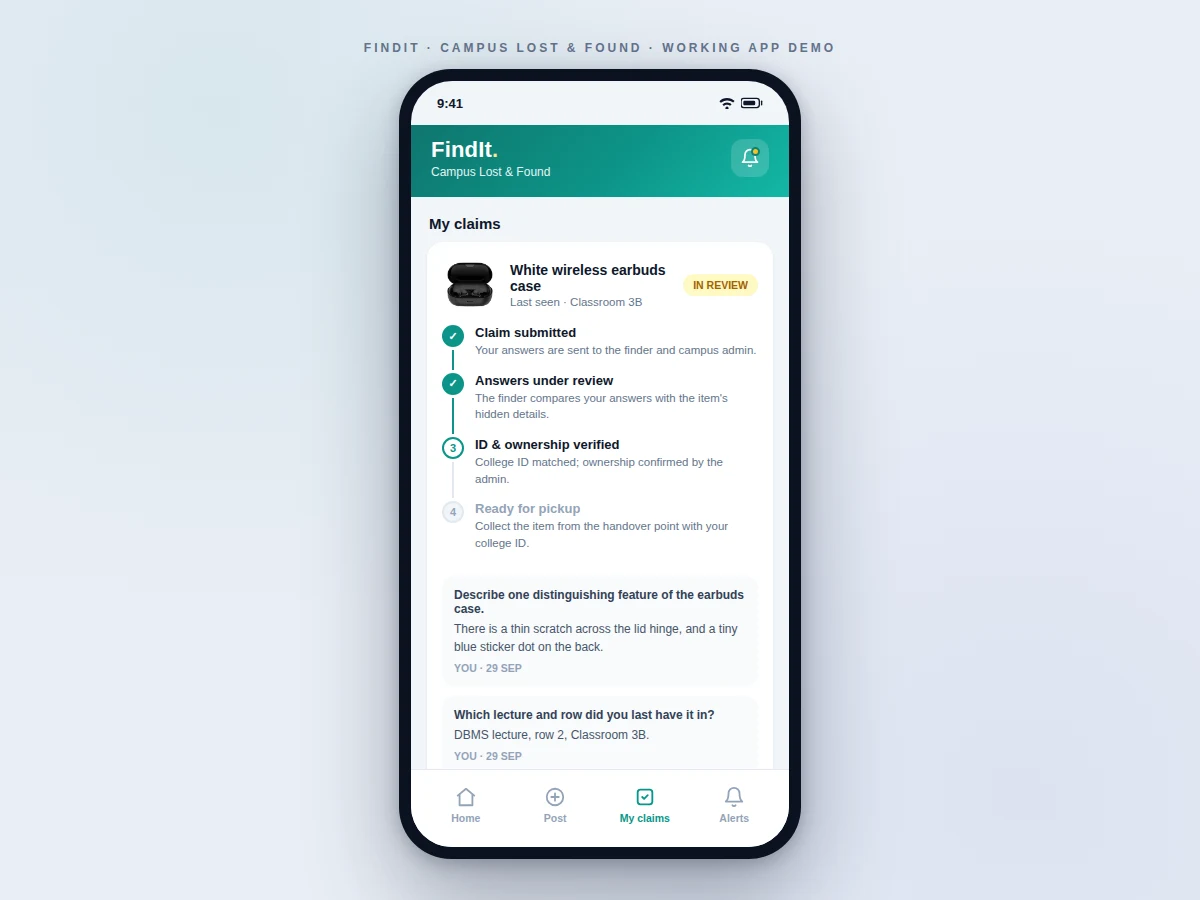
- The finder and the campus admin review the answers against the item's hidden details and approve or reject the claim; the claimant watches the four-step status update.
- On approval, the claimant collects the item from the handover point with their college ID, and the listing is marked returned.
- Push notifications fire at each step: matching new items, claim submitted, under review, approved or rejected.
Tech stack:
- Kotlin (Android frontend)
- Firebase Authentication (email/college-ID sign-in)
- Cloud Firestore (listings, claims, review threads)
- Firebase Storage (item photos)
- Firebase Cloud Messaging (push notifications)
- Firebase Security Rules (role-based read/write)
- Material 3 (Android UI components)
- Git
| Parameter | Value |
|---|---|
| Platform | Android 8.0 (API 26) and above (design target) |
| App size | Approximately 18–25 MB installed (expected) |
| Photos per listing | Up to 4, compressed on-device before upload (design target) |
| Claim flow | 4 steps: submitted → under review → verified → ready for pickup |
| Verification questions | 4 owner-only questions per claim (design target) |
| Notifications | Push on new matches, claim updates, admin decisions |
| Backend | Firebase (no self-hosted server required) |
| Offline support | Cached feed browsing; posting and claims need connectivity (design target) |
Project features
- [Photo-based item listings] Post a lost or found item with up to several photos, category, location, date and a free-text description — the photo gallery is the heart of every listing.
- [Lost / Found browse with search] Segmented lost/found feeds, keyword search across titles and locations, and category filters so students find a listing in seconds.
- [Claim-verification workflow] Claimants answer owner-only questions (distinguishing marks, contents, last-known location) — no item is released on a guess.
- [Four-step claim tracking] Every claim moves through Submitted → Under review → ID & ownership verified → Ready for pickup, visible to the claimant with the reviewer's questions and answers.
- [College-ID release rule] Items are handed over only against a matching college ID, enforced as a required step in the claim flow.
- [Push notifications] Alerts for new items matching a saved search, claim status changes, and admin decisions.
- [Admin moderation queue] The campus admin approves listings and reviews claims before handover, keeping the board trustworthy.
- [Hidden distinguishing details] Sensitive item details are visible only to the finder, the claimant under review and the admin — never on the public listing.
What is included
- Complete Android app source code (Kotlin) with all screens: browse, detail, post, claims, notifications, admin queue
- Firebase backend setup: Firestore schema, Storage rules and Security Rules for the three roles
- Claim-verification workflow implementation (questions, review thread, four-step tracking, ID release)
- Demo build (APK) with sample listings preloaded
- Project report PDF (requirements, architecture, database design, claim-verification logic, testing)
- PPT presentation for final review
- Viva Q&A preparation document (Android lifecycle, Firebase rules, verification design decisions)
Limitations & prerequisites
- The app cannot verify physical possession — the handover still happens in person at the designated point with a college ID check.
- Claim verification depends on honest, detailed answers; the system flags claims but the final release decision stays with the admin.
- Photo quality limits identification: blurry or dark photos make matching harder, so the app enforces a minimum on-device compression quality rather than accepting anything.
- Push notifications need an internet connection and a device with Google Play services for FCM.
- The demo build ships with sample data; connecting a real college's admin accounts is part of the setup guide, not automatic.
- No automated identity document scanning — ID matching is a manual check at handover, kept deliberate for a student-scale system.
Frequently Asked Questions
How does the claim verification actually work?
When a found item is posted, the finder records hidden distinguishing details (marks, contents) that never appear on the public listing. A claimant must answer four owner-only questions — distinguishing marks, contents, last-known location and college ID. The finder and the campus admin compare the answers with the hidden details and approve or reject; the claimant tracks the four-step status in the app.
What stops someone from falsely claiming an item?
Three layers: the verification questions test knowledge only the real owner has, the hidden details are never public, and the final release requires a matching college ID at handover with the admin's approval. A rejected claim leaves an audit trail.
What is the tech stack?
A native Android frontend in Kotlin with Material 3 UI, backed by Firebase: Authentication for sign-in, Firestore for listings/claims/review threads, Storage for item photos, Cloud Messaging for push notifications, and Security Rules enforcing the student/finder/admin roles.
Does it work offline?
The feed is cached for offline browsing, but posting a listing, submitting a claim and receiving notifications need connectivity. This is a deliberate design choice documented in the report.
How are photos handled?
Photos are compressed on-device before upload (design target: up to 4 per listing) to keep storage and data costs low, and stored in Firebase Storage with access rules tied to listing visibility.
Is this project suitable for a final-year project?
Yes — for Computer Science, IT and mobile-development programs. It demonstrates a complete mobile product: UI/UX, cloud backend design, role-based security rules, a real verification workflow and push notifications. Suitable for B.E./B.Tech final-year projects in Computer Science, IT and mobile application development.
Components & software requirements
- Kotlin (Android frontend)
- Firebase Authentication (email/college-ID sign-in)
- Cloud Firestore (listings, claims, review threads)
- Firebase Storage (item photos)
- Firebase Cloud Messaging (push notifications)
- Firebase Security Rules (role-based read/write)
- Material 3 (Android UI components)
- Git
Delivery information
Built-to-order project. Delivery timeline is shared after order confirmation based on current queue.
Support terms
Complete documentation, setup guide, and viva preparation included. Support for setup and explanation provided.
Download free synopsis (PDF)
Enter your name and email — the synopsis PDF downloads immediately. We may send occasional project updates; no spam, unsubscribe anytime.