
More project photos (2)
The problem
Most college departments still manage shared labs with a paper register kept at the door. Registers get overwritten, double bookings surface only when two batches arrive at the same bench, and instruments leave the lab on scraps of paper with no record of who holds them. Faculty approvals happen over chat messages that cannot be audited when a conflict arises. The result is familiar to every student: a wasted trip to an occupied lab, a missing oscilloscope, and a verbal "yes" that nobody remembers. This project replaces that register with a web portal built around three working modules: a colour-coded availability calendar across every lab, a booking flow that reserves equipment against live per-lab inventory counts, and a faculty approval queue where each decision — approve or reject — is recorded with its reason. The booking engine treats every request as a database transaction, so two concurrent requests for the same slot resolve to exactly one confirmed booking by design. Students track their requests from pending to approved or rejected; faculty see only their assigned labs' queues.
Browses the colour-coded slot calendar and submits booking requests with equipment.
Follow the working sequence
How it works
- The student opens the slot calendar, filters by lab and date, and sees every 90-minute cell coloured by status — green cells are clickable.
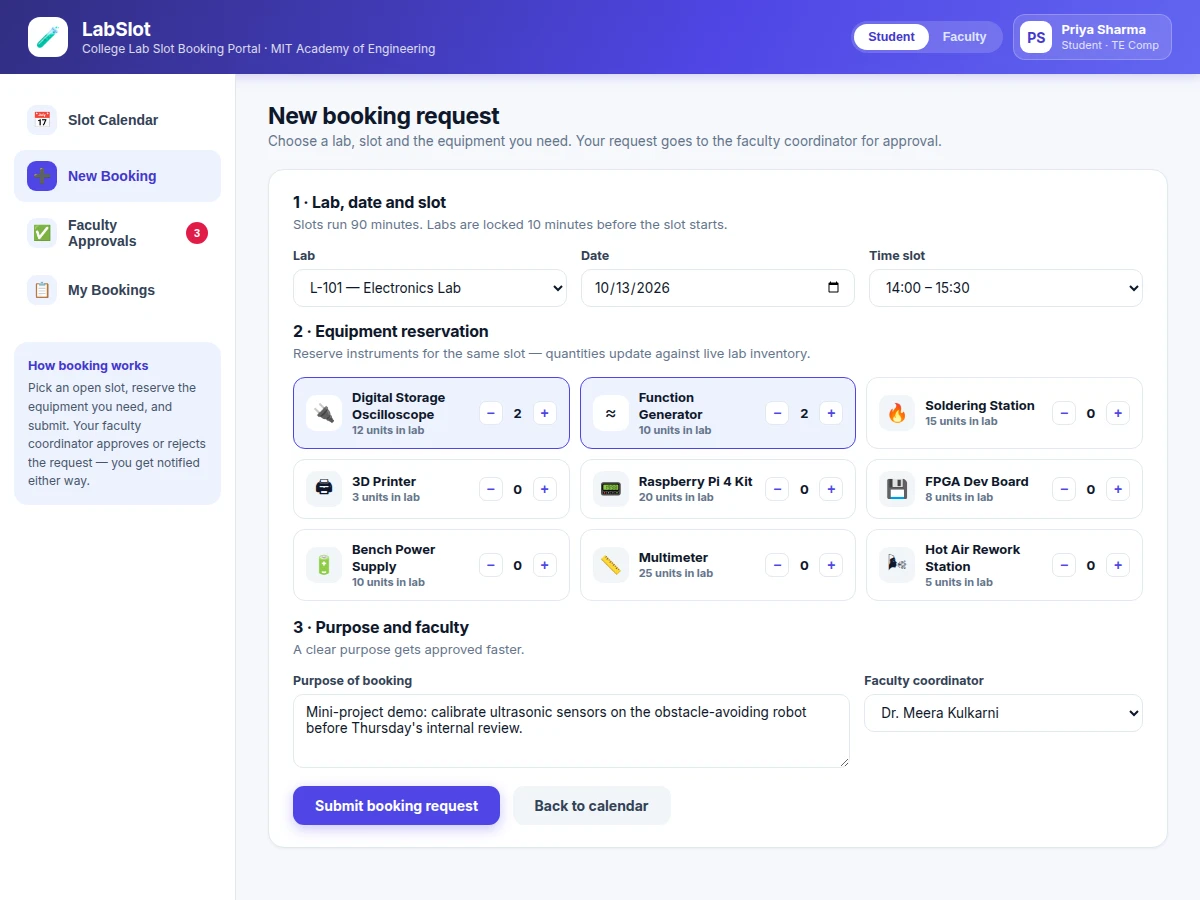
- Clicking a green cell (or the New Booking tab) opens the booking form with that lab and slot pre-filled; the student sets quantities on the equipment grid and writes the purpose of the booking.
- Submitting creates a pending request in one database transaction that holds the slot and decrements the reserved equipment counts.
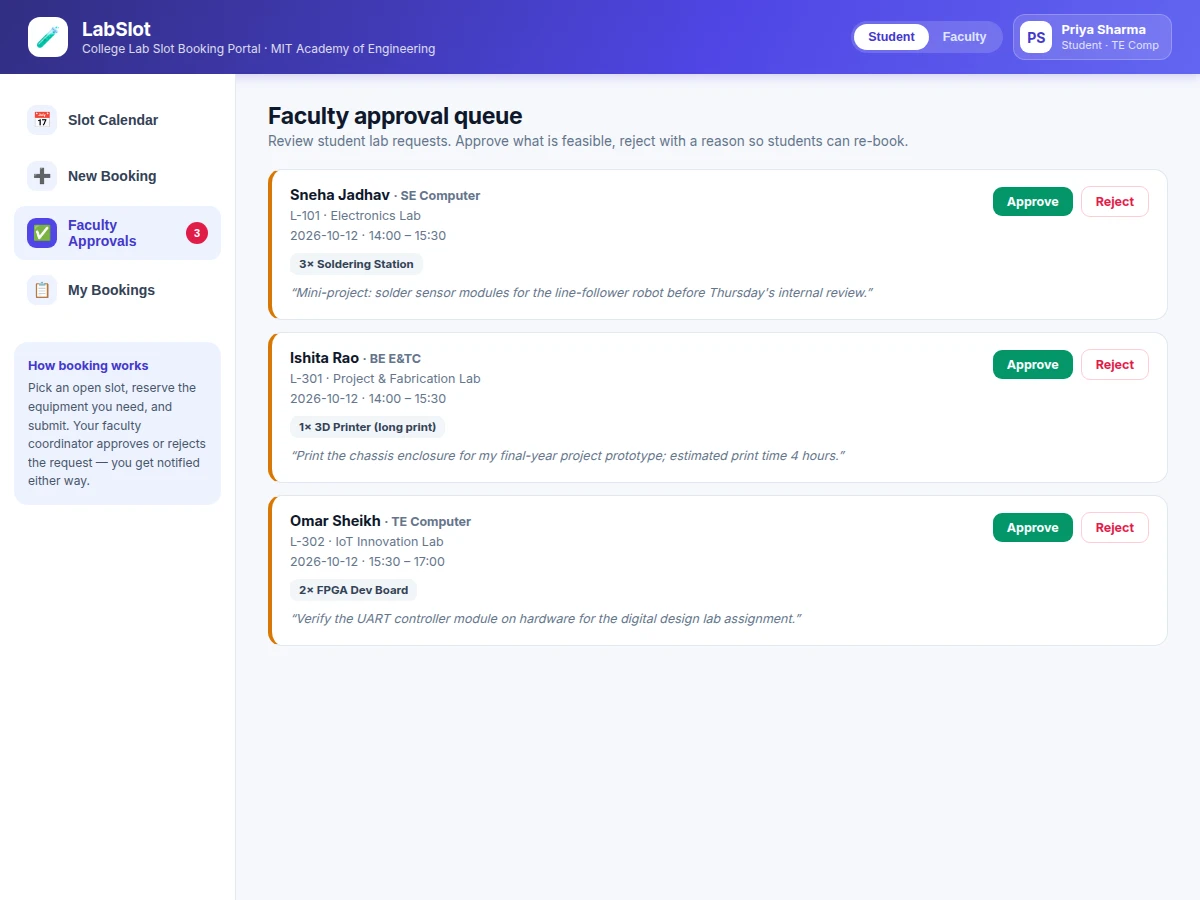
- The request appears in the faculty coordinator's approval queue with the student's name, branch, purpose and equipment list.
- The faculty member approves (slot confirmed, student notified in-app) or rejects with a written reason, which releases the slot and equipment and shows the reason to the student.
- The student tracks the request in My Bookings — pending requests can be cancelled, approved ones stay as confirmed reservations.
Tech stack:
- HTML5, CSS3, vanilla JavaScript (frontend)
- PHP 8 with MySQL 8 (reference backend, design target)
- Node.js with PostgreSQL 14 (alternate backend, design target)
- Relational schema with transactional booking logic
- Role-based access control (student / faculty)
- Responsive CSS, zero frontend framework dependency
- Git for version control
| Parameter | Value |
|---|---|
| Slot duration | 90 minutes per slot (design target, configurable) |
| Labs in demo seed | 6 labs (configurable) |
| Slots per lab per day | 5 slots (design target) |
| Equipment types | 9 instrument types with per-lab unit counts |
| Booking lifecycle | 4 states: pending, approved, rejected, cancelled |
| Concurrency guarantee | Exactly 1 confirmed booking per lab + slot (design target) |
| Browser support | Current Chrome, Edge and Firefox releases (design target) |
| Backend options | PHP 8 + MySQL 8, or Node.js 18+ + PostgreSQL 14 (design targets) |
| Demo dataset | 1 seeded week of bookings across 6 labs (included) |
Project features
- [Slot availability calendar] A colour-coded grid of labs against 90-minute time slots (green = bookable, red = booked, amber = pending) with lab and date filters; clicking a free cell opens the booking flow with that lab and slot pre-filled.
- [Booking flow with equipment reservation] Lab, date and slot selection plus instrument quantity steppers that cap reservations at the live per-lab inventory count, so the form never promises equipment that does not exist.
- [Faculty approval queue] Coordinators see every pending request with the student's purpose and reserved equipment, then approve in one click or reject with a mandatory reason that is shown to the student.
- [My bookings tracker] Each student sees their full request history with status chips (pending, approved, rejected) and can cancel pending requests, which immediately releases the slot and equipment.
- [Per-lab equipment inventory] Nine instrument types with per-lab unit counts (oscilloscopes, 3D printers, Raspberry Pi kits, FPGA boards and more); reservations decrement availability inside the same transaction as the slot hold.
- [Double-booking protection] The lab-plus-slot pair is guarded by a transactional check, so simultaneous requests for the same cell cannot both confirm — one wins, the other stays pending or is guided to another cell.
- [Role-separated access] Student and faculty views share one availability source: students create and track their own requests while faculty own the approval queue for their assigned labs.
- [Seeded demo data] A full demo week across 6 labs with realistic bookings, so the calendar, queue and tracker can be exercised end to end during the viva.
What is included
- Complete portal source code (frontend + backend reference implementation)
- Database schema with migration scripts and seeded demo data
- Working demo walkthrough covering calendar, booking, approval and tracker views
- Project report PDF (background, schema design, booking transaction logic, approval workflow, tested conflict scenarios)
- PPT presentation for final review
- Viva Q&A preparation document (transactions, concurrency, role-based access, inventory modelling)
Limitations & prerequisites
- The base build notifies in-app only — email and SMS alerts for approvals need a messaging provider and are quoted separately as future scope.
- Approvals are manual by faculty; there are no automatic allocation rules or priority scoring in the base build.
- Equipment is tracked by type and quantity per lab, not by individual serial-numbered instruments — per-unit tracking is future scope.
- No QR check-in or no-show auto-release in the base build; unused confirmed slots stay held until cancelled.
- Slot granularity is 90 minutes in the demo (configurable in code, not per-lab in the UI yet).
- Designed for a single department or campus; multi-campus federation is not in scope.
Frequently Asked Questions
How does the portal prevent two students booking the same slot?
The booking is written as a single database transaction that checks the lab-plus-slot pair before inserting. If two requests arrive at the same instant, the transaction guard lets exactly one confirm while the other stays pending or is guided to a free cell — so the calendar can never show the same slot confirmed twice.
What happens to the equipment when a booking is rejected?
Everything is released atomically. The slot cell returns to green on the shared calendar, the reserved instrument quantities go back into the lab's inventory counts, and the student sees the rejection with the faculty's written reason in My Bookings.
Do faculty see every request or only their own labs?
Only their assigned labs. The approval queue is scoped by the faculty-lab mapping, so the electronics coordinator never sees computer-centre requests. The underlying availability data is shared, so all views stay consistent.
Does it send SMS or email notifications?
Not in the base build — decisions surface in the portal's My Bookings view. Email and SMS notifications are the natural first extension and are documented as future scope in the report, with the provider integration quoted separately.
Is this project suitable for a final-year project?
Yes — for Computer Science, IT and Web Development programs. It demonstrates relational database design, transactional concurrency control, role-based workflows and a genuinely usable multi-view interface, all of which give examiners concrete implementation questions to discuss.
Components & software requirements
- HTML5, CSS3, vanilla JavaScript (frontend)
- PHP 8 with MySQL 8 (reference backend, design target)
- Node.js with PostgreSQL 14 (alternate backend, design target)
- Relational schema with transactional booking logic
- Role-based access control (student / faculty)
- Responsive CSS, zero frontend framework dependency
- Git for version control
Delivery information
Built-to-order project. Delivery timeline is shared after order confirmation based on current queue.
Support terms
Complete documentation, setup guide, and viva preparation included. Support for setup and explanation provided.
Download free synopsis (PDF)
Enter your name and email — the synopsis PDF downloads immediately. We may send occasional project updates; no spam, unsubscribe anytime.