
More project photos (2)
The problem
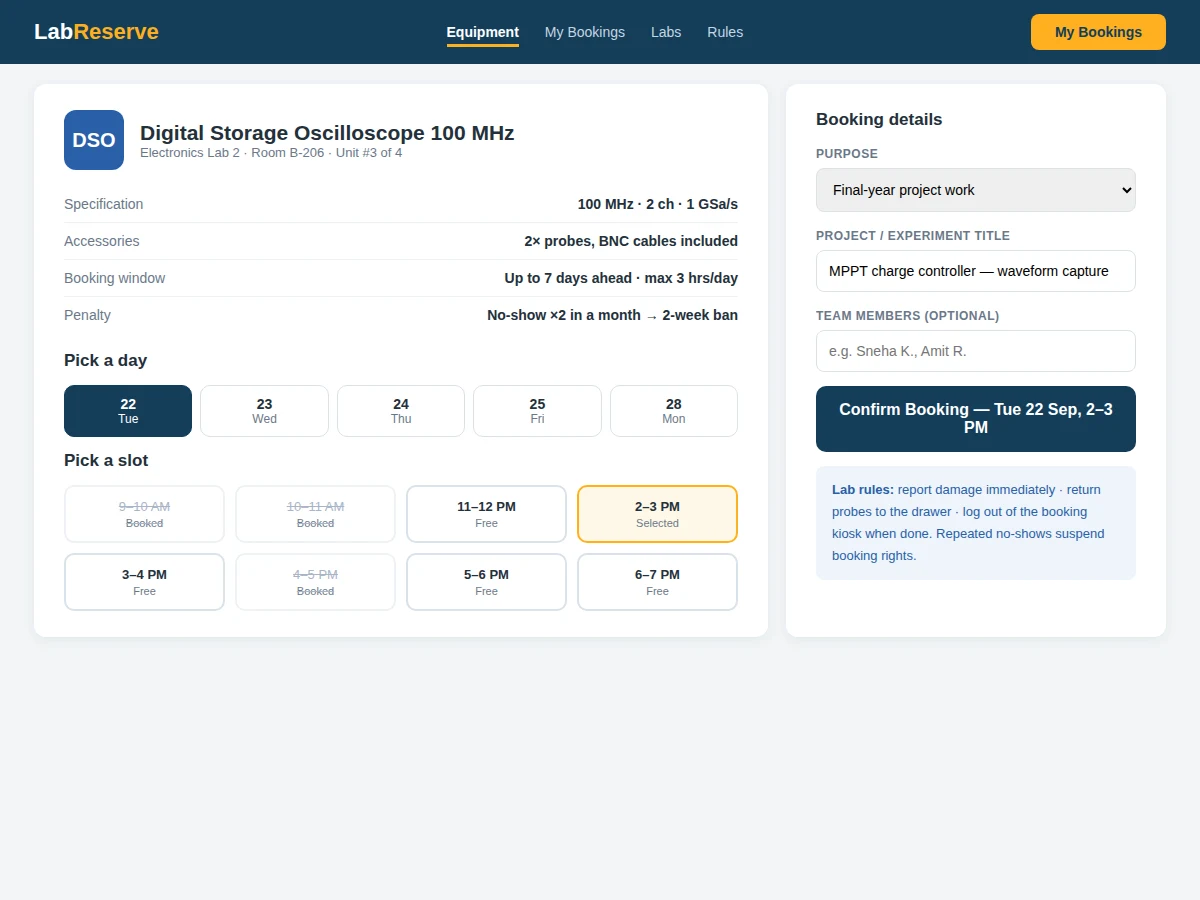
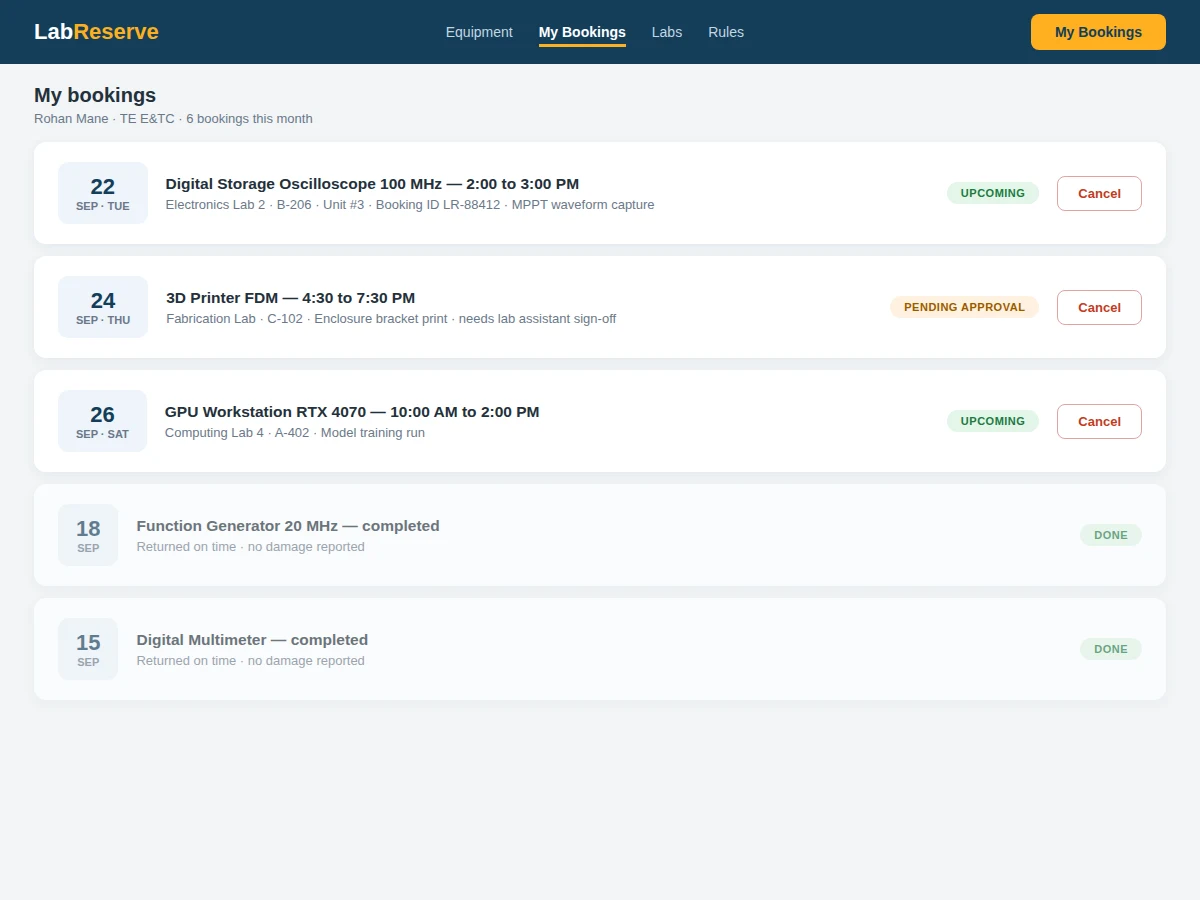
Oscilloscopes, 3D printers and GPU workstations are shared across hundreds of students, yet most labs still run on a paper register at the lab door — first-come chaos, no-shows wasting prime slots, double-bookings, and no record of who damaged what. Expensive instruments also need protection: training prerequisites, supervision rules and usage limits that a register cannot enforce. This project builds a lab equipment booking system: each instrument has a bookable calendar governed by its policy, high-risk equipment routes through approval or verified-training checks, check-ins confirm real usage, and repeated no-shows suspend booking rights. Utilization analytics show lab in-charges exactly how instruments are used.
How it works
- Lab staff register instruments with specifications, location, unit count, status and a booking policy.
- Students browse live availability and book slots; the allocation is transactional so concurrent requests cannot double-book.
- Restricted instruments route the request through an approval queue (faculty sign-off or training verification).
- The student checks in at the lab (kiosk or phone); unclaimed slots auto-release after the grace period.
- Damage or issues are reported against the booking, creating a maintenance trail tied to the user.
- No-shows accumulate per the penalty policy, and utilization dashboards update for the lab in-charge.
Tech stack:
- Python (Django/Flask) or Node.js backend
- PostgreSQL/MySQL relational database
- HTML5, CSS3, JavaScript (kiosk-friendly frontend)
- Transactional slot allocation
- Approval workflow engine
- Background scheduler (releases, penalties)
- Email/SMS confirmations and reminders
- QR codes linking instruments to booking pages
| Parameter | Value |
|---|---|
| Application type | Role-based reservation web application |
| Booking model | Transactional per-instrument slot allocation |
| Policy dimensions | Slot length, max hours, advance window, approval, training prerequisite |
| No-show rule | Auto-release after grace period; suspension on repeats (configurable) |
| Roles | Student, lab assistant, lab in-charge |
| Check-in | Kiosk or phone-based |
| Deployment | Shared hosting or small VPS |
| Deliverables | Source code, DB schema, setup guide, report, PPT, viva Q&A |
Project features
- [Searchable instrument inventory] Specs, location, unit count and live status (available, in use, maintenance) with filters by lab and category.
- [Policy-based slot booking] Per-instrument rules: slot length, max hours per day, advance-booking window and approval requirements.
- [Approval workflows] Restricted equipment (VNA, high-power rigs) needs faculty approval or verified training completion before booking.
- [Transactional allocation] Concurrent bookings for the same slot resolve to exactly one holder — double-booking is impossible.
- [Check-in and no-show engine] Unclaimed slots release after a grace period; repeated no-shows trigger booking suspensions.
- [Damage reporting] Issues logged against the booking create an accountability trail for maintenance.
- [Utilization dashboards] Peak hours, most-booked instruments and repeat-offender lists for lab in-charges.
What is included
- Complete booking system source code (student, assistant, in-charge interfaces)
- Database schema and migration scripts
- Policy engine for per-instrument booking rules
- Approval workflow implementation
- Utilization analytics dashboards
- QR-code instrument page linking
- Setup and deployment guide
- Concurrency test script for the buyer to verify no-double-booking behavior
- Project report PDF (background, reservation design, policy model, methodology)
- PPT presentation for final review
- Viva Q&A preparation document (transactions, workflows, scheduling, access control)
Limitations & prerequisites
- The system governs bookings; physical supervision of dangerous equipment still needs lab staff present.
- Training verification depends on records the lab maintains — the system enforces prerequisites, it does not conduct training.
- Penalty policies (suspension lengths, grace periods) are configured by the lab, not decided by the software.
- QR check-in assumes students carry phones; kiosk mode needs a lab PC or tablet.
- IoT interlocks (instrument powers on only for the booked user) are future scope.
- Usage-meter billing for consumables is future scope.
Frequently Asked Questions
How are double-bookings prevented?
Slot allocation is a single atomic transaction. Two simultaneous requests for the same slot resolve to exactly one confirmed booking; the other gets a clear "just taken" response.
What happens if someone books and never shows up?
After a grace period the slot auto-releases for others, and the no-show is recorded. Repeat no-shows trigger escalating suspensions per the lab's configured policy.
How is restricted equipment protected?
Instruments can require faculty approval, verified training completion, or lab-assistant supervision per booking. These are per-instrument policies, not hard-coded rules.
Can the lab block an instrument for maintenance?
Yes — lab assistants set maintenance windows that remove the instrument from booking and notify holders of affected bookings.
Who pays for consumables like 3D-printer filament?
Policy decision for the lab. The booking form can record material declarations; metered billing is listed as future scope.
Is this project suitable for a final-year project?
Yes — for Computer Science, IT and Web Development programs. It demonstrates resource-reservation design, transactional allocation, workflow engines and analytics for shared infrastructure. Suitable for B.E./B.Tech final-year projects in Computer Science, IT and Web Development.
Components & software requirements
- Python (Django/Flask) or Node.js backend
- PostgreSQL/MySQL relational database
- HTML5, CSS3, JavaScript (kiosk-friendly frontend)
- Transactional slot allocation
- Approval workflow engine
- Background scheduler (releases, penalties)
- Email/SMS confirmations and reminders
- QR codes linking instruments to booking pages
Delivery information
Built-to-order project. Delivery timeline is shared after order confirmation based on current queue.
Support terms
Complete documentation, setup guide, and viva preparation included. Support for setup and explanation provided.