
More project photos (2)

The problem
Students needing five minutes with a professor face a familiar ritual: hovering outside a cabin, knocking during a meeting, or sending emails that drown in the inbox. Faculty, meanwhile, get interrupted at random hours, and project-guidance discussions happen without preparation because no agenda was shared in advance. This project builds an office-hour scheduler that replaces corridor queues with a calendar: faculty define recurring weekly availability with exceptions for leave and meetings, students book free slots with a stated purpose, agendas reach the faculty beforehand, reminders fire on schedule, and no-shows are tracked so the system stays fair. Department heads get a view of consultation load across faculty.
How it works
- Faculty set up a weekly template (e.g. Tue/Thu 4–6 PM in 15-minute slots) plus exceptions for leave, holidays and meetings.
- The engine expands templates into bookable slots; leave and busy blocks remove slots automatically.
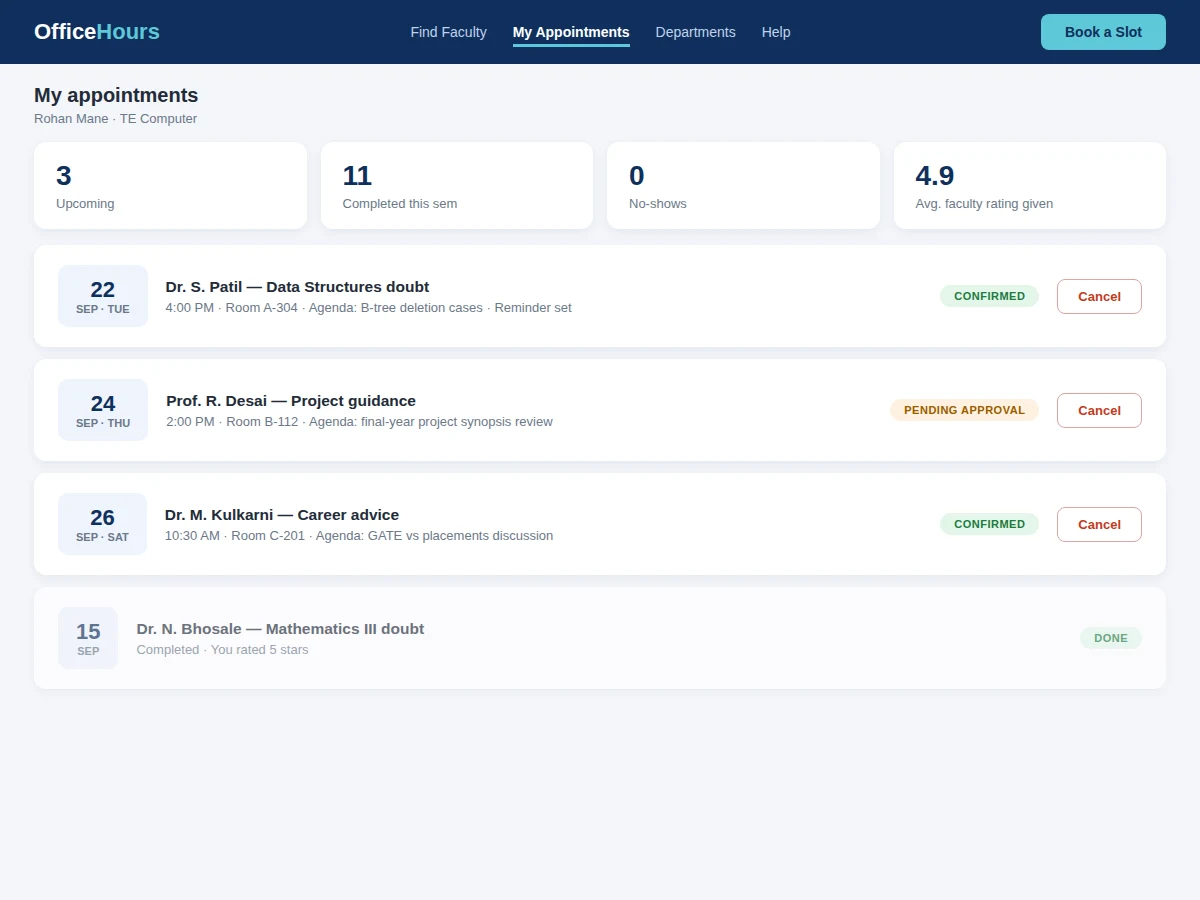
- A student searches for the faculty member, picks a free slot, and states a purpose and agenda.
- The booking is confirmed instantly or queued for faculty approval, per the faculty's setting.
- Both sides receive reminders before the slot with the agenda attached; the student gets room details.
- After the meeting, completion is logged with optional mutual feedback, feeding no-show and rating records.
Tech stack:
- Python (Django/Flask) or Node.js backend
- PostgreSQL/MySQL relational database
- HTML5, CSS3, JavaScript with calendar components
- Transactional booking logic
- Email/SMS reminder service
- ICS calendar export
- Role-based access (faculty, student, department)
- Responsive web UI
| Parameter | Value |
|---|---|
| Application type | Appointment scheduling web application |
| Slot model | Configurable length (15 min default), recurring templates + exceptions |
| Booking integrity | Atomic slot allocation (no double-booking) |
| Approval modes | Instant confirm or faculty approval |
| Reminders | Configurable lead time, email/SMS |
| Cancellation policy | Free cancellation up to 2 hours before (configurable) |
| Deployment | Shared hosting or small VPS |
| Deliverables | Source code, DB schema, setup guide, report, PPT, viva Q&A |
Project features
- [Faculty availability templates] Recurring weekly office hours with slot length, breaks, leave blocks and per-slot capacity.
- [Student discovery] Find faculty by name, department or subject, with live availability indicators and next-free-slot display.
- [Transactional slot booking] 15-minute (configurable) slots booked atomically — double-booking is impossible at the data layer.
- [Purpose and agenda] Every booking carries a purpose category and agenda notes the faculty reads before the meeting.
- [Reminders and rescheduling] Email/SMS reminders before the slot; one-tap cancellation or rescheduling within policy.
- [Approval modes] Faculty choose instant confirmation or approval-required booking per their preference.
- [Accountability] No-show tracking for students and completion ratings that keep both sides honest.
What is included
- Complete scheduler source code (faculty, student, department views)
- Database schema and migration scripts
- Slot-generation engine (templates + exceptions)
- Reminder scheduling implementation
- ICS export for personal calendars
- Setup and deployment guide
- Pilot plan for the buyer to trial in one department
- Project report PDF (background, scheduling model, concurrency design, methodology)
- PPT presentation for final review
- Viva Q&A preparation document (recurrence modeling, transactions, notifications)
Limitations & prerequisites
- The system schedules meetings; it cannot make either party show up — no-show tracking is informational.
- Availability is only as current as faculty keep it; stale templates show stale slots.
- Video-meeting links for remote consultations are future scope; the base build assumes in-person meetings.
- Reminder delivery depends on the notification service and correct contact details.
- Department-level analytics describe consultation load; they do not evaluate teaching quality.
- Timetable integration (auto-blocking class hours) is future scope.
Frequently Asked Questions
What stops two students booking the same slot?
The booking is a single atomic database transaction on the slot row. Even if two requests arrive in the same millisecond, exactly one succeeds and the other sees the slot as taken.
How do faculty handle leave or sudden meetings?
They add an exception — a leave day or a blocked hour — and the engine removes those slots from booking immediately; existing bookings in blocked time are flagged for rescheduling.
Can a faculty member require approval before confirming?
Yes. Each faculty profile sets instant-confirm or approval-required mode; pending requests show in their appointment list with the student's agenda.
What happens on a no-show?
The faculty marks it after the slot; repeated no-shows are visible on the student's record and the department can set policies (e.g. temporary booking limits).
Do students need an account?
Yes — campus-email accounts keep bookings tied to real students and make reminders and no-show tracking possible.
Is this project suitable for a final-year project?
Yes — for Computer Science, IT and Web Development programs. It demonstrates recurrence modeling, transactional booking, notification scheduling and calendar UX. Suitable for B.E./B.Tech final-year projects in Computer Science, IT and Web Development.
Components & software requirements
- Python (Django/Flask) or Node.js backend
- PostgreSQL/MySQL relational database
- HTML5, CSS3, JavaScript with calendar components
- Transactional booking logic
- Email/SMS reminder service
- ICS calendar export
- Role-based access (faculty, student, department)
- Responsive web UI
Delivery information
Built-to-order project. Delivery timeline is shared after order confirmation based on current queue.
Support terms
Complete documentation, setup guide, and viva preparation included. Support for setup and explanation provided.