
More project photos (2)
The problem
At lunch hour, a college canteen counter turns into a bottleneck: students stand in a physical line to order, wait again to pay, and crowd around the counter asking when their food will be ready. Cash and UPI payments at the till slow every transaction, the vendor has no organized order list, and nobody can tell how long the wait is — so students skip meals or miss the start of afternoon lectures. Food-delivery apps do not fit: the canteen needs counter pickup, one-tap payment without a checkout detour, and a public queue everyone can follow. This project builds a token-based ordering system designed for that exact workflow: order from your phone, pay from a prepaid wallet in one tap, receive a token number, and watch it progress on a live queue display until the counter calls it. For the vendor, orders arrive as a clean prioritized queue instead of a shouting crowd. The project demonstrates real mobile-engineering problems — realtime multi-client synchronization, payment-gateway integration, offline caching, and role-based app design — in a setting every student has lived through.
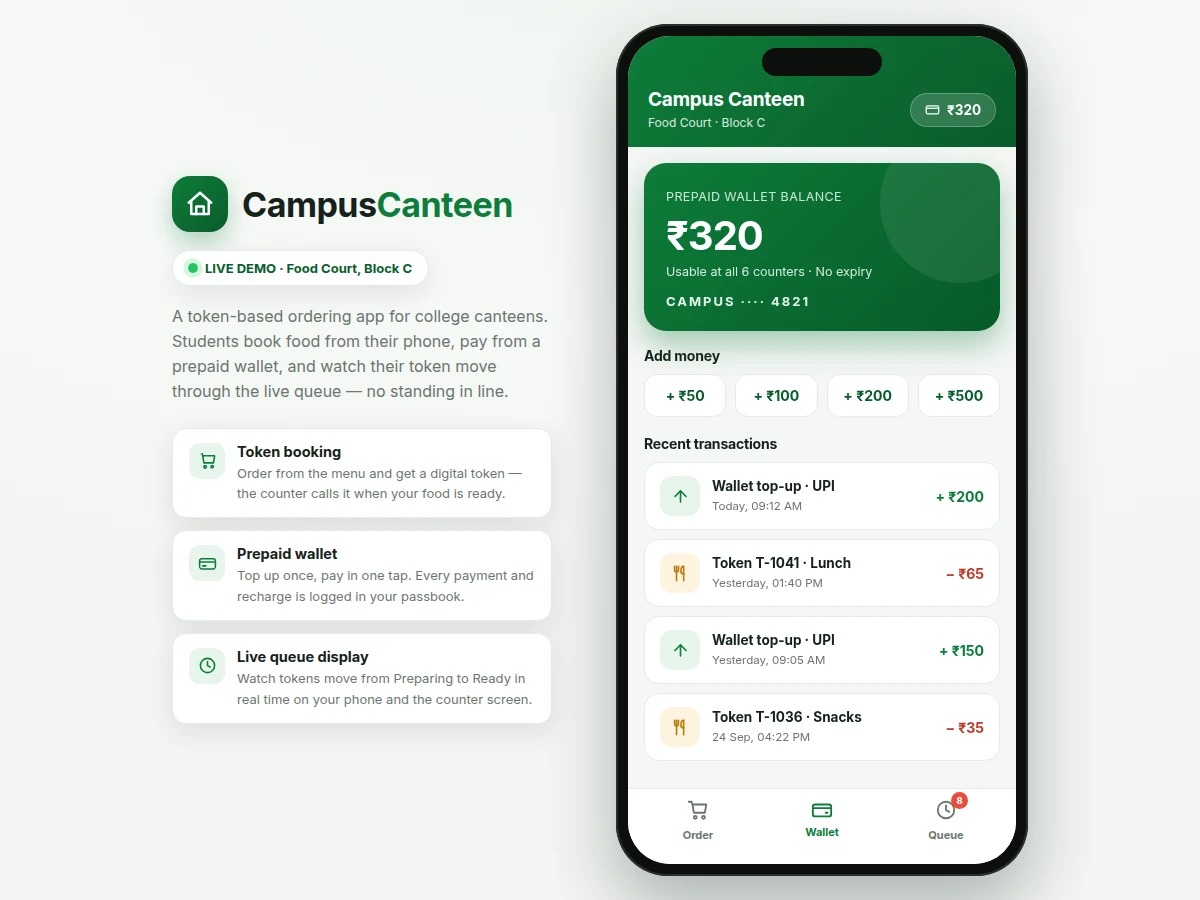
Tops up the wallet, books tokens and watches the live queue.
Follow the working sequence
How it works
- The student signs in with phone OTP and tops up the prepaid wallet once via UPI through the integrated payment gateway.
- They browse the cached canteen menu, add items to the cart, and tap Book Token — the app checks the wallet balance first.
- On confirmation, the order is written to the realtime database under a new token number and the wallet is debited; both succeed or the booking is rejected.
- The vendor console receives the token instantly in its incoming-orders list and accepts it, starting preparation.
- As the vendor taps Preparing → Ready, each state change pushes to every subscribed device within about a second on campus Wi-Fi.
- The student watches their token's progress bar advance and walks to the counter only when the display shows Ready.
- The counter display screen mirrors the queue so the whole hall can follow now-serving tokens without crowding the till.
Tech stack:
- Kotlin, Android SDK (Jetpack)
- Firebase Realtime Database (live queue sync)
- Firebase Authentication (phone OTP)
- Razorpay payment gateway (UPI top-ups)
- Room database (offline menu & balance cache)
- MVVM architecture with Kotlin coroutines
- Retrofit (admin REST calls)
- Git (version control)
| Parameter | Value |
|---|---|
| Platform | Native Android (min SDK 26 / Android 8.0, design target) |
| Language | Kotlin with Jetpack libraries |
| Live sync | Firebase Realtime Database listeners (expected sub-second updates on campus Wi-Fi) |
| Authentication | Phone-number OTP via Firebase Authentication |
| Payments | Razorpay gateway, UPI top-ups (test mode in base build; production needs merchant KYC) |
| Local cache | Room database for menu, prices and last known balance |
| Roles | Student app, vendor console, admin panel, counter display mode |
| Token format | Configurable prefix + running number (e.g. T-1047) |
| App size | Approximately 18–25 MB installed (design target) |
Project features
- [Token booking flow] Browse the canteen menu by category, add items to a cart, and book with one tap — each order generates a unique token number (e.g. T-1047) with its items, counter assignment and timestamp.
- [Prepaid wallet with passbook] Top up the wallet via UPI through the payment gateway; every recharge and every order payment is written to a transaction ledger with running balance, so spending is fully traceable.
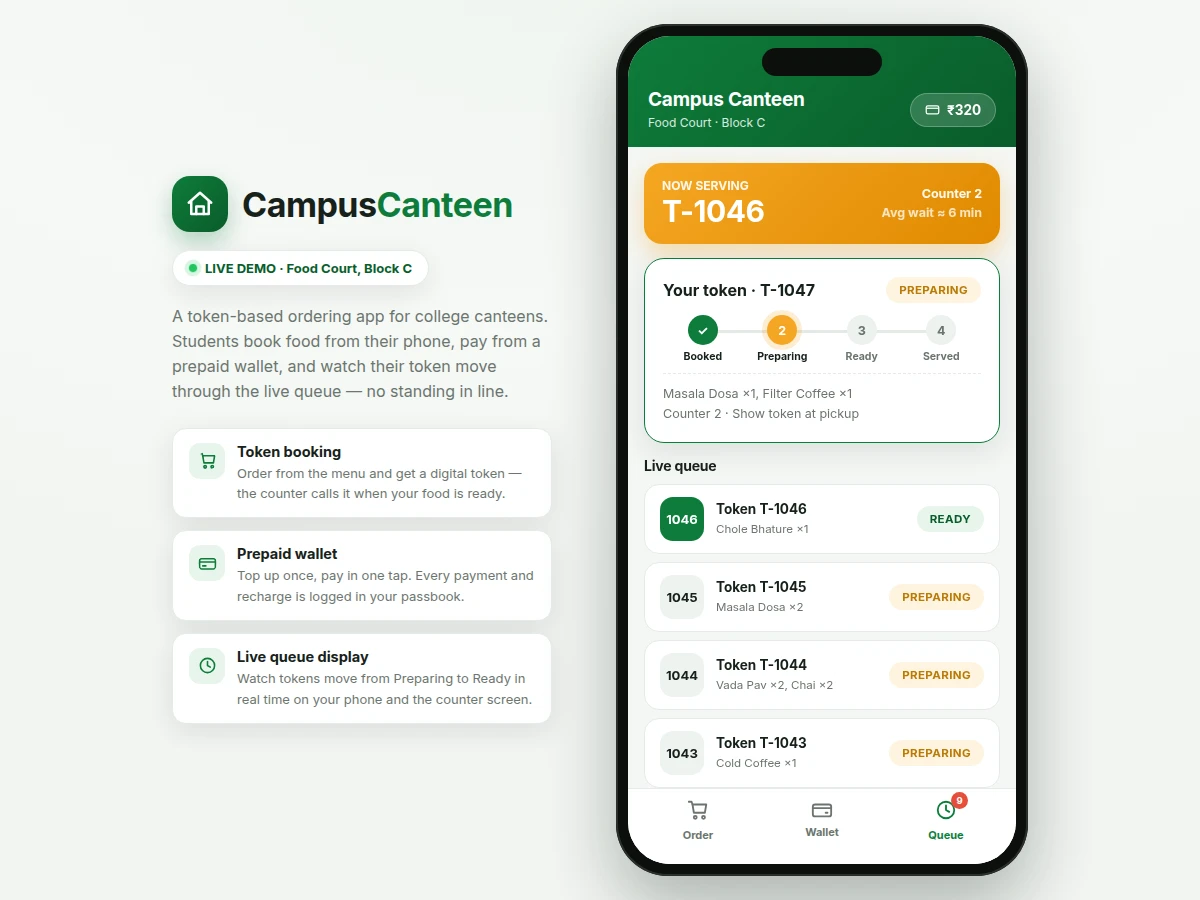
- [Live queue display] Tokens move through Booked → Preparing → Ready → Served in near real time on the student's phone and on a counter display screen, all driven by the same realtime database node.
- [Vendor order console] The canteen staff app lists incoming tokens in order, lets the vendor accept, mark preparing, and mark ready, and highlights the currently serving token for the counter screen.
- [Order status tracking] The student sees a step-by-step progress indicator for their own token plus an approximate wait estimate computed from the tokens ahead in the queue.
- [Offline menu cache] The menu, prices and the last known wallet balance are cached locally, so the app opens and browses even on patchy campus Wi-Fi; booking and payment resume when connectivity returns.
- [Role-based access] Separate student, vendor and admin roles with phone-OTP sign-in; vendors only see their counter's orders and admins manage the menu, prices and wallet refunds.
What is included
- Complete Android source code (student app + vendor console + counter display mode)
- Firebase project configuration guide (database rules, auth setup, cloud functions if used)
- Payment gateway integration in test mode with production-activation checklist
- Setup and build instructions (Android Studio, SDK versions, signing)
- Project report PDF (background, architecture, database schema, methodology)
- PPT presentation for final review
- Viva Q&A preparation document (Firebase realtime sync, payment flows, MVVM, offline caching)
Limitations & prerequisites
- Live queue updates need an active internet connection on both the student and vendor devices; bookings and status changes cannot sync offline (the menu still browses from cache).
- Wallet top-ups run in the payment gateway's test mode in the base build — accepting real money needs the canteen's merchant KYC and production activation, which is the canteen owner's step.
- The approximate wait time is a design-target estimate from queue length and a configurable per-order prep time, not a measured guarantee of actual preparation speed.
- Wallet refunds for cancelled orders are processed by the admin, not automatic — the base build logs the request and adjusts the ledger on admin approval.
- The vendor console assumes one device per counter with a stable connection; it is an order-management tool, not a full POS billing or GST-invoicing system.
- Push-notification reliability for "your token is ready" depends on the device's battery-optimization settings, which the setup guide covers.
Frequently Asked Questions
Does the wallet handle real money?
The base build integrates the payment gateway in test mode, so top-ups are simulated end-to-end without moving real money. The wallet ledger, balance checks, debit-on-booking and refund-request flows are all fully implemented. Switching to production is a configuration step plus the canteen's merchant KYC with the gateway — the setup guide walks through it.
How does the live queue stay in sync across phones?
Every token is a node in Firebase Realtime Database, and the student app, vendor console and counter display all attach listeners to the same queue. When the vendor marks a token Ready, the change pushes to every subscribed device, typically within about a second on campus Wi-Fi. The report documents the data schema and the listener lifecycle for the viva.
Is the vendor/counter side included too?
Yes. The build ships a vendor console for accepting orders and advancing tokens through Preparing and Ready, plus a counter display mode that shows the now-serving token and the live queue for the whole hall. Both share the same backend as the student app, which is the project's main realtime-sync demonstration.
Can the menu, prices and counters be changed for my college?
Yes. Menu items, prices, categories, counter names, the token-number format and the per-order prep-time used for wait estimates are all admin-configurable through the admin panel and the database — no code changes needed. Branding, colors and the college name are also parameterized.
What happens if the internet drops mid-order?
The menu and your last wallet balance stay visible from the local cache, but booking a token, paying, and receiving queue updates need connectivity and will wait or show a clear offline state rather than fail silently. The vendor side is expected to run on the canteen's own stable connection.
Is this project suitable for a final-year project?
Yes — for Computer Science, IT and related programs. It demonstrates native Android development, realtime database synchronization across multiple clients, payment-gateway integration, offline caching with Room, and role-based app design, all wrapped in a problem every examiner has personally experienced. Suitable for B.E./B.Tech final-year projects in Computer Science, IT and mobile application development.
Components & software requirements
- Kotlin, Android SDK (Jetpack)
- Firebase Realtime Database (live queue sync)
- Firebase Authentication (phone OTP)
- Razorpay payment gateway (UPI top-ups)
- Room database (offline menu & balance cache)
- MVVM architecture with Kotlin coroutines
- Retrofit (admin REST calls)
- Git (version control)
Delivery information
Built-to-order project. Delivery timeline is shared after order confirmation based on current queue.
Support terms
Complete documentation, setup guide, and viva preparation included. Support for setup and explanation provided.
Download free synopsis (PDF)
Enter your name and email — the synopsis PDF downloads immediately. We may send occasional project updates; no spam, unsubscribe anytime.