
More project photos (2)
The problem
Hostel laundry runs on paper tokens, a notebook, and memory. Students hand over a bag, get a scribbled slip, and have no idea when the bag will be ready — while the vendor has no clean record of who owes what. Disputes over lost slips, missed pickups and unpaid dues are routine. This project builds a complete Android app that digitizes that whole loop: each bag gets a unique token with a QR code, students book one of the vendor's pickup slots so the counter never crowds, the bag's status moves visibly from Dropped to Washing to Ready to Delivered, and every invoice lands in a payment ledger with paid/pending states. It is a realistic client-server mobile project — Kotlin on the front end, Firebase on the back end, push notifications for slot reminders and status changes, and a UPI payment flow for dues — the kind of system a student can actually demo end-to-end in a viva.
Books a pickup slot and pays the invoice via UPI.
Follow the working sequence
How it works
- The student signs in with phone-number OTP (Firebase Authentication) and selects their hostel block once; the profile stores room number and UPI ID.
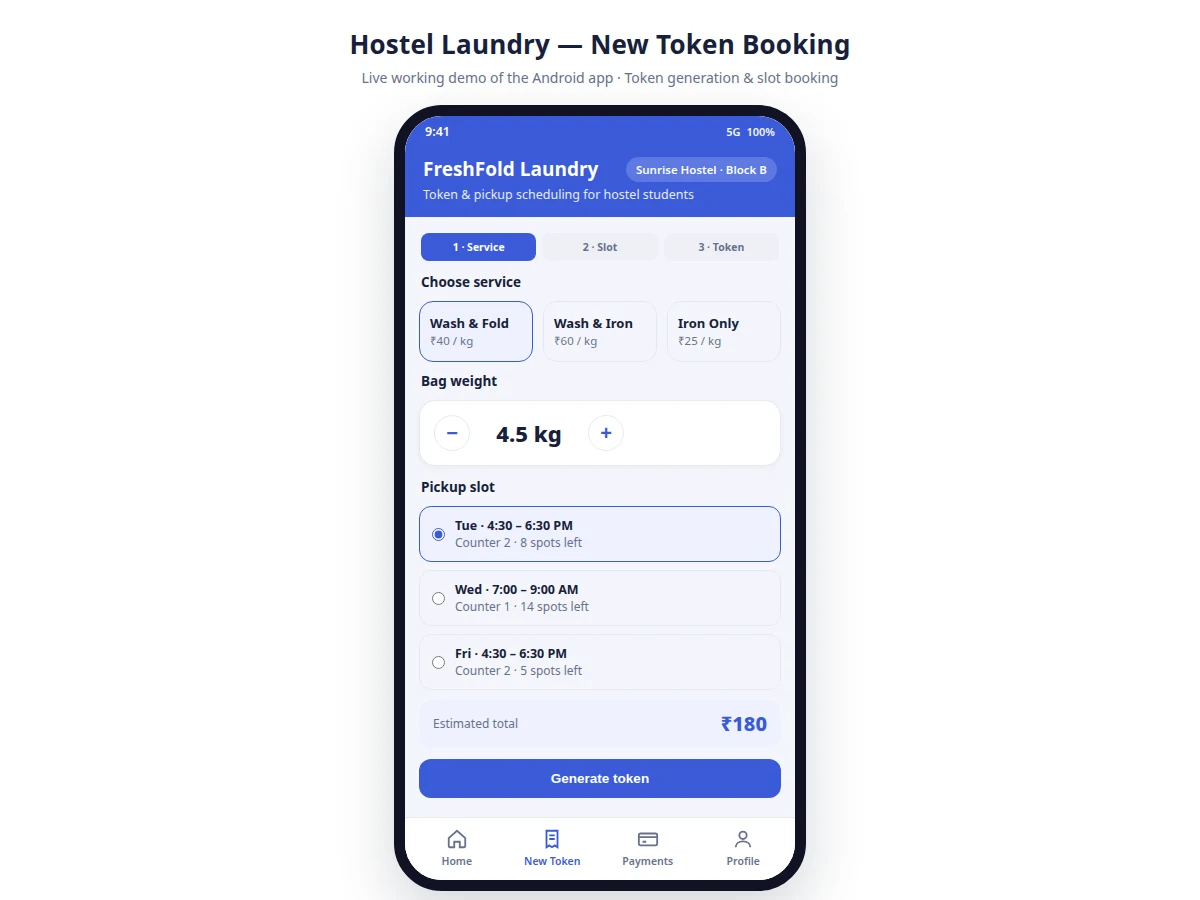
- On the New Token screen the student picks a service (Wash & Fold, Wash & Iron, Iron Only), enters the bag weight with a stepper, and the app computes the estimated total from the vendor's rate card.
- The student chooses a pickup slot from the vendor's published list; the booking decrements that slot's remaining capacity in Cloud Firestore inside a transaction so two students cannot take the last spot.
- The app generates the token with a QR code and registers it as Dropped; the vendor's token queue updates in real time.
- The vendor moves the token through Washing, Ready and Delivered from the management screens; each transition writes a status event and triggers a Firebase Cloud Messaging push to the student.
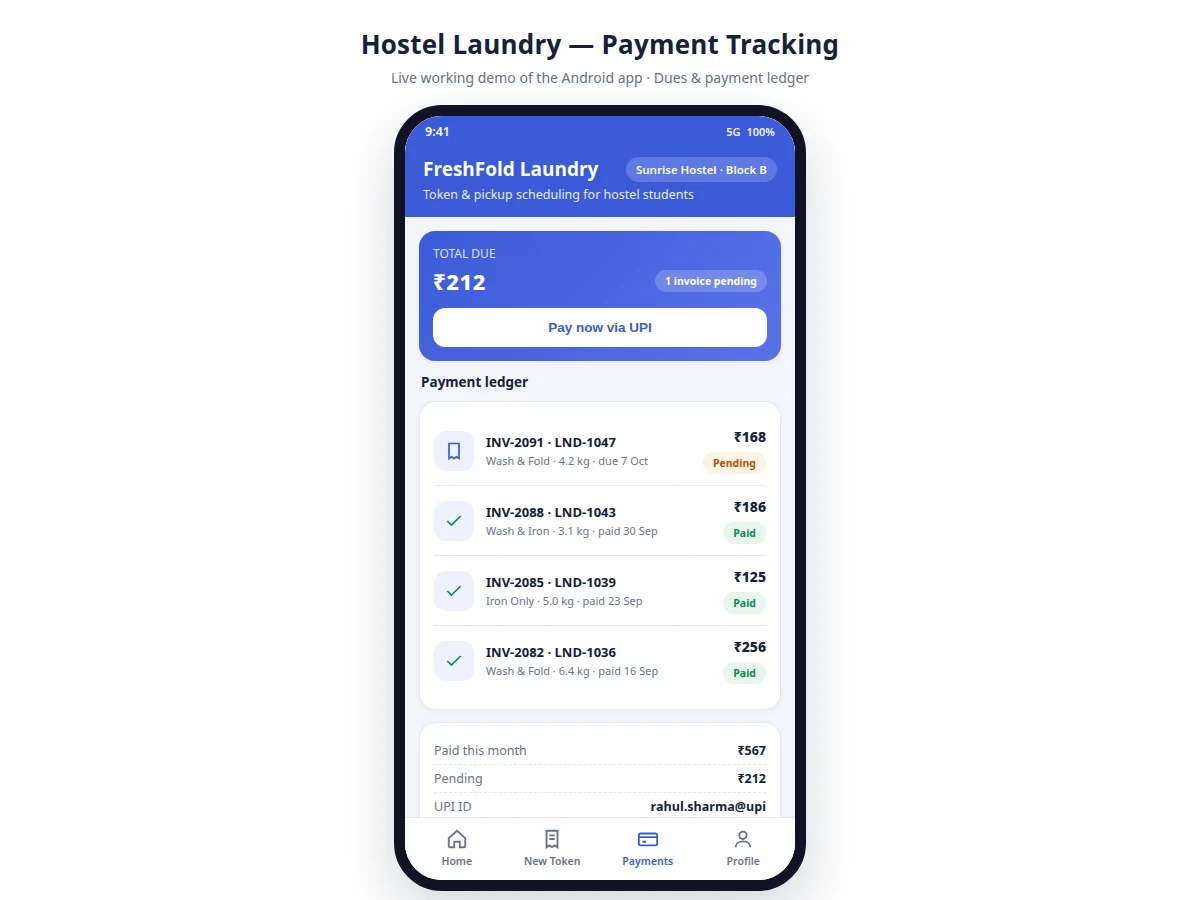
- On delivery (or earlier), the student pays the invoice through the UPI flow; the ledger marks it paid with the transaction reference, and the vendor's dues summary updates.
Tech stack:
- Kotlin, Android SDK with Jetpack (Navigation, ViewModel)
- Material Design 3 components
- Firebase Authentication (phone OTP)
- Cloud Firestore (tokens, slots, invoices)
- Firebase Cloud Messaging (status + reminder pushes)
- UPI payment flow via payment gateway SDK
- ZXing-style QR code generation
- Git
| Parameter | Value |
|---|---|
| Platform | Android 8.0 (API 26) and above (design target) |
| App language | Kotlin, single-module Gradle project |
| Authentication | Phone-number OTP via Firebase Authentication |
| Database | Cloud Firestore; tokens, slots, invoices, rate card collections |
| Token format | LND-#### with per-token QR code payload |
| Push notifications | Firebase Cloud Messaging for status changes and slot reminders |
| Payments | UPI flow via gateway SDK (test credentials included; production keys configured by buyer) |
| Slot booking | Transactional capacity decrement in Firestore |
| Vendor screens | Token queue, status updates, dues summary |
Project features
- [Token generation with QR code] Every laundry bag gets a unique token (e.g. LND-1048) with a scannable QR; the token carries service type, weight, slot and amount, so the counter can pull up the bag in one scan.
- [Pickup slot scheduling] The vendor defines slots (day, time window, counter, bag capacity); students book a slot when generating the token, and the app decrements available spots so the counter never overflows.
- [Live bag status tracking] Each token moves through Dropped, Washing, Ready and Delivered; the student watches the timeline on the home screen and gets a push notification at every transition.
- [Payment ledger with UPI flow] Invoices per token show service, weight and amount with paid/pending states; dues can be settled through the UPI payment flow and receipts are recorded against the token.
- [Slot reminders] The app sends a reminder before the booked pickup slot so students do not miss their window, reducing the vendor's unclaimed-bag pile.
- [Vendor bag management] The vendor side lists all active tokens, filters by status and slot, updates bag status in one tap, and sees which invoices are still unpaid.
- [Due and defaulter summary] Outstanding amounts are aggregated per student and per hostel block so the vendor can chase dues instead of losing them in a notebook.
What is included
- Complete Android app source code (student app + vendor management screens)
- Firebase project setup guide with Firestore schema and security rules
- QR token generation and scanning implementation
- UPI payment flow integration code with test credentials
- Push notification setup (FCM) for status changes and reminders
- Project report PDF (background, system design, database schema, methodology)
- PPT presentation for final review
- Viva Q&A preparation document (Firebase, transactions, FCM, payment flow, QR)
Limitations & prerequisites
- Payment gateway integration ships with test/sandbox credentials — going live needs the buyer's own merchant account and production keys, which the setup guide covers.
- Push notifications need Google Play services on the device; they do not arrive on de-Googled or emulator builds without Play services.
- Slot capacity is enforced by Firestore transactions, so booking needs an internet connection; an offline mode is listed as future scope, not included.
- The QR payload is a lookup key, not a payment instrument — scanning shows the token; it does not transfer money or prove identity.
- Rate cards, slot timings and capacity are configured per vendor; the app ships with one sample vendor profile and the buyer adapts it to their hostel.
- Concurrent booking correctness was designed with transactions, but load behaviour under hundreds of simultaneous bookings is a design expectation, not a measured benchmark.
Frequently Asked Questions
How does the token system replace paper slips?
Each bag gets a unique token like LND-1048 with a QR code, generated in the app at drop-off. The vendor scans the QR to pull up the bag, and every status change and payment is recorded against that token — nothing lives only on paper.
How do pickup slots prevent counter crowding?
The vendor publishes slots with a fixed bag capacity per time window. Students book a slot when generating the token and the app decrements remaining spots transactionally, so the last spot cannot be double-booked.
Is the UPI payment real or simulated?
The payment flow integrates a real gateway SDK with test credentials included, so the full flow — intent, authorization, callback, ledger update — can be demoed. Production keys are the buyer's own and the setup guide explains the switch.
Does the vendor need a separate app?
No — vendor management screens (token queue, status updates, dues summary) ship inside the same app behind a vendor role; the role is assigned in Firestore.
Can it handle multiple hostels or vendors?
The schema supports it: tokens and dues are keyed by hostel block and vendor ID. The demo ships with one sample vendor; adding more is configuration, covered in the report's future scope.
Is this project suitable for a final-year project?
Yes — for Computer Science, IT and Computer Engineering programs. It demonstrates mobile UI development, cloud database design with transactions, authentication, push notifications and a real payment flow. Suitable for B.E./B.Tech final-year projects in Computer Science, IT and Computer Engineering.
Components & software requirements
- Kotlin, Android SDK with Jetpack (Navigation, ViewModel)
- Material Design 3 components
- Firebase Authentication (phone OTP)
- Cloud Firestore (tokens, slots, invoices)
- Firebase Cloud Messaging (status + reminder pushes)
- UPI payment flow via payment gateway SDK
- ZXing-style QR code generation
- Git
Delivery information
Built-to-order project. Delivery timeline is shared after order confirmation based on current queue.
Support terms
Complete documentation, setup guide, and viva preparation included. Support for setup and explanation provided.
Download free synopsis (PDF)
Enter your name and email — the synopsis PDF downloads immediately. We may send occasional project updates; no spam, unsubscribe anytime.