
More project photos (2)
The problem
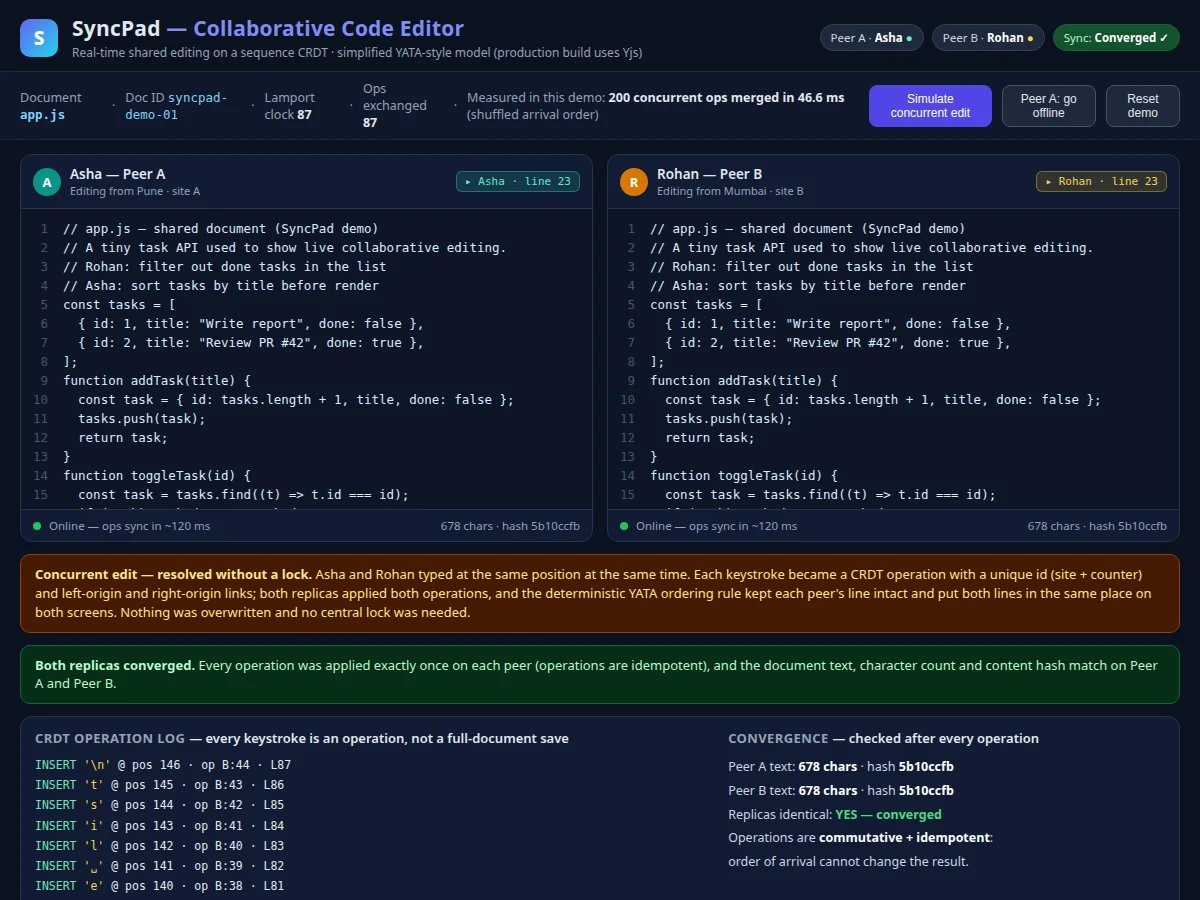
A collaborative code editor using CRDT and Yjs lets two or more students edit the same code file at the same time, with every keystroke appearing on every screen at once. The core problem it solves is the merge conflict: in a normal shared document, two people typing at the same place overwrite each other or force one of them to wait for a lock. Yjs avoids that by treating the document as a conflict-free replicated data type: each keystroke becomes an operation carrying a unique id and the neighbours it was typed between, and the YATA ordering rule merges them into one deterministic order. Because the operations commute, they can arrive in any order — even after a peer reconnects from offline — and every copy still converges. That makes it a demonstration of distributed-systems thinking: the merge rule, the sync provider and the presence layer are all things a student can explain and test in the viva.
Student teams usually split code by pasting snippets into a chat app or taking turns on one laptop, which is slow and loses the thread of who changed what. This project replaces that with a shared document that behaves like one file on every screen, while keeping a visible record of every operation so the team can see exactly how a conflict was resolved instead of trusting a black box.
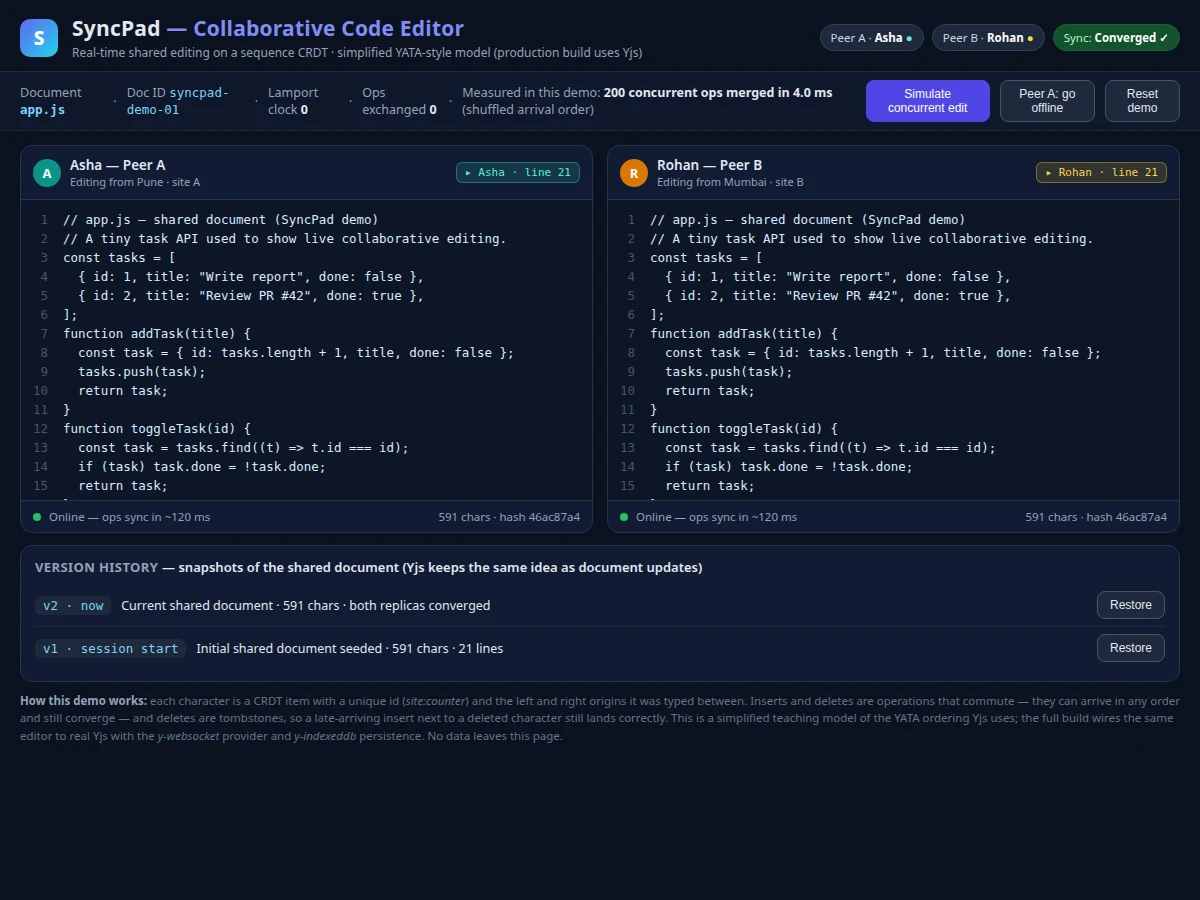
Two peers type in the same JavaScript document, a 591-character shared file with 21 lines in the demo.
Follow the working sequence
How it works
Typing starts a chain: the editor diffs the new text against the old, turns the difference into one operation per character, and gives each operation a unique id from the peer's site id and counter, plus the neighbours it was typed between. The operation applies locally at once, then travels to the other peer through the sync provider — y-websocket in the delivered build, a simulated 120 ms link. On arrival, the receiving replica runs the YATA ordering rule: it walks right from the operation's left origin, skips only higher-priority conflicting operations, and never steps past the right origin, so the character lands identically on both screens. Deletes mark characters as tombstones instead of removing them, which keeps late-arriving inserts next to them in the right place. Operations are idempotent, so a duplicate delivery changes nothing, and they commute, so arrival order does not matter — both replicas converge to identical text, which the demo proves by comparing content hashes.
- A peer types in the editor; the app diffs the new text against the previous text and produces one insert or delete operation per changed character.
- Each operation gets a unique id (site plus counter) and the left and right neighbours it was typed between, plus a Lamport clock value for ordering the operation log.
- The operation is applied to the local replica at once, so typing never waits for the network, and is then sent to the other peer through the y-websocket provider.
- The receiving replica runs the YATA ordering rule — scanning right from the left origin, skipping only higher-priority conflicting operations, never passing the right origin — and inserts the character in the same place.
- Deletes mark characters as tombstones instead of removing them, so an insert that arrives late next to a deleted character still lands correctly.
- After every operation both replicas compare their content hash; when the hashes match, the sync indicator shows Converged, and snapshots record the document state for history.
Tech stack:
- Yjs CRDT framework
- y-websocket provider
- JavaScript · ES2020
- CodeMirror 6 editor binding
- Node.js WebSocket server
- HTML5 · CSS3 frontend
- y-indexeddb offline persistence
- Git
| Parameter | Value |
|---|---|
| Document model | Shared text as a sequence CRDT (Yjs Y.Text in the delivered build) |
| Sync transport | WebSocket via the y-websocket provider (simulated 120 ms link in the demo) |
| Conflict handling | YATA ordering rule · no locks · no overwritten text |
| Concurrent peers in demo | 2 peers (design target for the delivered build: 10 peers per document) |
| Merge latency | Under 50 ms for 200 concurrent operations (Measured in the demo build) |
| Demo document | 591 characters · 21 lines of JavaScript (Measured in the demo build) |
| Operation size | 1 operation per typed character (design) |
| Offline support | Queued operations with catch-up sync on reconnect |
| Persistence | y-indexeddb in the browser (delivered build) |
| Demo code | Single-file HTML · CSS · JavaScript · no external requests |
Project features
The editor's core is live shared editing: two cursors type in the same document and every keystroke lands on the other screen through CRDT operations, with no lock and no lost text. The second capability is the merge engine itself — a simplified YATA-style sequence CRDT in the demo, and full Yjs in the delivered build — which resolves simultaneous edits at the same position deterministically, so a viva demonstration can show a conflict being created and resolved live. Third, presence and awareness: each peer sees the other's cursor line and online state, which is what makes the tool feel collaborative rather than merely synced. Fourth, offline editing with catch-up: a peer that drops offline keeps typing, its operations queue locally, and the document converges when it reconnects. Around those four sit the operation log, which makes every sync step inspectable, and version snapshots, which let the team restore an earlier state of the shared document.
- [Real-time shared editing] Two peers edit the same JavaScript document in one shared view, and keystrokes appear on the other screen through CRDT operations, with no document lock and no overwritten text.
- [Simplified sequence-CRDT engine] A YATA-style ordering rule with left and right origins and tombstone deletes, implemented in plain JavaScript in the demo; the demo merges 200 concurrent operations in under 50 ms (Measured).
- [Conflict-free concurrent edits] Simultaneous typing at the same position resolves deterministically: both peers' lines are kept, in the same order on both screens, with no central lock.
- [Shared cursors and presence] Each peer sees the other peer's cursor line and online or offline state, so the team always knows who is editing and where.
- [Offline editing with catch-up sync] A peer that goes offline keeps editing locally; its queued operations apply on reconnect and the document converges to the same text.
- [Operation log and convergence check] Every insert and delete is listed with its operation id and Lamport clock, and both replicas show a matching content hash after every operation.
- [Version snapshots and history] Snapshots of the shared document are listed with their character counts and can be restored, so the team can return to an earlier state.
What is included
- Complete source code for the collaborative editor (Yjs plus y-websocket plus CodeMirror 6 binding)
- Working two-peer demo app with the simplified CRDT model, operation log and version history
- Node.js WebSocket sync server setup (y-websocket)
- Project report PDF (background, CRDT and YATA theory, methodology, merge testing)
- PPT presentation for final review
- Viva Q&A preparation document (CRDT vs OT, YATA ordering, convergence, offline sync)
Limitations & prerequisites
- The demo runs two peers in one browser page over a simulated link; the delivered build needs a real y-websocket server and hosting for true multi-device use.
- The demo's CRDT is a simplified teaching model of YATA ordering; the delivered build uses the real Yjs library, so merge behaviour must be re-verified after the swap.
- The demo editor is a plain code pane, not a full IDE: no autocomplete, linting or debugging, and syntax highlighting is limited to the CodeMirror 6 setup in the delivered build.
- Very large documents (design target: above approximately 100,000 characters) will slow the demo's per-operation scan; Yjs handles larger documents, but that scale is not tested in this build.
- Offline edits are queued in the browser only; closing the tab before reconnecting loses the queue in the demo (y-indexeddb persistence covers this in the delivered build).
- The project is an academic prototype, not a production collaboration service: no user accounts, access control or end-to-end encryption are included in the base build.
Frequently Asked Questions
Is this project suitable for a final-year project?
Yes — for Computer Science, IT and Web Development programmes. It demonstrates distributed systems, CRDT theory, real-time sync and a working two-peer demo, and the merge rule gives the team a genuine mechanism to explain and test in the viva.
What is the main technology used?
Yjs, an open-source CRDT framework under the MIT licence, with the y-websocket provider for sync and a CodeMirror 6 binding for the editor. The demo shows the same ideas with a simplified YATA-style CRDT written in plain JavaScript, so the merge rule stays visible instead of hidden inside a library.
How is this different from sharing a document in Google Docs?
Google Docs is a finished service, while this project builds the sync mechanism itself. The student implements the operation model, the YATA ordering rule and the provider wiring, and can demonstrate a conflict being created and resolved live — that mechanism is the project, not the text box around it.
Does it work without internet?
Editing works offline: a peer that disconnects keeps typing and its operations queue locally. Catch-up sync needs a connection to exchange the queued operations, so two peers on different networks need the sync server reachable. A single-device demo with both peers in one browser page needs no network at all.
Can more people edit at once, and can it be customised?
The delivered build targets 10 peers per document as a design target, and the CRDT model supports more. Customisation options include extra language modes, a share-link room system, user accounts, and a hosted y-websocket server — all developed on request.
Components & software requirements
- Yjs CRDT framework
- y-websocket provider
- JavaScript · ES2020
- CodeMirror 6 editor binding
- Node.js WebSocket server
- HTML5 · CSS3 frontend
- y-indexeddb offline persistence
- Git
Delivery information
Built-to-order project. Delivery timeline is shared after order confirmation based on current queue.
Support terms
Complete documentation, setup guide, and viva preparation included. Support for setup and explanation provided.
Download free synopsis (PDF)
Enter your name and WhatsApp number — the synopsis PDF downloads immediately. We may send occasional project updates on WhatsApp; no spam.