
More project photos (2)
The problem
A browser-based video editor is a video editing app that runs entirely in a web page: the user opens the editor, loads a video file, trims clips on a timeline, splits scenes, adds text overlays, and exports a finished video — all without installing software or uploading footage to a server. This project builds that, using the WebCodecs API — VideoDecoder and VideoEncoder, supported in Chrome and Edge since version 94 — for frame-accurate decoding and encoding, and FFmpeg.wasm, the WebAssembly port of FFmpeg at version 0.12.x, for re-encoding and MP4 export. The problem it solves is practical: desktop editors are heavy installs, online editors upload private footage to someone else's server and charge a subscription, and neither is a realistic student build. A browser editor keeps footage on the user's machine, starts instantly from a link, and teaches the real media pipeline — demuxing, decoding, frame processing, encoding and muxing — which is the core of this project.
Most video editing still assumes a heavy desktop app or a cloud service that takes the user's footage. Students who want to learn how video actually works — codecs, frames, timestamps, containers — find both options opaque: the desktop app hides the pipeline, and the cloud editor hides the machine. This project makes the pipeline visible and buildable: every stage runs in JavaScript the student wrote, the timeline shows real frame numbers, and the export step produces a real file. The combination is genuinely new as a student build — WebCodecs for the frame path plus FFmpeg.wasm for the file path, in one editor, with nothing uploaded anywhere.
Sample clip or uploaded file
Follow the working sequence
How it works
The editor works as a pipeline: upload, decode, timeline, edit, encode, export. A video file is loaded from the user's computer and demuxed into compressed audio and video chunks; nothing is uploaded to a server. WebCodecs decodes the video chunks into raw VideoFrame pixels — the browser's own hardware-accelerated codecs do this work, which is why the editor stays fast. The frames are drawn on a canvas timeline, where the student trims in and out points, splits clips at the playhead and adds text overlays, with the playhead showing the exact frame number. When the student exports, the edited frames are fed to VideoEncoder, the encoded chunks are collected, and FFmpeg.wasm muxes them into an MP4 file with audio. In the demo build the same flow is shown with a canvas-generated sample clip and MediaRecorder export, so every step is visible and measurable before the full pipeline is added.
- The user loads a video file from their computer (in the demo, a 14.0-second sample clip is generated on a canvas instead, so no file is needed to try it).
- The file is demuxed into compressed video and audio chunks; WebCodecs' VideoDecoder turns the video chunks into raw VideoFrame pixels, using the browser's built-in codecs.
- Frames are drawn on the canvas preview and laid out on the timeline at 30 fps, with the playhead, timecode and frame counter tracking the exact position.
- The student edits: trim sets the in and out points of a clip, split cuts a clip at the playhead into two clips, and a text overlay is composited onto the frames.
- On export, the edited frames are fed to VideoEncoder, which produces encoded chunks; the demo records these through MediaRecorder into a WebM file.
- In the delivered build, FFmpeg.wasm takes over the file work: it re-encodes the chunks, muxes video and audio into an MP4 container, and converts between MP4 and WebM on request.
| Method | Install needed | Footage leaves the machine | MP4 export | Cost to run |
|---|---|---|---|---|
| Browser editor (this project) | None — opens from a link | No | Yes — FFmpeg.wasm (delivered build) | Free — runs locally |
| Desktop editor | Large download + install | No | Yes | Free tier or paid licence (expected) |
| Cloud editor | None | Yes — uploaded to a server | Yes | Subscription (expected) |
Tech stack:
- WebCodecs API (VideoDecoder · VideoEncoder)
- FFmpeg.wasm 0.12.x (@ffmpeg/core · @ffmpeg/core-mt)
- JavaScript · HTML5 Canvas
- MediaRecorder API (WebM export in demo)
- mp4-muxer (MP4 container writing)
- Vite (dev server + COOP/COEP headers)
- Node.js 18+ (build tooling)
- Git
| Parameter | Value |
|---|---|
| Sample clip (demo) | 14.0 s · 420 frames at 30 fps |
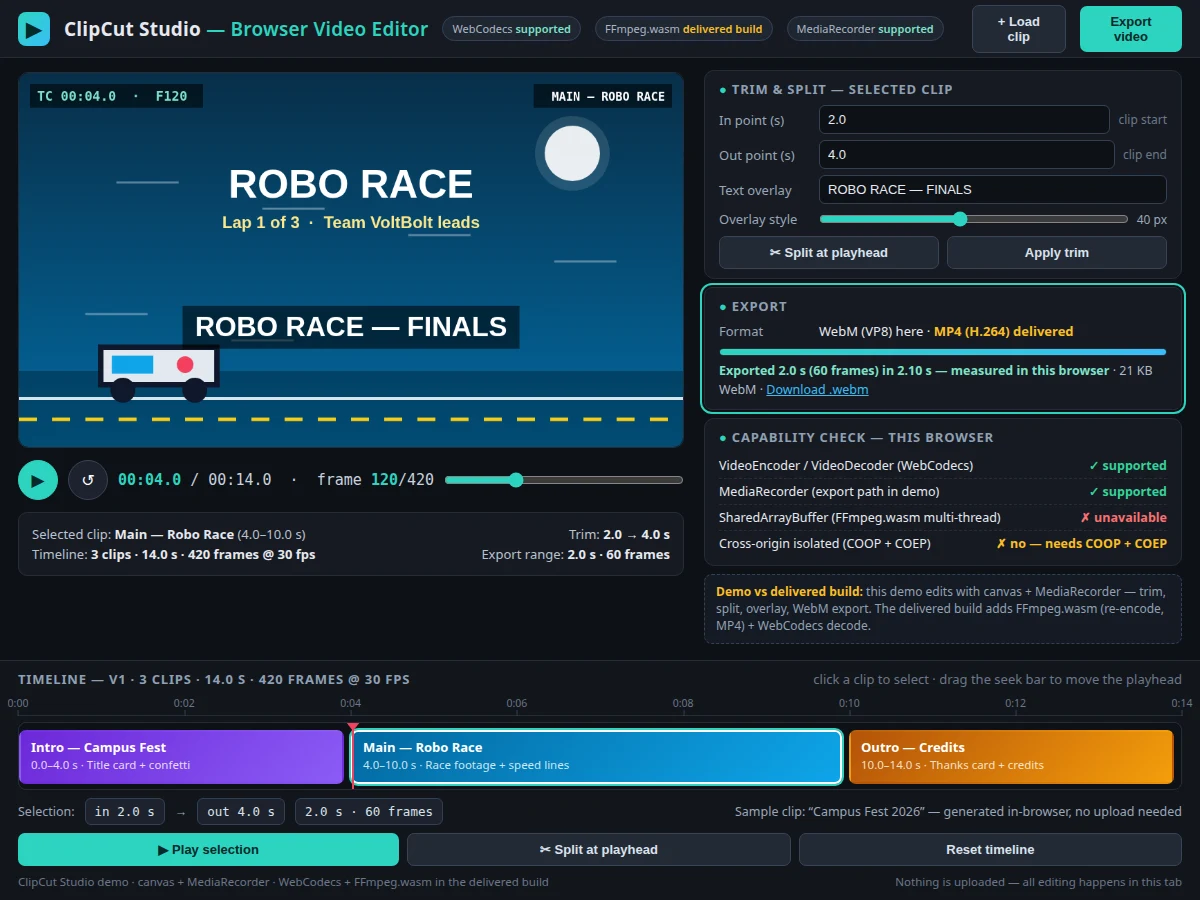
| Demo export (measured) | 2.0 s clip (60 frames) exported in 2.10 s as a 21 KB WebM (measured in headless Chromium) |
| WebCodecs support | Chrome/Edge 94+, Firefox desktop 130+, Safari 16.4 video (datasheet values) |
| FFmpeg.wasm core (single-thread) | Approximately 31 MB download on first use (datasheet value) |
| FFmpeg.wasm core (multi-thread) | Approximately 32 MB; needs COOP + COEP headers (datasheet values) |
| Export formats (delivered) | MP4 (H.264) + WebM (VP8) (design target) |
| Timeline | 1 video track + 1 overlay track (design target) |
| Max project length | Approximately 5 minutes per project (design target; browser memory bound) |
| Recommended browsers | Chrome/Edge 94+; Firefox desktop 130+ (design target) |
Project features
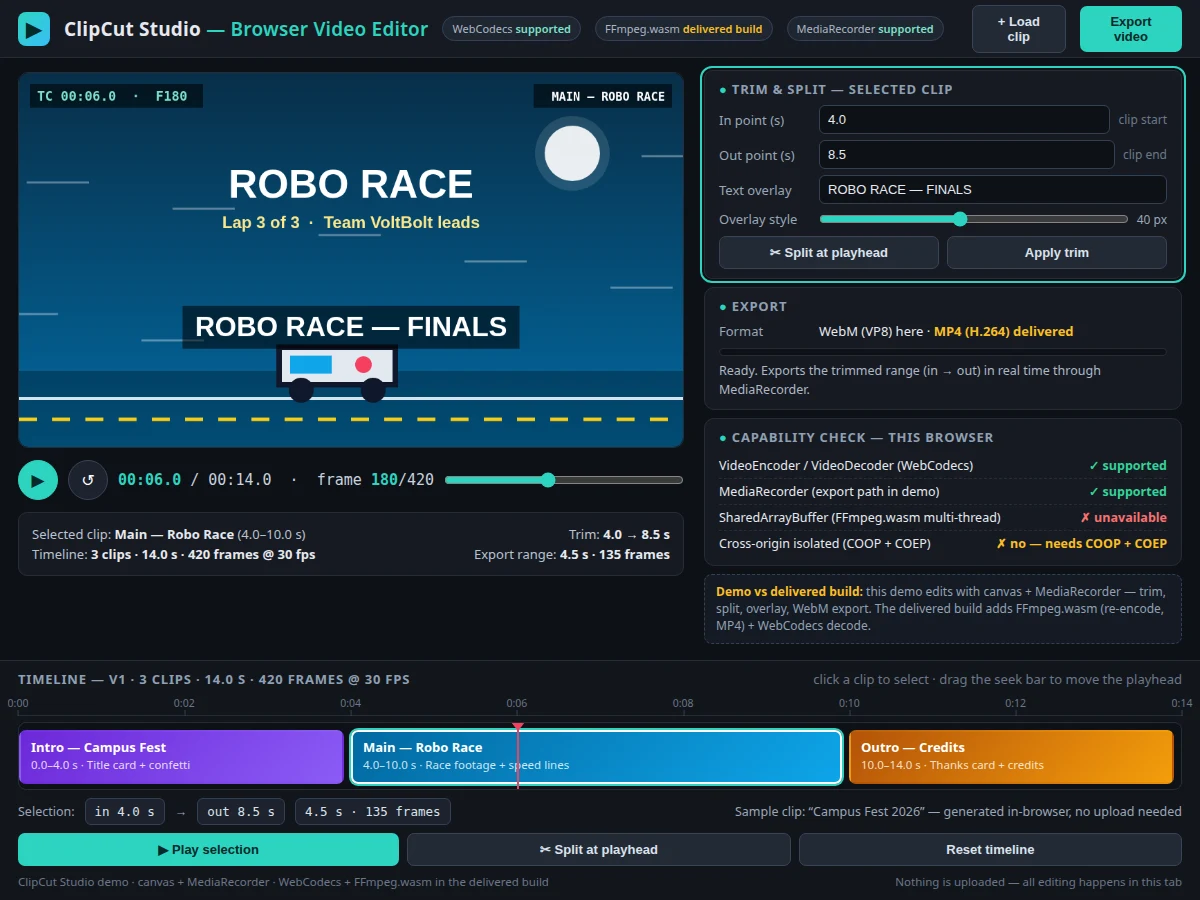
The editor's strongest capabilities are its frame-accurate timeline, its in-browser export, and its honesty about what runs where. The timeline shows the clip as frames, not just seconds — the demo's sample clip is 14.0 seconds long, which is 420 frames at 30 frames per second — so a trim lands on an exact frame and the student can see the frame number change as the playhead moves. Trim, split and text overlay all run in the tab: there is no upload, no server round-trip and no waiting for a render queue. Export uses MediaRecorder in the demo and the WebCodecs plus FFmpeg.wasm pipeline in the delivered build, producing a real MP4 file the student can play anywhere. A live capability check probes the browser for VideoEncoder, MediaRecorder and cross-origin isolation and reports what is actually available, so the editor degrades gracefully instead of failing silently.
- [Frame-accurate timeline] The timeline is measured in frames at 30 fps, with a playhead, timecode and frame counter, so trims and splits land on exact frames instead of approximate seconds.
- [Trim, split and text overlay] Set in and out points, split a clip at the playhead, and add a text overlay with adjustable size — all applied live on the canvas preview.
- [In-browser export] The demo exports the trimmed range as a WebM file through MediaRecorder; the delivered build re-encodes the same range to MP4 through FFmpeg.wasm.
- [Live capability check] The editor probes the browser for VideoEncoder, VideoDecoder, MediaRecorder, SharedArrayBuffer and cross-origin isolation, and shows exactly which features are available before editing starts.
- [Sample clip generated in-browser] A 14.0-second, 420-frame sample clip is generated on a canvas, so the demo works with no upload and no external video file.
- [FFmpeg.wasm pipeline] The delivered build loads the FFmpeg.wasm core, re-encodes the edited frames, converts between MP4 and WebM, and handles audio — the file work WebCodecs alone cannot do.
- [Nothing uploaded] All editing happens in the browser tab; the video file never leaves the user's computer, and the editor works offline once the page has loaded.
What is included
- Complete editor source code (HTML, CSS, JavaScript + Vite setup)
- Working demo app with the canvas-generated sample clip, timeline, trim/split/overlay and MediaRecorder export
- FFmpeg.wasm pipeline: core loading, re-encode, MP4/WebM conversion and audio handling
- COOP/COEP header configuration for cross-origin isolation (multi-thread core)
- Project report PDF (background, WebCodecs + FFmpeg.wasm theory, methodology, results)
- PPT presentation for final review
- Viva Q&A preparation document (codecs, containers, WebCodecs, WebAssembly, cross-origin isolation)
Limitations & prerequisites
- The demo exports WebM only; MP4 export needs the FFmpeg.wasm pipeline in the delivered build.
- The multi-thread FFmpeg.wasm core needs COOP + COEP response headers; without them only the slower single-thread core loads.
- Demo export records in real time — a 2.0 s clip took 2.10 s to export (measured); long clips take proportionally long, and the delivered build's WebCodecs encode path is faster.
- Browser memory bounds clip length; approximately 5-minute projects are the design target, not hour-long edits.
- No server-side rendering: a weak device encodes slowly, and FFmpeg.wasm runs approximately 3–10x slower than native FFmpeg (published figures).
- Safari supports video-only WebCodecs from version 16.4, with audio encode/decode from Safari 26; Firefox for Android lacks the codec classes, so the editor is desktop-first.
Frequently Asked Questions
What does the demo actually do, and what does the delivered build add?
The demo is a real working editor: it plays a 14.0-second sample clip, trims, splits and adds text overlays on a frame-accurate timeline, and exports the trimmed range as a WebM file. The delivered build adds file upload for any MP4 or WebM, the WebCodecs decode path for real footage, and the FFmpeg.wasm pipeline for re-encoding, MP4 export and format conversion.
Why use WebCodecs instead of just FFmpeg.wasm?
WebCodecs uses the browser's own hardware-accelerated codecs, so decoding and encoding a frame is fast and cheap, and it gives frame-by-frame control for the timeline. FFmpeg.wasm is a full software encoder running in WebAssembly, so it is slower — approximately 3–10x slower than native FFmpeg — and its job here is the file work WebCodecs cannot do: muxing, demuxing and format conversion.
Why does FFmpeg.wasm need COOP and COEP headers?
The multi-thread core shares memory between Web Workers through SharedArrayBuffer, and browsers only expose SharedArrayBuffer to pages that are cross-origin isolated. That isolation needs two response headers on every page that loads the multi-thread core: Cross-Origin-Opener-Policy: same-origin and Cross-Origin-Embedder-Policy: require-corp. Without them the page falls back to the single-thread core, which works everywhere but encodes more slowly.
Can it export MP4, and which browsers work?
Yes — MP4 (H.264) export is part of the delivered build through FFmpeg.wasm, while the demo exports WebM through MediaRecorder. The editor targets Chrome and Edge 94 and later, where WebCodecs is fully supported, and Firefox on desktop from version 130. Safari supports video-only WebCodecs from 16.4, so audio features need Safari 26 or later.
Can it edit long videos or 4K footage?
Not as designed — the project targets short clips of approximately 5 minutes at 1080p or below, because the whole video is held in browser memory and FFmpeg.wasm encodes in software. A 4K or hour-long project would run slowly and risk running out of memory. The report states this limit honestly, and longer-form editing is listed as future scope, not a current feature.
Is this project suitable for a final-year project?
Yes — for Computer Science, IT and Web Development programs, where it fits naturally as a final-year build. It demonstrates browser media APIs, WebAssembly, video codecs and containers, timeline UI engineering and honest performance measurement, all in a build a student can demo live in the viva.
Components & software requirements
- WebCodecs API (VideoDecoder · VideoEncoder)
- FFmpeg.wasm 0.12.x (@ffmpeg/core · @ffmpeg/core-mt)
- JavaScript · HTML5 Canvas
- MediaRecorder API (WebM export in demo)
- mp4-muxer (MP4 container writing)
- Vite (dev server + COOP/COEP headers)
- Node.js 18+ (build tooling)
- Git
Delivery information
Built-to-order project. Delivery timeline is shared after order confirmation based on current queue.
Support terms
Complete documentation, setup guide, and viva preparation included. Support for setup and explanation provided.
Download free synopsis (PDF)
Enter your name and WhatsApp number — the synopsis PDF downloads immediately. We may send occasional project updates on WhatsApp; no spam.