
More project photos (2)
The problem
A college club portal is a web application where a college's student clubs manage their members, events and money in one place instead of across spreadsheets, chat groups and paper registers. This portal gives each club a searchable member directory, a shared event calendar, and a budget tracker that records every entry with its approver and produces a balance report.
| Way of running clubs | Member list | Event planning | Money tracking |
|---|---|---|---|
| Spreadsheets and WhatsApp groups | Scattered across files and chats | Dates announced in chat, easy to miss | Totals worked out by hand |
| This portal | One searchable directory with roles | Shared month calendar with event details | Ledger with categories and balance report |
Most colleges run five or more student clubs, yet each club keeps its own records in its own way: one club tracks members in a spreadsheet, another keeps event dates in a WhatsApp group, and the treasurer carries the budget in a notebook. When office bearers graduate, the records leave with them, so the next team starts from scratch and repeats the same mistakes. Money is the weakest link — without a shared ledger, nobody can say how much was collected, what was spent, or who approved each payment, and disputes surface only when the next event needs funding. Events clash because no single calendar exists, and members drift away when they never hear about activities. This portal fixes that by giving every club one shared system with a member directory, an event calendar and a budget ledger, so records survive handovers and every rupee is traceable.
Adds members, creates events and records transactions for their own club.
Follow the working sequence
How it works
A member logs in and the portal checks the JSON Web Token to decide which role applies; an admin sees all five clubs, a club officer sees only their own club, and a plain member sees the directory and calendar without editing rights. Adding a member writes a row to the members table with club, role, year and join date, and the directory search filters those rows by name, club or role in the browser. Creating an event stores its date, venue and organiser, and the calendar renders the month grid with each event placed on its day. Recording a transaction inserts an income or expense row with its category and approver, and the budget report recomputes totals and category shares from the ledger on every load. The dashboard reads the same three tables and shows member counts, upcoming events and the current balance, so every screen agrees because every screen reads the same database.
- A user logs in with email and password; the server verifies the bcrypt-hashed password and issues a signed JSON Web Token (RFC 7519).
- The token's role decides what the user sees: admin sees all clubs, a club officer manages only their own club, a member has read-only access.
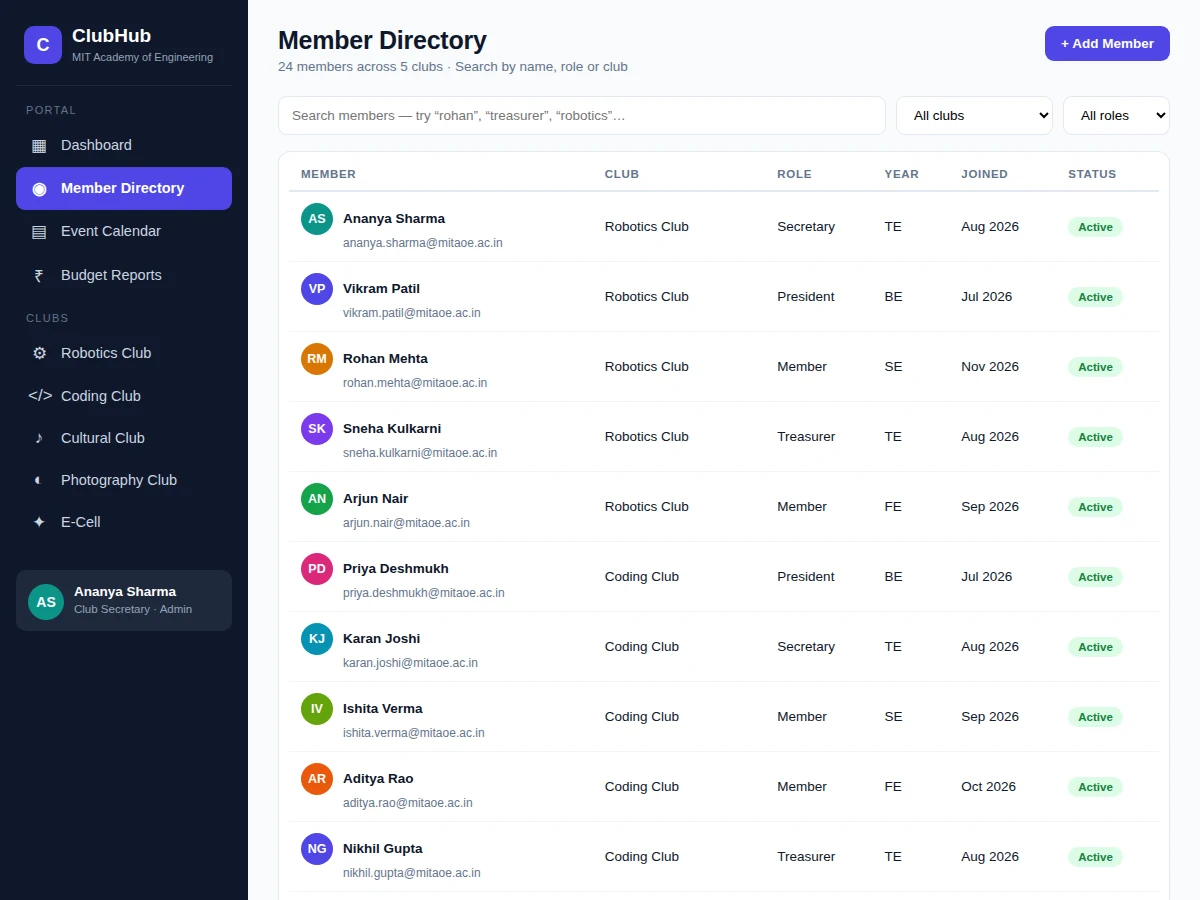
- An officer adds or edits a member through the directory form; the record is stored in MySQL with club, role, year and join date.
- The directory search and filters query the members table by name, club or role and render the matching rows instantly.
- An officer creates an event with date, time, venue and organiser; the calendar places it on the correct day of the month grid.
- The treasurer records each income or expense entry with its club, category and approver; every entry lands in the ledger table.
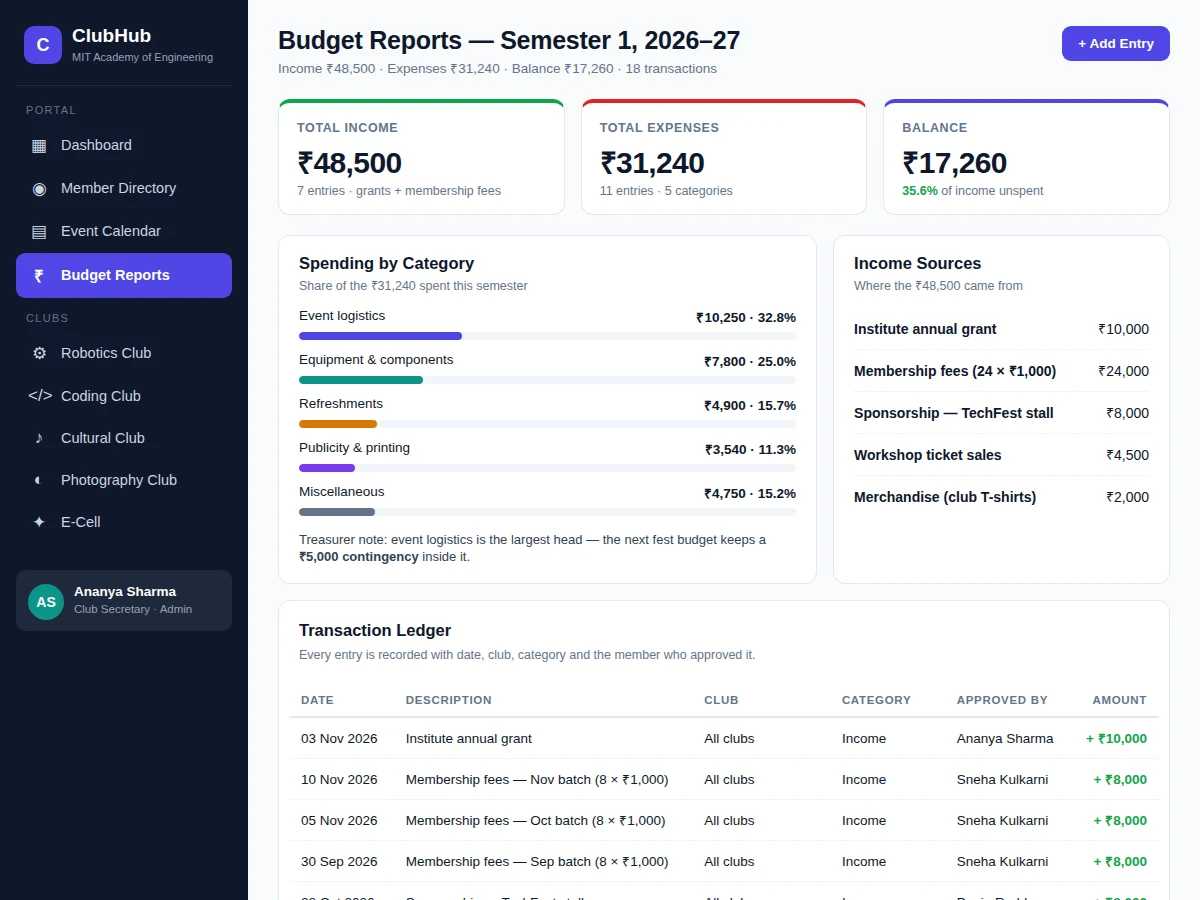
- The budget report reads the ledger, totals income and expenses, computes the balance, and breaks spending down by category for the report view.
- The dashboard aggregates the same tables into member counts, upcoming events, budget balance and recent activity on one screen.
Tech stack:
- Node.js 18 with Express 5 (REST API and page serving)
- MySQL 8 with the mysql2 driver
- HTML5, CSS and vanilla JavaScript (frontend)
- JSON Web Tokens (RFC 7519) for authentication
- bcrypt password hashing
- Git for version control
| Parameter | Value |
|---|---|
| User roles | 3 roles (admin, club officer, member) |
| Demo dataset | 24 members, 5 clubs, 12 events, 18 ledger transactions (measured from the demo build) |
| Demo budget | Income ₹48,500, expenses ₹31,240, balance ₹17,260 (computed from the demo ledger) |
| Database tables | Approximately 8 tables (users, clubs, members, events, registrations, transactions, categories, roles) |
| Authentication | JSON Web Tokens per RFC 7519, passwords hashed with bcrypt |
| Backend | Node.js 18 with Express 5 (current stable major line, requires Node.js 18 or later) |
| Database | MySQL 8 |
| Pages | 4 views (dashboard, member directory, event calendar, budget reports) |
| Response target | Design target: directory search and page loads under 2 seconds on a local setup |
| Deployment | Design target: runs on any Node.js host with a MySQL database |
Project features
The portal's three core capabilities work as one system: the member directory keeps every club's people in a single searchable place with roles and contact details, the event calendar puts all five clubs' activities on one shared month view so dates never clash silently, and the budget tracker records each income and expense entry with its approver and category, then turns the ledger into a balance report the treasurer can defend. Role-based access ties them together — officers manage only their own club, while the secretary and treasurer see everything — and the dashboard pulls the three modules into one overview of members, events and money. Nothing in the portal is a mock screen: the demo holds 24 real-looking members, 12 events and 18 ledger transactions, and the figures on screen are computed from that data.
- [Member directory with search and filters] A searchable directory of every member with club, role, year and join date. Officers search by name, filter by club or role, and see contact details at a glance; the demo directory holds 24 members across 5 clubs.
- [Shared event calendar] A month-view calendar showing every club's events with dates, venues and times, so clashes are visible before they happen. Each event carries its organiser, registration count and budget allocation.
- [Budget tracker with balance report] Every income and expense entry is recorded with date, club, category and the member who approved it. The portal totals income, expenses and balance automatically and breaks spending down by category.
- [Role-based access control] Three roles — admin, club officer and member — decide who can add members, create events and approve spending. Authentication uses JSON Web Tokens (RFC 7519) with bcrypt-hashed passwords.
- [Dashboard overview] One screen shows active members, events this semester, budget balance and active clubs, plus upcoming events and recent activity, so the secretary sees the state of all clubs without opening five spreadsheets.
- [Event registration tracking] Each event records how many teams or members registered, so organisers know attendance before the day and can plan venues, refreshments and prizes against real numbers.
- [Income source breakdown] The budget report separates grants, membership fees, sponsorships, ticket sales and merchandise, so the treasurer can show exactly where every rupee came from.
What is included
- Complete portal source code (Node.js + Express 5 backend, MySQL schema, HTML/CSS/JavaScript frontend)
- Working demo with 24 members, 5 clubs, 12 events and 18 ledger transactions across 4 views
- MySQL database schema with seed data matching the demo
- Project report PDF (background, design, database schema, methodology, results)
- PPT presentation for final review
- Viva Q&A preparation document (REST APIs, JWT authentication, MySQL design, role-based access)
Limitations & prerequisites
- The demo runs on local demo data; connecting it to a real college's member records needs data entry or an import step.
- Email notifications for events are not implemented — reminders currently depend on members checking the calendar.
- Payment collection (membership fees, ticket sales) is recorded manually; no payment gateway is integrated.
- The portal is a single-college build; running it for multiple colleges would need a multi-tenant change.
- JWT tokens expire and must be refreshed on re-login; there is no "remember me" session persistence in the base build.
- The calendar covers one month at a time; recurring events must be created individually.
Frequently Asked Questions
Is this project suitable for a final-year project?
Yes, it suits Computer Engineering, Information Technology and Web Development final-year projects. It demonstrates full-stack development: REST API design with Express 5, relational database design in MySQL, JWT-based authentication, role-based access control and a working multi-module frontend. The three modules give a clear, defensible scope for a viva, and the demo data makes every feature testable live.
What does the budget tracker actually do?
It records every income and expense entry with date, club, category and the approver, then totals income, expenses and balance automatically. The report breaks spending down by category — event logistics, equipment, refreshments, publicity and miscellaneous — and lists income by source, so the treasurer can show exactly where money came from and where it went.
Can more clubs, roles or modules be added?
Yes. Clubs are rows in the database, so adding a sixth club needs no code change, and new roles can be added to the roles table with matching permission checks. Extra modules such as attendance tracking, document storage or a notice board can be added as separate tables and views without touching the existing three.
Is the database included, and can the portal be hosted online?
Yes, the MySQL schema and seed data are included, and the portal is designed to run on any Node.js host with a MySQL database. The build targets Node.js 18 with Express 5, so a basic shared host with Node.js support or a small VPS is enough for a college deployment.
What are the main limitations?
The main limits are that event reminders depend on members checking the calendar because email notifications are not built in, and fee collection is recorded manually because no payment gateway is integrated. The demo ships with local demo data, so real member records need to be entered or imported before a college can use it live.
Components & software requirements
- Node.js 18 with Express 5 (REST API and page serving)
- MySQL 8 with the mysql2 driver
- HTML5, CSS and vanilla JavaScript (frontend)
- JSON Web Tokens (RFC 7519) for authentication
- bcrypt password hashing
- Git for version control
Delivery information
Built-to-order project. Delivery timeline is shared after order confirmation based on current queue.
Support terms
Complete documentation, setup guide, and viva preparation included. Support for setup and explanation provided.
Download free synopsis (PDF)
Enter your name and WhatsApp number — the synopsis PDF downloads immediately. We may send occasional project updates on WhatsApp; no spam.