
More project photos (2)
The problem
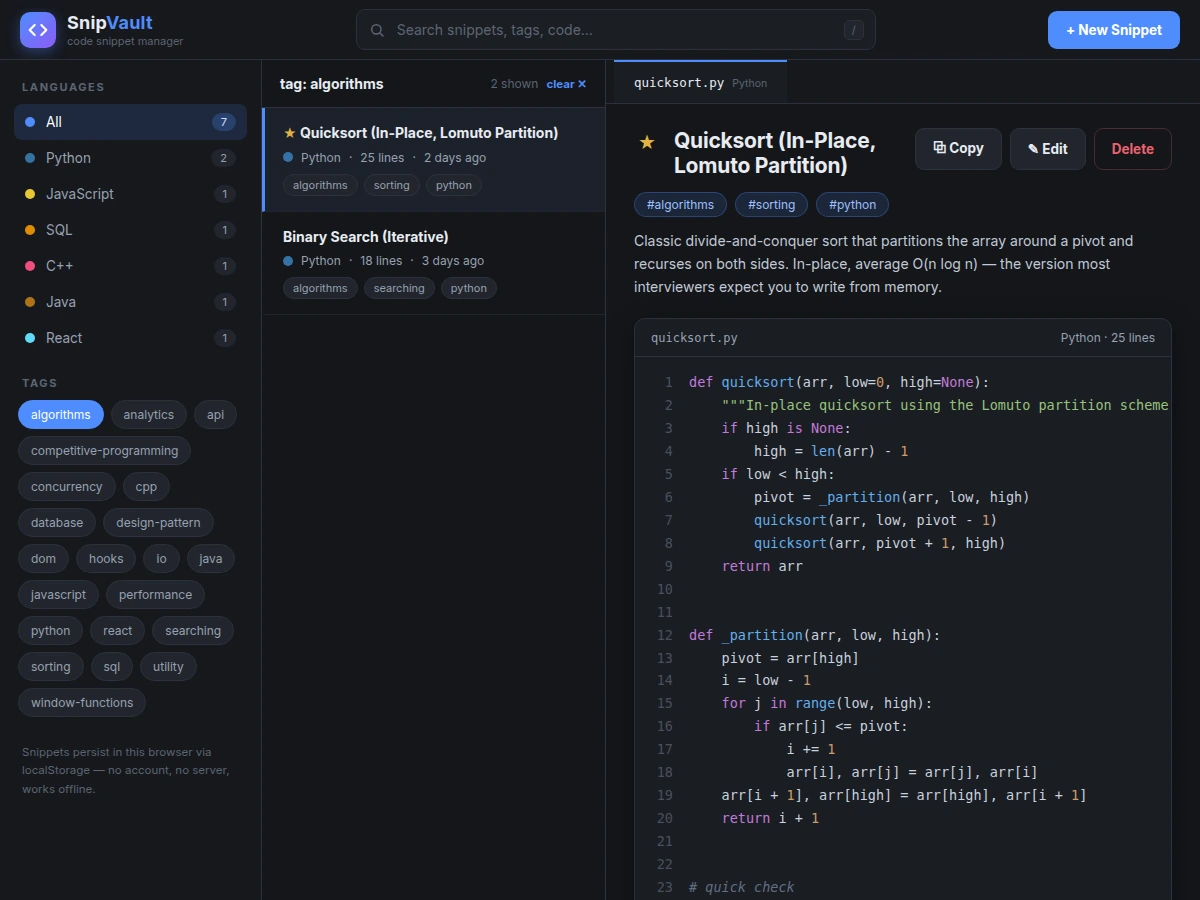
Every developer accumulates reusable code — a debounce function, a tricky SQL query, a thread-safe singleton, a data-fetching hook. In practice these fragments scatter across gists, chat histories, old projects and desktop files, and retrieving the right one often takes longer than rewriting it from memory. Generic note apps store code as plain text with no language awareness, while cloud snippet services demand accounts and connectivity for what is fundamentally a personal reference library. This project builds a dedicated code snippet manager as a web application: a dark, editor-style interface with a language sidebar, tag cloud and live search across titles, descriptions, tags and the code itself. Syntax highlighting is implemented from scratch in JavaScript with per-language tokenizers — no highlighting library, no CDN dependency — and the entire library persists in the browser's localStorage, so it works fully offline from a single HTML file. The result is both a genuinely useful developer tool and a complete, viva-ready demonstration of frontend engineering: tokenizing highlighters, client-side search and filtering, CRUD state management and browser storage.
The developer who stores, searches and reuses their code snippets.
Follow the working sequence
How it works
- On first load the app seeds seven realistic snippets (Python quicksort and binary search, JS debounce, SQL window function, C++ fast I/O, Java singleton, React useFetch) and stores the library in localStorage.
- The state layer tracks the search query, language filter, tag filter and selected snippet; every change re-renders the sidebar counts, the filtered list and the detail view.
- The detail view passes the snippet's code through its language's tokenizer, which emits color-coded, HTML-escaped tokens in a single regex pass; the result renders with line numbers in the code panel.
- Search matches substrings across title, description, tags and code body, and wraps matches in highlight marks in the snippet list.
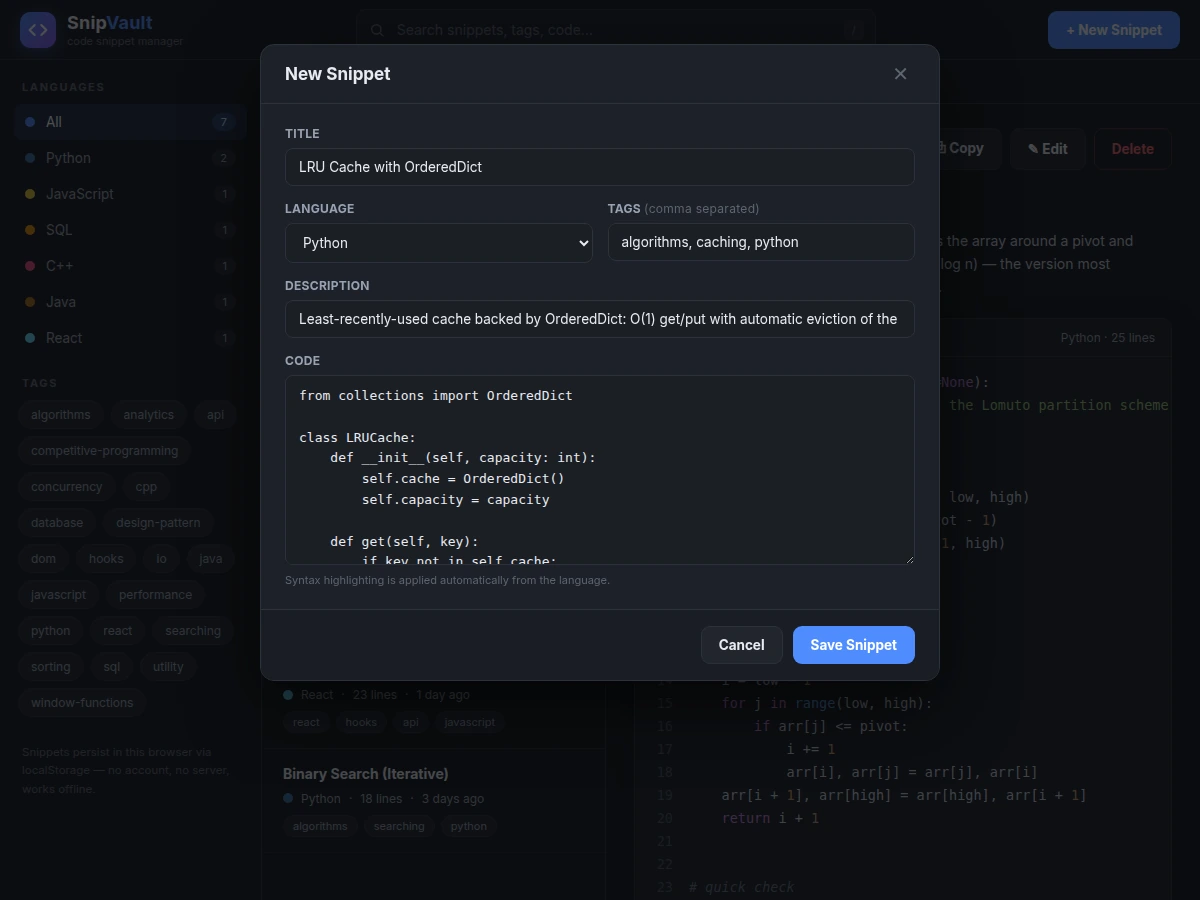
- The add/edit modal writes through the same store: new snippets are prepended and selected, edits update in place, and every write persists to localStorage immediately.
- Copy uses the Clipboard API with a fallback for non-secure contexts; favorites toggle a persisted star flag on the snippet.
Tech stack:
- HTML5 · CSS3 (custom dark editor theme)
- Vanilla JavaScript (ES6+, no framework)
- Hand-written regex tokenizer (no highlighting library)
- Browser localStorage (offline persistence)
- Clipboard API (copy-to-clipboard)
- Single-file build (no build step, no dependencies)
| Parameter | Value |
|---|---|
| Application type | Single-file client-only web app (HTML + CSS + JS) |
| Languages highlighted | 6 (Python, JavaScript, React/JSX, SQL, C++, Java) |
| Seeded snippets | 7 realistic, runnable snippets included |
| Search scope | Title, description, tags and code body (substring match) |
| Search response | Instant for typical personal libraries of a few hundred snippets (expected) |
| Storage | Browser localStorage, approximately 5 MB per origin (browser-defined quota) |
| File size | Approximately 36 KB, one HTML file |
| Runtime requirement | Any modern browser; no server, account or network needed after download |
| Offline support | Full — works from file:// with no connectivity |
Project features
- [Hand-built syntax highlighter] A tokenizer written from scratch in JavaScript covers Python, JavaScript, React/JSX, SQL, C++ and Java — comments and strings are matched first so keywords inside them are never miscolored, with zero external library or CDN dependency.
- [Instant full-text search] One search box matches across titles, descriptions, tags and the code body itself, with matched terms highlighted in the result list and a "/" keyboard shortcut to focus it.
- [Language & tag filtering] A sidebar groups snippets by language with counts, and a tag cloud filters the library to any tag; filters combine with search and clear in one click.
- [Snippet CRUD with modal editor] Create, edit and delete snippets through a clean modal form (title, language, comma-separated tags, description, code); filenames and line counts update automatically.
- [Copy-to-clipboard] One click copies any snippet's code via the Clipboard API with a textarea fallback, with a toast confirming the copy.
- [Favorites] Star frequently used snippets; they sort visually to the top of the list with a gold star marker.
- [Offline localStorage persistence] The whole library is saved in the browser on every change — no server, no account, no internet needed after download.
- [Deep-link views] URL parameters open the app straight into a search, a tag filter, or the new-snippet form, which also makes each view easy to demo.
What is included
- Complete single-file source code (HTML/CSS/JS) with the hand-written highlighter
- 7 realistic seeded snippets demonstrating the library immediately
- Setup & customization guide (adding a language, changing the theme, seed data)
- Project report PDF (tokenizer design, search/filter architecture, storage model)
- PPT presentation for final review
- Viva Q&A preparation document (regex tokenizing, XSS-safe rendering, localStorage limits, Clipboard API)
Limitations & prerequisites
- Browser localStorage is typically capped around 5 MB per origin — very large libraries (thousands of long snippets) can hit the quota; import/export and cloud sync are future scope, not included.
- Highlighting uses a regex tokenizer, not a full parser — exotic edge cases (deeply nested template literals, unusual string escapes) can miscolor; common code in the six covered languages highlights correctly.
- Single-user and single-browser by design: no accounts, no sync, no sharing between devices in the base build.
- The app stores and displays code but does not execute it — it is a snippet manager, not an IDE or online compiler.
- Search is client-side substring matching, not semantic search — it finds text that literally matches, not related concepts.
- The Clipboard API requires a secure context (https or localhost); on plain file:// the built-in textarea fallback is used instead.
Frequently Asked Questions
Is this project suitable for a final-year project?
Yes — for Computer Science and IT programs. It demonstrates real frontend engineering: a from-scratch tokenizing syntax highlighter, client-side search and filtering, CRUD state management and browser storage, all in a genuinely useful tool.
Does it really highlight code without any library?
Yes. The highlighter is hand-written JavaScript: ordered regex alternations match comments and strings first (so keywords inside them are never miscolored), then numbers, keywords, built-ins and function calls, emitting escaped, color-coded spans in one pass.
Where is my data stored — do I need a server or internet?
Nowhere but your browser. The library lives in localStorage and the app is one HTML file, so it works fully offline after download — no account, no backend, no hosting needed.
Can I add more languages or change the theme?
Yes. Each language is a small definition object (comment styles, string styles, keyword list); the customization guide shows how to add one, and all colors are CSS variables in one place.
Can this be extended with accounts and cloud sync?
That is realistic future scope — a Firebase/Supabase backend could sync the same snippet objects across devices. It is not part of the base build, which is intentionally serverless. Suitable for B.E./B.Tech final-year projects in Computer Science and IT.
Components & software requirements
- HTML5 · CSS3 (custom dark editor theme)
- Vanilla JavaScript (ES6+, no framework)
- Hand-written regex tokenizer (no highlighting library)
- Browser localStorage (offline persistence)
- Clipboard API (copy-to-clipboard)
- Single-file build (no build step, no dependencies)
Delivery information
Built-to-order project. Delivery timeline is shared after order confirmation based on current queue.
Support terms
Complete documentation, setup guide, and viva preparation included. Support for setup and explanation provided.
Download free synopsis (PDF)
Enter your name and email — the synopsis PDF downloads immediately. We may send occasional project updates; no spam, unsubscribe anytime.