
More project photos (2)

The problem
A chat application built on Python socket programming is a working multi-client messaging system: one TCP server accepts connections from many desktop clients, and every message a client sends is relayed to the other connected users in real time. Each client registers a username when it connects, sees who else is online, sends public messages to the whole group, and sends private messages to one chosen user. The server keeps a short message history, so a client that joins late can read the recent conversation, and it notices when a client disconnects and tells the remaining users. Students usually meet networking only as theory — ports, sockets and threads on a slide — and this project turns those ideas into a program they can run, break and explain. It is a natural fit for a computer networks or Python programming course, and it compares honestly with the HTTP-polling and WebSocket chat builds students often consider alongside it.
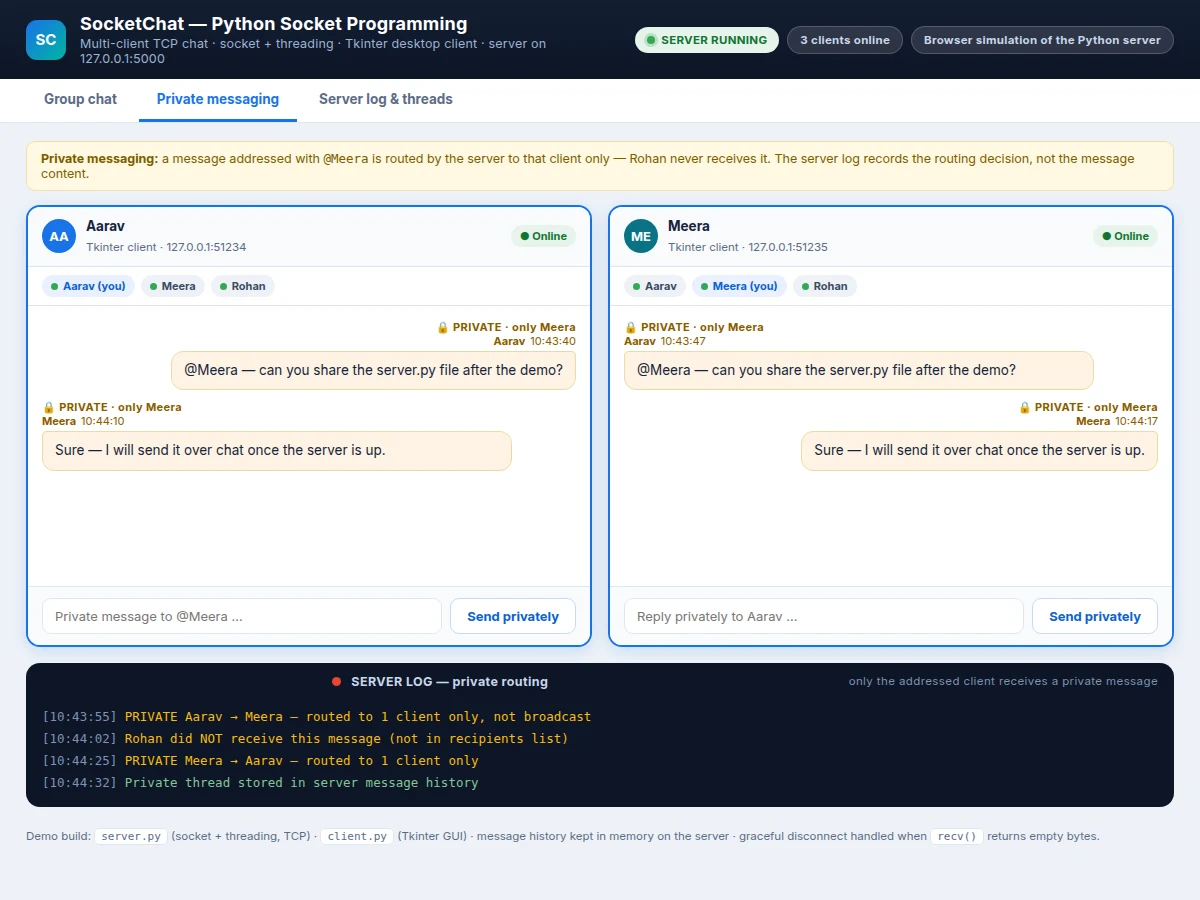
Tkinter desktop client: message pane, user list and composer.
Follow the working sequence
How it works
A client starts by connecting to the server's address, and accept() returns a new socket plus the client's address; the server registers the chosen username and starts a dedicated handler thread for that client. Inside the thread, the server loops on recv() with a 1024-byte buffer and decodes each chunk as UTF-8 text: a message beginning with @username is sent only to the matching client, while any other message is broadcast with sendall() to every other connected client and appended to the in-memory history. When a new client joins, the server first sends the last 50 stored messages so the conversation is already visible. When a client closes its window, recv() returns empty bytes, the server treats that as a disconnect, closes the socket, ends the thread and broadcasts that the user has left — the one gotcha the demo build exposed, because without the empty-bytes check the handler thread would spin forever on a dead connection.
- The server creates a TCP socket with socket.socket(socket.AF_INET, socket.SOCK_STREAM), sets SO_REUSEADDR so it can restart immediately, and binds it to 127.0.0.1:5000.
- The server calls listen(5), which queues up to 5 pending connections, then loops on accept() waiting for clients to connect.
- Each client connects with socket.connect(), sends its chosen username, and the server registers the name-to-socket mapping and starts a new threading.Thread to handle that client.
- The handler thread loops on recv(1024), decodes each chunk as UTF-8, and checks whether the message starts with @username.
- A private message is sent with sendall() to the one addressed client only; a public message is broadcast with sendall() to every other connected client and appended to the last-50-message history.
- A client that joins late first receives the stored history, then live messages; a client whose recv() returns empty bytes is treated as disconnected, its socket is closed, its thread ends, and the group is told it has left.
Socket chat vs the alternatives
| Approach | Connection | Message delay | Server work per message | Good for |
|---|---|---|---|---|
| Python socket chat (this project) | One persistent TCP connection per client | Immediate push, no polling wait | One sendall() per recipient | Learning TCP, threading and real-time messaging |
| HTTP polling chat | New HTTP request every few seconds | Up to the polling interval | One request handled per poll, per client | Simple web chat with no persistent connection |
| WebSocket chat | One persistent WebSocket connection per client | Immediate push, no polling wait | One frame per recipient | Browser-based real-time apps at larger scale |
Tech stack:
- Python 3 (socket + threading, standard library)
- Tkinter (desktop client GUI)
- TCP over IPv4 (AF_INET · SOCK_STREAM)
- JSON message framing (UTF-8 text)
- Git (version control)
| Parameter | Value |
|---|---|
| Server bind address | 127.0.0.1:5000 (design value, configurable) |
| Transport | TCP over IPv4 (AF_INET · SOCK_STREAM) |
| Concurrent clients | 3 clients connected in the demo build (measured); 10 simultaneous clients on a LAN (design target) |
| Listen backlog | 5 pending connections (design value) |
| Message buffer | 1024 bytes per recv() call (design value) |
| Message history | Last 50 messages kept in server memory (design value) |
| Message format | UTF-8 text with JSON framing (design value) |
| Client | Tkinter desktop GUI, Python 3 |
| Demo exchange | 9-message scripted exchange completes in approximately 6 seconds in the browser simulation (measured) |
| Setup time | Approximately 10 minutes on a LAN (expected) |
Project features
The chat application is built around four capabilities that carry the whole demonstration: a threaded multi-client TCP server that never blocks on one slow client, group broadcast messaging that reaches every connected user, private messaging that routes a message to one addressed client only, and a Tkinter desktop client that shows the online user list, the message history and a live server log. Around those four, the build adds username registration, a short in-memory message history for clients that join late, graceful disconnect handling, and a server activity log that records every connection, broadcast, private route and disconnect with a timestamp. Each feature below is part of the base build as shipped; file sharing, a web client and end-to-end encryption are listed separately as optional additions, not as included features.
- [Threaded multi-client TCP server] The server creates one TCP socket, binds it to 127.0.0.1:5000 and listens with a backlog of 5 pending connections, then starts a new threading.Thread for every client that accept() returns, so one slow or idle client never blocks the others.
- [Group broadcast messaging] Any public message a client sends is relayed by the server to every other connected client with sendall(), so the whole group sees the same conversation in the same order.
- [Private messaging] A message addressed with @username is routed by the server to that one client only; other clients never receive it, and the server log records the routing decision without storing the message content.
- [Username registration and online user list] Each client sends a username when it connects, the server keeps the name-to-socket mapping, and every client window shows the current online users with a live status indicator.
- [Message history for late joiners] The server keeps the last 50 messages in memory and sends them to each client as soon as it connects, so a new user can read the recent conversation instead of joining a blank screen.
- [Graceful disconnect handling] When a client closes without logging out, recv() returns empty bytes, and the server closes that socket, ends its handler thread and broadcasts that the user has left.
- [Tkinter desktop client] A clean desktop GUI with a message pane, online-user chips, a message composer and a send button, built with Tkinter so it runs on any machine with Python 3 and no extra installation.
- [Server activity log] Every connection, broadcast, private route and disconnect is written to a timestamped server log, which makes the whole accept-thread-broadcast flow visible during a demonstration or viva.
What is included
- Complete server source code (server.py: socket + threading, TCP, broadcast and private routing)
- Complete client source code (client.py: Tkinter desktop GUI with user list and history)
- Working browser simulation of the three-client chat for demonstration
- Setup instructions for running the server and clients on one machine or across a LAN
- Project report PDF (background, socket theory, architecture, methodology, results, future scope)
- PPT presentation for final review
- Viva Q&A preparation document (sockets, TCP vs UDP, threading, blocking calls, disconnect handling)
- WhatsApp quotation with scope, price and delivery date: message Projectech on WhatsApp with your branch, deadline and any custom scope (for example a web client or file sharing) and you receive the confirmed scope, a quotation and a delivery date before any payment.
Limitations & prerequisites
- LAN-only by default: the server binds to a local address, so clients must be on the same network unless port forwarding or a public host is arranged separately.
- No encryption: messages travel as plain UTF-8 text over TCP, so this build is not suitable for private or sensitive conversations without adding TLS.
- History is in-memory only: restarting the server clears the last-50-message history, which is not saved to a file or database in the base build.
- No user accounts or passwords: usernames are chosen freely when a client connects and are not verified, so impersonation is possible.
- Desktop only: the client is a Tkinter desktop app, so there is no mobile app or browser client in the base build; a web client is an optional add-on.
- No file transfer, voice, video or message reactions in the base build; these are listed as optional additions.
- Performance is not load-tested beyond 10 simultaneous clients (design target), so large-group behaviour is untested and not claimed.
Frequently Asked Questions
How does the server handle many clients at once?
The server starts one threading.Thread for every client that connects, so each client gets its own handler loop and one slow or idle client never blocks the others. The main thread keeps looping on accept() for new connections while the handler threads each run their own recv() loop, which is the standard threaded-server pattern from Python's socket documentation.
How is a private message different from a broadcast?
A private message is delivered to exactly one client — the user named after @ — while a broadcast goes to every other connected client. The server checks each incoming message for an @username prefix and routes it accordingly; the demo's server log shows the routing decision, and the other clients never receive the private text.
Does this chat work over the internet, or only on one network?
It works on one local network as shipped, because the server binds to a local address and clients connect to it directly. Reaching it over the internet needs port forwarding on the router or hosting the server on a public machine, which is a setup change rather than a code change, and the base build has no encryption either way.
What happens when a client closes the app without logging out?
The server notices on its own: recv() on that client's socket returns empty bytes, which is how a closed TCP connection shows up in Python. The server then closes the socket, ends that client's handler thread and broadcasts that the user has left, so no ghost user stays in the online list.
Can file sharing or a web client be added later?
Yes — both are realistic optional additions quoted separately. File sharing needs a small transfer protocol on top of the same sockets, and a web client needs either a WebSocket bridge or a rewrite of the client side, so neither is a one-line change and both are scoped and priced before work starts.
Is this project suitable for a final-year project?
Yes — for Computer Science and IT programs, especially alongside a computer networks or Python programming course. It demonstrates TCP sockets, threading, client-server architecture, message routing and disconnect handling, and the server log makes the whole flow visible during a viva. For a WhatsApp quotation, share your branch, deadline and any custom scope, and you receive the confirmed scope, price and delivery date before any payment.
Components & software requirements
- Python 3 (socket + threading, standard library)
- Tkinter (desktop client GUI)
- TCP over IPv4 (AF_INET · SOCK_STREAM)
- JSON message framing (UTF-8 text)
- Git (version control)
Delivery information
Built-to-order project. Delivery timeline is shared after order confirmation based on current queue.
Support terms
Complete documentation, setup guide, and viva preparation included. Support for setup and explanation provided.
Download free synopsis (PDF)
Enter your name and WhatsApp number — the synopsis PDF downloads immediately. We may send occasional project updates on WhatsApp; no spam.