
More project photos (2)

The problem
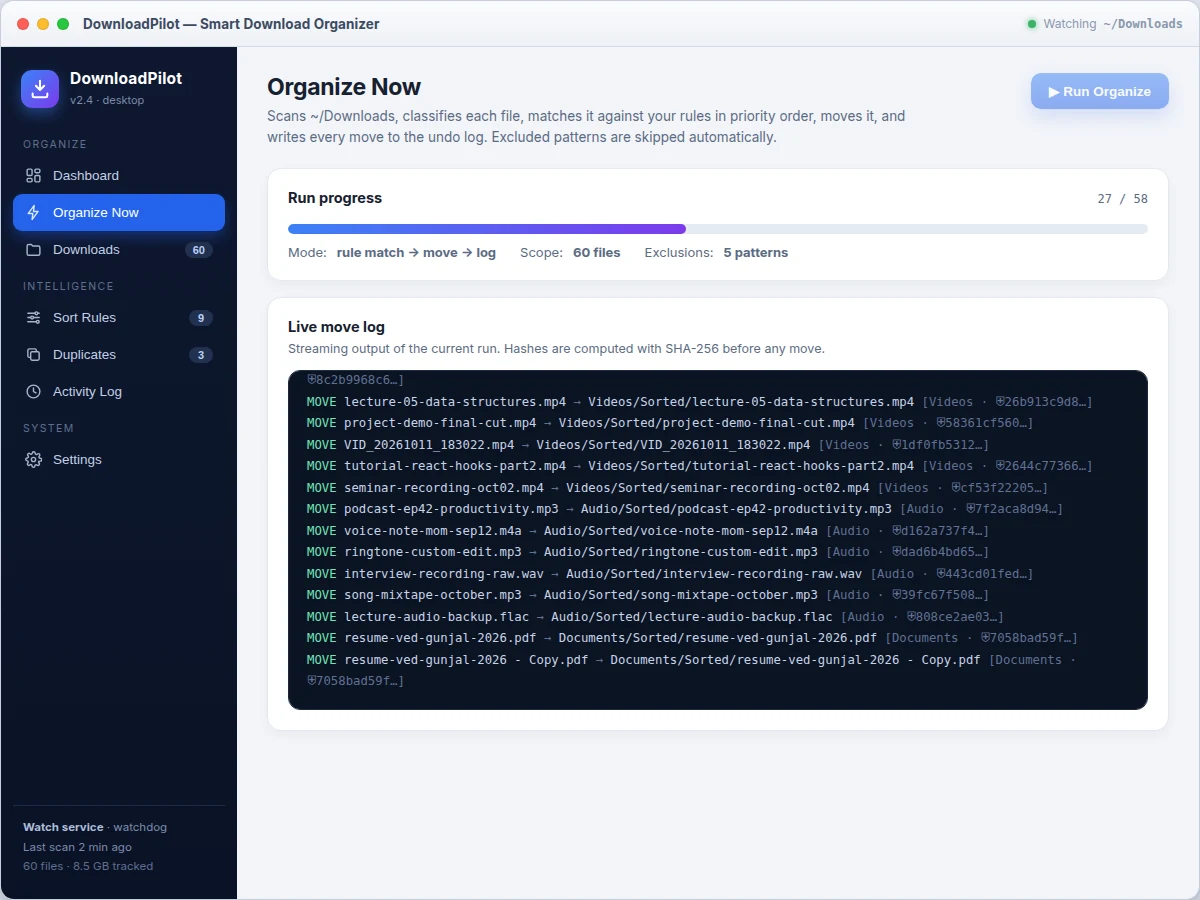
Smart Download Organizer is a desktop application that auto-sorts the Downloads folder using user-defined, priority-ordered rules. Smart Download Organizer watches the folder in real time, classifies every new file by extension, origin and age, matches it against the rule list and moves it to its destination — installers, photos and stale files each land in their own folder. Every file is hashed with SHA-256 before it is moved, and each move is logged with its source path, destination path, the rule that fired and the file hash, so any batch can be undone. Duplicates are found by comparing content hashes, not file names, which catches renamed copies that name-based checks miss. Exclusion patterns shield partial downloads and temp files, and files matching no rule are parked in Unsorted instead of being guessed at. A schedule engine runs the rule set unattended on a timetable, and a dashboard shows what moved, what is pending and where disk space goes.
The Downloads folder is where every student's files go to be forgotten: semester PDFs mixed with installers, duplicate photos, half-downloaded archives and installers from two years ago. Manual cleanups never last because the mess rebuilds within weeks, and existing "auto-organizer" scripts are usually one-off hacks with no undo — one bad pattern can scatter files irrecoverably. This project treats the problem as a small systems-engineering build: a real watch service, a deterministic rule engine with explicit priority, content-hash safety nets and a fully reversible operation log, all wrapped in a desktop UI a non-technical user can trust.
Filesystem monitor that notices new and changed files.
Follow the working sequence
How it works
A file's journey through Smart Download Organizer has six stages. The watchdog-based watch service notices each file the moment it appears and the classifier tags it with extension, size, modification age and download origin. The rule engine then walks the user's rule list in priority order and the first enabled rule whose condition matches claims the file; if nothing matches, the file is parked in an Unsorted folder rather than guessed at. Before anything moves, the file's SHA-256 hash is computed and cached — hashing must run before moving, because files renamed mid-scan silently break the undo log, so the build hashes first, then moves, and the log stores both paths. The move is recorded in the SQLite log with timestamp, rule name and hash. Finally, the schedule engine repeats the cycle unattended, the duplicate scanner regroups content hashes, and any batch in the Activity Log can be undone, restoring every file to its original path.
- The watchdog watch service monitors the configured folder and fires on file creation or modification events.
- Each new file is classified by extension, byte size, modification age and recorded download origin.
- Exclusion patterns are checked first — partial downloads and temp files are skipped untouched.
- Enabled rules are evaluated in priority order; the first match decides the destination folder, otherwise the file goes to Unsorted.
- The file's SHA-256 hash (256-bit digest) is computed and cached before any move takes place.
- The file is moved to its destination and the move is written to the SQLite operation log with timestamp, rule, hash and both paths.
- The schedule engine reruns the pipeline hourly, daily or weekly; the duplicate scanner regroups hashes after each run.
- Any batch in the Activity Log can be undone, restoring files to their logged original paths in reverse order.
Tech stack:
- Python 3
- watchdog file monitoring
- PyQt6 · Tkinter UI options
- SQLite operation log
- hashlib SHA-256
- cron · Task Scheduler
- Git
- pytest rule-engine tests
| Parameter | Value |
|---|---|
| Default rule set | 9 rules (design) |
| Match types | 5: extension, source, age, size, name |
| Hash algorithm | SHA-256, 256-bit digest (cryptographic fact) |
| Hash-then-move ordering | Hashing completes before any move (design) |
| Undo granularity | Per batch and per file (design) |
| Default exclusion patterns | 5 (user-editable) |
| Schedule options | Hourly, daily or weekly (configurable) |
| Watch latency | Under 1 s for local folders (expected) |
| Platforms | Windows, macOS and Linux (design target) |
| Demo file set | 60 files, 8.5 GB total (measured in the demo build) |
Project features
The build centers on four capabilities that work as one pipeline. First, a priority-ordered rule engine with five match types — extension, download source, file age, file size and name substring — where the first enabled rule that matches wins, so behavior is always predictable and explainable. Second, a safety layer: every file is hashed with SHA-256 (a 256-bit digest) before any move, duplicates are grouped by identical hashes, and every move lands in a SQLite operation log with both paths, making each batch individually undoable. Third, a real-time watch service plus a schedule engine, so sorting happens continuously or on a timetable without the app window open. Fourth, a storage dashboard that breaks the folder down by category and size, so the user sees where gigabytes are actually going.
- [Priority-ordered rule engine] Rules are evaluated top to bottom and the first enabled match wins; reorder with up/down controls and the behavior stays fully deterministic and explainable in a viva.
- [Five match types] Extension lists, download-source substrings, older-than days, larger-than megabytes, and file-name substrings cover the realistic sorting cases without any machine learning.
- [Real-time watch service] A watchdog-based monitor detects new and changed files in the watched folder within about a second (expected) and files them without the main window open.
- [SHA-256 duplicate detection] Content hashes (256-bit digests) group identical files even when names differ; keep-newest / keep-oldest actions move the rest to Trash, all undoable.
- [Undoable operation log] Every move is stored in SQLite with timestamp, rule name, hash and both paths; any batch can be reversed file-by-file from the Activity Log.
- [Exclusion patterns] Glob-style patterns (for example *.crdownload, *.part, *.tmp) keep partial downloads and temp files permanently out of the rule engine's reach.
- [Schedule engine] Hourly, daily or weekly unattended runs via the OS scheduler, plus run-on-startup for the watch service — all configurable from Settings.
- [Storage dashboard] Live donut and bar breakdowns of the watched folder by category and size, with pending counts, duplicate counts and last-run summaries.
What is included
- Complete Python desktop application source (watch service, rule engine, dashboard UI)
- Rule-engine unit tests (pytest)
- Working interactive demo mirroring the desktop app (single-file build)
- SQLite schema for the operation log
- Project report PDF (background, design, rule-matching logic, testing notes)
- PPT presentation for final review
- Viva Q&A preparation document
Limitations & prerequisites
- Rule matching is deterministic pattern matching, not AI — it cannot understand file content or user intent, and this is stated plainly in the report.
- Moves within the same volume are near-instant; cross-volume moves copy then delete, which takes proportionally longer for multi-gigabyte files.
- The real-time watcher targets local folders; network drives and cloud-synced folders are outside the watch scope.
- Duplicate detection hashes full file contents, so the first scan of a very large folder takes minutes (expected) — later runs use the cache.
- Undo restores the paths recorded in the log; files the user manually moved or renamed after a run cannot be restored automatically.
- Scheduled runs depend on the OS task scheduler (cron or Task Scheduler) and the permissions the installer requests.
Frequently Asked Questions
Is this project suitable for a final-year project?
Yes — for Computer Science, IT and related branches. It demonstrates a real desktop application with a background service, a deterministic rule engine, SQLite persistence, content hashing and full undo semantics, all of which give strong viva material on systems programming without any machine-learning prerequisites.
Does it use AI or machine learning?
No. File sorting here is deterministic pattern matching — extension lists, source substrings, age and size thresholds evaluated in priority order. The report states this plainly, which is actually a viva strength: every decision the app makes is explainable, unlike a black-box classifier.
How does duplicate detection work?
Every file's SHA-256 hash (a 256-bit digest) is computed before any move, and files with identical hashes are grouped as duplicates regardless of their names. This catches renamed copies that name-based checks miss. The keep-newest / keep-oldest actions move the rest to Trash, and the batch is undoable.
What if a rule moves the wrong file?
Every move is written to the SQLite operation log with its source path, destination path, the rule that fired and the file hash. From the Activity Log, any batch can be undone, restoring each file to its recorded original path in reverse order.
Can custom rules be added?
Yes. The rule editor supports all five match types with a target folder per rule, rules can be reordered by priority, toggled on or off, and edited or deleted at any time. Exclusion patterns are edited from Settings as one-per-line globs.
Components & software requirements
- Python 3
- watchdog file monitoring
- PyQt6 · Tkinter UI options
- SQLite operation log
- hashlib SHA-256
- cron · Task Scheduler
- Git
- pytest rule-engine tests
Delivery information
Built-to-order project. Delivery timeline is shared after order confirmation based on current queue.
Support terms
Complete documentation, setup guide, and viva preparation included. Support for setup and explanation provided.
Download free synopsis (PDF)
Enter your name and WhatsApp number — the synopsis PDF downloads immediately. We may send occasional project updates on WhatsApp; no spam.