
More project photos (2)
The problem
A desktop email organizer with rule-based sorting and a priority inbox is a desktop application that takes over the daily job of triaging mail. Most students open the same inbox every morning and face the same pile: assignment notices, bank statements, newsletters, promotions and social notifications, all mixed together. The important mail hides inside that pile, so a guide's review-slot confirmation or an interview shortlist can sit unread for hours while a food-delivery offer sits on top of it. Webmail filters exist, but they live on the server and stop working the moment the connection drops. A local organizer solves this differently: it fetches messages over IMAP, applies the user's own rules, files each message into a labelled folder, and surfaces only the mail the rules mark important in a priority inbox. The result is a mailbox that stays sorted even offline, and mornings that start with the five messages that matter instead of a hundred that do not.
Adds an IMAP account and writes sorting rules on sender, subject, date and size.
Follow the working sequence
How it works
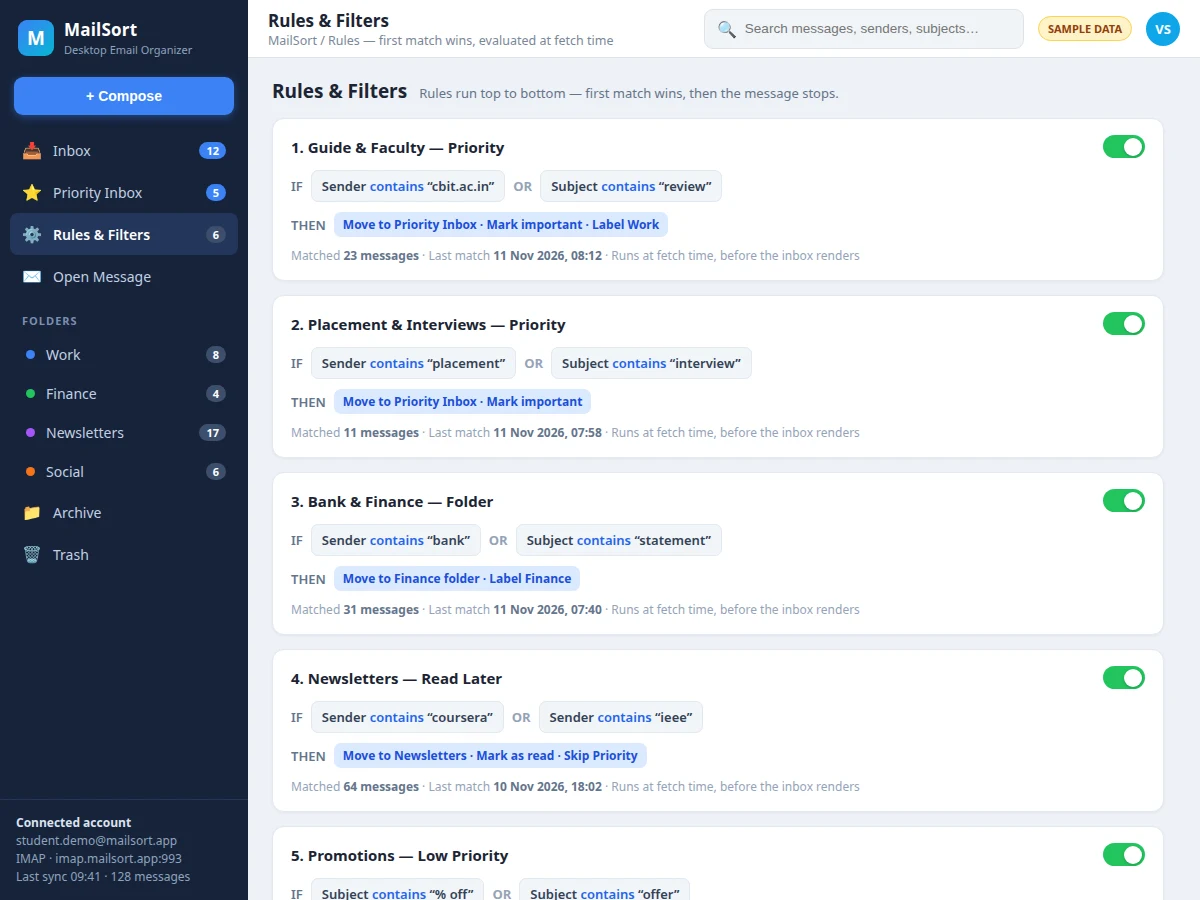
The organizer works as a five-stage pipeline that runs every time mail arrives. First, the application connects over IMAP with SSL and fetches each new message in full before any sorting logic touches it. Second, the fetched message is stored in a local SQLite database, so the organizer keeps working offline after sync. Third, the rule engine walks the user's rules from top to bottom and tests the message against each rule's conditions on sender, subject, date or size. Fourth, the first rule that matches wins: its action moves the message to a folder, applies a label, marks it important, or keeps it out of the priority inbox, and the engine stops there. Fifth, the priority inbox renders only the messages marked important, ranked by rule score and date, while every other message waits in its folder. Search, bulk actions and the rule-match log all read from the same local store, so the whole application stays fast and consistent.
- The user adds an IMAP account (Gmail, Outlook, Yahoo or college mail) with SSL on port 993, and the app verifies the connection before the first sync.
- New messages are fetched in full over IMAP — headers and body together — and written to the local SQLite store with sender, subject, date, size and folder state.
- The rule engine tests each message against the rules in order, checking sender, subject, date and size conditions, and the first matching rule wins.
- The winning rule's action runs: move the message to a folder, apply a label, mark it important for the priority inbox, or skip priority for newsletters and promotions.
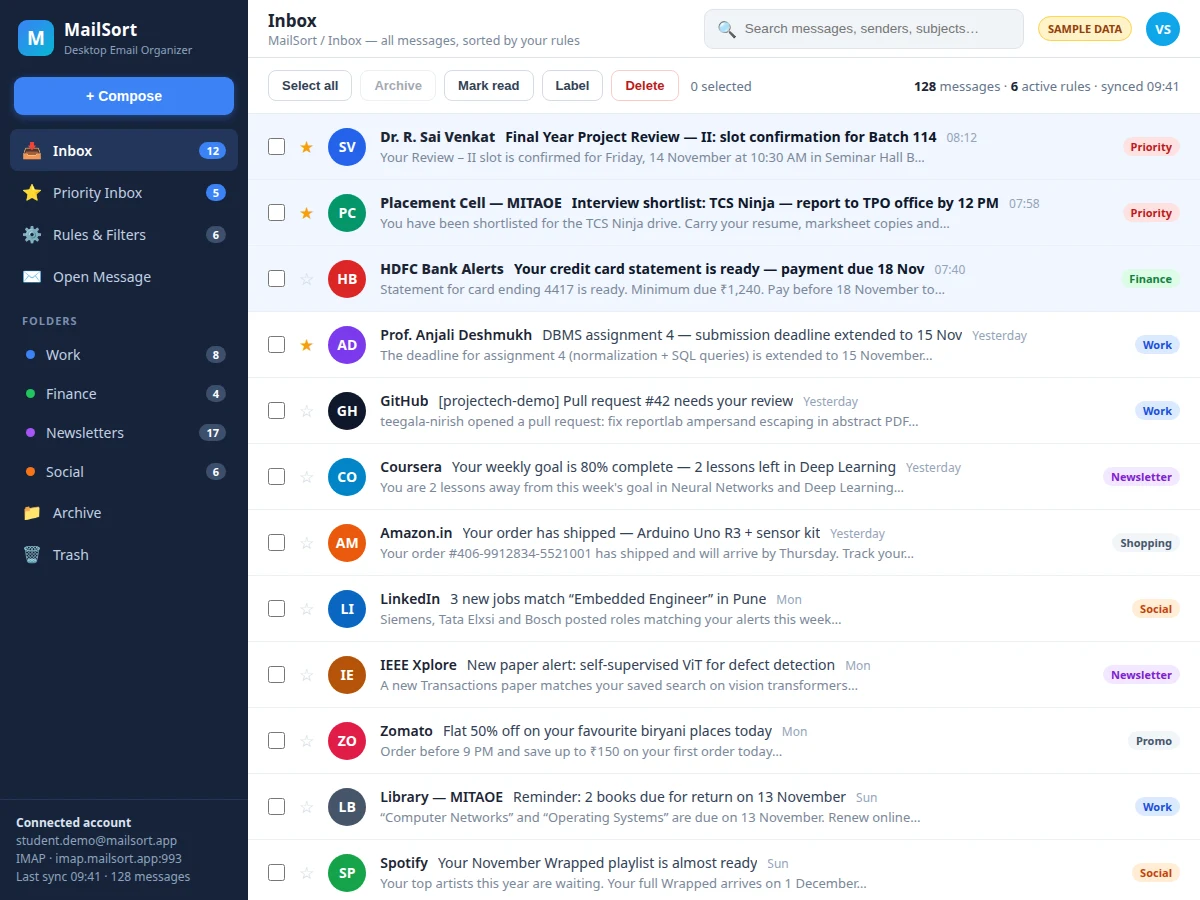
- The priority inbox shows only the messages marked important, ranked by rule score and date, with the rest filed in their folders.
- The user searches sender, subject and body from the local index, and applies bulk actions — archive, label, mark read, move or delete — to any selection, with undo for the last bulk action.
- Every message records which rule matched it, so a misfiled message can be traced to one rule and corrected in the rule editor.
Tech stack:
- Python 3
- Tkinter · ttk desktop UI
- imaplib · email parser
- SQLite local store
- HTML · CSS · JavaScript demo
- Git
| Parameter | Value |
|---|---|
| Mail protocol | IMAP over SSL · port 993 (design target) |
| Rule condition types | 4 — sender · subject · date · size |
| Sample rules in demo | 6 rules across 5 folders |
| Sample messages in demo | 12 messages across 5 folders |
| Bulk actions | 5 — archive · label · mark read · move · delete |
| Local store | SQLite · works offline after first sync |
| Search scope | Sender · subject · message body (local index) |
| Platforms | Windows · macOS · Linux (desktop) |
| Rule evaluation order | Top to bottom · first match wins |
| Sync model | Full-message fetch before classification (design rule) |
Project features
The desktop email organizer ships with four capabilities that carry the whole build: a rule editor that sorts mail on sender, subject, date and size; a priority inbox that surfaces only the messages the rules mark important; bulk actions that clear dozens of messages in one step; and full-text search across every synced message. Around those four sit the supporting pieces — labelled folders, a local SQLite store that works offline after sync, and a rule-match log that shows exactly why each message landed where it did. The rule engine is the heart of the project: every rule is a readable IF–THEN pair, rules run top to bottom, and the first match wins, so the sorting behaviour is always explainable. Nothing here depends on a server-side filter or a cloud service, which is what makes the organizer portable across any IMAP mailbox.
- [Rule editor with 4 condition types] Rules match on sender, subject, date or size, combined with AND/OR, and run top to bottom with first-match-wins ordering. Rules can be reordered, enabled or disabled without touching code.
- [Priority inbox] Messages the rules mark important appear in a dedicated priority view, ranked by rule score and date, so the five messages that matter are visible before anything else.
- [Bulk actions with undo] Select any set of messages and archive, label, mark read, move or delete them in one step; the last bulk action can be undone from the local store.
- [Full-text search] Search across sender, subject and message body from the local index, so finding an old placement mail or bank statement takes seconds even offline.
- [Labelled folders] Rules file mail into named folders — Work, Finance, Newsletters, Social, Promotions — each with its own colour label and unread count.
- [Local SQLite message store] Synced messages and rule results are stored locally, so the inbox, folders and search keep working after the connection drops.
- [Rule-match explanation] Every message shows which rule matched it and what action the rule applied, so a wrong filing can be traced to one rule and fixed in seconds.
What is included
- Complete desktop application source code (Python + Tkinter)
- Rule engine with sender, subject, date and size conditions
- Priority inbox, labelled folders and bulk actions with undo
- Local SQLite message store and full-text search
- Working single-file HTML demo with 12 sample messages and 6 sample rules
- Project report PDF (background, methodology, architecture, outcomes)
- PPT presentation for final review
- Viva Q&A preparation document (IMAP, rule engines, SQLite, desktop UI)
- Specific next step: message on WhatsApp for a quotation stating scope (desktop email organizer, IMAP rule engine, priority inbox), and the price and delivery date are confirmed before the build starts as a built-to-order project
Limitations & prerequisites
- IMAP accounts only in the base build — POP3 mailboxes are not supported.
- Gmail and Outlook accounts need an app password or OAuth2 setup; the build documents the steps but cannot bypass the provider's sign-in rules.
- No push notifications in the base build — new mail appears at the next sync, not the instant it arrives.
- Sync time for a very large mailbox depends on the connection; the first sync of thousands of messages takes noticeably longer than later incremental syncs.
- Attachment preview covers common types (PDF, images, documents); unusual attachment formats open in the system viewer instead.
- The base build is a desktop application — there is no mobile companion app.
- Rule actions apply to messages fetched after the rule is created; older messages are sorted only when the user runs "Apply rules to existing mail".
Frequently Asked Questions
How is this different from a file organizer app?
It is different in what it organizes: this project sorts email messages fetched over IMAP, not files on a disk. Its rules test sender, subject, date and message size, its folders are mailbox folders, and its priority inbox ranks messages — nothing here watches a folder, hashes a file or moves downloads.
Which email accounts does it work with?
Any account that offers IMAP access, which covers Gmail, Outlook, Yahoo and most college mail servers. The setup asks for the IMAP server, port 993 with SSL, and the account credentials; the build documents the app-password steps for providers that require them.
Does it work offline?
Yes — once the first sync has downloaded the mailbox, the organizer works fully offline. Messages, folders, labels and the search index all live in the local SQLite store, so reading, searching, labelling and bulk actions keep working without a connection. Only fetching new mail needs the network, and the next sync picks up whatever arrived meanwhile.
Can rules be changed after setup?
Yes — the rule editor is the main screen of the application, and every rule can be changed there. Rules can be added, edited, reordered, enabled or disabled at any time, and each change applies to the next fetch without touching any code. A "run rules on existing mail" action re-sorts messages already in the store.
Is this project suitable for a final-year project?
Yes — for Computer Science and IT programs, where it fits the standard desktop-application brief. It demonstrates IMAP client programming, rule-engine design, local database storage, desktop UI development and offline-first architecture, all of which are concrete, explainable topics in a review.
Components & software requirements
- Python 3
- Tkinter · ttk desktop UI
- imaplib · email parser
- SQLite local store
- HTML · CSS · JavaScript demo
- Git
Delivery information
Built-to-order project. Delivery timeline is shared after order confirmation based on current queue.
Support terms
Complete documentation, setup guide, and viva preparation included. Support for setup and explanation provided.
Download free synopsis (PDF)
Enter your name and WhatsApp number — the synopsis PDF downloads immediately. We may send occasional project updates on WhatsApp; no spam.