
More project photos (2)
The problem
A small car rental business usually runs on phone calls, a register and memory: a customer asks for a car, the owner guesses whether it is free on those dates, quotes a rate from habit, and discovers the overlap only when two customers arrive for the same vehicle. Deposits are tracked loosely, return damage is argued about because no pickup record exists, and a car due for service keeps getting rented. This project replaces that informal process with one web system. Customers browse the fleet, see only cars that are genuinely free for their chosen dates, and see the full price — per-day rate, duration and weekend rules, taxes and the refundable deposit — before they book. Staff manage vehicles, bookings, pricing rules and pickup and return inspections, where fuel level and odometer readings are recorded at both ends so the deposit decision rests on a record, not an argument.
Browses cars and picks pickup and return dates.
Follow the working sequence
How it works
- A customer registers and logs in, then searches by pickup location, pickup and return dates and car category; the system queries vehicle availability for that exact date range.
- The availability engine excludes vehicles with an overlapping confirmed booking, an active service block or an unreturned prior rental, and returns only bookable cars with their per-day rates.
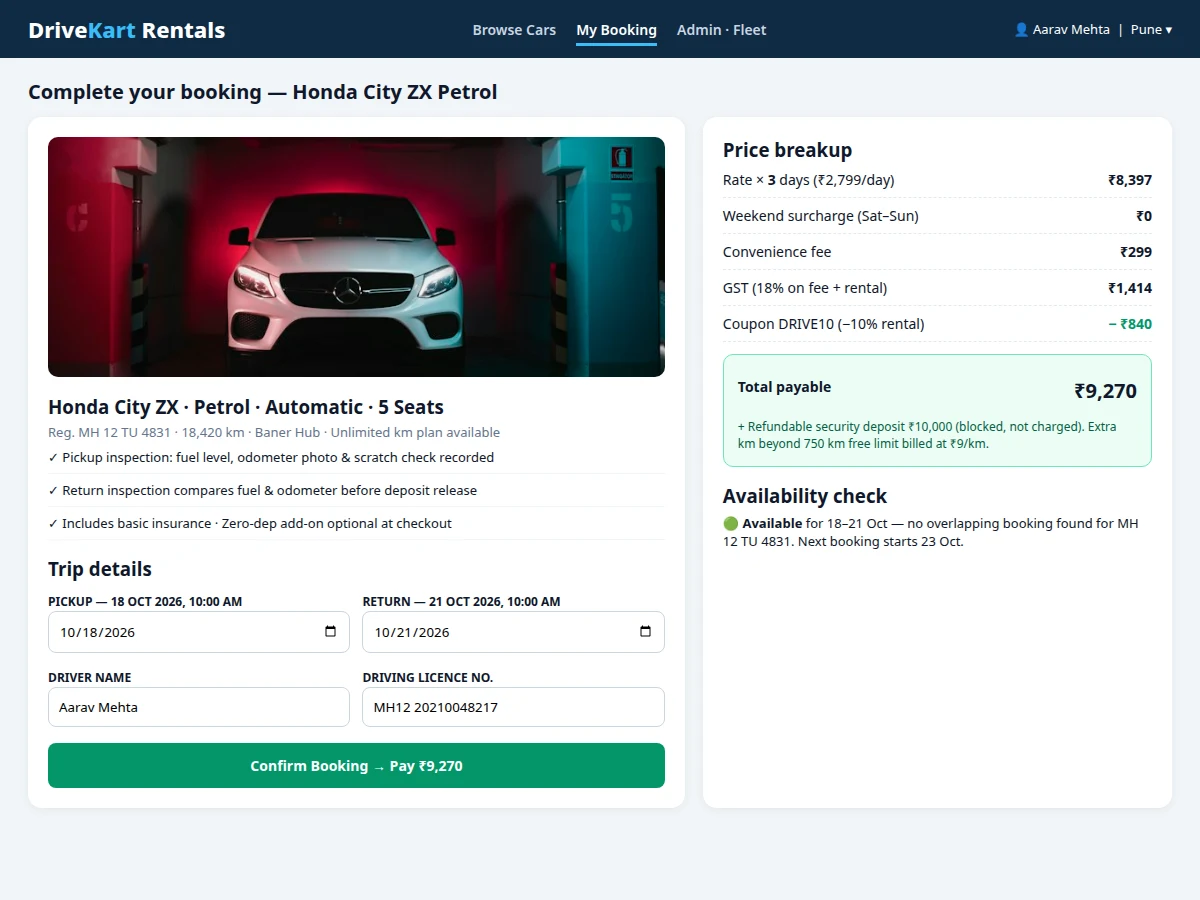
- The customer opens a car, adjusts the dates if needed, and the pricing engine recomputes the total live: rate multiplied by days, weekend and duration rules, fee, tax and any coupon, plus the refundable deposit shown separately.
- On confirmation, the booking, driver details and price breakup are stored, the vehicle is marked reserved for those dates, and a booking reference is issued to the customer.
- At pickup, a staff member completes the inspection form — fuel level, odometer reading and damage notes — which moves the booking to on-trip and the vehicle status to on trip.
- At return, staff record the closing fuel level and odometer, the system computes extra kilometres beyond the free limit and any late-return charge, and the inspection comparison is shown side by side.
- The admin closes the booking by releasing the deposit in full or recording a deduction with a reason; the vehicle returns to available status unless a service block is due, and revenue and fleet reports update.
Tech stack:
- PHP · Laravel
- MySQL
- HTML · CSS · JavaScript
- Bootstrap
- REST-style routes
- Date-range availability logic
| Parameter | Value |
|---|---|
| User roles | 3 roles — customer, staff / fleet operator, admin |
| Vehicle categories | 4 categories — hatchback, sedan, SUV, MUV (configurable) |
| Booking unit | Per-day rental, minimum 1 day (design) |
| Availability check | Date-range overlap check per vehicle, including service blocks |
| Pricing rules | Per-day rate, weekend surcharge, 7-day and 30-day discounts, late-return charge (all configurable) |
| Free kilometre limit | 250 km per day (configurable, design value) |
| Inspection fields | Fuel level, odometer reading and damage notes at pickup and at return |
| Deposit record | Per-booking refundable deposit with held / deducted / released status |
| Page response time | Design target: under 2 seconds on a typical broadband connection |
| Database | MySQL — users, vehicles, bookings, pricing rules, inspections, deposits |
Project features
- [Car catalogue with live availability] Cars are listed with photos, model, fuel, transmission, seats, per-day rate and deposit amount, and the catalogue filters out any vehicle already booked or blocked for service on the selected dates. (Implemented)
- [Date-range availability engine] Every booking stores pickup and return date-times per vehicle; the engine checks for overlapping bookings, service blocks and pending returns before a car can be offered or confirmed. (Implemented)
- [Rental pricing engine] The total is computed from the per-day rate multiplied by rental days, with configurable weekend surcharge, long-rental discounts for 7-day and 30-day plans, convenience fee, tax and coupon handling shown as a line-by-line breakup. (Implemented)
- [Online booking flow] A registered customer selects a car and dates, enters driver and driving licence details, reviews the price breakup and confirms the booking; the vehicle is reserved immediately and a booking reference is generated. (Implemented)
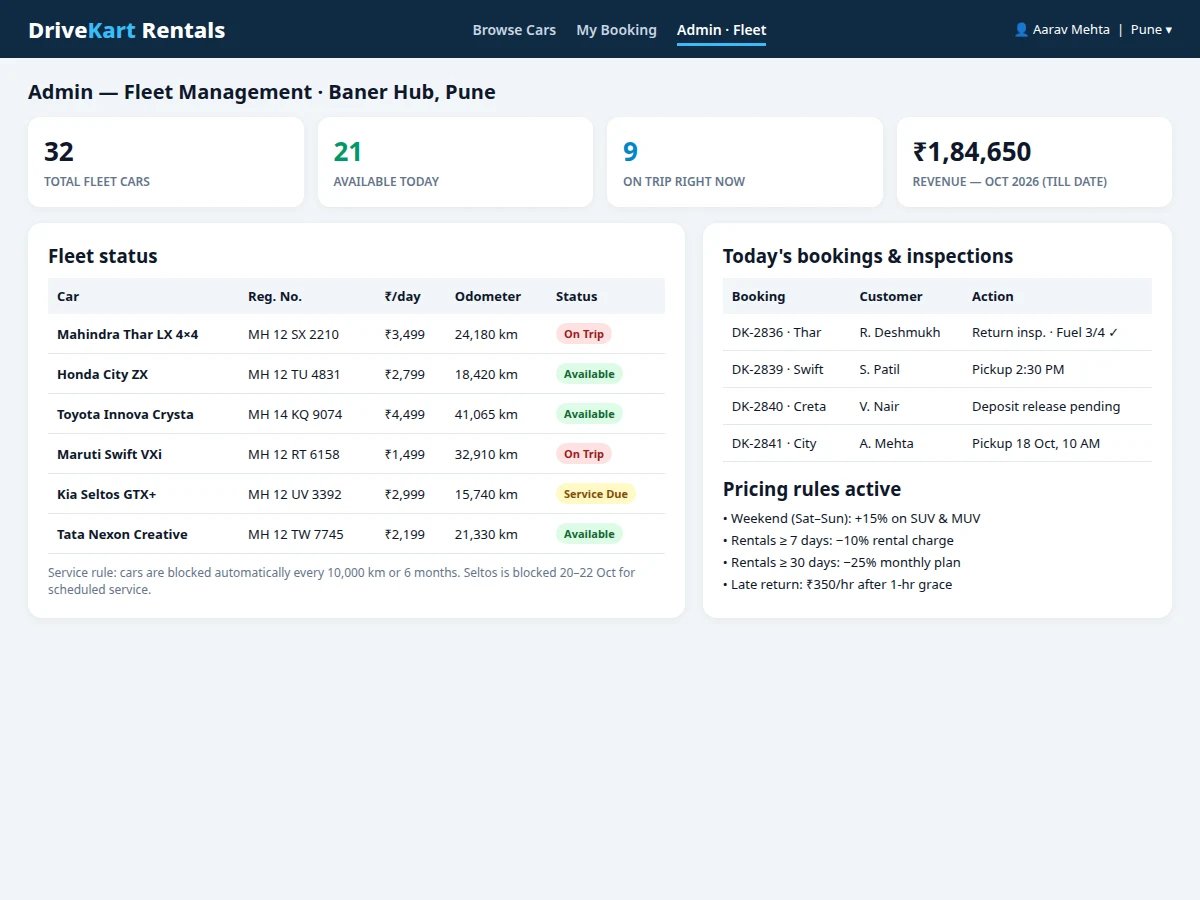
- [Fleet management panel] Staff add, edit and retire vehicles with registration number, category, rate, deposit and odometer history, track statuses such as available, on trip and service due, and block cars for scheduled maintenance. (Implemented)
- [Pickup and return inspection] At handover, staff record fuel level, odometer reading and existing-damage notes; at return the same fields are compared, extra kilometres and late-return charges are computed, and the deposit release or deduction is decided from that record. (Implemented)
- [Security deposit handling] Each booking carries its refundable deposit amount as a blocked or collected record with its own status — held, partially deducted with reason, or released — visible to staff and summarised for the customer. (Implemented)
- Optional / future scope: online payment gateway collection, GPS live tracking of vehicles and a native mobile app are NOT part of the base build — payments and deposit settlement happen outside the system in the base version; these are listed as optional customisation and future scope.
What is included
- Complete source code (Laravel application with customer and admin panels)
- MySQL database schema with seed vehicles, pricing rules and sample bookings
- Date-range availability and rental pricing engine
- Fleet management, inspection and security deposit modules
- Setup and hosting guide (local run plus deployment steps)
- Project report PDF (background, architecture, methodology, results)
- PPT presentation for final review
- Viva Q&A preparation document (availability logic, database design, pricing rules, inspection workflow)
Limitations & prerequisites
- No payment gateway is integrated in the base build, so booking payment and deposit settlement are handled outside the system and only recorded in it; gateway integration is optional customisation.
- Availability is only as accurate as the data staff enter — a car taken out without an inspection entry, or a service block that was never created, will not be reflected until it is recorded.
- The system does not verify a driving licence against any government database; licence details are stored as entered and physical verification remains a counter process.
- Damage assessment at return is a recorded comparison of notes, fuel and odometer values; the system does not automatically detect scratches or damage from photographs.
- There is no GPS tracking in the base build, so vehicle location during a trip is not visible; tracking hardware and a maps integration are future scope.
- Hosting, domain and any paid SMS or email notification services are separate costs and are not part of the software itself.
Frequently Asked Questions
Is this project suitable for a final-year project?
Yes — for Computer Engineering, Information Technology and Web Development programmes. It demonstrates a complete transactional web build: relational database design across vehicles, bookings, inspections and deposits, a date-range overlap algorithm at the heart of the availability engine, a configurable pricing rules engine, role-based access for customers, staff and admin, and a two-stage inspection workflow — each of which gives concrete technical material to explain and defend in a viva.
Is the database included and how is it structured?
Yes, the MySQL schema is included with seed data. Core tables cover users, vehicles with category, rate and deposit fields, bookings with pickup and return date-times, pricing rules, pickup and return inspections, and deposit records. Foreign keys link each booking to its customer and vehicle, inspections to their booking, and deposit status to the booking it belongs to, so the data model can be presented as an ER diagram and explained table by table.
How does the system stop the same car being booked twice for the same dates?
Through the availability engine. A vehicle is offered only when no confirmed booking overlaps the requested pickup-to-return range, no service block covers those dates, and the previous rental has been closed with a return inspection. The overlap test compares the requested start and end against every stored booking for that vehicle, which is the central algorithm of the project and a strong viva topic.
Does the project contain an admin and fleet panel?
Yes, fleet management is part of the base build. Staff add and edit vehicles, set per-day rates and deposit amounts, change vehicle status, create service blocks, view the day's pickups and returns, complete inspection forms and close bookings with a deposit decision. Pricing rules such as the weekend surcharge and long-rental discounts are edited there as configuration, not hard-coded values.
Is a payment gateway included?
No, and this is stated plainly. The booking flow computes and records the full payable amount and the deposit, but actual collection happens outside the system in the base build. Connecting a payment gateway so customers pay and block the deposit online is a realistic optional customisation if a college specifically requires that flow.
Can it be hosted online and what does hosting need?
Yes, the build runs on a standard PHP and MySQL hosting setup. The Laravel application serves both the customer site and the admin panel, and MySQL holds the data. Hosting, domain and any paid notification services are separate recurring costs paid to the provider; the included guide covers environment configuration, database import and the steps to take the application live.
Components & software requirements
- PHP · Laravel
- MySQL
- HTML · CSS · JavaScript
- Bootstrap
- REST-style routes
- Date-range availability logic
Delivery information
Built-to-order project. Delivery timeline is shared after order confirmation based on current queue.
Support terms
Complete documentation, setup guide, and viva preparation included. Support for setup and explanation provided.
Download free synopsis (PDF)
Enter your name and email — the synopsis PDF downloads immediately. We may send occasional project updates; no spam, unsubscribe anytime.