
More project photos (3)
The problem
College central workshops own expensive shared machines — centre lathes, milling machines, pillar drills, CNC routers — that every mechanical and production batch needs for mini and major projects. In most colleges the booking still happens on a paper register at the workshop office: students queue to write their names, double bookings surface only at the machine, and the faculty in-charge has no record of who used what and when. The result is idle machines sitting next to frustrated students, and zero utilisation data for maintenance or purchase planning. This project replaces the register with a web application. Machines and their hourly slots are visible to every student on a live grid, booking requests flow through a faculty approval queue, and every confirmed, cancelled or completed booking is logged. A week-calendar view shows the whole workshop at a glance, and utilisation reports turn the log into decisions — peak hours, most-used machines and no-show patterns.
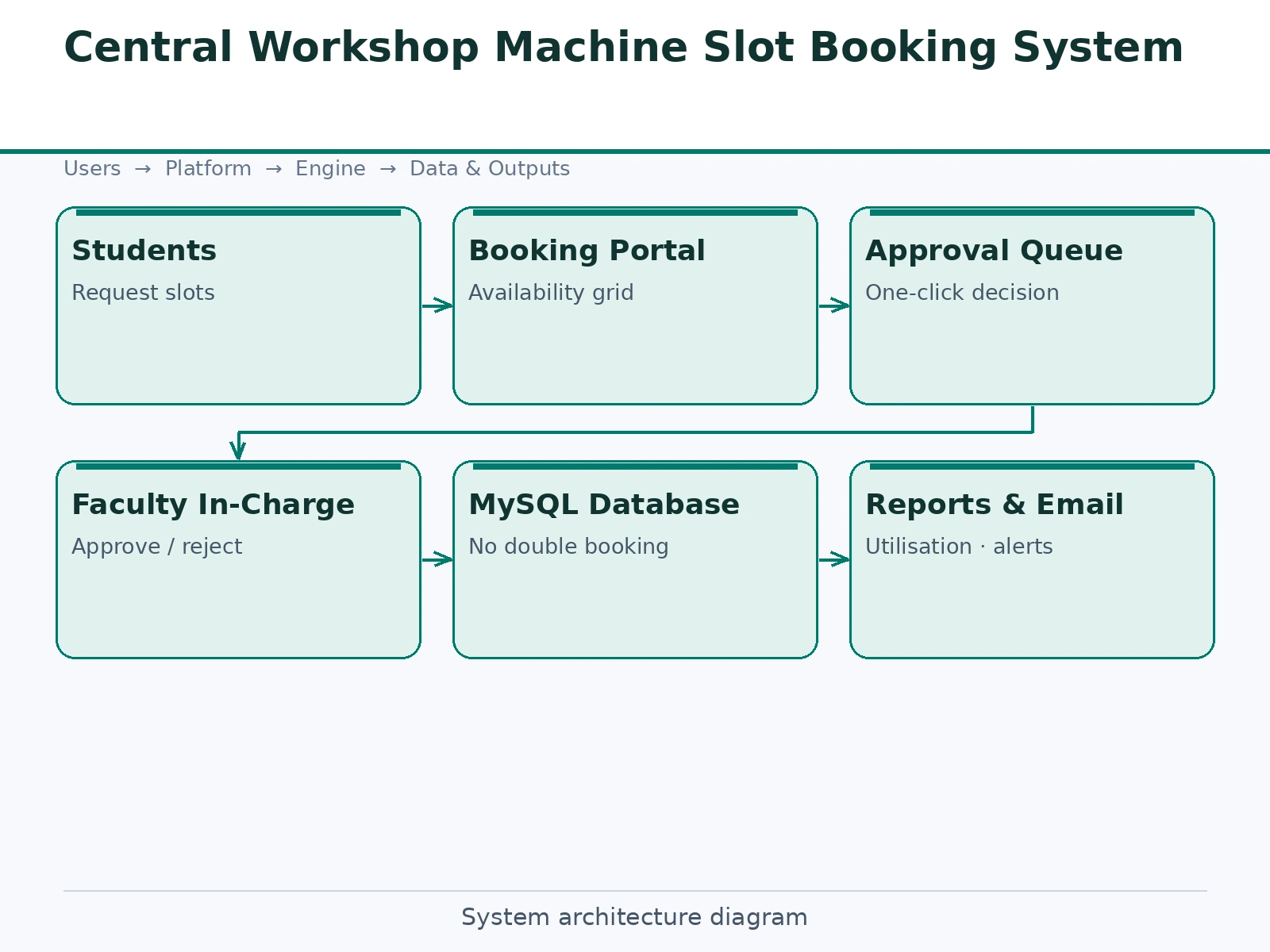
Picks a free slot, submits purpose and faculty guide, and waits for approval.
Follow the working sequence
How it works
- The admin registers machines (name, code, status) and the daily slot template (e.g. eight 1-hour slots, 09:00–17:00).
- A student logs in, opens a machine card and sees today's slots colour-coded free or booked.
- Selecting a free slot opens the booking form — purpose, faculty guide, safety-briefing confirmation — and submits a PENDING request.
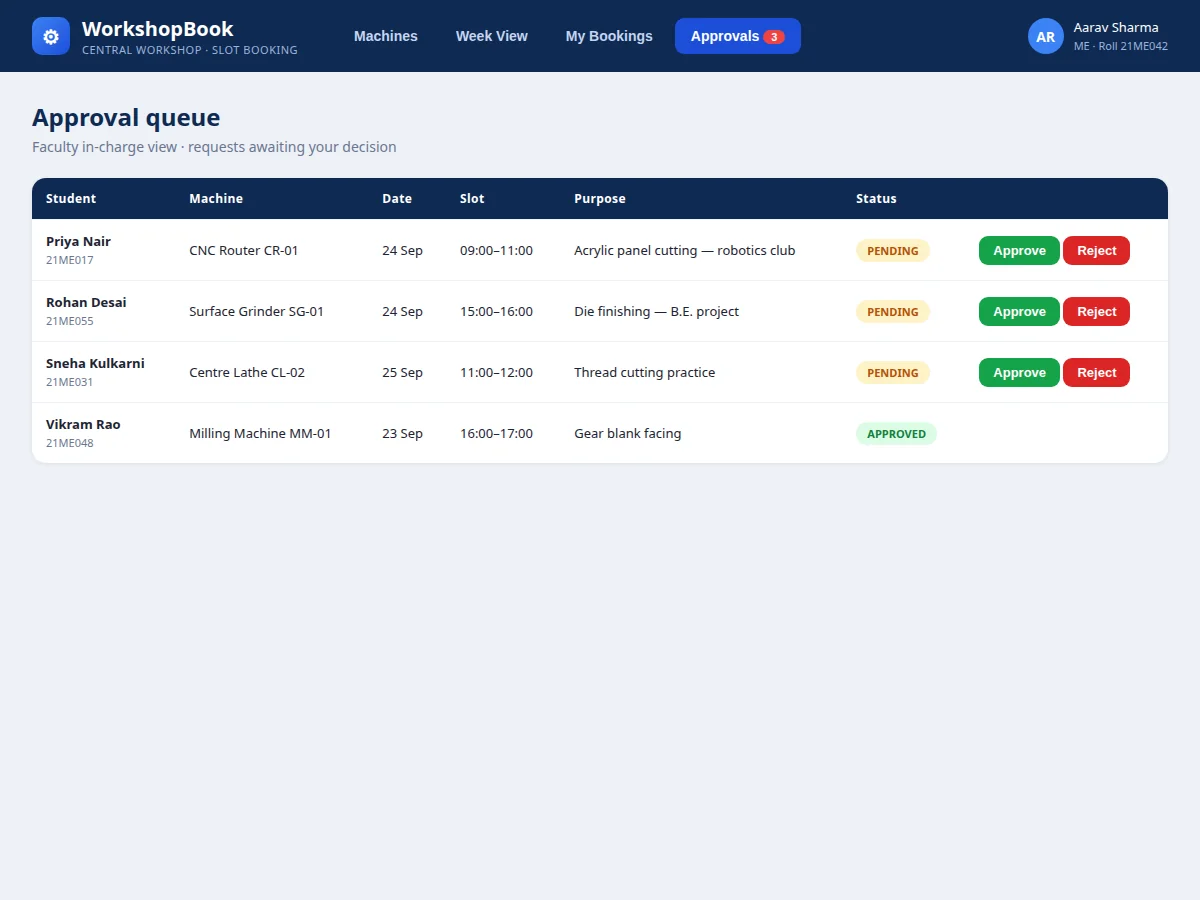
- The faculty in-charge opens the approval queue and approves or rejects; the decision notifies the student and locks or releases the slot.
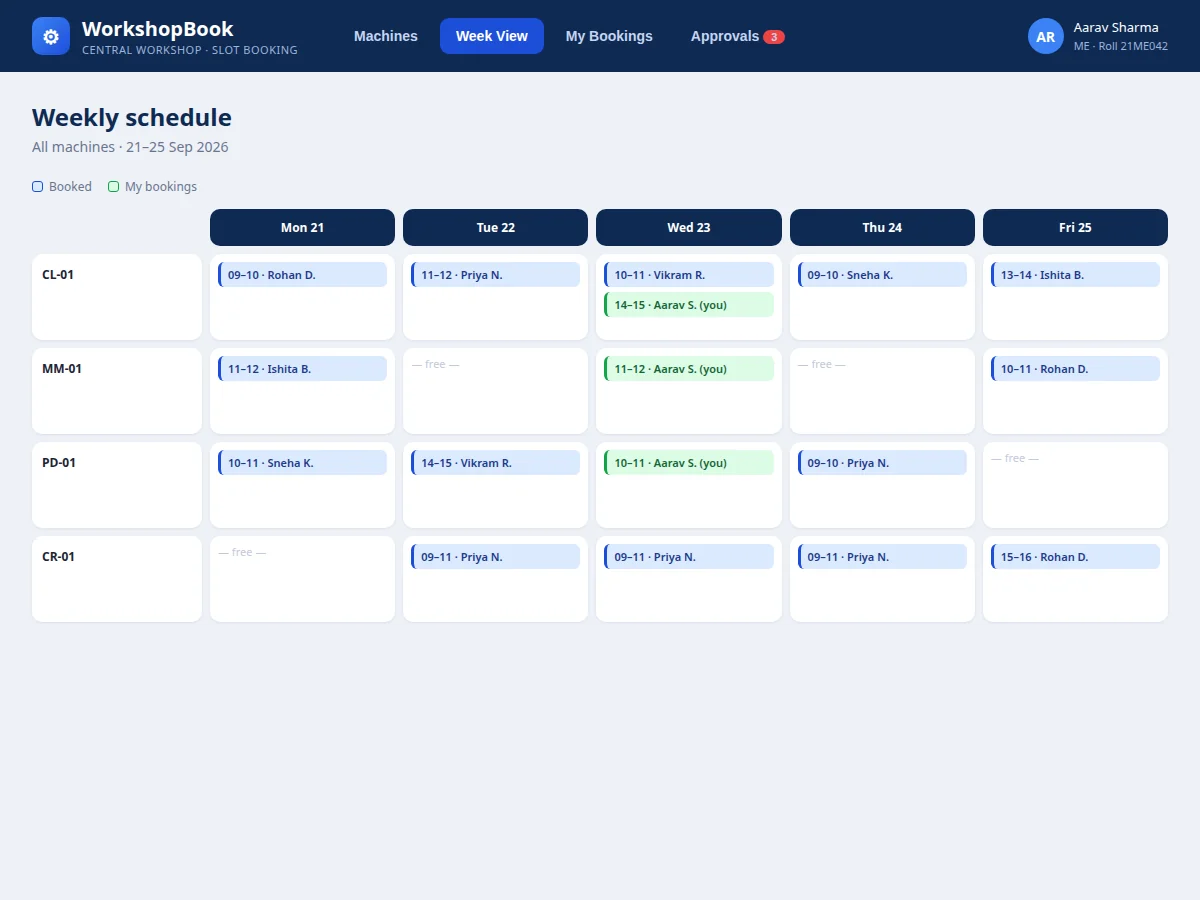
- The week view renders every machine's confirmed bookings as a calendar; the student's own bookings are highlighted.
- Cancellations release the slot immediately. The reports module aggregates the booking log into per-machine utilisation and peak-hour charts.
Tech stack:
- PHP · Laravel (REST API + Blade views)
- MySQL (relational schema with seed data)
- HTML · CSS · JavaScript (responsive frontend)
- Role-based access (student, faculty in-charge, admin)
- Session authentication
- Email notification hooks
- Chart.js utilisation reports
- Git
| Parameter | Value |
|---|---|
| Slot granularity | 1 hour (configurable, design target) |
| Daily window | 09:00–17:00, 8 slots per machine (configurable) |
| User roles | 3 (student, faculty in-charge, admin) |
| Conflict handling | Unique (machine, date, slot) constraint — no double booking possible |
| Booking states | Requested → Approved/Rejected → Completed/Cancelled/No-show |
| Booking rule | 1 active booking per student per day (configurable) |
| Reports | Per-machine utilisation, peak-hour bands, no-show list |
| Deployment | Shared hosting, VPS or college intranet server |
| Client requirement | Any modern browser, mobile-friendly layout |
Project features
- [Live availability grid] Every machine's hourly slots for the day are colour-coded free or booked, so students know availability without visiting the workshop office.
- [Slot booking with purpose] Booking requests capture the purpose of use, faculty guide and safety-briefing confirmation — the same information the paper register tried to hold.
- [Faculty approval queue] The in-charge sees all pending requests in one table and approves or rejects with one click; students are notified of the decision.
- [Week calendar view] All machines rendered as a Mon–Fri calendar with booked blocks attributed to students, including the viewer's own bookings highlighted.
- [Database-level conflict prevention] A unique constraint on (machine, date, slot) makes double booking impossible even under concurrent requests.
- [Utilisation reports] Bookings per machine, peak-hour bands and no-show tracking give the workshop data for maintenance scheduling.
- [Cancellation & no-show handling] Students cancel from their bookings page, freeing the slot instantly; repeated no-shows are flagged per the configured policy.
What is included
- Complete working web application (booking, approvals, calendar, reports)
- Database schema with seed data (machines, slots, demo users and bookings)
- Admin panel for machine and slot-template management
- Project report PDF (SRS, ER diagram, DFD, test cases, screenshots)
- PPT presentation for final review
- Viva Q&A preparation document (scheduling logic, RBAC, conflict handling, reporting)
Limitations & prerequisites
- This is a scheduling system, not access control — it does not physically lock machines; QR/RFID check-in is listed as future scope.
- Notifications use email hooks; SMS reminders need a paid gateway the buyer configures separately.
- The demo ships with one workshop and a fixed slot template; multi-workshop support needs the documented extension.
- No-show detection is manual (staff marks attendance); automatic detection needs the QR check-in extension.
- Utilisation figures in the demo are illustrative seed data, not measured from a real workshop.
Frequently Asked Questions
How does the system prevent two students booking the same slot?
A unique database constraint on (machine, date, slot) rejects any second approved booking for the same slot, even if two requests arrive at the same instant. The application also checks availability before showing the booking form.
Who approves the bookings?
The faculty in-charge (or workshop superintendent) role. They see a queue of pending requests with the student's purpose and guide, and approve or reject each in one click.
Can the workshop change slot timings?
Yes. Slot duration and the daily window are a configurable template managed from the admin panel — 30-minute or 2-hour slots work the same way.
Does it work on phones?
Yes, the frontend is responsive, so students can check availability and request slots from their phones without visiting the workshop.
Can this extend to other shared resources?
Yes — seminar halls, sports facilities and lab equipment follow the same resource-plus-slot model, and the report documents how to add a new resource type.
Is this project suitable for a final-year project?
Yes — for Computer Science, IT and Web Development programs. It demonstrates authentication, role-based access, state machines, database constraints and reporting in one coherent system. Suitable for B.E./B.Tech final-year projects in Computer Science, IT and Web Development.
Components & software requirements
- PHP · Laravel (REST API + Blade views)
- MySQL (relational schema with seed data)
- HTML · CSS · JavaScript (responsive frontend)
- Role-based access (student, faculty in-charge, admin)
- Session authentication
- Email notification hooks
- Chart.js utilisation reports
- Git
Delivery information
Built-to-order project. Delivery timeline is shared after order confirmation based on current queue.
Support terms
Complete documentation, setup guide, and viva preparation included. Support for setup and explanation provided.
Download free synopsis (PDF)
Enter your name and WhatsApp number — the synopsis PDF downloads immediately. We may send occasional project updates on WhatsApp; no spam.