
More project photos (2)
The problem
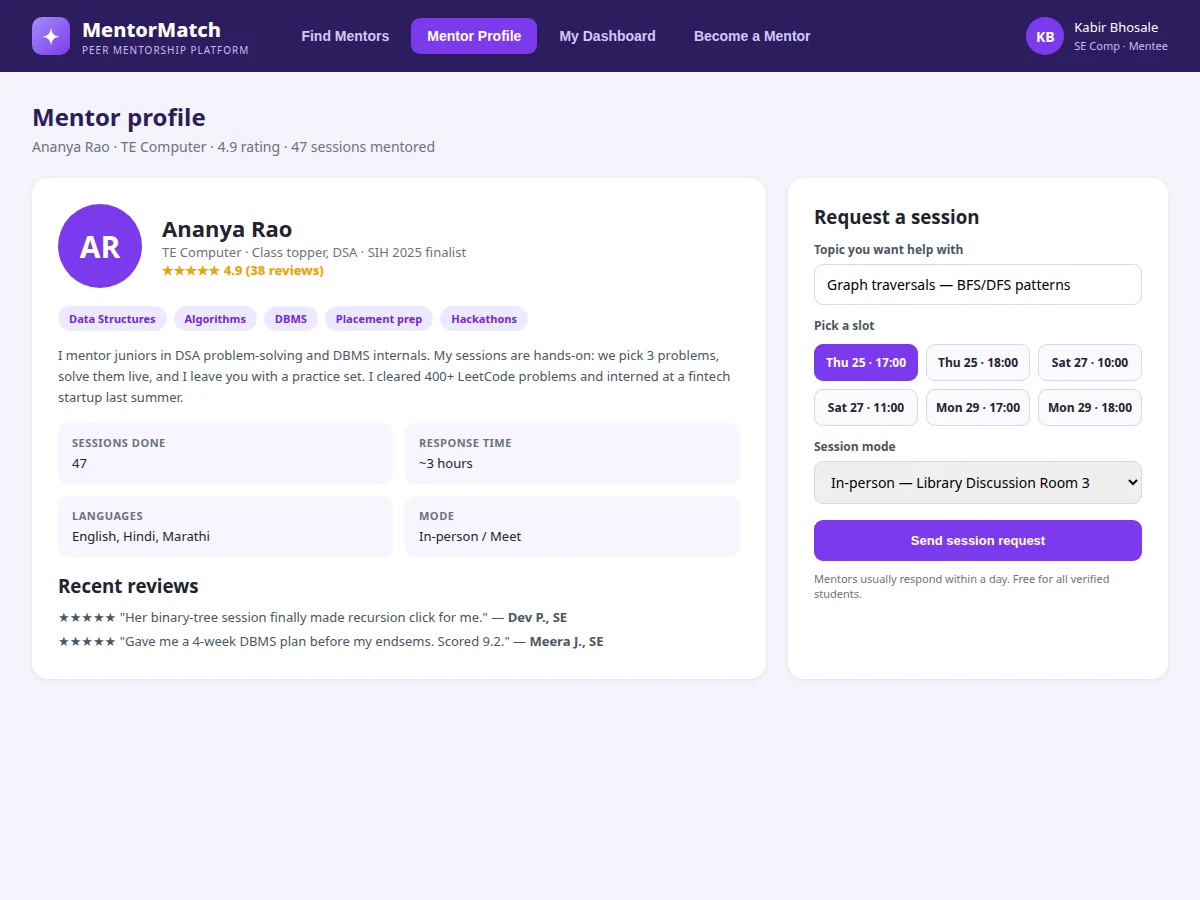
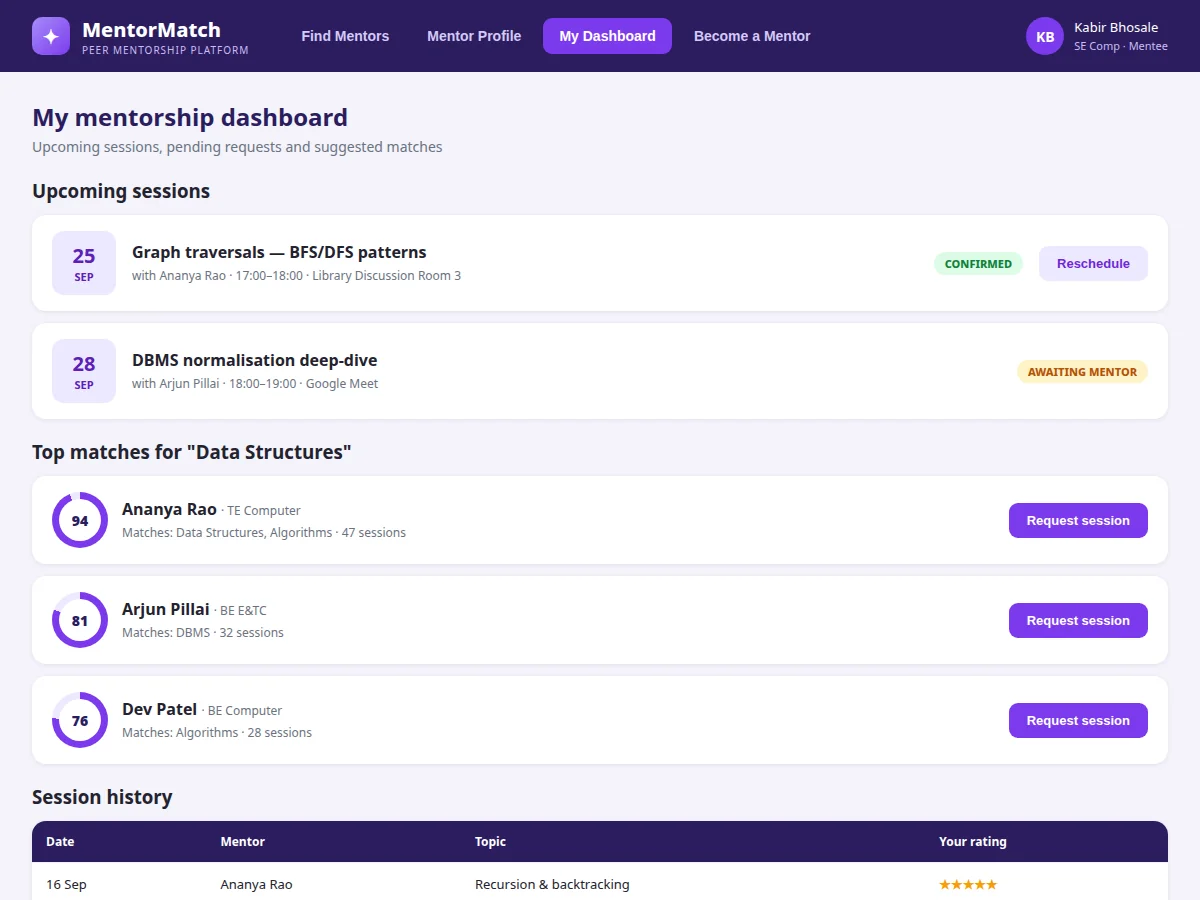
Every semester, juniors struggle with the same subjects and project choices that seniors have already survived — yet the knowledge transfer happens informally, if at all. A first-year stuck on data structures doesn't know which third-year is good at explaining recursion; a senior willing to mentor has no way to advertise free hours. The result is missed learning and repeated mistakes that a 30-minute session could have prevented. This project is a mentorship platform that makes senior-junior matching systematic. Seniors register as mentors with subjects, domains and free slots; the platform verifies them against enrollment data. Juniors search by subject, year and mode, see a match score computed from overlapping subjects, mentor rating and availability, and request 1:1 sessions on a mentor's open slots. Sessions are tracked with goals, reminders and post-session ratings, and both sides get dashboards — upcoming sessions, history, reviews for mentors, learning goals for mentees. The platform is free for verified students and runs on the college's identity data, so trust is built in.
How it works
- Seniors apply through the Become-a-Mentor form; an admin verifies enrollment and activates the profile.
- Mentors list subjects, project domains and weekly free slots; ratings accumulate from completed sessions.
- A mentee searches by subject, department and mode; the platform scores and ranks matching mentors.
- The mentee picks a free slot, writes the topic they need help with, and sends a session request.
- The mentor confirms; both get the session with mode (in-person room or video link) and a reminder.
- After the session, the mentee rates and reviews; the rating updates the mentor's profile and future match scores.
Tech stack:
- PHP · Laravel (REST API + Blade views)
- MySQL (relational schema with seed data)
- HTML · CSS · JavaScript (responsive frontend)
- Match-scoring engine (weighted, explainable)
- Session authentication
- Role-based access (mentee, mentor, admin)
- Email notification hooks
- Git
| Parameter | Value |
|---|---|
| User roles | 3 (mentee, mentor, admin) |
| Match score | 0–100, weighted: subject overlap, rating, availability, seniority |
| Session lifecycle | Requested → Confirmed → Completed / Cancelled |
| Slot granularity | 1-hour mentor-defined slots |
| Rating scale | 1–5 stars with text review |
| Mentor verification | Admin approval against enrollment records |
| Session modes | In-person (room) or video link |
| Deployment | Shared hosting, VPS or college intranet |
Project features
- [Match scoring] A transparent score (subject overlap, rating, availability, seniority) ranks mentors for each search so mentees see why a mentor is suggested.
- [Mentor profiles] Subjects, domains, session history, response time, languages and verified reviews — everything a mentee needs to choose.
- [Slot-based session requests] Mentors publish free slots; mentees book a specific slot with a topic, and the request lifecycle (requested → confirmed → completed) is tracked.
- [Become-a-mentor flow] A structured application with subjects, availability and a short intro, verified by an admin before the profile goes live.
- [Session dashboards] Mentees see upcoming sessions, pending requests and goals; mentors see requests to accept, their calendar and ratings trend.
- [Ratings & reviews] Every completed session is rated and optionally reviewed; ratings feed back into match scores and mentor badges.
- [Learning goals tracking] Mentees set goals per subject and link sessions to them, building a visible record of what each session achieved.
What is included
- Complete working web application (mentor directory, profiles, booking, dashboards, ratings)
- Database schema with seed data (mentors, subjects, slots, sessions, reviews)
- Admin panel for mentor verification and subject taxonomy
- Match-scoring engine with documented weights
- Project report PDF (SRS, ER diagram, DFD, test cases, screenshots)
- PPT presentation for final review
- Viva Q&A preparation document (matching logic, session state machine, trust design)
Limitations & prerequisites
- Mentor verification is manual admin approval against enrollment records; automatic verification against the college ERP is future scope.
- Video sessions are scheduled links, not an in-app video call — the demo expects Google Meet or similar.
- Match scores are a transparent weighted formula, not machine-learned recommendations; no training data is used or claimed.
- Reminders use email hooks; SMS/WhatsApp reminders need a buyer-configured gateway.
- Ratings in the demo are illustrative seed data, not from real sessions.
Frequently Asked Questions
How is the match score calculated?
From four weighted factors: subject overlap with the search, mentor rating, availability in the coming week, and seniority. The weights are documented in the report so the ranking is explainable, not a black box.
Who can become a mentor?
Any enrolled senior student who applies and is verified by the admin. Verification checks enrollment and year; subject expertise is established through session ratings over time.
Is the platform free?
Yes for verified students — mentorship is peer-to-peer and unpaid by design. The admin can add a credit or badge system as future scope.
How do sessions happen — online or offline?
Both. The mentor sets the mode per slot: an in-person venue like a library discussion room, or a video link pasted into the session.
What stops fake reviews?
Only the mentee of a completed session can rate it, and each session allows exactly one rating — enforced by the session state machine.
Is this project suitable for a final-year project?
Yes — for Computer Science, IT and Web Development programs. It demonstrates user matching, booking state machines, role-based access and review systems in one product. Suitable for B.E./B.Tech final-year projects in Computer Science, IT and Web Development.
Components & software requirements
- PHP · Laravel (REST API + Blade views)
- MySQL (relational schema with seed data)
- HTML · CSS · JavaScript (responsive frontend)
- Match-scoring engine (weighted, explainable)
- Session authentication
- Role-based access (mentee, mentor, admin)
- Email notification hooks
- Git
Delivery information
Built-to-order project. Delivery timeline is shared after order confirmation based on current queue.
Support terms
Complete documentation, setup guide, and viva preparation included. Support for setup and explanation provided.