
More project photos (2)

The problem
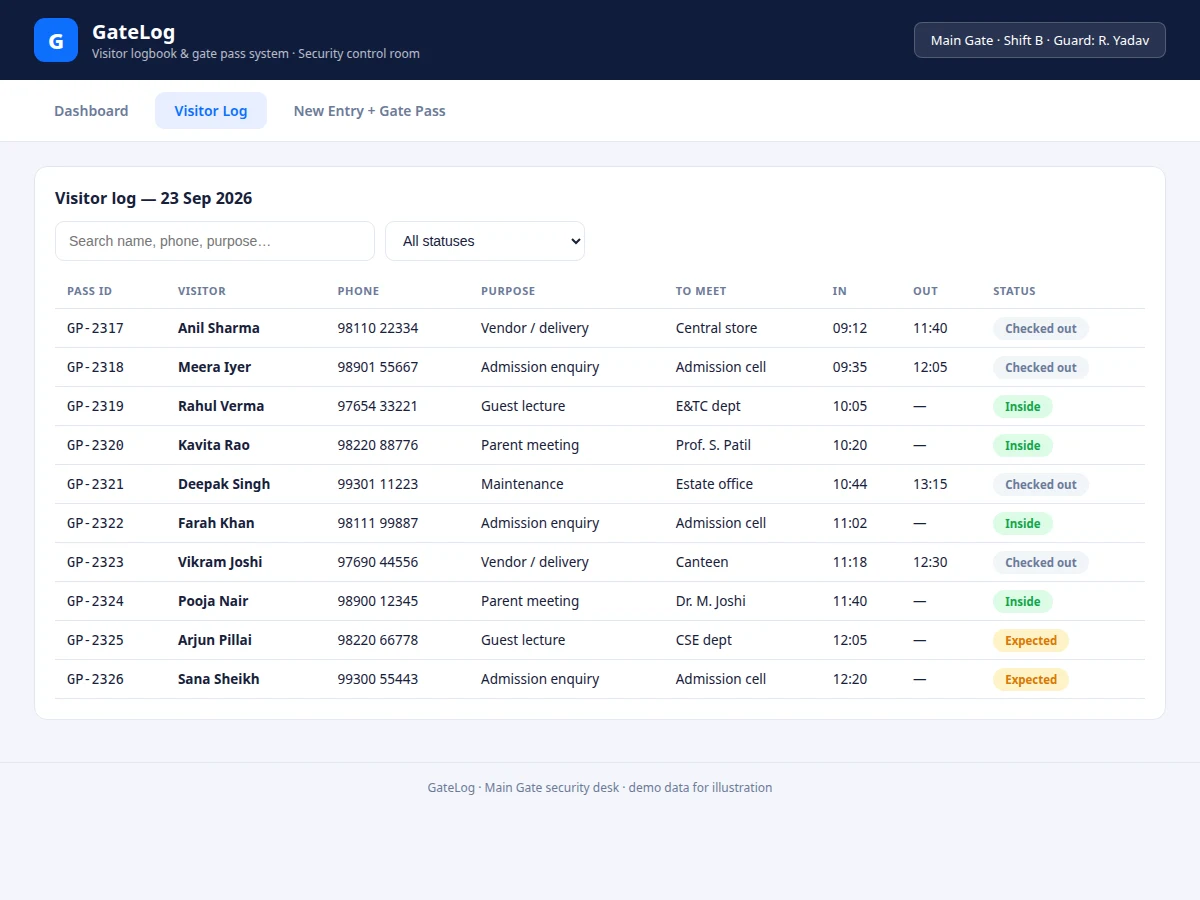
Campus main gates still run on paper registers: the guard writes a name and phone number, tears off no pass, and nobody knows who is currently inside. During an emergency or an audit, reconstructing the day's visitors from handwriting is hopeless — and exit checks have nothing verifiable to check against. GateLog digitizes the desk end to end. The dashboard answers "who is inside right now" at a glance with footfall, inside-count, expected and overstay tiles plus an hourly chart and purpose breakdown. The log view makes every record searchable and filterable by status. The entry form captures ID proof and vehicle number, mints a pass ID, and renders a printable gate pass with a scan code — closing the loop that paper never could.
How it works
- On load, the seeded log (a realistic day's entries) renders the dashboard: counts are aggregated by status from the records.
- The hourly chart bins check-in times into hour slots; the purpose table groups and shares them.
- The log view filters the same records by search text and status dropdown, rendering pass ID, visitor, purpose, times and a status pill per row.
- Submitting the entry form validates the phone format, mints the next pass ID, stamps the current time, and prepends the record — dashboard counts update immediately.
- The gate pass template renders with visitor details, validity window and scan code; the Print button uses a print stylesheet showing only the pass.
- Views switch via URL hash across dashboard, log and entry screens.
Tech stack:
- HTML5, CSS3 (desk-portal theme + print stylesheet)
- Vanilla JavaScript (no frameworks)
- In-memory log store with aggregation functions
- URL-hash navigation (dashboard / log / entry)
- No backend, no dependencies — runs offline
| Parameter | Value |
|---|---|
| Dashboard tiles | 4 (footfall, inside, expected, overstay) (as shipped) |
| Log fields per record | 8 (pass ID, name, phone, purpose, to-meet, in, out, status) (as shipped) |
| Seeded demo entries | 10 with realistic spread (as shipped) |
| Pass validity options | 2 hours / 4 hours / full day (as shipped) |
| Dedicated print stylesheet — pass only (as shipped) | |
| Dependencies | None — zero npm packages (as shipped) |
| File size | Single HTML file, approximately 16 KB (expected) |
| Browser support | Chrome, Edge, Firefox (current versions, expected) |
Project features
- [Security dashboard] Today's footfall, currently-inside count, expected visits and overstay alerts as live tiles, computed from the log.
- [Hourly footfall chart] Bar visualization of check-ins by hour for the day, plus a visits-by-purpose breakdown table.
- [Currently-inside table] Every visitor who has not checked out, with elapsed time since entry.
- [Searchable visitor log] Text search across name, phone and purpose, plus status filters (Inside / Checked out / Expected).
- [New-entry form] Name, phone, ID type and number, purpose, person-to-meet, vehicle and validity window, with a photo-capture placeholder for the kiosk webcam.
- [Printable gate pass] A dashed-border pass template with all entry details and a scan-at-exit code, using a print stylesheet that hides everything else.
- [Overstay flagging] Visitors inside beyond their pass validity are surfaced as overstays on the dashboard.
What is included
- Complete single-file web app (dashboard, log, entry + pass views)
- Documented log-store and aggregation code
- Project report PDF (background, workflow analysis, data model, screenshots)
- PPT presentation for final review
- Viva Q&A preparation document (dashboard design, data model, print CSS, deployment path)
- User guide for running and demonstrating the portal
Limitations & prerequisites
- Demo build keeps the log in memory; multi-desk sync and overnight persistence need the backend (listed as future scope).
- The scan code on the pass is illustrative — QR scanning at exit is future scope, not implemented.
- Photo capture is a placeholder panel; wiring a real webcam feed needs the kiosk hardware.
- ID numbers are logged as last-4-digits in the demo; a production build needs proper PII handling policy.
Frequently Asked Questions
Does it replace the paper register completely?
For the desk workflow, yes: entries, search, dashboard and passes are all digital. Multi-desk sync and a real database are the documented backend extension.
How does check-out work?
Each pass carries a scan-at-exit code; in this build the guard marks check-out in the log, and the dashboard inside-count drops. QR auto check-out is listed as future scope.
What are overstays?
Visitors still inside after their pass validity window — the dashboard flags them so the desk can follow up, which paper registers cannot do at all.
Can the pass be printed?
Yes — the Print button uses a print stylesheet that outputs only the pass card, sized for a desk printer.
What should I be able to explain in the viva?
The record data model, how dashboard aggregates derive from the log, the print stylesheet technique, and what the backend must add for production — all in the Q&A document.
Is this project suitable for a final-year project?
Yes — for Computer Science, IT and Web Development programs. It digitizes a real campus workflow with a dashboard, CRUD log and printable output. Suitable for B.E./B.Tech final-year projects in Computer Science, IT and Web Development.
Components & software requirements
- HTML5, CSS3 (desk-portal theme + print stylesheet)
- Vanilla JavaScript (no frameworks)
- In-memory log store with aggregation functions
- URL-hash navigation (dashboard / log / entry)
- No backend, no dependencies — runs offline
Delivery information
Built-to-order project. Delivery timeline is shared after order confirmation based on current queue.
Support terms
Complete documentation, setup guide, and viva preparation included. Support for setup and explanation provided.