
More project photos (2)
The problem
Tab overload is a genuine productivity problem: research, documentation, videos and dashboards pile up across windows until the tab strip is a row of identical favicons and the browser starts eating gigabytes of RAM. Native tab search is limited, session restore in browsers is all-or-nothing, and most users lose carefully assembled research contexts when they close a window. This project treats the browser as a platform and builds a proper engineering solution on top of it: a tab manager extension that inventories every open tab through the Tabs API, searches them instantly by title or URL, detects duplicates by normalized URL, parks idle tabs to reclaim memory, and snapshots named sessions — the full set of tabs and window structure — into persistent local storage so a whole working context can be restored later with one click. Everything runs locally: no account, no server, no telemetry.
Searches tabs, saves sessions and restores them from the popup.
Follow the working sequence
How it works
- The manifest registers the popup UI and a background service worker with the tabs, tabGroups and storage permissions; the extension badge shows the live open-tab count.
- On popup open, the service worker queries all tabs across all windows via the Tabs API and returns title, URL, favicon, pinned and windowId for each.
- The popup renders tabs grouped by window, with duplicates found by comparing normalized URLs (query strings and hash fragments stripped) and suspended tabs detected via the discarded flag.
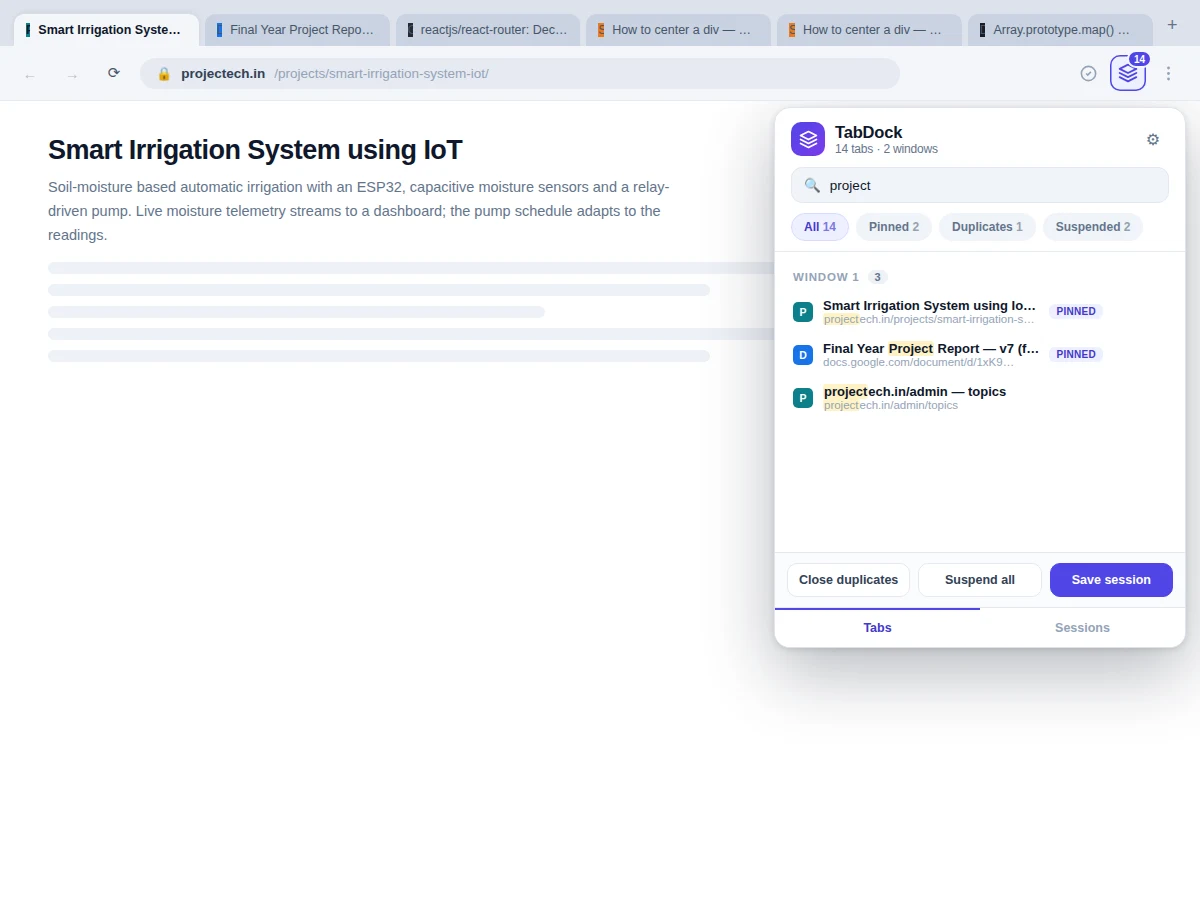
- Typing in the search box filters the in-memory tab list by substring match on title + URL and re-renders with highlighted matches — no round trip, results appear as you type.
- "Save session" serializes the tab list (URL, title, pinned, window grouping) into a JSON session record in extension local storage with a name and timestamp.
- "Restore" reads a session record and recreates its windows and tabs through the Windows and Tabs APIs, reopening each URL in the original order; the extension never closes the user's current tabs during restore.
Tech stack:
- JavaScript (ES2020) + HTML5 + CSS3
- Chrome Extensions Manifest V3 (service worker background)
- chrome.tabs, chrome.windows, chrome.storage APIs
- chrome.action badge for the live tab counter
- Single-file demo build for screenshots and testing
| Parameter | Value |
|---|---|
| Extension format | Chrome/Edge Manifest V3 (zipped source) |
| Popup UI | Single popup, ~412 px wide, Tabs + Sessions views |
| Search | Live substring search over title + URL, all windows |
| Duplicate detection | Normalized-URL comparison (query/hash stripped) |
| Session storage | chrome.storage.local, JSON session records |
| Session record | Name, timestamp, tab count, per-tab URL/title/window/pinned |
| Permissions | tabs, tabGroups, storage (declared in manifest) |
| Network dependency | None for core features (works fully offline) |
| Demo build | Single HTML file, runs in any modern browser |
Project features
- [Instant tab search] Type in the popup search box and matching tabs filter live as you type, with the matched text highlighted in titles and URLs; search covers every tab across all open windows.
- [Duplicate detection] Tabs pointing at the same normalized URL are flagged with a duplicate badge, and one click closes all duplicates while keeping the pinned originals safe.
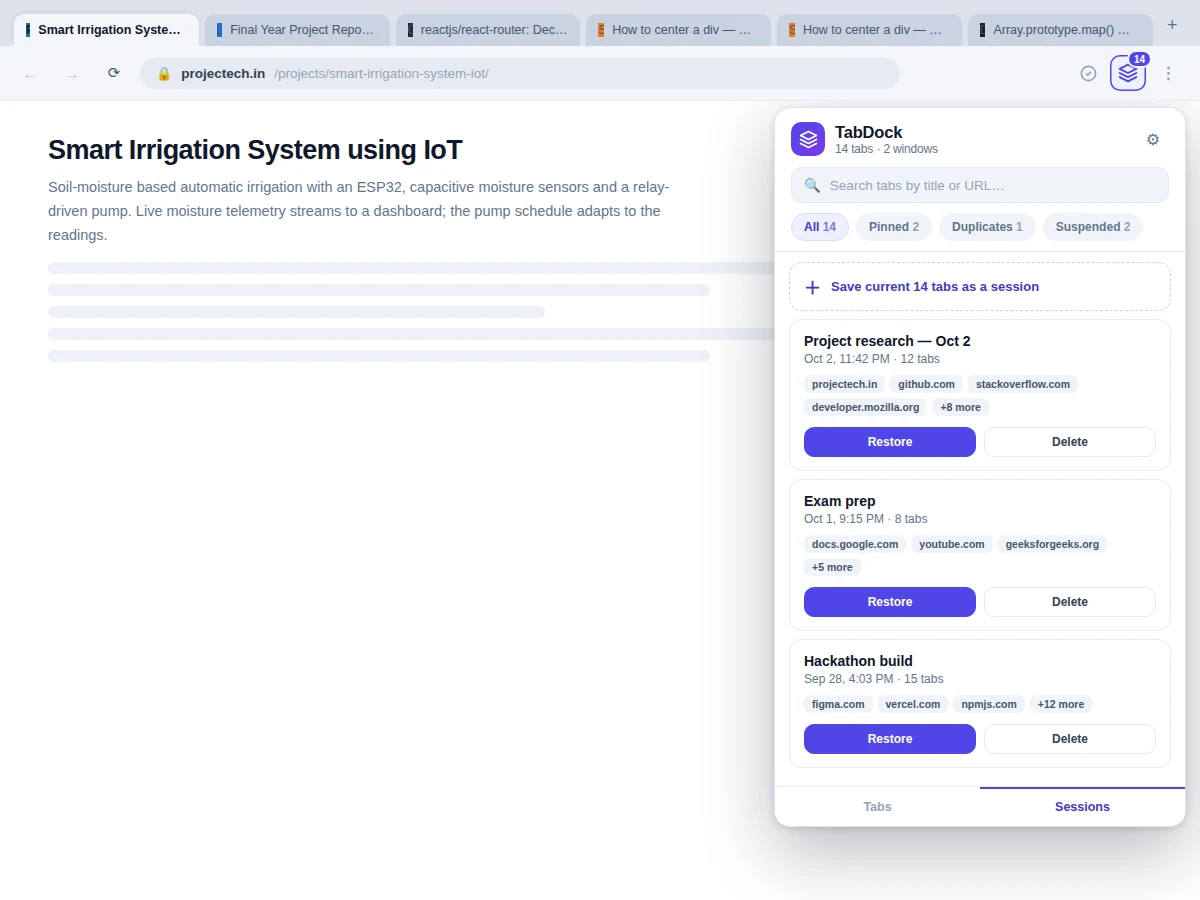
- [One-click session save] Snapshot the entire current state — all tabs, their window grouping, pinned and suspended flags — into a named session card showing tab count, timestamp and domain chips.
- [Session restore] Restore any saved session with one click: windows and tab order are rebuilt as they were, and restoring never touches the tabs you already have open.
- [Window grouping] Tabs are grouped by their parent window with per-window counts, so a two-window research setup stays legible instead of collapsing into one flat list.
- [Pin, suspend and close controls] Every tab row carries working pin, suspend (memory release) and close actions, plus a suspend-all that skips pinned tabs; the tab counter and badge stay in sync with every action.
- [Persistent local storage] Sessions and preferences are stored with the extension storage API, so saved sessions survive browser restarts with zero backend infrastructure.
- [Polished popup UI] A modern popup — search box, filter chips (All / Pinned / Duplicates / Suspended), session cards with restore/delete — designed as a real extension surface, not a demo sketch.
What is included
- Complete extension source (manifest V3, popup UI, background service worker, storage layer)
- Working single-file demo build of the extension UI for screenshots and testing
- Session save/restore test procedure with expected results for each action
- Project report PDF (browser extension architecture, Tabs/Storage API design, session model, testing)
- PPT presentation for final review
- Viva Q&A preparation document (Manifest V3 vs V2, service workers, permissions model, storage limits)
Limitations & prerequisites
- Built against Manifest V3 — Firefox support would need the browser.* namespace port, listed as future scope.
- chrome.storage.local has a per-extension quota (approximately 10 MB); very large session libraries with hundreds of tabs should be pruned, and the demo documents this honestly.
- Suspended-tab memory reclaim depends on the browser's tab discarding behavior; the extension requests it but the browser decides.
- Restored tabs reload from their URLs — pages behind logins reopen at the login screen, which is a browser limitation, not an extension bug.
- Duplicate detection compares normalized URLs only; two pages with different URLs but identical content are not flagged.
- The demo build simulates the extension APIs in-page; the shipped extension source is the real deliverable tested via chrome://extensions developer mode.
Frequently Asked Questions
How is this different from the browser's built-in tab search?
Built-in search (Ctrl+Shift+A) only finds and switches to tabs. This extension adds the full management layer on top: duplicate detection with one-click cleanup, memory-suspending idle tabs, window grouping, and — the core feature — named sessions that snapshot and restore an entire multi-window working context, which no built-in tool does.
What does a "session" actually store?
A JSON record with the session name, timestamp, and per-tab entries (URL, title, pinned flag, window grouping and order). On restore, the extension recreates the windows and tabs in that order. No page content or cookies are stored — sessions are lightweight URL lists, typically a few kilobytes each.
Does the extension send my browsing data anywhere?
No. Every feature runs locally in the browser: the tab inventory comes from the Tabs API, sessions live in chrome.storage.local, and there is no account, no server and no telemetry in the build. The permissions requested (tabs, storage) are the minimum needed for the features.
Will it work in Edge, Brave or other Chromium browsers?
Yes — any Chromium-based browser that supports Manifest V3 loads the extension unchanged via developer mode. Firefox uses a different extension namespace, so a Firefox port is listed as future scope rather than claimed as included.
How do I demo this in the viva?
The standard flow: open a messy set of tabs across two windows, open the popup, search for a tab live, flag and close duplicates, suspend the idle ones, save the set as a named session, close everything, then restore the session with one click. The test procedure documents each step with its expected result.
Is this project suitable for a final-year project?
Yes — for Computer Science, IT and Web Development programs. It demonstrates real platform engineering: the extension permission model, background service workers, browser storage APIs, and a complete search/session data model, all in a tool examiners can try hands-on. Suitable for B.E./B.Tech final-year projects in Computer Science, IT and Web Development.
Components & software requirements
- JavaScript (ES2020) + HTML5 + CSS3
- Chrome Extensions Manifest V3 (service worker background)
- chrome.tabs, chrome.windows, chrome.storage APIs
- chrome.action badge for the live tab counter
- Single-file demo build for screenshots and testing
Delivery information
Built-to-order project. Delivery timeline is shared after order confirmation based on current queue.
Support terms
Complete documentation, setup guide, and viva preparation included. Support for setup and explanation provided.
Download free synopsis (PDF)
Enter your name and email — the synopsis PDF downloads immediately. We may send occasional project updates; no spam, unsubscribe anytime.