
More project photos (2)
The problem
Manual roll-calls eat the first ten minutes of every lecture, and proxy attendance — a friend answering for an absent classmate — is trivial with paper or shouted names. Bluetooth Low Energy changes the game: nearly every student's phone can act as a proximity token the classroom itself can read, no contact or line-of-sight needed. This project builds a Python desktop application that scans for registered BLE beacons, tracks each device's RSSI in real time, and auto-checks a student in only when their signal stays above a configurable threshold for a configurable dwell time. The dwell requirement is the anti-gaming core — a device glimpsed for a second in the corridor never becomes a check-in. A live dashboard shows the roster with check-in timestamps, a session timer, per-student signal-history charts, and late/absent flags against a configurable late-after mark. Sessions persist in SQLite and export to CSV. Built with Python, the bleak BLE library and a desktop GUI, it demonstrates real wireless sensing, threshold-based signal logic and database-backed session management in one working system.
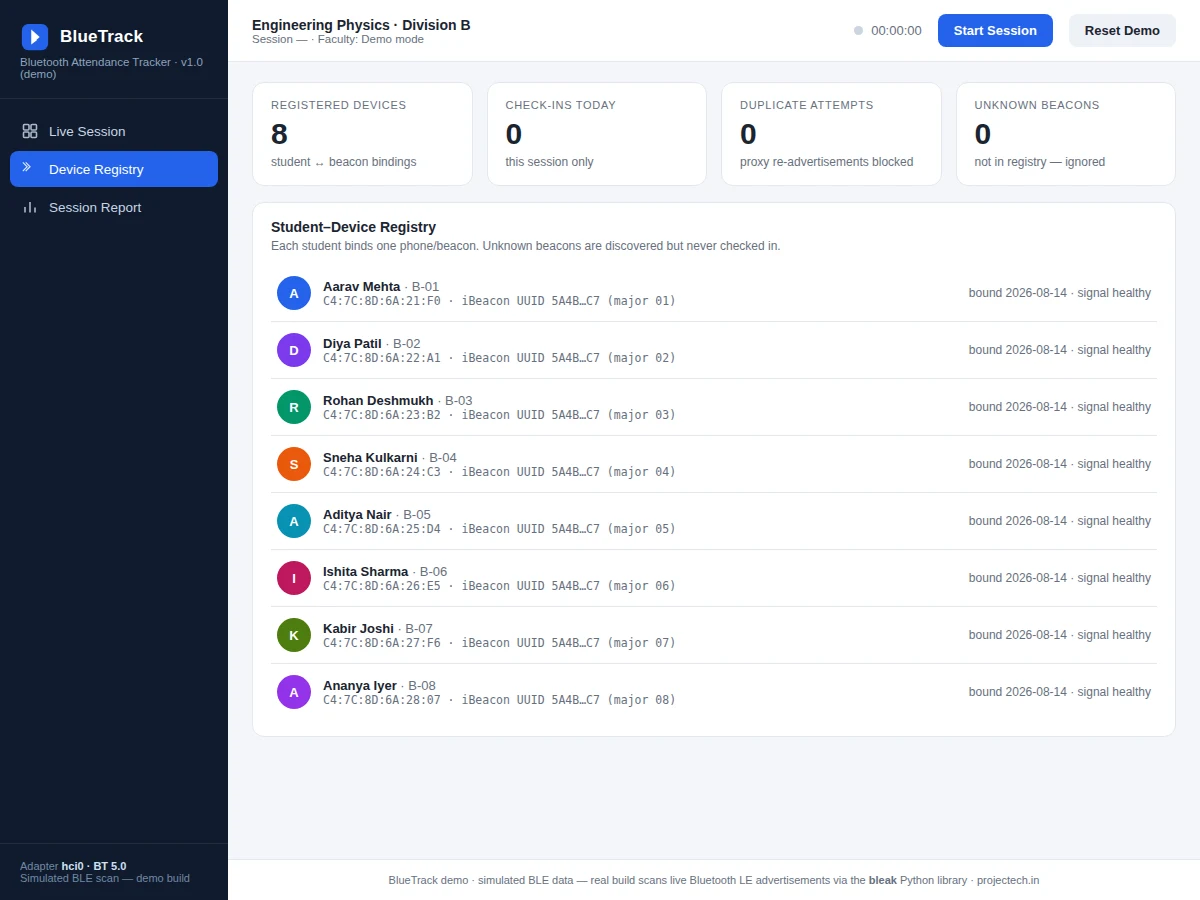
Registers student beacons and starts the attendance session.
Follow the working sequence
How it works
- Before the session, each student's phone is registered: its BLE beacon UUID/MAC is bound to their roll number in the app's registry (a low-cost beacon tag works too).
- The teacher starts a session. The app begins a continuous BLE scan using the bleak library and the session timer starts.
- Every discovered advertisement is matched against the registry; unknown beacons are listed but ignored for attendance.
- For each registered device, the app tracks a rolling RSSI. When RSSI stays above the configured threshold (default −70 dBm) for the full dwell time (default 20 s), the student is checked in with a timestamp and the signal level.
- If the check-in happens after the late-after mark (default 10 min into the session), the student is flagged late instead of present.
- During the session the dashboard updates live: roster statuses, signal bars per device, and per-student RSSI charts with the threshold line.
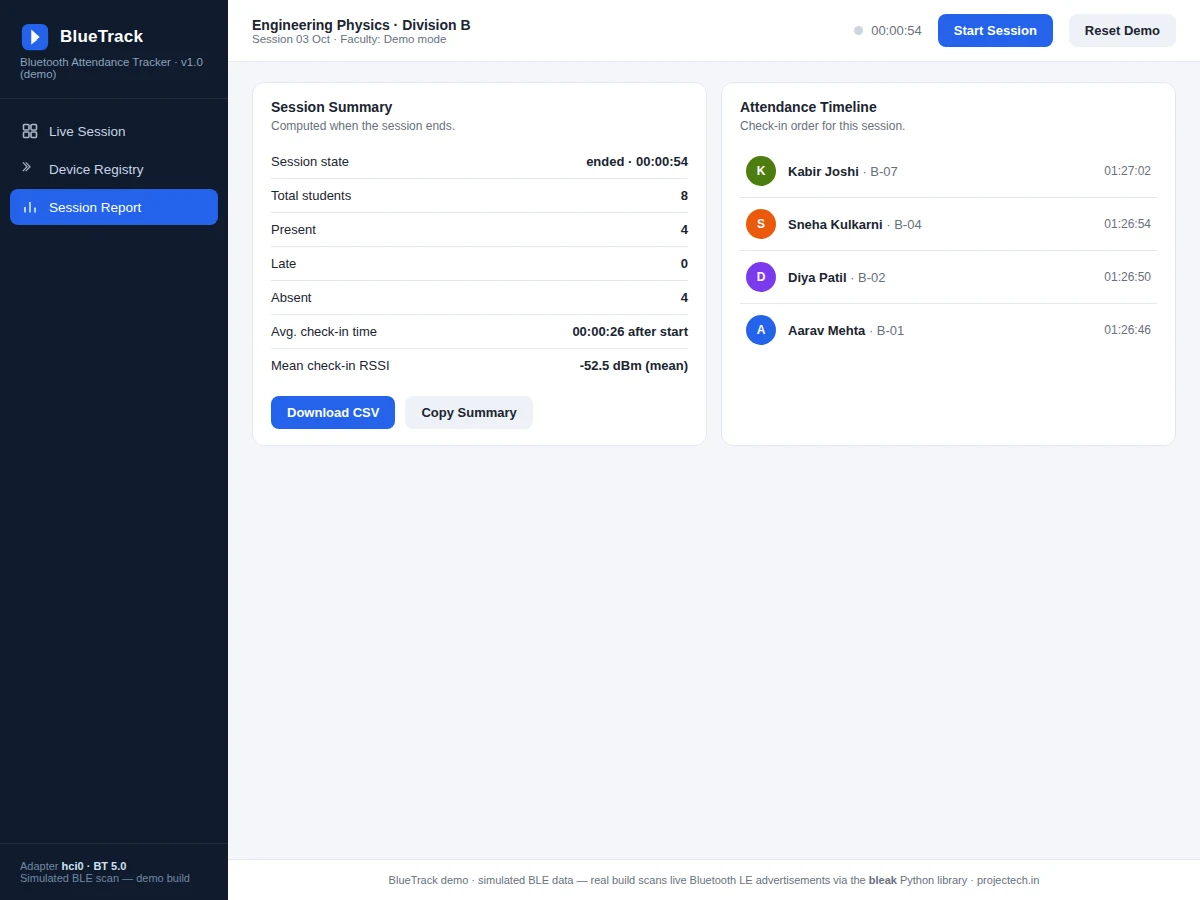
- Ending the session computes the summary — counts, average check-in time, mean check-in RSSI — and the teacher downloads the CSV attendance sheet.
Tech stack:
- Python 3.10+
- bleak (Bluetooth LE scanning)
- SQLite (session + registry storage)
- PyQt6 or Flask (dashboard UI — buyer's choice at order)
- HTML · CSS · JavaScript (web dashboard variant)
- pandas (CSV export)
- pyinstaller (packaged Windows executable)
| Parameter | Value |
|---|---|
| Scan method | BLE advertisement scan via bleak (design) |
| Check-in rule | RSSI above threshold for full dwell time (design) |
| Default threshold | −70 dBm (configurable −85 to −50 dBm) |
| Default dwell time | 20 s (configurable 5–60 s) |
| Default late-after mark | 10 min into session (configurable 5–30 min) |
| Signal history window | 60 s rolling, 1 sample/s (design) |
| Registry capacity | 200 student-device bindings (design target) |
| Storage | SQLite, one database file per installation (design) |
| Export | CSV with roll, name, MAC, status, time, RSSI (implemented) |
Project features
- [Automatic BLE check-in] The app scans Bluetooth LE advertisements and checks a student in when their registered beacon's RSSI stays above the threshold for the full dwell time — no tapping, no QR codes.
- [Dwell-time anti-proxy logic] A device must hold a strong signal continuously; brief pass-bys, corridor glimpses and walk-outs never become check-ins. Threshold and dwell are configurable per classroom.
- [Live roster dashboard] Real-time table of all students with status (present / late / absent), check-in timestamps and current RSSI, updating as the session runs.
- [Per-student signal history] A 60-second rolling RSSI chart per student with the threshold line drawn, so the teacher (and the viva panel) can see exactly why a check-in fired or didn't.
- [Student-device registry] Each student binds one beacon UUID/MAC; unknown beacons are discovered but never checked in, and duplicate re-advertisements from the same device are ignored.
- [Late and absent flags] Students checked in after the configurable late-after mark are flagged late; everyone else without a qualifying signal stays absent for the session.
- [Session timer and summary] Running session clock, end-of-session totals (present / late / absent, average check-in time, mean check-in RSSI).
- [One-click CSV export] The full attendance sheet — roll, name, device, status, check-in time, RSSI — downloads as CSV for records.
What is included
- Python BLE scanner service with configurable threshold, dwell and late-after rules
- Student-device registry module with unknown-beacon handling
- Live dashboard (roster, session timer, signal bars, per-student RSSI charts)
- Session summary and one-click CSV export
- SQLite schema and seed data for a demo classroom
- Packaged executable build (Windows) via pyinstaller
- Project report PDF (BLE background, RSSI behavior, check-in logic, methodology)
- PPT presentation for final review
- Viva Q&A preparation document (BLE advertising, RSSI vs distance, threshold tuning, proxy resistance)
Limitations & prerequisites
- RSSI is a noisy proxy for distance — walls, pockets, phone orientation and crowd density shift readings, so the threshold must be tuned per classroom with the included procedure; no universal distance figure is claimed.
- Requires Bluetooth LE on the host machine and on each student device (or beacon tags); the demo classroom uses 8 registered devices.
- A student who leaves the phone at their desk and walks out is still "present" — the system proves device proximity, not person presence; this is stated openly in the report.
- Check-in is dwell-gated, so the first students are marked only after the dwell period elapses, not instantly.
- The packaged build targets Windows; Linux/macOS builds need the buyer's own pyinstaller run.
Frequently Asked Questions
How does the automatic check-in actually decide someone is present?
The app scans BLE advertisements from registered devices and watches each one's RSSI. Only when the signal stays stronger than the configured threshold (−70 dBm default) continuously for the full dwell time (20 s default) is the student checked in. A momentary strong blip does nothing — that is the whole anti-proxy design.
What does the student need — a special device?
No. Any phone that can advertise a BLE beacon works (a free beacon-advertiser app is used at demo time), or a low-cost standalone BLE beacon tag. Each device's UUID/MAC is registered once against the student's roll number.
Can a student mark a friend present by carrying two phones?
Carrying two registered devices would check in both — the report states this limitation honestly. What the system does block is the cheap attack: a phone left in the corridor or a one-second walk-past never qualifies because of the dwell requirement.
Why can RSSI vary so much, and how do you handle it?
RSSI fluctuates with walls, pockets, phone orientation and crowd density — the project never claims a fixed RSSI-to-distance mapping. Instead the threshold and dwell are configurable, and the included tuning procedure walks the student through calibrating both for their actual classroom.
Does it work without internet?
Yes. Scanning, the check-in engine, the dashboard and the SQLite store all run locally on the teacher's machine. CSV export is local too — there is no cloud dependency.
Is this project suitable for a final-year project?
Yes — for Computer Science and IT programs. It combines Bluetooth LE wireless sensing, real-time signal processing logic, a database-backed application and a live dashboard, with clear viva material on RSSI behavior and threshold design. Suitable for B.E./B.Tech final-year projects in Computer Science and Information Technology.
Components & software requirements
- Python 3.10+
- bleak (Bluetooth LE scanning)
- SQLite (session + registry storage)
- PyQt6 or Flask (dashboard UI — buyer's choice at order)
- HTML · CSS · JavaScript (web dashboard variant)
- pandas (CSV export)
- pyinstaller (packaged Windows executable)
Delivery information
Built-to-order project. Delivery timeline is shared after order confirmation based on current queue.
Support terms
Complete documentation, setup guide, and viva preparation included. Support for setup and explanation provided.
Download free synopsis (PDF)
Enter your name and email — the synopsis PDF downloads immediately. We may send occasional project updates; no spam, unsubscribe anytime.