
More project photos (2)
The problem
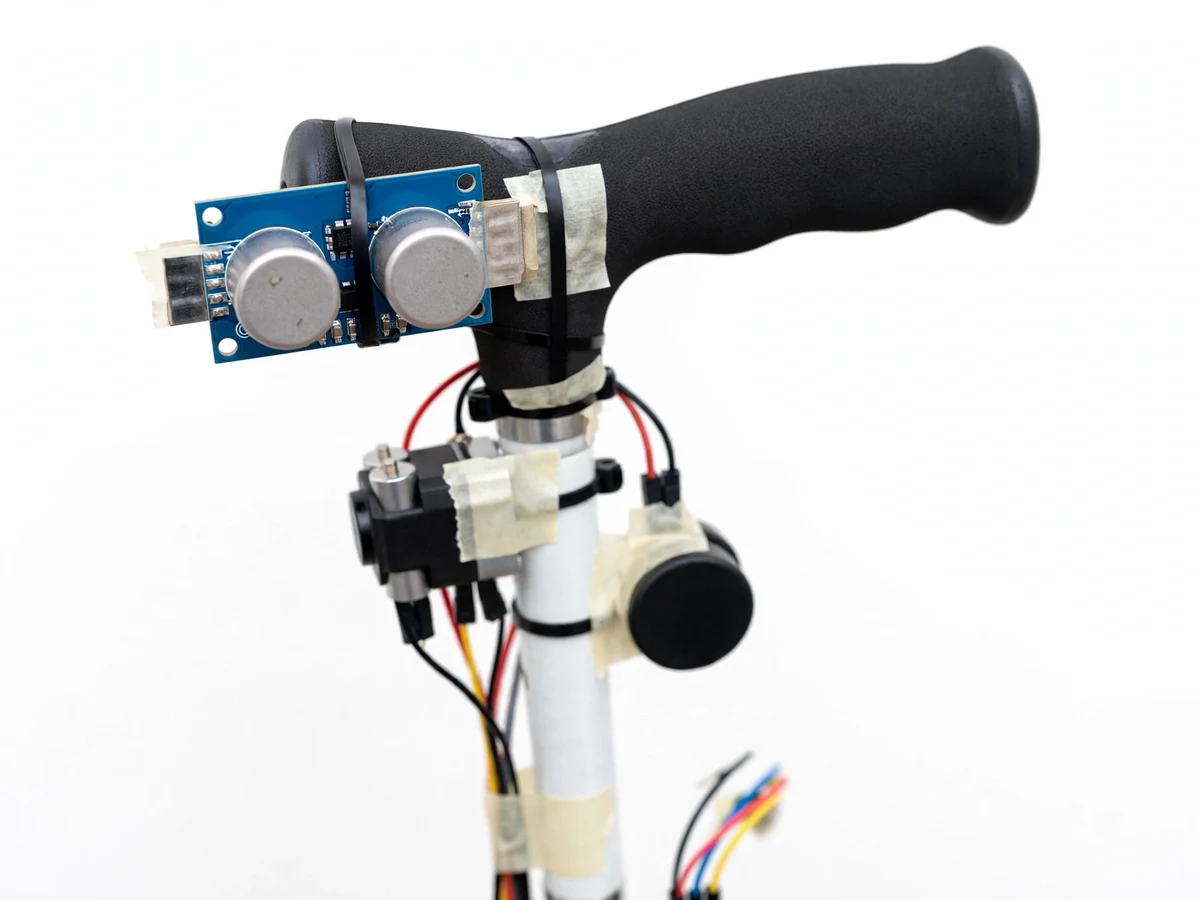
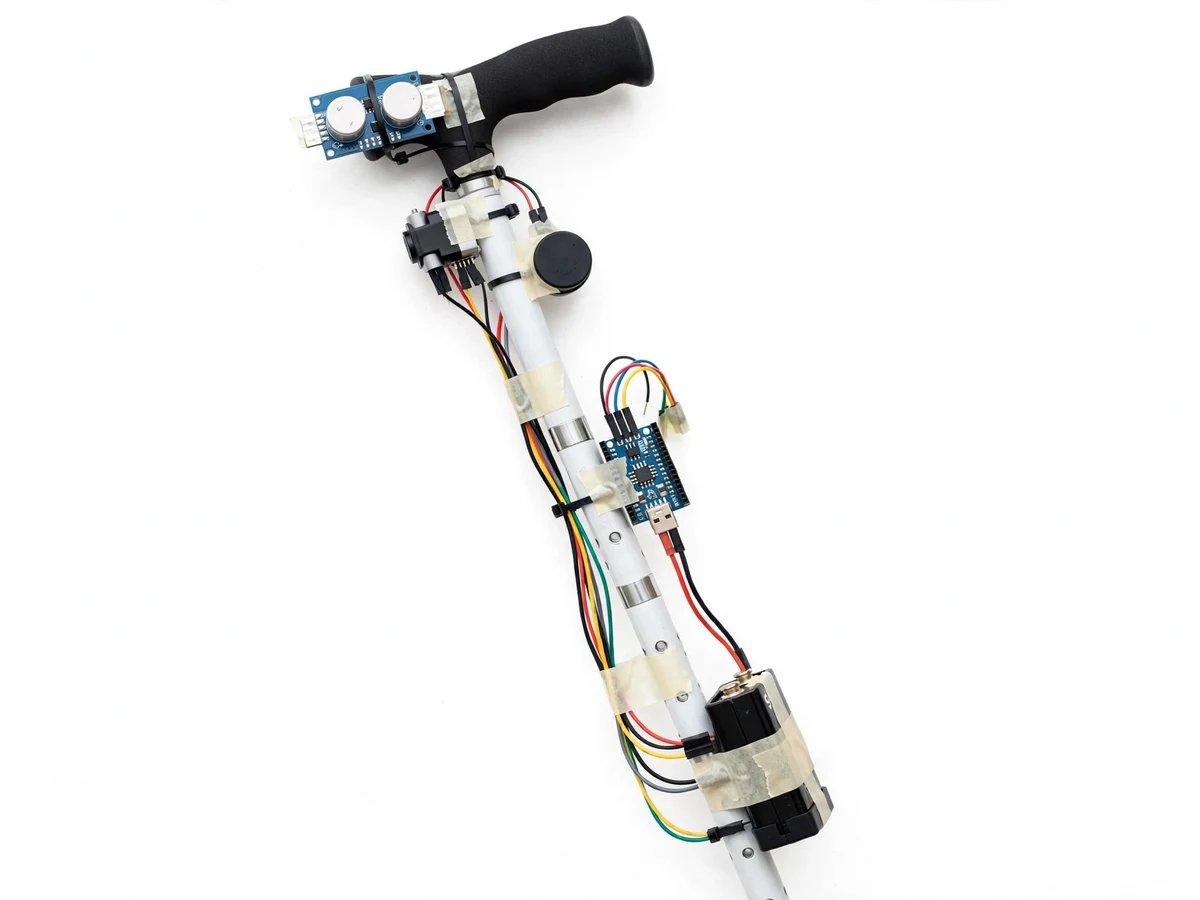
A blind stick using an ultrasonic sensor with vibration alert and buzzer warns a blind person about obstacles before the cane tip touches them. A white cane is the standard mobility aid, but it only reports what it physically touches: a wall, a parked vehicle or a low branch is found only on contact, and by then the user may already have bumped into it. This project adds a second sense to the cane. An HC-SR04 ultrasonic sensor near the handle sends out 40 kHz sound pulses and times their echoes to measure the distance ahead, and an Arduino Nano converts that distance into a vibration felt in the handle and a buzzer that beeps faster as the obstacle gets closer. The user is warned while the obstacle is still about a metre away, in time to stop or step around it. The stick needs no phone, no internet and no screen.
The user walks with the cane; the sensor watches the space ahead.
Follow the working sequence
How it works
From an obstacle ahead to a vibration in the hand, the blind stick runs a loop that repeats several times a second. The HC-SR04 sensor fires a burst of 40 kHz ultrasonic pulses forward from the cane handle, and its receiver listens for the echo bouncing back from whatever stands in the beam. The Arduino Nano measures the echo pulse width — the time between sending and receiving — and converts it into a distance with the formula distance equals echo time multiplied by the speed of sound divided by two, using the standard value of 343 metres per second at 20 °C. The Nano compares that distance with two design-target thresholds: vibration starts at 100 cm, and the buzzer joins in below 60 cm, beeping faster as the distance falls, with a continuous alert below 30 cm. The loop then repeats, so the alert tracks the obstacle as the user walks toward it or steers away.
- The builder assembles the system: an HC-SR04 sensor mounted near the handle of a white cane, a vibration motor and a buzzer fitted to the handle, and an Arduino Nano with a 9 V battery pack mounted on the shaft, wired with jumper wires.
- The Nano sends a 10 microsecond trigger pulse to the sensor, and the HC-SR04 emits a burst of 8 ultrasonic pulses at 40 kHz from its transmitter.
- The sensor's receiver catches the echo, and the echo pin stays high for the round-trip time; the Nano measures this pulse width in microseconds.
- The firmware converts the pulse width into a distance with the formula distance equals echo time multiplied by 343 metres per second divided by two, using the standard speed of sound at 20 °C.
- The distance is compared with the design-target thresholds: above 100 cm there is no alert, from 100 cm to 60 cm the vibration motor runs, below 60 cm the buzzer joins in and beeps faster as the distance falls, and below 30 cm the alert becomes continuous.
- The loop repeats with a new reading approximately every 100 ms (design target), so the warning follows the obstacle as the user moves; the buyer-run test walks toward a wall from 2 m and records where the vibration starts and where the buzzer joins in.
Tech stack:
- Arduino Nano · ATmega328P microcontroller
- HC-SR04 ultrasonic sensor · 40 kHz ranging module
- Vibration motor module · coin-type alert motor
- Active buzzer · 5 V audible alert
- 9 V battery pack · portable power
- Jumper wires · solderless wiring
- White cane · assistive mobility aid
- Embedded C · Arduino IDE firmware
| Parameter | Value |
|---|---|
| Controller | Arduino Nano · ATmega328P · 16 MHz clock |
| Sensor | HC-SR04 · 40 kHz ultrasonic · 2 cm to 400 cm range (datasheet value) |
| Measuring angle | Approximately 15 degrees (datasheet value) |
| Sensor supply | 5 V DC · 15 mA working current (datasheet value) |
| Ranging accuracy | 3 mm (datasheet value, best case) |
| Distance formula | Distance = echo pulse width × 343 m/s / 2 · standard speed of sound at 20 °C |
| Alert thresholds | Vibration from 100 cm · buzzer below 60 cm · continuous below 30 cm (design targets) |
| Reading rate | Approximately 1 reading every 100 ms (design target) |
| Power | 9 V battery pack · Nano VIN input 7 V to 12 V |
| Build style | White cane prototype · sensor near handle |
Project features
The blind stick works through four capabilities that together turn a distance measurement into a warning a person can feel and hear. First, the HC-SR04 ultrasonic sensor measures the distance ahead without contact, over a datasheet range of 2 cm to 400 cm. Second, the Arduino Nano converts each reading into an alert: a vibration motor in the handle starts at a design-target distance of 100 cm, and a buzzer joins in and beeps faster as the obstacle gets closer. Third, the alerts are graded rather than on-or-off, so the user can judge whether the obstacle is far, near or very close without looking at anything. Fourth, the whole system is self-contained: it runs on a 9 V battery pack, needs no phone and no internet, and the vibration alert is felt only by the person holding the stick.
- [Ultrasonic obstacle sensing] The HC-SR04 sensor measures the distance to obstacles ahead without contact, over a datasheet range of 2 cm to 400 cm — implemented in the base build.
- [Vibration alert in the handle] A vibration motor in the handle starts at a design-target distance of 100 cm, so the warning is felt silently by the user — implemented in the base build.
- [Graded buzzer alert] A buzzer joins in below a design-target distance of 60 cm and beeps faster as the obstacle gets closer, with a continuous tone below 30 cm — implemented in the base build.
- [Distance from echo time] The Arduino Nano converts the echo pulse width into distance using the formula distance equals echo time multiplied by the speed of sound divided by two — implemented in the base build.
- [Handle-height sensor mounting] The sensor sits near the handle, angled slightly forward, so the cane tip still does its normal ground-contact job while the sensor watches the space ahead — a builder note from the demo build.
- [Self-contained battery power] A 9 V battery pack powers the Nano, sensor, motor and buzzer, so the stick works anywhere with no phone, no internet and no mains supply — implemented in the base build.
- [Adjustable alert thresholds] The vibration and buzzer distances are set in the firmware and can be changed for the student's own demonstration space — configurable in the base build.
What is included
- Working white-cane prototype with HC-SR04 sensor, vibration motor, buzzer, Arduino Nano and 9 V battery pack
- Arduino firmware with the distance calculation and graded vibration and buzzer alert logic
- Wiring diagram and component list
- Threshold calibration and buyer-run test procedure (walk-toward-a-wall test with a recording sheet)
- Project report PDF (ultrasonic ranging theory, alert thresholds, honest measurement limits)
- PPT presentation for final review
- Viva Q&A preparation document (how the HC-SR04 measures distance, what the thresholds mean, why the stick is an aid and not a replacement for a white cane, what the sensor cannot detect)
- Setup and demonstration support — wiring and firmware-upload guidance so the student can run the demo independently
- Specific next step: message on WhatsApp for a quotation stating scope (blind stick with HC-SR04 sensor, vibration motor and buzzer alerts, Arduino Nano), with delivery under the built-to-order timeline as a built-to-order project
Limitations & prerequisites
- Not a replacement for a white cane or orientation training: the stick is an assistive aid that adds a warning; it does not replace cane technique, orientation and mobility training, or a guide.
- Cannot reliably detect stairs, potholes, kerbs or overhead obstacles: the single forward-facing sensor watches one approximately 15 degree cone ahead at handle height, so drops, low kerbs and branches above the beam are not reliably detected.
- Soft and angled surfaces: soft materials absorb ultrasound and angled surfaces reflect the echo away, so some obstacles read as farther away than they are or are missed.
- Moving vehicles are not reliably tracked: the sensor measures the nearest surface in its cone at each reading, and a fast-moving vehicle can enter the path between readings.
- Minimum range: objects closer than 2 cm (datasheet value) are outside the sensor's measuring range, so a very close obstacle may read incorrectly.
- Battery runtime depends on use: the 9 V battery pack powers the Nano, sensor, motor and buzzer, so runtime varies with how often the alerts run, and the battery must be checked before each demonstration.
Frequently Asked Questions
Is this project suitable for a final-year project?
Yes, for Electronics, E&TC and Electrical programmes, because it combines ultrasonic ranging, time-of-flight distance calculation, threshold logic and a two-channel alert on a single microcontroller into one testable loop that a student can demonstrate live in front of examiners with a walk-toward-a-wall test as proof. The review thread is clear: the HC-SR04 measures distance from echo time, the Arduino turns distance into graded alerts, and the test proves the thresholds on real hardware.
How does the blind stick detect obstacles?
The HC-SR04 sensor sends out 40 kHz ultrasonic pulses and times the echo coming back from whatever stands ahead, and the Arduino Nano converts that echo time into a distance with the formula distance equals echo time multiplied by the speed of sound divided by two. The sensor measures over a datasheet range of 2 cm to 400 cm, and the warning starts while the obstacle is still about a metre away.
What do the vibration and buzzer mean?
Vibration alone means an obstacle is ahead within about 100 cm, and the buzzer joining in means it is within about 60 cm, with the beeping getting faster as the distance falls and a continuous tone below 30 cm, and both thresholds are set in the firmware. These are design-target thresholds, so the user learns to read the distance from the alert itself, without any display.
Does it need a phone or internet?
No phone or internet is needed: the stick is fully self-contained, the Arduino Nano, the HC-SR04 sensor, the vibration motor and the buzzer all run from a 9 V battery pack, and the alerts are felt and heard directly by the user, with no app, no Bluetooth link and no cloud service in the base build. That makes the demonstration simple to run anywhere: switch the stick on and walk toward a wall.
What can the stick not detect?
It cannot reliably detect stairs, potholes, kerbs or overhead obstacles, because the single forward-facing sensor watches one approximately 15 degree cone ahead at handle height, and drops below the beam or branches above it fall outside that cone, so the stick stays an aid and not a replacement for cane technique. Soft materials absorb ultrasound and angled surfaces reflect the echo away, so some obstacles are missed or read as farther away than they are, and moving vehicles are not reliably tracked.
What will I receive with the project?
The working white-cane prototype with HC-SR04 sensor, vibration motor, buzzer, Arduino Nano and 9 V battery pack, the firmware with the distance calculation and graded alert logic, the wiring diagram and component list, the threshold calibration and buyer-run test procedure, the project report, the presentation and the viva Q&A document. A laptop for uploading the firmware is needed, covered in the setup guide.
Components & software requirements
- Arduino Nano · ATmega328P microcontroller
- HC-SR04 ultrasonic sensor · 40 kHz ranging module
- Vibration motor module · coin-type alert motor
- Active buzzer · 5 V audible alert
- 9 V battery pack · portable power
- Jumper wires · solderless wiring
- White cane · assistive mobility aid
- Embedded C · Arduino IDE firmware
Delivery information
Built-to-order project. Delivery timeline is shared after order confirmation based on current queue.
Support terms
Complete documentation, setup guide, and viva preparation included. Support for setup and explanation provided.
Download free synopsis (PDF)
Enter your name and WhatsApp number — the synopsis PDF downloads immediately. We may send occasional project updates on WhatsApp; no spam.