
More project photos (2)
The problem
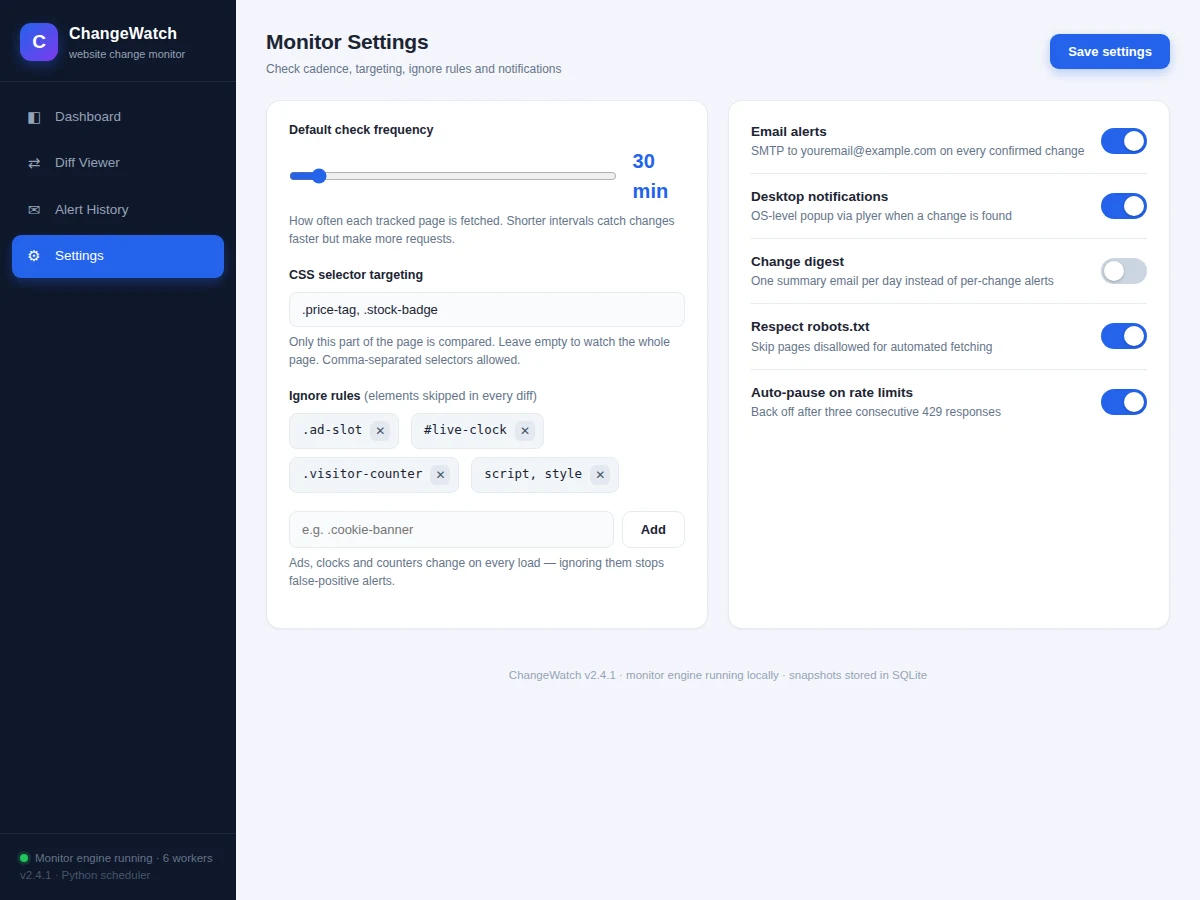
Websites change constantly — prices drop, admission deadlines move, job listings appear and disappear — but manually re-checking pages every day is tedious and easy to miss. This project solves that with an automated website change monitor written in Python: you register the URLs you care about, choose how often each one should be checked, and the system fetches the page on schedule, compares the fresh snapshot against the stored one, and alerts you the instant something relevant changes. Instead of diffing the entire page (which would trigger on every rotating ad or clock widget), it can watch just a CSS selector such as a price element or a notice board, and ignore rules filter out dynamic noise like visitor counters and timestamps.
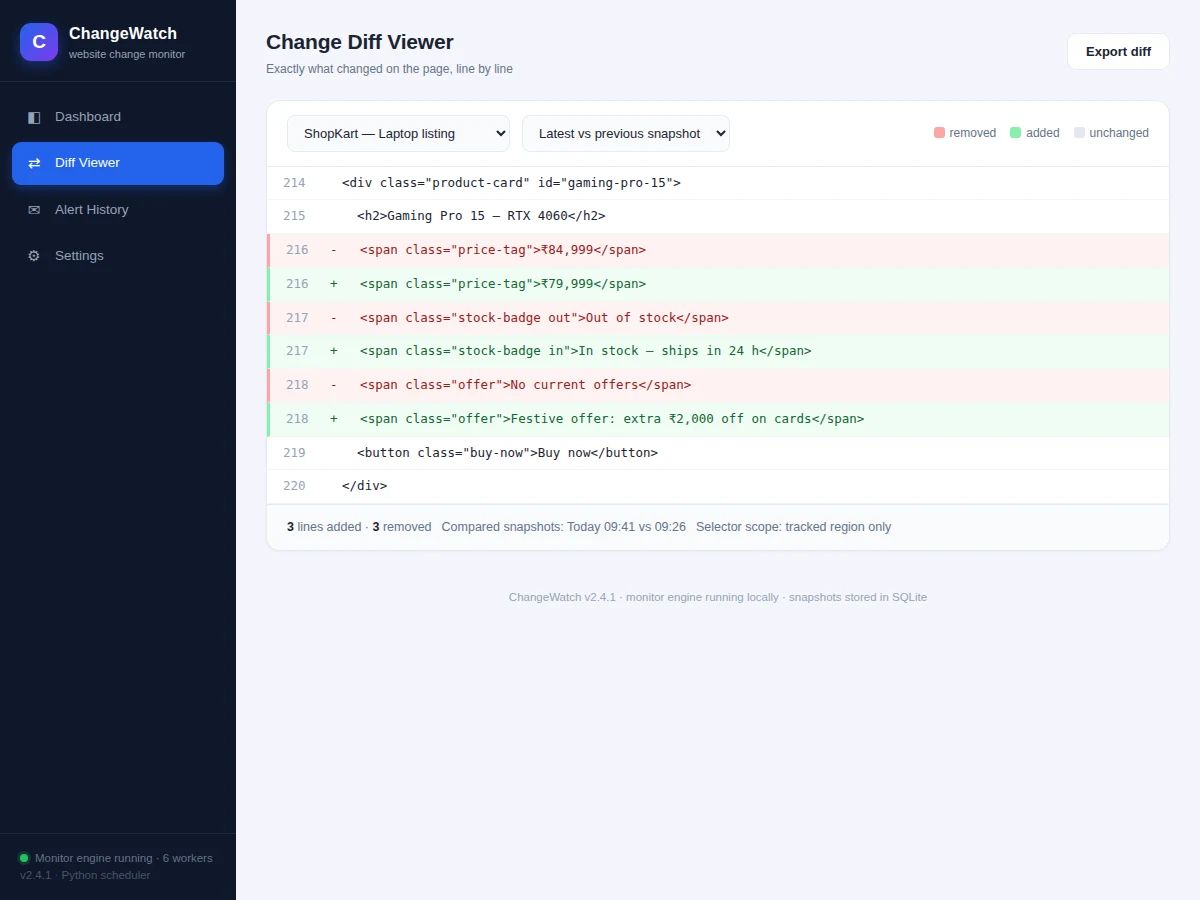
The monitor sends two kinds of alerts: an email through SMTP with the change summary, and a desktop notification via the operating system's notification service. A web dashboard ties it all together — the tracked-site list with per-site status, a visual diff viewer showing exactly which lines changed, an alert history, and settings for check frequency, selectors and ignore rules. All snapshots are stored in SQLite, so any past change can be re-examined. It is a practical demonstration of web scraping, scheduling, text diffing and notification plumbing — skills that transfer directly to monitoring, QA automation and price-tracking work.
Registers URLs with check intervals, CSS selectors and ignore rules.
Follow the working sequence
How it works
- The user registers a URL with a check interval (default 30 minutes), an optional CSS selector to narrow the watched region, and optional ignore rules.
- On schedule, the engine fetches the page with an HTTP timeout of 15 seconds, extracts the selected region, and normalizes whitespace.
- The fresh content is hashed (SHA-256) and compared against the hash of the stored snapshot; ignore-rule elements are stripped before comparison.
- If the hash differs, a line-level diff is computed and both snapshots are saved to the SQLite store with timestamps.
- The engine fires the configured alerts — an SMTP email with the change summary and a desktop notification — and logs each alert with its delivery status.
- If three consecutive fetches return HTTP 429, the site is auto-paused with exponential back-off and resumes automatically, respecting the server.
- The dashboard reads the same SQLite store to show site status, the diff viewer, alert history and settings.
Tech stack:
- Python 3
- requests (page fetching)
- BeautifulSoup (HTML parsing & selector extraction)
- difflib (line-level diffing)
- smtplib + email (SMTP alerts)
- plyer (desktop notifications)
- SQLite (snapshot & alert store)
- HTML, CSS, JavaScript (dashboard)
| Parameter | Value |
|---|---|
| Default check interval | 30 minutes (configurable per site, 5 minutes – 6 hours) |
| HTTP fetch timeout | 15 seconds (configurable) |
| Snapshot hashing | SHA-256 of normalized content |
| Rate-limit handling | Auto-pause after 3 consecutive HTTP 429s (design behavior) |
| Alert channels | Email (SMTP) + desktop notification |
| Notification latency | Desktop popup within seconds of a confirmed change (expected on local machine) |
| Snapshot storage | SQLite, one row per check per site (expected size: a few KB per snapshot) |
| Dashboard | Single-page web UI served locally |
| Platform | Windows / Linux / macOS with Python 3.10+ (expected) |
Project features
- [Scheduled page checking] Each tracked URL is fetched on its own interval (default 30 minutes, configurable per site from 5 minutes to 6 hours), with automatic back-off after repeated HTTP 429 rate-limit responses.
- [CSS-selector targeting] Watch only part of a page — a
.price-tag, a#notice-board— instead of the whole document, so unrelated layout edits never raise an alert. - [Ignore rules] Selector-based exclusions (ads, live clocks, visitor counters, script/style blocks) are stripped before every comparison, eliminating the false positives that plague naive page monitors.
- [Visual diff viewer] Every detected change opens a line-by-line before/after diff with added and removed lines highlighted, exactly as the page source changed.
- [Email alerts] SMTP sends a change-summary email with the site name, what changed and a link to the diff; a daily digest mode can replace per-change emails.
- [Desktop notifications] OS-level popups appear on the machine running the monitor within seconds of a confirmed change, so alerts are seen even with the mailbox closed.
- [Snapshot history in SQLite] Every fetched snapshot is hashed and stored with its timestamp, making it possible to review what a page looked like at any point and when it changed.
- [Alert history & dashboard] A web dashboard lists all tracked sites with status, recent activity, the full alert log with delivery status, and per-site settings.
What is included
- Complete Python source code (fetch engine, scheduler, differ, alert modules)
- Web dashboard (tracked sites, diff viewer, alert history, settings UI)
- SQLite schema and snapshot/alert storage code
- Configuration guide (intervals, selectors, ignore rules, SMTP setup)
- Sample tracked-site configuration with example pages
- Project report PDF (background, methodology, architecture, results)
- PPT presentation for final review
- Viva Q&A preparation document (HTTP, scraping ethics, diffing, scheduling, notifications)
Limitations & prerequisites
- Pages that require login, CAPTCHAs or heavy JavaScript rendering are not handled by plain HTTP fetching — such sites need a browser-automation add-on (listed as future scope).
- The monitor must respect each site's terms of use and robots.txt; aggressive check intervals can get the machine's IP rate-limited or blocked.
- Ignore rules reduce false positives but cannot catch every dynamic element — a new ad format or layout change may need a rule update.
- Email delivery depends on valid SMTP credentials and the recipient's spam filters; the desktop popup only appears on the machine running the monitor.
- Very short check intervals on many sites multiply bandwidth and storage use — snapshot history should be pruned periodically on long runs.
Frequently Asked Questions
How does it know a page changed?
Each fetch is normalized (whitespace, ignore-rule elements stripped) and hashed with SHA-256. If the hash differs from the stored snapshot, a change is confirmed and a line-level diff is computed — so byte-level noise never triggers alerts.
What if only one part of the page matters?
Use CSS-selector targeting: give the monitor .price-tag or #notice-board and it compares only that element's content, ignoring everything else on the page.
How are false positives avoided?
Ignore rules strip dynamic elements (ad slots, clocks, counters, script/style blocks) before comparison, and per-site intervals plus rate-limit back-off keep the monitor polite to servers.
Does it need the computer to be on?
Yes — the Python scheduler runs locally, so checks happen while the machine is on. Running it on an always-on machine or a small server gives continuous monitoring.
Can it watch pages behind a login?
Not in the base build — plain HTTP fetching cannot pass logins or CAPTCHAs. A browser-automation (Selenium/Playwright) fetcher can be added as a customization.
Is this project suitable for a final-year project?
Yes — for Computer Engineering, IT and related computing programs. It demonstrates HTTP and web scraping, scheduling, text diffing, database storage, SMTP and desktop notification APIs, plus responsible scraping practices — a strong applied-software viva story.
Components & software requirements
- Python 3
- requests (page fetching)
- BeautifulSoup (HTML parsing & selector extraction)
- difflib (line-level diffing)
- smtplib + email (SMTP alerts)
- plyer (desktop notifications)
- SQLite (snapshot & alert store)
- HTML, CSS, JavaScript (dashboard)
Delivery information
Built-to-order project. Delivery timeline is shared after order confirmation based on current queue.
Support terms
Complete documentation, setup guide, and viva preparation included. Support for setup and explanation provided.
Download free synopsis (PDF)
Enter your name and email — the synopsis PDF downloads immediately. We may send occasional project updates; no spam, unsubscribe anytime.