
More project photos (2)
The problem
A passenger standing at an auto stand usually has no reliable figure for what the ride should cost. The driver quotes a lump sum, the passenger guesses from past rides, and the disagreement surfaces only at the destination, when one side feels overcharged and the other feels short-changed. Meter readings do not settle it either, because the passenger cannot see the rate card behind the reading, cannot check whether a night surcharge applies, and has no record of what previous comparable trips cost. The result is a small, repeated, everyday dispute that neither side can prove.
This is a built-to-order software project: the Android app, rate-card editor, trip history, report, abstract and presentation slides are built fresh for each order.
The Auto Rickshaw Fare Estimator Android App with City Meter Rates and Trip History answers that dispute with a checkable figure before boarding. The passenger picks a city rate card, enters the trip distance and any expected waiting time, and the app returns an estimated fare with its full break-up: base fare, distance charge, waiting charge and any night surcharge, each a separate line. If the ride is shared, the same screen splits the estimate between passengers. Because the rate cards are saved on the device, the estimate works at an auto stand with no mobile data, and every estimate can be stored in a trip history that records the route, the city card used and the split, so the next similar trip starts from a real earlier figure, not a guess. The figure is always labelled an estimate; the meter reading at the end of the ride is the final fare.
| Comparison | This estimator | Live GPS meter app | Asking the driver / aggregator estimate |
|---|---|---|---|
| What it needs | Distance + a saved city rate card | GPS signal + mobile data + location permission | The driver's quote, or an aggregator price for a different vehicle class |
| When it works offline | Yes, once rate cards are saved on the device | No, it needs live GPS and data throughout the trip | The driver's quote needs no phone, but leaves no record to check later |
| What it can prove | The full fare break-up and a saved trip record for the same route later | A live running total during the ride, if signal holds | Neither a break-up nor a record; an aggregator price is not an auto meter fare |
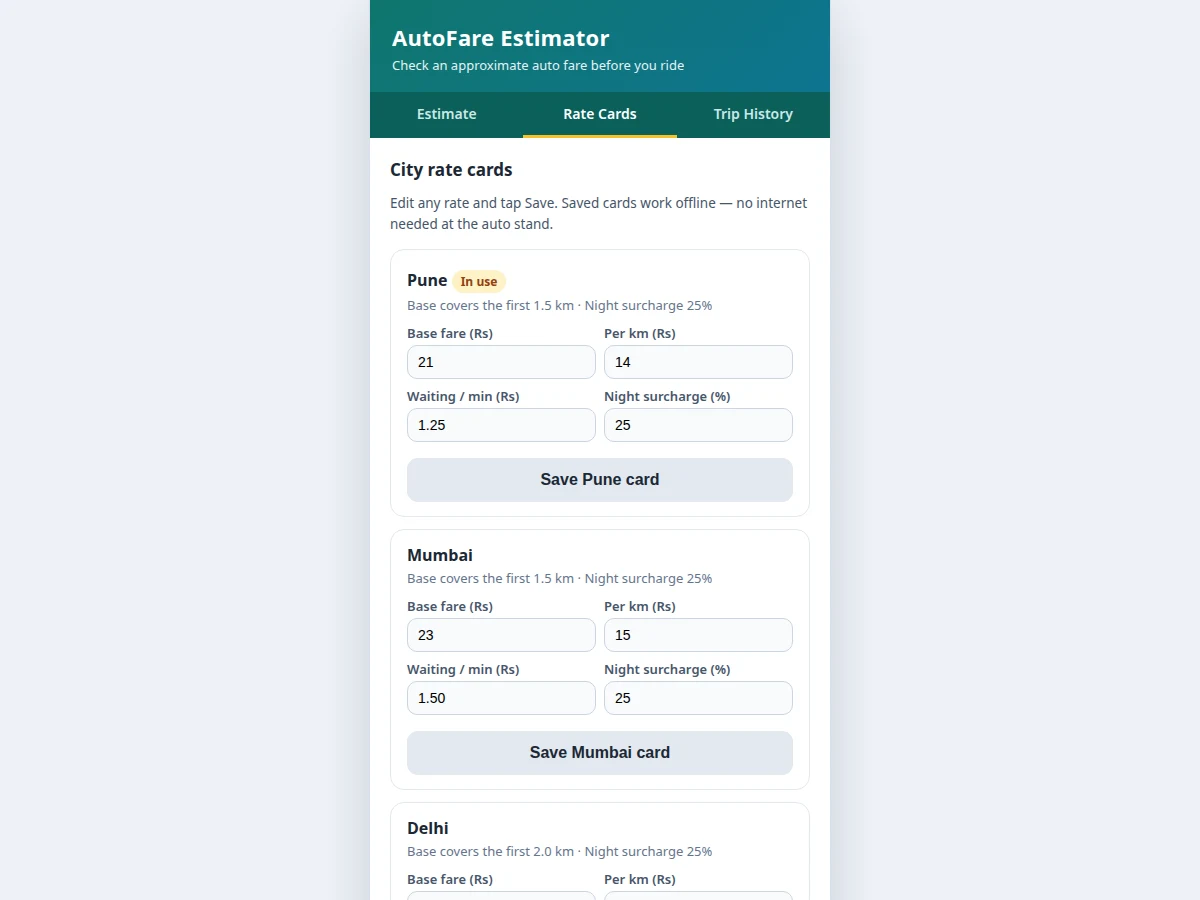
The saved rate card holds base fare, per-km rate and surcharges.
Follow the working sequence
How it works
The Auto Rickshaw Fare Estimator Android App with City Meter Rates and Trip History runs as one short flow from card to saved trip. The user first opens the rate-card screen and checks the card for the city of travel, editing any changed rate. On the estimate screen the user picks that city, enters the trip distance and expected waiting time, sets the passenger count and night hours for rides between 11 pm and 5 am. The app then applies the card's rules in order: base fare for the included kilometres, per-kilometre rate for the distance beyond them, waiting rate for the waiting minutes, and the night surcharge percentage on the subtotal when night hours are on. The result appears as a broken-down estimate with the split beside it, and the user can save the trip to on-device history, so the next similar trip can be checked against a real earlier figure offline.
- The user opens the rate-card screen and checks the card for the city of travel, editing the base fare, per-kilometre rate, waiting rate or night surcharge if any rate has changed.
- On the estimate screen the user picks the city card, enters the trip distance in kilometres and the expected waiting time in minutes.
- The user sets the number of passengers sharing the ride and switches night hours on when the ride falls between 11 pm and 5 am.
- The app applies the card's base fare for the included kilometres, then charges the per-kilometre rate for the distance beyond them.
- Waiting minutes are charged at the card's per-minute rate, and the night surcharge percentage is applied to the subtotal when night hours are on.
- The estimate is shown with its full break-up, base fare, distance charge, waiting charge and night surcharge as separate lines, with the fare-split beside the unchanged total.
- The user saves the trip to the on-device history with its route, city card and split, and the saved record remains available offline for the next similar trip.
Tech stack:
- Kotlin · Android app development
- Android Studio · app build and layout editor
- Jetpack Compose · declarative Android UI
- Room database · on-device trip history storage
- SharedPreferences · saved city rate cards
- Material Design 3 · app theme and components
- JUnit · unit tests for fare calculation
- Git · source version control
| Parameter | Value |
|---|---|
| Platform | Android app (design target) · Android 8.0 and above (design target) |
| Cities in demo | 6 city rate cards: Mumbai · Pune · Delhi · Bengaluru · Chennai · Hyderabad (design target) |
| Base fare included distance | 1.5 km to 2.0 km depending on the city card (design target) |
| Night hours | 11 pm to 5 am (design target) |
| Night surcharge | 25% on the subtotal (design target) |
| Fare-split | Up to 4 passengers (design target) |
| Worked example | 8.5 km Pune trip: base Rs 21 + 7.0 km × Rs 14 + 4 min × Rs 1.25 = Rs 124 estimated (calculated from the demo rate card, not a meter reading) |
| Storage | On-device only (design target) · no account and no server upload |
| Offline use | Fully offline once rate cards are saved (design target) |
| Rounding | Fares rounded to the nearest Re 1 (design target) · split shares rounded per person |
Project features
The Auto Rickshaw Fare Estimator Android App with City Meter Rates and Trip History is built around four capabilities that carry the whole experience. Editable city rate cards let the user store and change the base fare, per-kilometre rate, waiting rate and night surcharge for each city, so the estimate follows the rates the user actually travels under instead of one fixed table. The fare estimate itself takes a distance and waiting time and returns a broken-down figure, with a night-hours toggle that applies the surcharge rule visibly rather than hiding it inside the total. Fare-split divides the estimate between up to four passengers and shows each share beside the unchanged total. Trip history saves each estimate with its route, city card and split, and because all of it lives on the device, the app keeps working offline at an auto stand with no mobile data.
- [Editable city rate cards] The user can add or change a city's base fare, per-kilometre rate, waiting rate and night surcharge, and the saved card is used for every later estimate in that city. Implemented in the base build.
- [Fare estimate with break-up] Distance and waiting time produce an estimate shown as separate lines for base fare, distance charge, waiting charge and night surcharge, so the passenger can see exactly which rule produced each rupee. Implemented in the base build.
- [Night and waiting surcharge rules] A night-hours toggle applies the card's night surcharge percentage to the subtotal, and waiting minutes are charged at the card's per-minute rate, both shown as their own lines in the break-up. Implemented in the base build.
- [Fare-split for shared rides] The estimate divides between up to four passengers, showing each person's share next to the unchanged total, so a shared ride can be settled before boarding. Implemented in the base build.
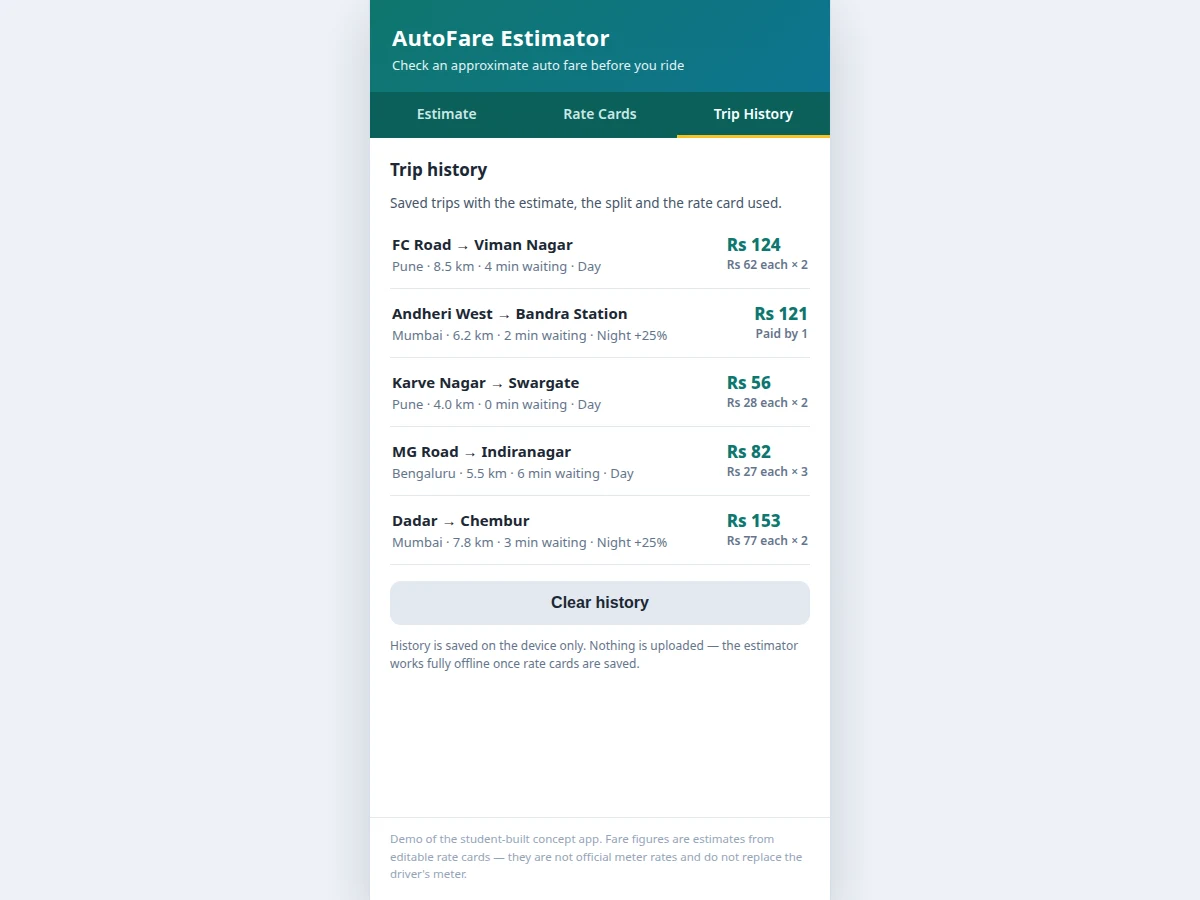
- [Offline trip history] Every estimate can be saved with its route, city card, distance, waiting time and split, and the history stays on the device, so past trips can be checked at an auto stand without mobile data. Implemented in the base build.
- [Rounding rule for split fares] Builder note from the demo build: rounding a split fare to whole rupees can push the sum of the shares Re 1 above the total, for example Rs 153 split two ways shows Rs 77 each, totalling Rs 154, so the demo always shows the true total beside the per-person figure and never adjusts the total to fit the split. Implemented in the base build.
- [Estimate-only labelling] Every fare figure in the app carries the word estimated, and the screen states that the meter reading at the end of the ride is the final fare, so the estimate is never presented as a bill. Implemented in the base build.
Optional and future scope (not in the base build): live GPS distance capture, official city rate updates from a server, route search with distance lookup, ride receipt sharing, and multi-language screens. These can be developed on request and are not claimed as included.
What is included
- Working Android app with estimate screen, rate-card editor, fare-split and on-device trip history
- Complete Kotlin source code with the fare calculation, surcharge rules and history storage
- Demo rate cards for six Indian cities with editable values
- Setup guide covering Android Studio build, install on a device and first estimate
- Project report covering background, working, fare rules, limitations and testing
- Project abstract PDF with 10 labelled sections matching this page
- Presentation slides for final review
- Viva Q&A preparation document covering Android storage, fare-rule design and offline behaviour
Limitations & prerequisites
- All fare figures are estimates from user-editable rate cards, not official government rates, and the final fare on the driver's meter may differ.
- The app does not track the ride with GPS, so the distance must be entered by the user and a wrong distance produces a wrong estimate.
- Rate cards go out of date when a city revises its fares; the user must update the card, and the app does not fetch official rates.
- The estimate does not account for route diversions, tolls or extra luggage charges a driver may apply.
- Trip history is stored only on the device, so it is lost if the app is uninstalled without a backup.
- Fare-split rounds each share to whole rupees, so the shares can sum to Re 1 above or below the total; the total itself is never adjusted.
- Night hours are a fixed 11 pm to 5 am window in the base build and cannot be set per city.
- The base build is an Android app only; no iOS version is included.
Frequently Asked Questions
Is this project suitable for a final-year project?
Yes, it fits Bachelor of Engineering and Bachelor of Technology programmes in Computer Science and Engineering, because it combines Android UI development, on-device database storage, rule-based fare calculation and offline behaviour in one complete app that reviewers can install, run and test with their own distances and rates. The testable story is simple: edit a rate card, enter a trip, check the break-up and find it in history.
Are the fares shown official auto meter rates?
No, the fares are estimates calculated from rate cards the user can edit, and they are not official government rates. The app labels every figure as an estimate and states that the meter reading at the end of the ride is the final fare, so the estimate is a before-ride check, not a bill or a fare authority.
Does the app need internet or GPS to estimate a fare?
No, the app needs neither internet nor GPS once the city rate cards are saved, because the estimate is calculated on the device from the entered distance and the saved card. The user enters the distance manually, so the estimate works at an auto stand with no mobile data and no location permission.
How does the fare-split handle odd amounts?
The split divides the total by the passenger count and rounds each share to the nearest rupee, showing the unchanged total beside the shares. Because of rounding, the shares can sum to Re 1 above or below the total, for example Rs 153 split two ways shows Rs 77 each, and the app never adjusts the total to force the shares to add up.
What happens when a city changes its auto fares?
The user edits the city's rate card on the rate-card screen, changing the base fare, per-kilometre rate, waiting rate or night surcharge, and later estimates in that city use the new values. Old trips in the history keep the card they were saved with, so an earlier trip record is not silently rewritten when rates change.
Components & software requirements
- Kotlin · Android app development
- Android Studio · app build and layout editor
- Jetpack Compose · declarative Android UI
- Room database · on-device trip history storage
- SharedPreferences · saved city rate cards
- Material Design 3 · app theme and components
- JUnit · unit tests for fare calculation
- Git · source version control
Delivery information
Built-to-order project. Delivery timeline is shared after order confirmation based on current queue.
Support terms
Complete documentation, setup guide, and viva preparation included. Support for setup and explanation provided.
Download free synopsis (PDF)
Enter your name and WhatsApp number — the synopsis PDF downloads immediately. We may send occasional project updates on WhatsApp; no spam.