
More project photos (2)
The problem
Most yoga learners practise alone — in a hostel room or at home — with no one watching their alignment. A knee collapsing inward in Warrior II or sagging hips in Downward Dog quietly turns a strengthening pose into a strained joint, and by the time a teacher sees it, the habit is set. Existing fitness apps count repetitions or track calories, but almost none check whether the pose itself is geometrically right. This project closes that gap with on-device computer vision: MediaPipe Pose detects 33 body landmarks per frame, the application derives joint angles from landmark triplets, and an alignment engine compares each angle against a reference table for the selected asana. The result is immediate, specific feedback on form — the part of yoga instruction that is hardest to get without a teacher in the room.
Holds yoga asanas in front of the camera and reads the correction cues.
Follow the working sequence
How it works
- A video frame from the webcam — or a sample/uploaded photo — is passed to the MediaPipe PoseLandmarker (tasks-vision), which returns 33 normalized landmarks with per-point visibility.
- The app converts the normalized landmarks to pixel coordinates and computes joint angles (elbow, knee, hip, shoulder) from landmark triplets using the cosine rule.
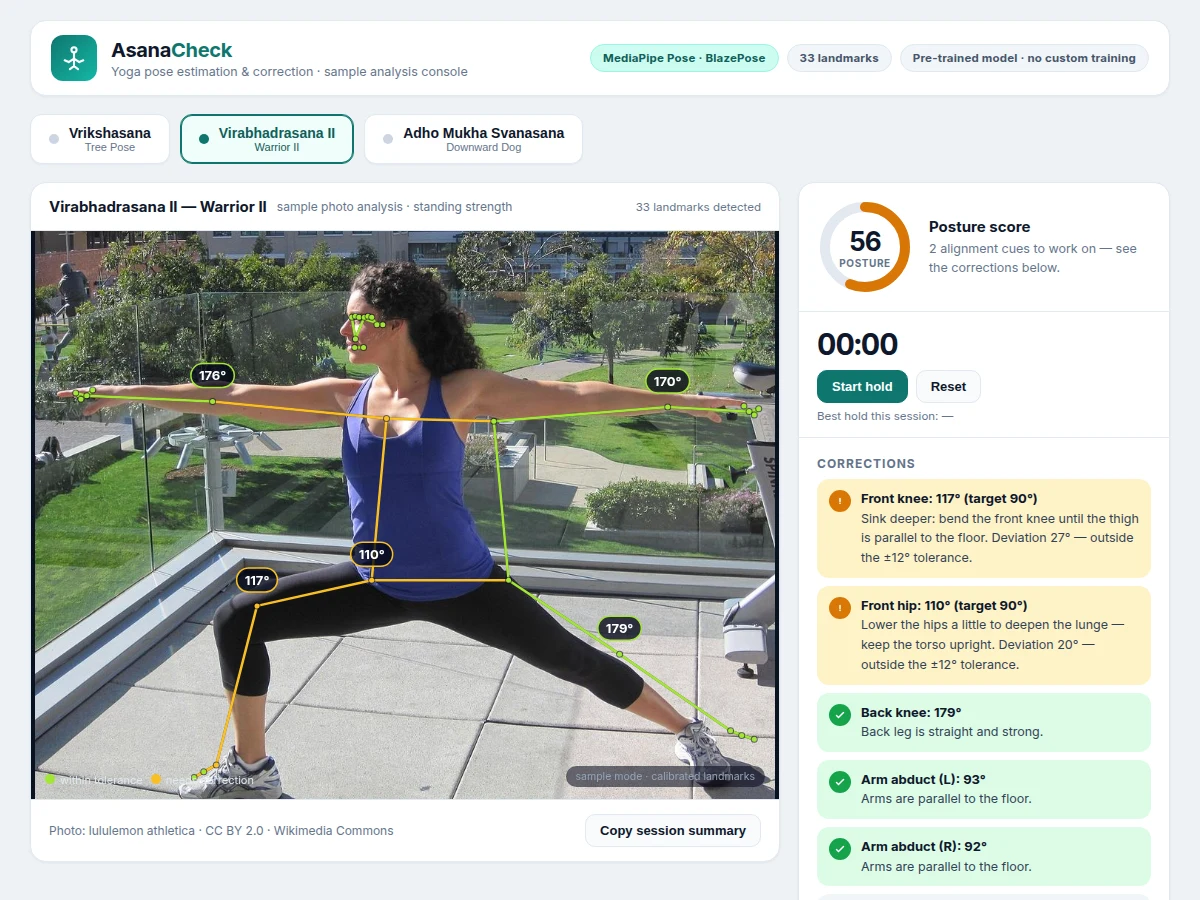
- The selected asana's reference table supplies a target angle and tolerance for each checked joint (design targets from standard alignment teaching, e.g. 90° ± 12° for the Warrior II front knee).
- Each measured angle is compared against its target; deviations inside ±12° pass, deviations outside become correction cues with the measured value, the target and a concrete fix.
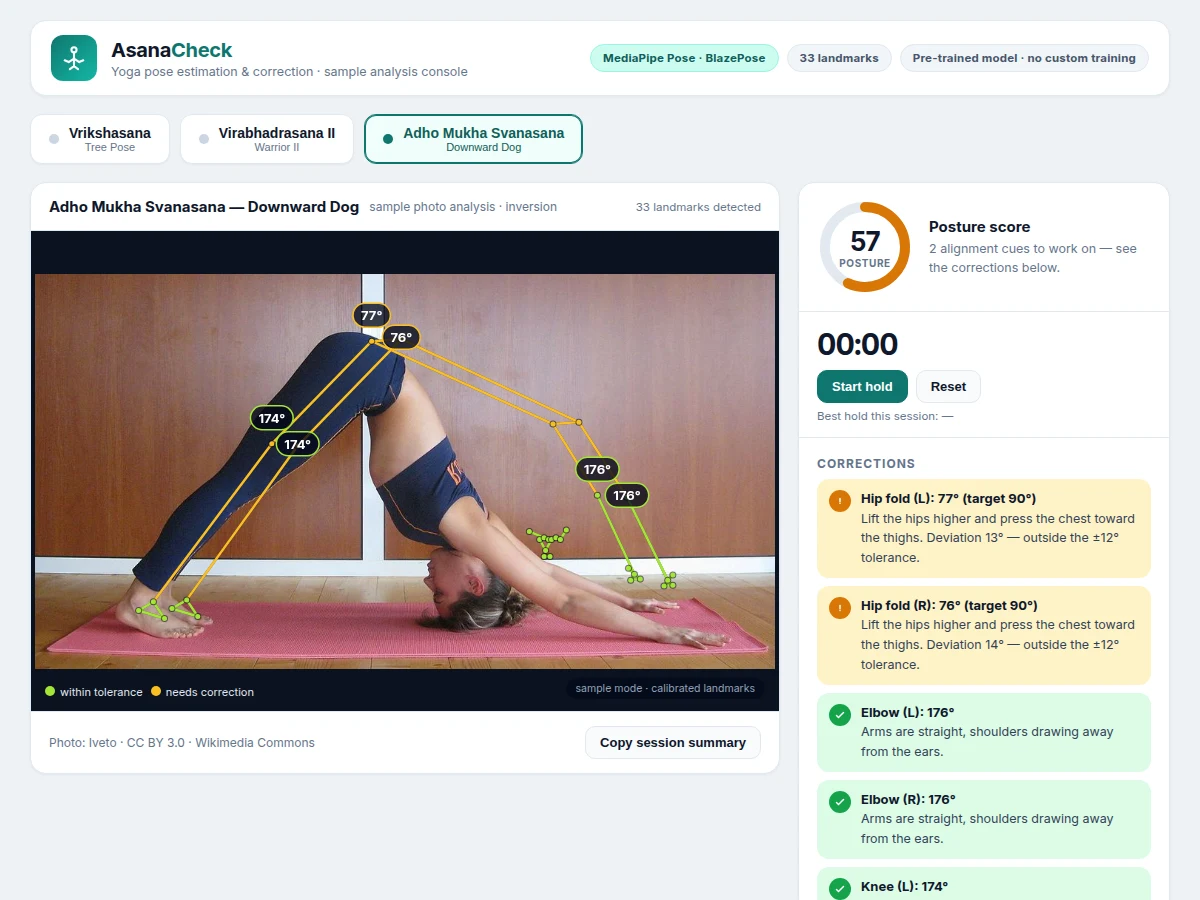
- The skeleton overlay is drawn on the frame — green segments for joints within tolerance, amber for joints needing correction — with degree pills on the primary joints.
- The posture score (100 minus weighted deviations) and the hold timer update live, and the session summary can be copied for a practice log.
Tech stack:
- MediaPipe Pose · BlazePose GHUM 3D (pre-trained)
- @mediapipe/tasks-vision (PoseLandmarker, CDN)
- JavaScript (ES2020) + HTML5 Canvas 2D overlay
- WebRTC getUserMedia (webcam capture)
- Python 3 (report/abstract tooling)
- Git
Dataset & model details
- Dataset: None in this project — MediaPipe Pose is used pre-trained exactly as shipped by Google. There is no project-specific training set, no labeling effort and no training run to report.
- Task: Human pose landmark regression; input = an RGB video frame, output = 33 body landmarks (x, y, visibility) per detected person. The project's own computation is joint-angle derivation and rule-based alignment checking on top of those landmarks.
- Model: BlazePose GHUM 3D (MediaPipe Pose), pre-trained by Google. Used unmodified via the tasks-vision PoseLandmarker API with GPU delegate where available.
- Metrics: No accuracy is claimed for the model. The project reports approximate joint angles with a ±12° acceptance tolerance (design target) and a computed 0–100 posture heuristic — both are engineering choices, not measured results.
| Parameter | Value |
|---|---|
| Input source | Webcam at 640 × 480 (expected) or uploaded/sample photo |
| Landmarks | 33 per person (BlazePose GHUM 3D, pre-trained) |
| Angle tolerance | ±12° (design target) |
| Asanas in reference library | 3 (Vrikshasana, Virabhadrasana II, Adho Mukha Svanasana; Approximate count, extensible) |
| Inference location | On-device in the browser (expected; webcam mode needs a one-time CDN model download) |
| Posture score | 0–100 computed heuristic (not a measured claim) |
| Hold timer resolution | 1 second (expected) |
| Demo app size | Approximately 600 KB single HTML file (measured for the sample build) |
| Browser requirement | Any WebRTC + WebAssembly-capable browser — Chrome, Edge or Firefox (expected) |
| Training performed | None — model used pre-trained; no training dataset in this project |
Project features
- [Real-time 33-landmark pose detection] MediaPipe Pose (BlazePose GHUM 3D) runs on each video frame and returns 33 body landmarks — shoulders, elbows, wrists, hips, knees, ankles and facial points — entirely on-device in the browser. The model is used pre-trained as shipped by Google; this project trains nothing and claims no accuracy figure.
- [Joint-angle computation] Elbow, knee, hip and shoulder angles are derived from landmark triplets with the cosine rule and reported in degrees. Angles are 2D projections from a single camera and are presented as approximate — the app never pretends to measure clinical-grade biomechanics.
- [Asana reference-alignment engine] Each supported asana ships with a reference table of target angles taken from standard yoga alignment teaching — for example, a 90° front knee in Virabhadrasana II or straight 180° arms in Adho Mukha Svanasana — checked inside a ±12° design tolerance.
- [Plain-language correction feedback] Any angle outside tolerance becomes a specific cue naming the joint, the measured value and the fix, such as "Front knee: 117° (target 90°) — sink deeper until the thigh is parallel to the floor." Joints needing correction are highlighted amber on the skeleton overlay; correct joints stay green.
- [Posture score] A 0–100 score computed as 100 minus weighted angle deviations, so a session has one number to improve across attempts. It is a computed heuristic, not a measured performance claim.
- [Hold timer with session best] A start/pause/reset timer tracks how long the pose is held, records the session best, and pairs naturally with the posture score for practice sessions.
- [Sample-photo analysis mode] Three built-in sample photos (Vrikshasana, Virabhadrasana II, Adho Mukha Svanasana — CC-licensed, credited in-app) demonstrate the full analysis pipeline offline, with reference landmarks calibrated per photo so the UI works without a camera.
- [Reference alignment library] A browsable table of every target angle, tolerance and alignment cue per asana, plus "How it works" and "Model & honesty" panels that document the pipeline and its limits in plain terms.
What is included
- Pose-analysis web app (single-file HTML/CSS/JS): live webcam mode, sample-photo analysis mode, skeleton overlay with angle pills, corrections panel, joint-angle table, posture score, hold timer
- Asana reference-alignment library for 3 asanas (target angles, tolerances, alignment cues) with "How it works" and "Model & honesty" documentation panels
- MediaPipe tasks-vision integration code (PoseLandmarker setup, GPU delegate, video-frame loop)
- Project report PDF (background, BlazePose overview, methodology, alignment-table rationale, limitations)
- PPT presentation for final review
- Viva Q&A preparation document (pose estimation vs classification, landmark topology, 2D angle limits, why pre-trained)
Limitations & prerequisites
- Angles are 2D projections from a single camera — occlusion, loose clothing and camera angle shift the numbers; the ±12° tolerance exists precisely because of this, and the app reports approximate angles only.
- The model is used pre-trained; no accuracy figure is claimed, and the app makes no clinical, therapeutic or certification claims about yoga instruction.
- Asana selection is manual in this build — the app checks alignment for the pose you choose; automatic asana recognition is future scope.
- One person per frame in the shipped configuration; multi-person tracking is not implemented.
- Webcam mode needs an internet connection once (CDN model download) and camera permission; sample-photo mode works fully offline.
- Heel position, foot placement and gaze direction are given as alignment notes, not measured angles.
Delivery & support
- Delivery: built to order in approximately 10–14 days (expected), including the web app, reference library, report PDF, PPT and viva Q&A.
- Support: explanation support for the viva — how BlazePose landmarks map to joint angles, why the tolerance band exists, and how to extend the asana library — for 30 days after delivery (expected).
Frequently Asked Questions
Which model is used, and is anything trained in this project?
MediaPipe Pose — Google's BlazePose GHUM 3D — used pre-trained exactly as shipped, through the tasks-vision PoseLandmarker API. Nothing is trained: there is no project dataset, no labeling and no training run. The project's own engineering is the joint-angle computation and the rule-based alignment engine built on top of the 33 landmarks.
How are the "correct" angles decided?
They are design targets taken from standard yoga alignment teaching — for example, a 90° front knee with the thigh parallel to the floor in Virabhadrasana II, or straight 180° arms in Adho Mukha Svanasana. Each target carries an explicit ±12° tolerance because single-camera 2D angles are approximate. They are teaching targets, not measured outcomes.
Does it work on photos, or only on a live webcam?
Both. The live webcam mode runs real-time inference in the browser (one-time CDN download, then on-device). The sample-photo mode analyses built-in CC-licensed yoga photos offline using reference landmarks calibrated per photo, which is also how the analysis UI is demonstrated without a camera.
How accurate are the angle measurements?
They are approximate 2D projections, not laboratory biomechanics. Occlusion (a bent knee hidden behind the torso), loose clothing and a tilted camera all shift the numbers — which is why every target carries a ±12° acceptance band. The app is a practice aid for spotting clear misalignments, not a measurement instrument, and it claims no accuracy percentage.
Can it recognise which asana I am doing automatically?
Not in this build — you select the asana, and the engine checks your alignment against that asana's reference table. Automatic asana classification from the landmark sequence is listed as future scope in the report, with the honest note that it would need a labeled asana dataset this project does not collect.
Is this project suitable for a final-year project?
Yes — for AI & Machine Learning, Computer Science and IT programmes. It combines a real pre-trained vision model with original engineering (angle computation, alignment rules, scoring, UI), demands honest handling of 2D-projection limits, and gives strong viva material on pose estimation, landmark topology and why pre-trained models beat training from scratch here. Suitable for B.E./B.Tech final-year projects in AI & Machine Learning, Computer Science and IT.
Components & software requirements
- MediaPipe Pose · BlazePose GHUM 3D (pre-trained)
- @mediapipe/tasks-vision (PoseLandmarker, CDN)
- JavaScript (ES2020) + HTML5 Canvas 2D overlay
- WebRTC getUserMedia (webcam capture)
- Python 3 (report/abstract tooling)
- Git
Dataset & model details
- Dataset: None in this project — MediaPipe Pose is used pre-trained exactly as shipped by Google. There is no project-specific training set, no labeling effort and no training run to report.
- Task: Human pose landmark regression; input = an RGB video frame, output = 33 body landmarks (x, y, visibility) per detected person. The project's own computation is joint-angle derivation and rule-based alignment checking on top of those landmarks.
- Model: BlazePose GHUM 3D (MediaPipe Pose), pre-trained by Google. Used unmodified via the tasks-vision PoseLandmarker API with GPU delegate where available.
- Metrics: No accuracy is claimed for the model. The project reports approximate joint angles with a ±12° acceptance tolerance (design target) and a computed 0–100 posture heuristic — both are engineering choices, not measured results.
Delivery information
Built-to-order project. Delivery timeline is shared after order confirmation based on current queue.
Support terms
Complete documentation, setup guide, and viva preparation included. Support for setup and explanation provided.
Download free synopsis (PDF)
Enter your name and email — the synopsis PDF downloads immediately. We may send occasional project updates; no spam, unsubscribe anytime.