
More project photos (2)
The problem
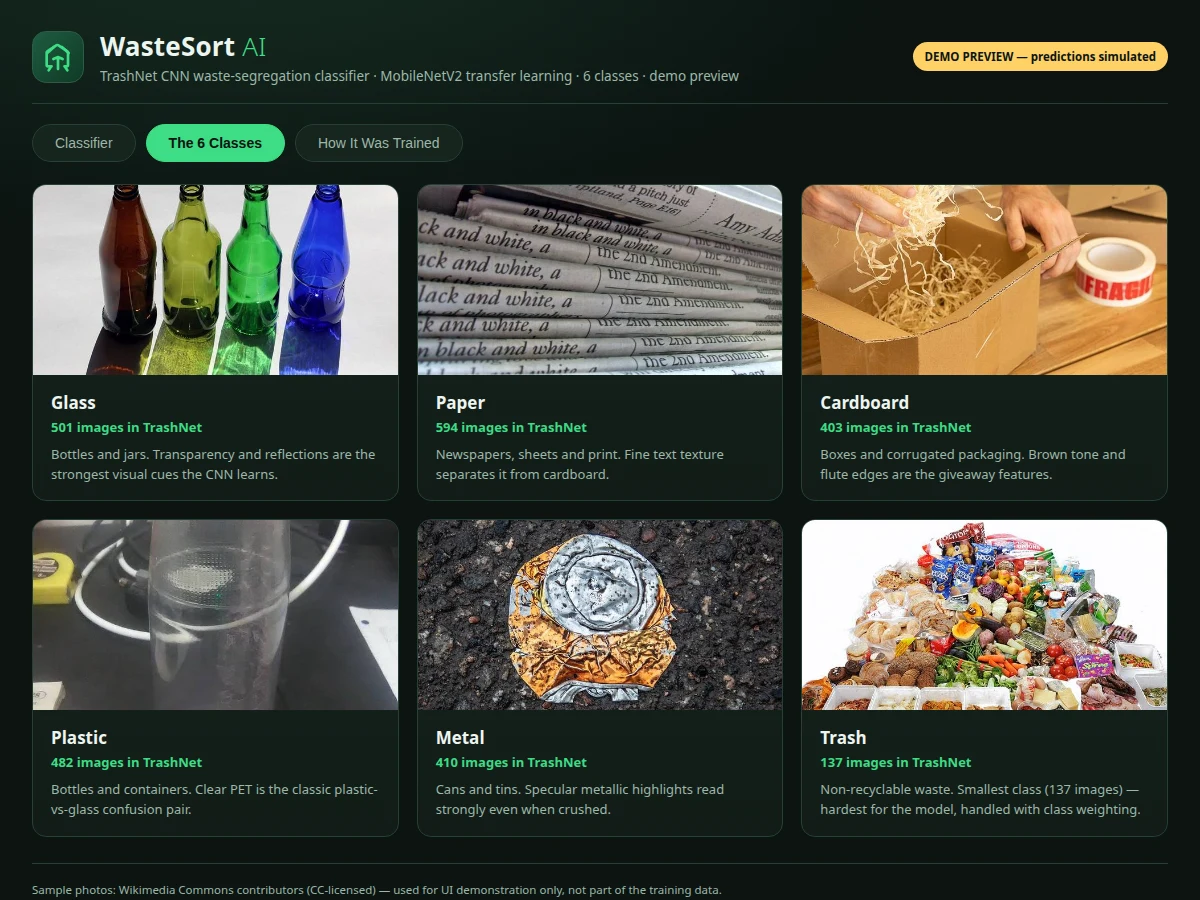
Mixed waste is the quiet failure point of every recycling program. Bins get contaminated when a plastic bottle lands in the paper stream or a glass jar in plastic, and once mixed, whole batches get downcycled or landfilled because hand-sorting is slow, expensive and inconsistent. Campuses run awareness drives, but the moment of sorting — one person, one item, one bin — still depends on guesswork. This project turns that moment into a teachable computer-vision problem. It trains a convolutional neural network on TrashNet, the public 2,527-image dataset of waste photos collected by Gary Thung and Mindy Yang for Stanford's CS 229 course, to classify a photo of a waste item into six classes: glass, paper, cardboard, plastic, metal or trash. Transfer learning from MobileNetV2 keeps training cheap enough for a student machine while producing a model fast enough to demo live. The build includes the training notebook, evaluation with per-class precision/recall/F1 and a confusion matrix, and a browser demo that classifies uploaded or captured photos with confidence bars — the full pipeline from dataset to prediction, explainable in a viva.
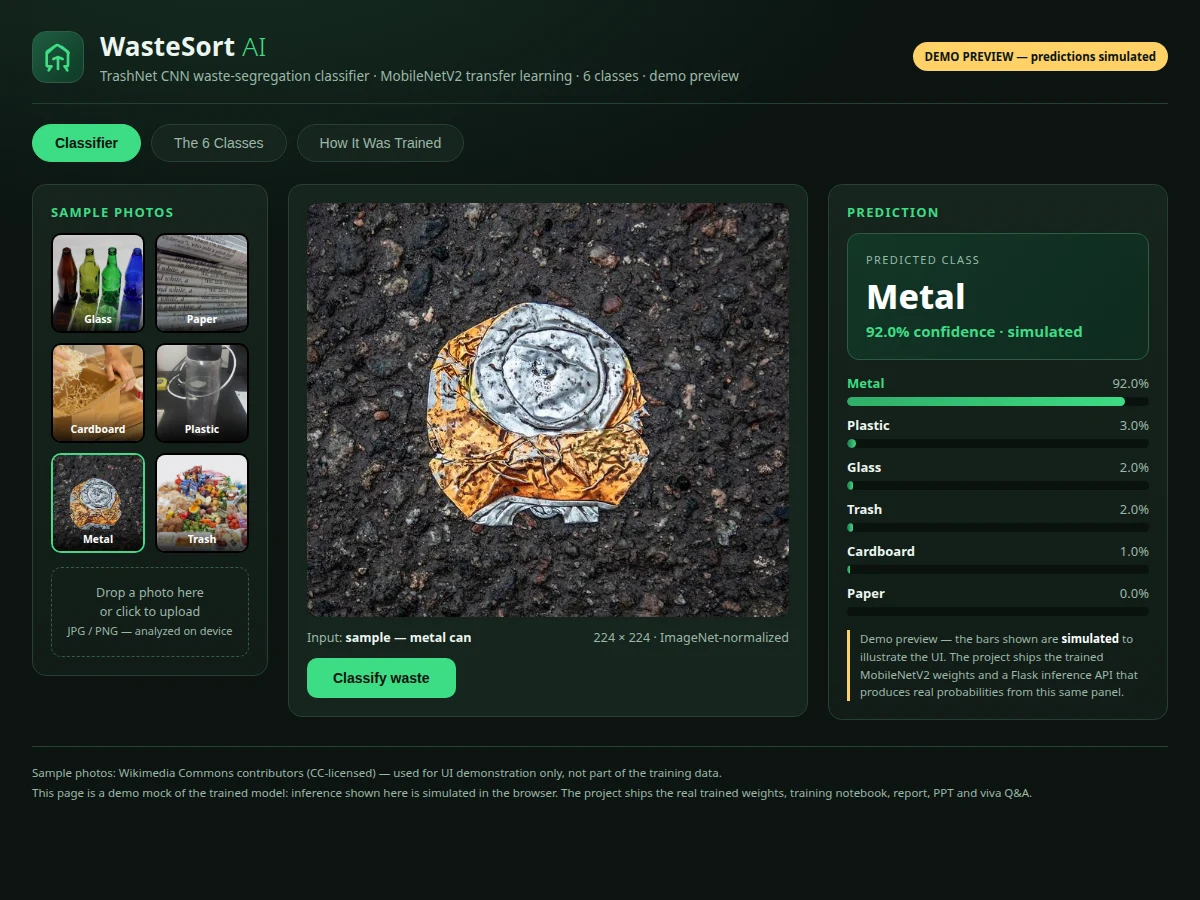
Uploads or captures a waste photo and studies the predicted class with confidence bars.
Follow the working sequence
How it works
- TrashNet's 2,527 white-background photos (6 classes: glass 501, paper 594, cardboard 403, plastic 482, metal 410, trash 137) are split into training, validation and test sets with a stratified 80/10/10 split (design target); the small trash class gets class weighting to offset its imbalance.
- Each image is resized to 224×224 px and normalized with ImageNet mean/std; during training, augmentation applies random rotations (design target ±20°), horizontal flips and zoom (design target ±15%) to make the model less sensitive to framing.
- MobileNetV2 pretrained on ImageNet acts as the feature extractor; a classifier head (global average pooling → dropout → 6-way softmax) is trained on TrashNet with the backbone frozen.
- After the head converges, the top convolutional blocks are unfrozen and fine-tuned at a lower learning rate (design target 1e-5), letting the network adapt its features to waste-specific textures.
- The held-out test set produces per-class precision, recall and F1-score plus a confusion matrix — the notebook computes these from the actual training run; no accuracy is claimed before training.
- For the demo, the trained weights are served (Flask inference API) and the web UI sends the uploaded or captured photo, receives the six softmax probabilities, and renders the top class with confidence bars. The standalone browser demo included for preview simulates inference for illustration.
Tech stack:
- Python · TensorFlow/Keras
- MobileNetV2 (ImageNet pretrained) · transfer learning
- TrashNet dataset · 2,527 images
- OpenCV · Pillow (preprocessing)
- NumPy · scikit-learn (metrics)
- Flask (inference API)
- HTML · CSS · JavaScript (demo UI)
- Jupyter notebook (training walkthrough)
Dataset & model details
- Dataset: TrashNet — public waste-photo dataset by Gary Thung & Mindy Yang (Stanford CS 229); 2,527 white-background photos (512×384 px) taken with iPhones under sunlight/room lighting. 6 classes with official counts: glass 501, paper 594, cardboard 403, plastic 482, metal 410, trash 137.
- Task: Single-label image classification — input a photo of one waste item, output one of 6 recyclability classes.
- Model: MobileNetV2 pretrained on ImageNet with a custom classifier head (global average pooling → dropout → 6-way softmax); two-phase training: frozen-backbone head training, then fine-tuning of the top convolutional blocks.
- Metrics: Per-class precision, recall and F1-score plus a confusion matrix on a stratified held-out test split, computed by the buyer's own training run; development target is F1 ≥ 0.80 on the test set. No accuracy is claimed before training.
| Parameter | Value |
|---|---|
| Dataset | TrashNet, Thung & Yang, Stanford CS 229; 2,527 images (official dataset count) |
| Classes | 6 — glass 501 · paper 594 · cardboard 403 · plastic 482 · metal 410 · trash 137 (official per-class counts) |
| Source images | White-background photos, 512×384 px originals, iPhone captures (dataset value) |
| Model | MobileNetV2 (ImageNet pretrained), custom 6-way softmax classifier head |
| Input size | 224×224 px RGB, ImageNet normalization (design target values) |
| Train/val/test split | Stratified 80/10/10 (design target) |
| Augmentation | Rotation ±20°, horizontal flip, zoom ±15% (design target values) |
| Fine-tune learning rate | 1e-5 for the unfrozen-block phase (design target) |
| Evaluation | Per-class precision, recall, F1-score; confusion matrix (computed from the training run) |
| Inference input | JPG/PNG upload or webcam capture |
| Inference output | 6 softmax probabilities; top class with confidence bars |
| Demo app | Browser demo simulates inference for illustration; real inference runs on the trained weights via Flask |
Project features
- [Six-class waste classification] The trained CNN sorts a photo of a waste item into one of TrashNet's six classes — glass, paper, cardboard, plastic, metal or trash — giving a direct, visible answer to the "which bin?" question.
- [Transfer learning with MobileNetV2] The model starts from ImageNet-pretrained MobileNetV2; a new classifier head is trained on TrashNet first, then the top convolutional blocks are unfrozen for a short fine-tune so features adapt to waste textures.
- [Upload or camera capture] The demo accepts a JPG/PNG upload from disk or a webcam capture, resizes the photo to 224×224 and normalizes it with ImageNet statistics before inference, exactly as the training pipeline does.
- [Confidence bars across all six classes] Every prediction shows the softmax probability for each class, not just the winner — borderline cases like plastic-vs-glass make excellent viva discussion material.
- [Dataset facts panel] The demo carries the real TrashNet facts — dataset name, authors, source, 2,527 images and per-class counts — so the student cites the official repository, not guesswork.
- [Training walkthrough panel] Dataset split, augmentation, training settings and the evaluation procedure are laid out step by step, matching the training notebook the student actually runs.
- [Per-class evaluation metrics] The notebook reports precision, recall and F1-score per class plus a confusion matrix on a held-out test split; these numbers come from the buyer's own training run and are never promised in advance.
What is included
- Trained classifier weights + exported model file (SavedModel/ONNX)
- Training notebook: dataset loading, preprocessing, augmentation, transfer learning, fine-tuning and evaluation
- Inference demo web app (upload/camera, confidence bars, dataset and training panels)
- Flask inference API wiring for real predictions
- Project report PDF (dataset, methodology, confusion matrix and metrics from the training run)
- PPT presentation for final review
- Viva Q&A preparation document (CNN basics, transfer learning, class imbalance, evaluation metrics)
Limitations & prerequisites
- The trash class has only 137 images in TrashNet, so performance on that class is expected to be lower; class weighting and augmentation narrow the gap but do not remove it.
- TrashNet photos are white-background close-ups; the model performs worse on cluttered real-world backgrounds, so field results will differ from test metrics.
- All reported metrics come from the buyer's own training run — no accuracy is promised before training.
- The standalone browser demo simulates inference for illustration; it does not run the trained model.
- Training needs a machine with a GPU (design target: 6+ GB VRAM) or a cloud notebook; CPU-only training is very slow.
- A real segregation-line deployment needs camera rigging, controlled lighting and a reject mechanism — none of that hardware is part of this software build.
Frequently Asked Questions
Is this project suitable for a final-year project?
Yes — for Computer, IT and AI/ML programs. It covers image classification, transfer learning, dataset handling, class imbalance and honest evaluation with per-class metrics, which is exactly the material examiners probe in a viva.
Which dataset is used?
TrashNet, the public 2,527-image dataset collected by Gary Thung and Mindy Yang for Stanford's CS 229 course: glass (501), paper (594), cardboard (403), plastic (482), metal (410) and trash (137) — all counts taken from the official repository.
Which model is trained?
MobileNetV2 pretrained on ImageNet, fine-tuned on TrashNet with a custom 6-way softmax head. It is light enough to train on a student GPU and fast enough to demo live.
What accuracy does it reach?
Accuracy is not promised in advance. The training notebook computes per-class precision, recall, F1-score and a confusion matrix on a held-out test split from the actual training run; the development target is F1 ≥ 0.80.
Can I use my own photos?
Yes — the demo accepts any uploaded photo or webcam capture. Photos that resemble TrashNet's style (single item, plain background) classify most reliably.
Does the browser demo run the real model?
No. The browser demo simulates inference for illustration. The trained weights and a Flask inference service ship with the project for real predictions.
Components & software requirements
- Python · TensorFlow/Keras
- MobileNetV2 (ImageNet pretrained) · transfer learning
- TrashNet dataset · 2,527 images
- OpenCV · Pillow (preprocessing)
- NumPy · scikit-learn (metrics)
- Flask (inference API)
- HTML · CSS · JavaScript (demo UI)
- Jupyter notebook (training walkthrough)
Dataset & model details
- Dataset: TrashNet — public waste-photo dataset by Gary Thung & Mindy Yang (Stanford CS 229); 2,527 white-background photos (512×384 px) taken with iPhones under sunlight/room lighting. 6 classes with official counts: glass 501, paper 594, cardboard 403, plastic 482, metal 410, trash 137.
- Task: Single-label image classification — input a photo of one waste item, output one of 6 recyclability classes.
- Model: MobileNetV2 pretrained on ImageNet with a custom classifier head (global average pooling → dropout → 6-way softmax); two-phase training: frozen-backbone head training, then fine-tuning of the top convolutional blocks.
- Metrics: Per-class precision, recall and F1-score plus a confusion matrix on a stratified held-out test split, computed by the buyer's own training run; development target is F1 ≥ 0.80 on the test set. No accuracy is claimed before training.
Delivery information
Built-to-order project. Delivery timeline is shared after order confirmation based on current queue.
Support terms
Complete documentation, setup guide, and viva preparation included. Support for setup and explanation provided.
Download free synopsis (PDF)
Enter your name and email — the synopsis PDF downloads immediately. We may send occasional project updates; no spam, unsubscribe anytime.